



Overview
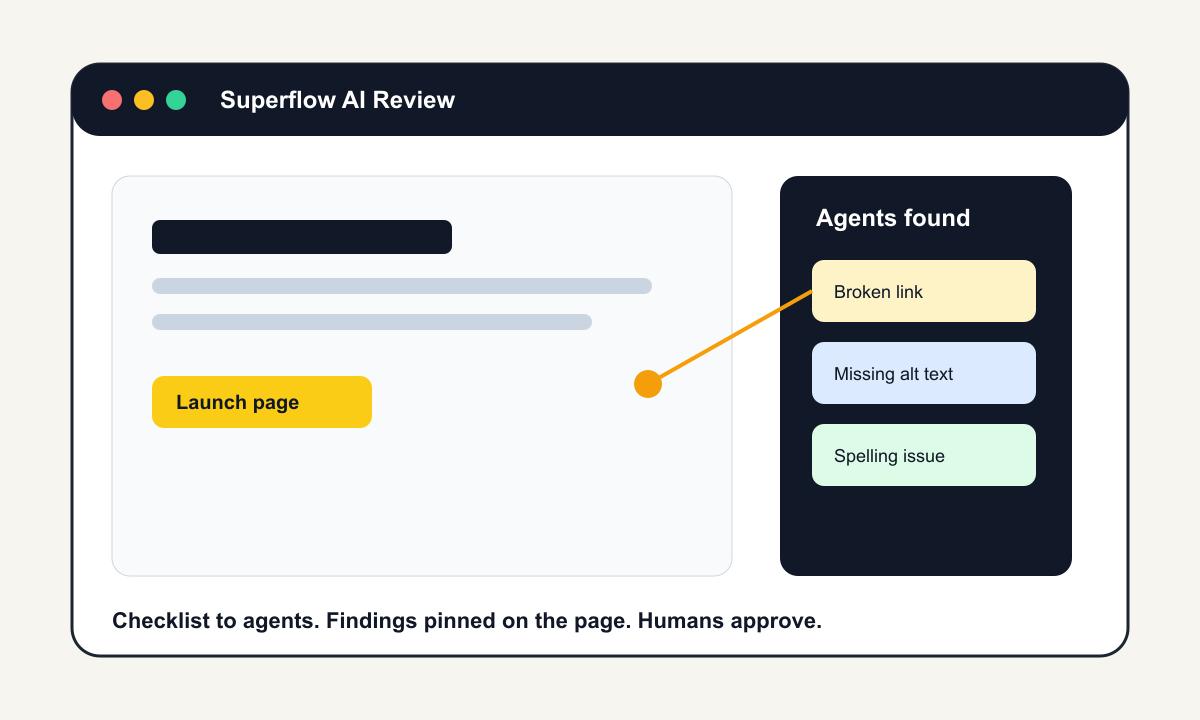
Superflow AI is a review platform for agencies, marketing teams, and web teams that need to check websites and creative assets before they go live. The product turns an existing QA checklist into AI review agents that inspect live pages, PDFs, videos, images, and other client assets. Each finding is pinned to the page or asset with context, so reviewers do not have to translate a spreadsheet row into a screenshot and a task.
The useful part is not that Superflow replaces human approval. Its official positioning keeps a human in the loop: agents do the first pass, then the team and client decide what matters. That makes it a practical AI agent workflow for repetitive checks such as broken links, missing alt text, spelling errors, SEO basics, outdated copy, wrong phone numbers, brand guideline violations, and other review items that are easy to miss when a launch is moving quickly.
Superflow AI is especially relevant for agencies and in-house teams that already ship with Webflow, Framer, WordPress, Shopify, or custom sites. Instead of adding another manual review pass, teams can run agents against staging or live pages and convert findings into tasks, approvals, and client comments.
Key Features
- Checklist-to-agent review - Paste or upload the QA checklist your team already uses, then run agents that know what to inspect on each page or asset.
- Pinned findings on live pages - Findings attach to the specific element or location, with screenshot evidence that survives later page changes.
- Human approval workflow - AI handles the first pass, but team members and clients approve, reject, or override findings before work is signed off.
- Website and creative asset support - Superflow supports websites, PDFs, videos, images, emails, ads, and Lottie files, which helps agencies keep one review workflow across deliverables.
- Client-friendly guest review - Clients can review through a shared link without needing a full account, reducing handoff friction.
- Integrations for delivery teams - Findings can sync into tools such as Slack, ClickUp, Asana, Monday.com, Trello, Jira, email, webhooks, and the REST API on higher tiers.
Integration Guide
Superflow is built to sit inside the stack a web team already uses. The official site lists installation support for Framer, WordPress, Webflow, and Shopify, plus a script-tag style path for other websites. That matters because website QA only works if reviewers can see the live experience, including responsive layout, real page content, and client-facing copy.
For agencies using AI website builder tools, Superflow is a good downstream checkpoint. AI can create pages quickly, but each generated page still needs link checks, spelling review, accessibility basics, metadata checks, and visual approval. Superflow helps turn those recurring checks into a repeatable review lane instead of a launch-day scramble.
Pricing & Plans
Superflow uses per-seat pricing with AI credits for agent reviews. Public pricing lists a free Starter plan and paid Growth and Scale plans, with annual billing shown as the lower monthly equivalent.
| Plan | Public Price | Included AI Credits | Best For |
|---|---|---|---|
| Starter | $0 per seat/month | 60 credits/month, about 6 agent reviews | Solo testing and one project |
| Growth | $24 per seat/month billed yearly | 300 credits/month, about 30 agent reviews | Agencies and teams with multiple projects |
| Scale | $28 per seat/month billed yearly | 600 credits/month, about 60 agent reviews | Teams that need private comments, access control, and broader integrations |
| Enterprise | Custom | Custom | Larger teams needing SSO, REST API, security reviews, or data self-hosting |
Each agent review is priced in credits, and the official pricing page says one agent reviewing one page costs 10 credits. New workspaces also receive signup bonus credits, and paid teams can buy add-on credit packs.
How It Compares
Superflow AI overlaps with manual feedback tools, no-code website QA checkers, and technical AI code checker products, but its center of gravity is creative and website review. Tools like BugHerd and Pastel help humans leave comments on pages. Superflow adds an AI first pass that can inspect a checklist before the human review starts.
Compared with autonomous testing tools such as Replay QA, Superflow is less about runtime debugging and more about launch readiness across content, client feedback, brand rules, and review operations. That makes it a stronger fit for agencies and marketing teams than for teams looking only for CI-level browser tests.
Best For
- Web agencies checking client websites before delivery
- Marketing teams reviewing landing pages, ads, PDFs, and campaign assets
- Teams using AI productivity tools to ship more assets but still needing approval gates
- Webflow, Framer, WordPress, and Shopify teams that want checklist-based QA on live pages
- Regulated or brand-sensitive teams that need evidence, approvals, and repeatable review records
FAQ
What does Superflow AI do?
Superflow AI turns review checklists into AI agents that inspect websites and creative assets. The agents leave pinned findings, then humans approve, reject, or resolve them.
Does Superflow AI replace human QA?
No. Superflow positions AI as the first pass. The team and client still approve work before it ships, which is important for subjective design, legal, and brand decisions.
What can the agents check?
The official site lists broken links, brand colors and fonts, spelling, accessibility basics, SEO checks, and custom rules from your QA checklist.
What websites does Superflow support?
Superflow lists support for Framer, WordPress, Webflow, Shopify, and other websites through installation options. It can also review non-website assets such as PDFs, images, videos, ads, and emails.
How much does Superflow AI cost?
Public pricing starts with a free Starter plan. Paid plans begin at $24 per seat per month when billed yearly, with AI review credits included by plan.
How are AI credits used?
Superflow says one agent reviewing one page counts as one agent review and costs 10 credits. Running multiple agents across many pages uses more credits.
Do clients need an account?
No. Superflow supports guest review links so clients can comment and approve without needing a full team account.
Who should skip Superflow AI?
Teams that only need code-level test execution or backend integration testing may be better served by a dedicated testing platform. Superflow is strongest for website, creative, and client review workflows.