
Best AI Agent Skills (2026): Coding, Frontend & Design Skills for Claude Code & Cursor
Stop installing 50 conflicting SKILL.md packs. Here are the best AI agent skills on GitHub and skills.sh for coding, frontend design, debugging, and verification—plus prompt-injection security checks.

On this page
The open SKILL.md standard has turned AI agent skills into the fastest-growing layer of the developer stack across Claude Code, Cursor, GitHub Copilot, and Cline. Yet most developers make the exact same mistake in week one: they browse GitHub or Skills.sh, install 30 trendy skill packs at once, and wonder why their coding agent suddenly feels slower, more verbose, and less reliable.
The reason is simple: skills are natural-language operating procedures injected into your model's working context. Stacking overlapping skills creates conflicting instructions and burns context budget. Instead of collecting dozens of packs, high-performing engineering teams install 3 to 5 targeted skills—each chosen to fix a specific failure mode where raw frontier models still stumble: generic "AI slop" UI design, blind trial-and-error debugging, context drift on multi-file refactors, and unverified "looks good!" build claims.
The Lean 2026 Developer Skill Stack at a Glance
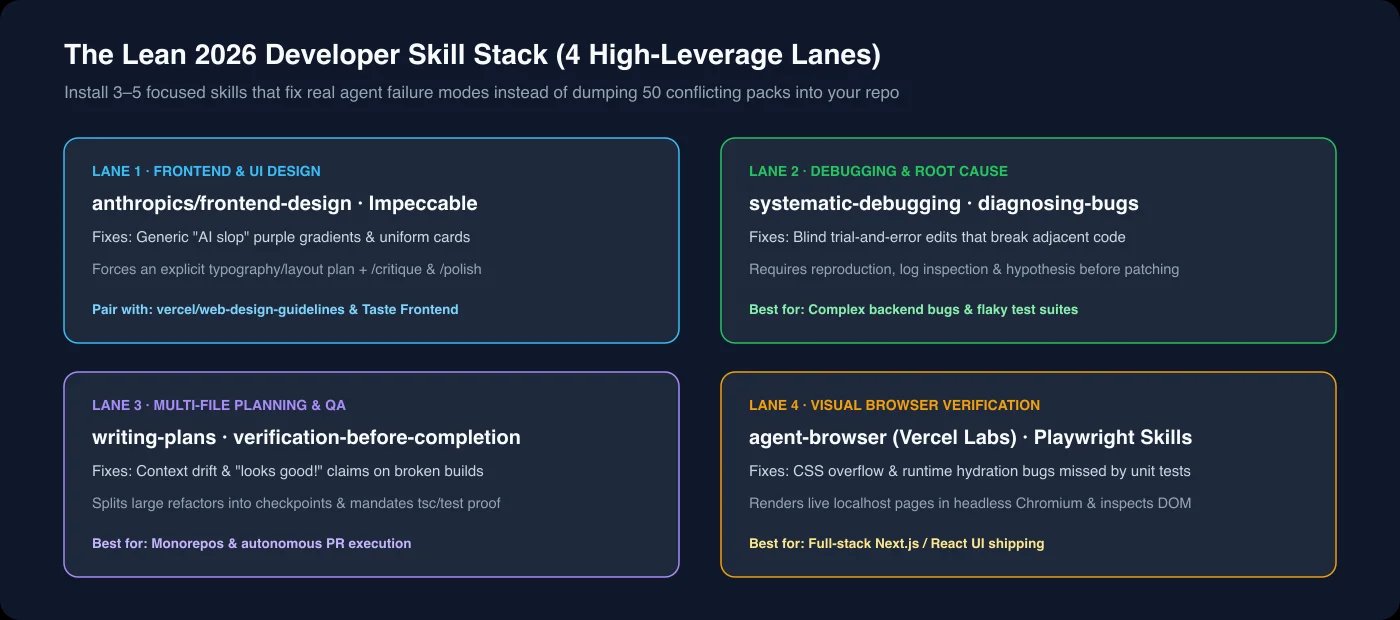
| Skill / Pack | Source / Registry | Failure Mode It Fixes | Works Best With |
|---|---|---|---|
anthropics/frontend-design | github.com/anthropics/skills | Generic purple-gradient "AI slop" layouts | Claude Code, Cursor |
Impeccable | Community extension | First-draft UI with weak contrast & spacing | Interactive /critique, /polish, /audit |
vercel/web-design-guidelines | Vercel Labs / skills.sh | Inconsistent spacing & micro-interactions | Next.js, React, Tailwind repos |
Taste Frontend | Community / skills.sh | Agents inventing rogue components off-brand | Design-system & token-driven teams |
systematic-debugging | Engineering workflow packs | Blind patching without root-cause traces | Backend bugs & flaky test suites |
writing-plans / executing-plans | Engineering workflow packs | Context drift across 10+ file refactors | Monorepos & autonomous PRs |
verification-before-completion | Engineering workflow packs | Agent declaring success on broken builds | TypeScript, Vitest, CI-gated repos |
agent-browser | Vercel Labs / skills.sh | CSS overflow & hydration errors missed by tests | Full-stack web UI verification |
Best AI Agent Skills for Frontend & UI Design
Left unguided, even frontier coding models default to the same visual clichés—predictable purple-indigo gradients, generic Inter cards, and timid whitespace. The strongest frontend skills work because they force the agent to think like a designer before emitting JSX.
anthropics/frontend-design
github.com/anthropics/skills reference repository, frontend-design has become the baseline standard with hundreds of thousands of installs. Its core mechanism is deceptively simple: it forbids the agent from jumping straight into raw code, requiring an explicit design plan covering typography hierarchy, color contrast, and layout composition first. If you only install one visual skill for landing pages or dashboards, start here.Impeccable
Impeccable turns visual refinement into an interactive critique loop via explicit slash-style workflows (/critique, /polish, and /audit). Rather than regenerating an entire screen from scratch when something looks off, it behaves like a senior product designer reviewing spacing rhythm, contrast ratios, and visual hierarchy in-place.vercel/web-design-guidelines & agent-browser
agent-browser). That pairing solves the single biggest blind spot in AI frontend coding: unit tests pass while a responsive header overflows at 375px. Letting the agent render localhost in Chromium and inspect its own DOM closes the feedback loop before you ever open a PR.Taste Frontend & Design System Extractors
Taste Frontend) force the agent to scan your existing CSS variables, Tailwind config, and component primitives first—locking new screens to your real design tokens instead of introducing inconsistent one-off styles.Best AI Agent Skills for Coding, Debugging & Verification
Visual polish matters, but engineering velocity depends on whether your agent can change 12 files without breaking production. Three procedural skill patterns consistently outperform raw prompting in real repositories:
systematic-debugging & diagnosing-bugs
Without guardrails, coding agents love guessing fixes—editing three files, introducing a new regression, and then editing two more. systematic-debugging enforces a strict four-step discipline: reproduce the failure first, inspect actual logs and stack traces, state a single falsifiable root-cause hypothesis, and only then apply a minimal patch. On tricky async or database bugs, this single skill saves more tokens than any model upgrade.
writing-plans & executing-plans
Large multi-file features fail because the agent loses track of earlier architectural decisions halfway through. Pairing writing-plans with executing-plans breaks a feature into atomic, testable checkpoints written to disk before implementation starts. Even if a session compacts or restarts, the agent resumes from a concrete plan rather than re-inventing requirements from memory.
verification-before-completion
tsc --noEmit still has four type errors. verification-before-completion acts as a hard behavioral gate: the agent is barred from declaring a task done until it runs the actual typecheck, linter, or test suite and reads the real exit code and diff.Where to Find & Install Skills (skills.sh vs. GitHub)
SKILL.md file and optional helper scripts. Vercel Labs' Skills.sh acts as the main discovery index and install leaderboard, backed by the npx skills CLI:# Install a specific skill from Anthropic's official repository
npx skills add https://github.com/anthropics/skills --skill frontend-design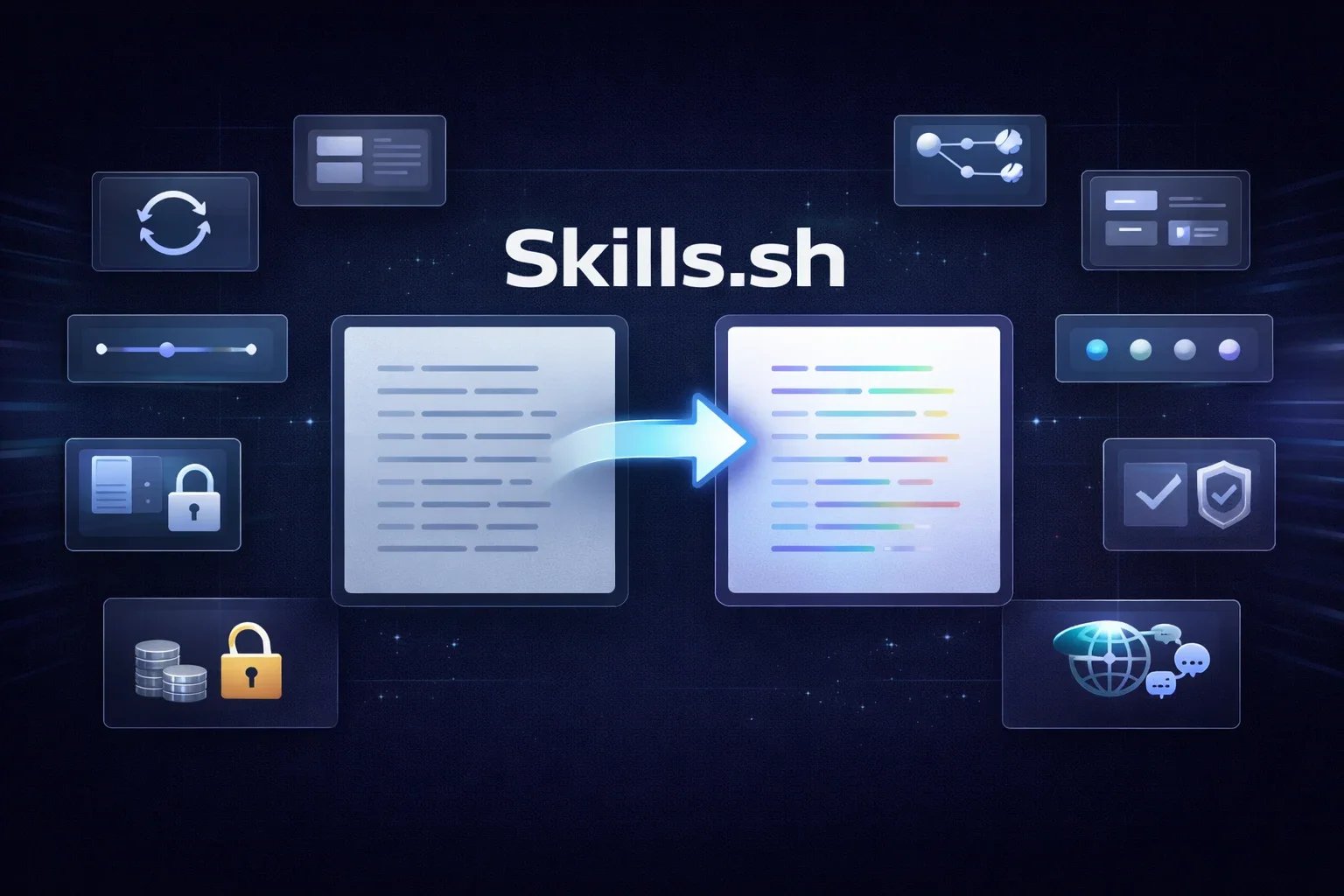
For broader browsing beyond the leaderboard, two GitHub hubs stand out: github.com/anthropics/skills for canonical official patterns (documents, UI, and tool workflows), and github.com/VoltAgent/awesome-agent-skills for community curations spanning over 1,000 vetted skills across backend, DevOps, and frontend stacks.
Architecture Decision: Rules vs. Skills vs. MCP Servers
CLAUDE.md, AGENTS.md, .cursorrules), Agent Skills (SKILL.md), and MCP Servers—and put instructions in the wrong layer.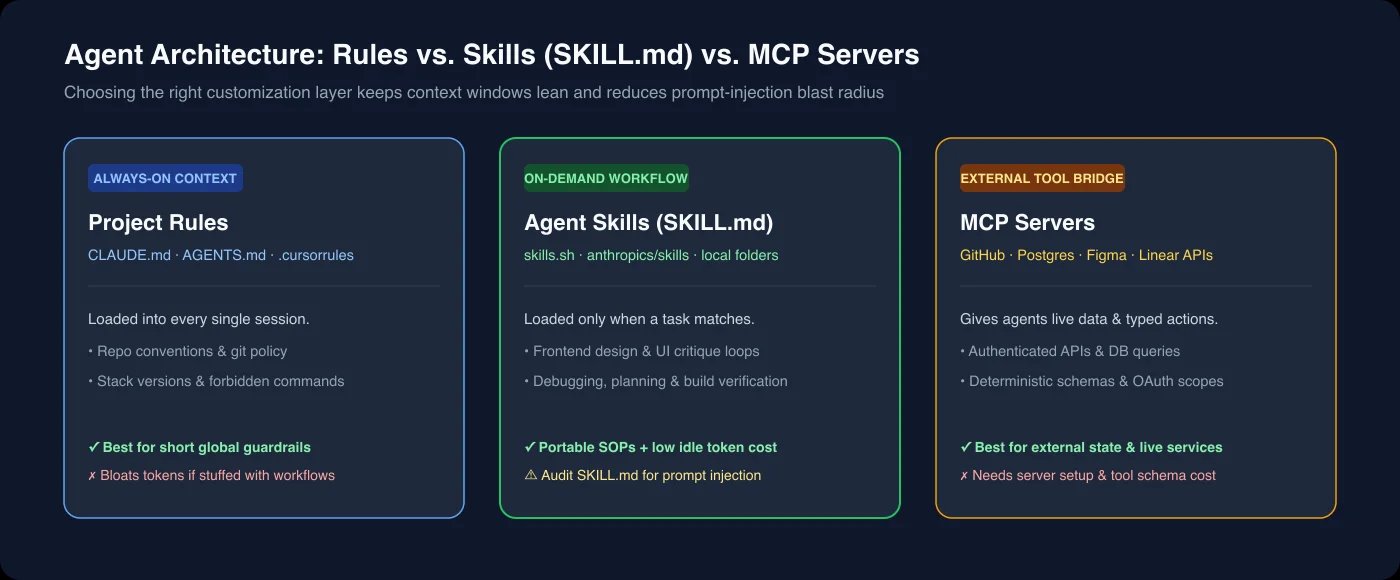
Keep your Project Rules short and universal: git hygiene, package manager choice, and non-negotiable repo boundaries that apply to every turn. Put repeatable multi-step workflows (UI critique loops, debugging protocols, PR checklists) into Agent Skills, because harnesses only load a skill's full instructions when a task matches—keeping idle token overhead low. Reserve MCP Servers for authenticated external state and live APIs (querying Postgres, creating Linear tickets, reading Figma frames). For a deeper look at agent interoperability protocols, see our MCP vs A2A protocol comparison or our best AI coding tools guide.
Troubleshooting: Why Installed Skills Fail to Trigger (and Cross-Tool Gotchas)
SKILL.md—or watching token usage spike unexpectedly across tools./context to inspect exactly which skills and token counts are active in your session, and run /clear when stale session state pollutes matching. For deterministic workflows you never want the model to skip, add disable-model-invocation: true in frontmatter and invoke the skill explicitly via slash command.SKILL.md markdown body is portable, directory conventions and variables still diverge. Claude Code expects flat skill folders under .claude/skills/, whereas some Cursor configurations recursively scan nested agent directories and over-inject local skills—occasionally burning half the context window on trivial turns. Likewise, skills written specifically for Claude Code often reference {baseDir} variables that fail to resolve in Cursor or other harnesses; switch those references to standard relative paths before sharing a skill folder across a mixed-IDE team.Minimal High-Trigger SKILL.md Template (Copy-Paste Baseline)
If you want to turn your own team's PR or UI checklist into a reliable skill, keep the trigger narrow and end with a verifiable command:
---
name: nextjs-ui-verify
description: Use before finishing any Next.js page or component edit in web/src/ to check TypeScript types, lint rules, and mobile viewport overflow.
---

# Next.js UI Verification

1. Run `pnpm tsc --noEmit` and fix every type error before replying.
2. Run the targeted test file for any modified component or hook.
3. Inspect rendered desktop (1440px) and mobile (375px) layouts for horizontal overflow.
4. Report exact command exit codes; never claim checks passed without running them.
Security Warning: "Toxic Skills" & Prompt Injection
npx skills add on a trending repository, treat it with the same caution as running npm install on an unverified package—arguably more. Because SKILL.md files are natural language interpreted directly by an LLM with terminal access, traditional static code scanners do not catch malicious directives.<!-- ... -->) or helper instructions to exfiltrate .env secrets, ~/.aws/credentials, or SSH keys via encoded network requests, hijack shell commands, or silently redirect tool calls to attacker-controlled MCP servers.SKILL.md and every file inside its scripts/ folder on GitHub before running npx skills add; search for hidden HTML comments, base64 strings, or unexpected curl / fetch instructions touching paths outside your repo; prefer official vendor repos (anthropics/skills, Vercel Labs) or pin a specific commit SHA rather than auto-updating from main; and run coding agents under least-privilege credentials so a compromised skill cannot touch production keys.Frequently Asked Questions
What are the best AI agent skills on GitHub right now?
anthropics/frontend-design (from github.com/anthropics/skills), Impeccable, and vercel/web-design-guidelines lead adoption. For core engineering reliability, systematic-debugging, writing-plans, and verification-before-completion deliver the biggest reduction in regressions.Do `SKILL.md` agent skills work across both Claude Code and Cursor?
.claude/skills/ vs .agents/skills/), watch for aggressive recursive loading in Cursor, and replace any Claude-specific {baseDir} variables with standard relative paths.Should I use an Agent Skill or an MCP server?
Use an Agent Skill when you want to teach the agent how to do a workflow (design critique, debugging steps, release checklists) using tools it already has. Use an MCP server when the agent needs live, authenticated access to an external system (databases, Jira, Figma, or private APIs).
Are community skills from `skills.sh` safe to install?
SKILL.md and bundled scripts before installing, pin trusted commits, and avoid exposing production credentials in your local agent environment.Get ToolWorthy Weekly
New AI tools, practical guides, and selected AI signals in one weekly brief.
Related Posts
- 15 Best Cursor Alternatives 2026 — Predictable Pricing, Real Privacy
Compare 15 Cursor alternatives by editor workflow, pricing model, privacy controls and migration effort, including Copilot, Windsurf, Claude Code and Cline.
- MCP vs A2A: Comprehensive Comparison of AI Agent Protocols
Compare Anthropic's MCP and Google's A2A protocols, their technical architectures, use cases, and impacts on AI interoperability.
- What is Model Context Protocol (MCP): The 2025 Beginner's Guide
A complete guide to Model Context Protocol (MCP): Learn its architecture and how it transforms AI system integration and context handling.
For AI tool founders
Built a tool that belongs in this decision set?
Request an editorial evaluation for possible inclusion in ToolWorthy.
Submit your tool for reviewPaid submission does not guarantee a ranking, recommendation, inclusion, or editorial outcome.