
5 Best Visual Regression Testing Tools for Web Teams
Compare five ways to catch layout breakage before merging. See where screenshots run, who approves the baseline, and what each tool bills.
On this page
A checkout test can pass while a banner covers the payment button at 390 pixels. A visual regression test catches changes in the rendered interface by comparing a known state against an approved screenshot. A reviewer then decides whether the change belongs in the next baseline.
If you already run Playwright and have a small set of screenshots, start with its built-in assertions. Add Argos when reviewers spend too much time opening CI artifacts. Start with Chromatic if your design system already has Storybook stories, or Percy if you want managed browser and width coverage for full web pages. Evaluate Applitools Eyes when pages contain changing content and you need different comparison rules for different areas.
Visual regression testing tools at a glance
| Tool | Start here when | First reason to rule it out |
|---|---|---|
| Playwright | Your developers can own a small set of Git baselines | Design or QA needs its own review dashboard |
| Argos | CI already captures the right screens | You need the service to supply the browser environment |
| Chromatic | Storybook is your component library | Most defects happen between components on full pages and you are only testing stories |
| Percy | Pages need managed rendering across browsers and widths | Cloud renders cannot reproduce your fixtures or private assets |
| Applitools Eyes | Dynamic text and strict layout checks must coexist | You mainly need a few fixed screenshots on a small budget |
Compare capture, approval and billing
| Tool | Capture and baseline | What you pay for |
|---|---|---|
| Playwright | Your browser runner. Update baseline images in Git | No paid service required. Your CI and storage still cost time or money |
| Argos | Your CI uploads captures. A hosted diff uses a baseline from Git history | Hobby includes 5,000 screenshots a month for one reviewer. Team review on Pro |
| Chromatic | Cloud snapshots of stories and their states. Review visual changes per build | Free includes 5,000 billed snapshots a month. Testing pauses at the limit |
| Percy | Cloud rendering for configured browsers and widths. Baseline strategy controls approvals | Free includes 5,000 screenshots a month. Paid overage is billed |
| Applitools Eyes | SDK checkpoints, configurable comparison rules and a dashboard for approval | Public Starter lists $667/month paid annually, with component or page checkpoint limits |
Public plan terms were checked November 19, 2026. The Applitools figure is the US-dollar display on its public pricing page. Browser, plan and billing rules differ. For example, 12 page states × 2 widths × 2 browsers × 80 builds yields 3,840 renders. Add a third width and it becomes 5,760. Percy counts a screenshot per rendered browser-and-width combination, so estimate screenshots from runs rather than the number of snapshots you see in its review UI. Percy billing · Chromatic billing
What should change the baseline?
A baseline is the last version your team accepted for that test state. Start with the app state, viewport, browser and test data held steady, then make three changes in a staging branch.
| Deliberate change | What the reviewer should see |
|---|---|
| Approved button redesign | A clear diff the owner can approve |
| A sticky banner blocks the payment button on mobile | A regression the owner can reject |
| Only a timestamp changes | The policy treats it as noise while the nearby controls stay checked |
Use an isolated component state to catch a broken button style and a page checkpoint to catch an overlay blocking it. A screenshot also cannot tell you where keyboard focus goes or whether a screen reader can make sense of the checkout. Use interaction assertions alongside visual checks and evaluate accessibility testing tools when you need coverage of those tasks.
Five visual regression tools in detail
Playwright
Best for. Developers already running Playwright tests who want versioned visual expectations in the same repository. The page or element assertion compares a fresh capture against a stored reference. Scope the check to one element when its surroundings legitimately change, or take the full viewport when its relationship to neighboring controls matters. The documented options include disabling animations, masking elements and setting a pixel tolerance. Visual comparisons · Screenshot assertion options
Skip if. QA and design need to approve changes without reading CI reports or Git diffs. Your team also owns consistent fonts, browser versions and execution environments. A screenshot from macOS can render differently from the same test in Linux CI.
First test. Take one snapshot in the same CI environment three times with unchanged code, then add the mobile overlap. Can the developer see the baseline, actual image and diff, and approve just the intended change in the PR?
Argos
Best for. Teams comfortable with existing test runners but tired of looking for image artifacts. Argos receives screenshots captured in your CI, chooses an approved baseline using Git history, and posts a status on the PR. This preserves your runner setup while giving reviewers a hosted comparison. Its Playwright integration also joins shards into one build. Playwright integration · Review workflow
Skip if. Your problem is supplying test browsers rather than reviewing captures, or your policy disallows uploading screenshots. Hobby is for one reviewer. Pro starts at $100 a month with 35,000 screenshots included and adds team review, with usage-based charges beyond the allowance. Argos pricing
First test. Run a two-shard build, make one known visual change and verify that the single PR status links reviewers to the right baseline. Have another reviewer reject the overlap and verify how that rejection affects your merge policy.
Chromatic
Best for. Teams with Storybook states for buttons, dialogs and forms. Chromatic captures the rendered states in cloud browsers and compares them with baseline snapshots. A component author can review a changed default, error or disabled state without reconstructing the entire page. Its integrations also support separate page tests, so an existing Playwright suite can cover defects that only appear once components are assembled. Visual testing · Playwright integration
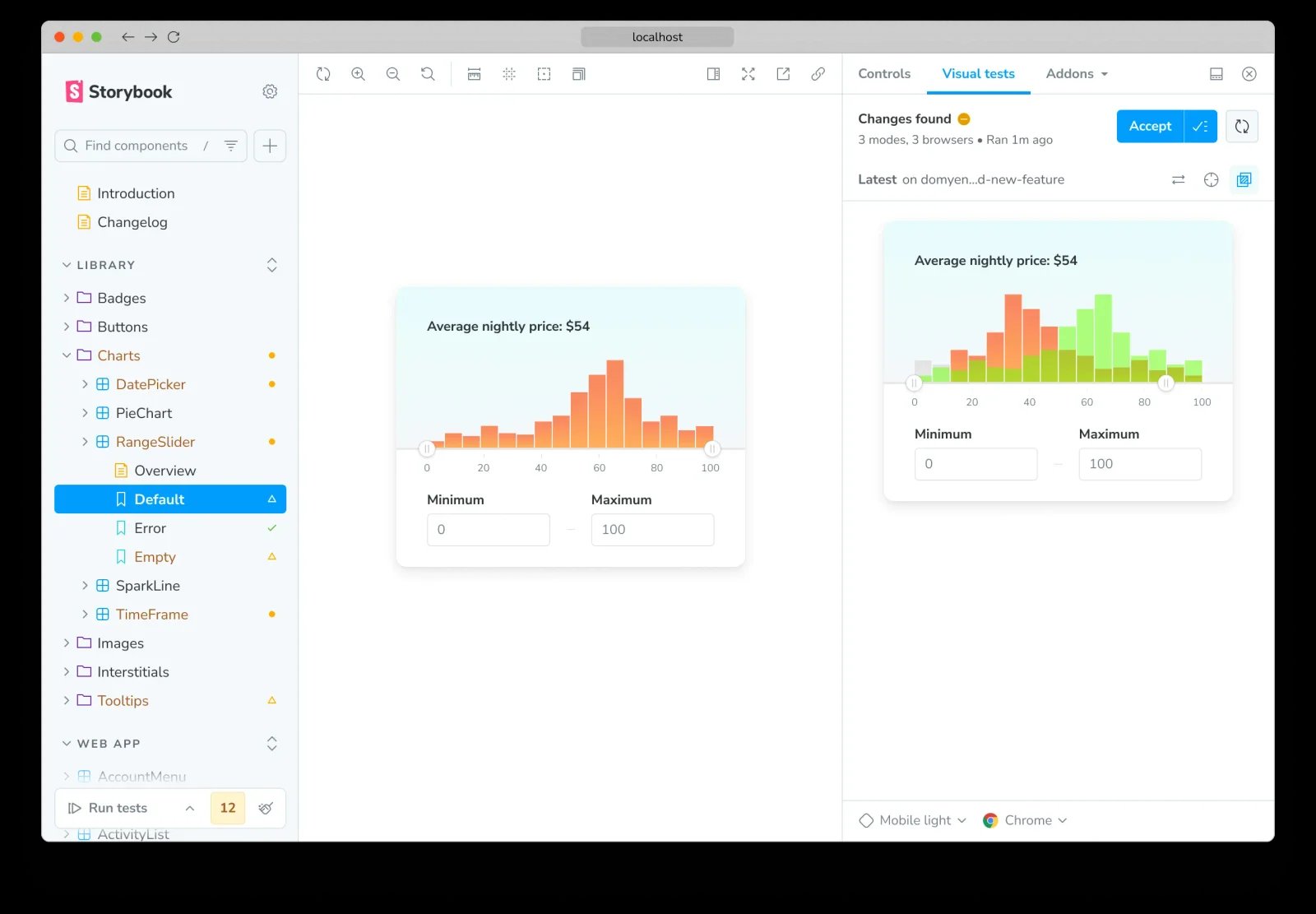
Chromatic's Storybook example shows a changed range slider and the Accept action in the Visual Tests panel. The highlighted chart belongs to one story state. Official example
Skip if. Your component stories do not model the cases that fail for readers. For example, a standalone button story cannot show a mobile banner obscuring it on a page. The free plan pauses testing and review when the monthly allowance is exhausted. Paid plans bill additional usage. Chromatic billing
First test. Change a shared spacing token that affects a modal and a button. Confirm both stories are selected, the intended update is easy to approve, and a page-level test still covers the mobile overlay.
Percy
Best for. QA teams that want to review entire web-page states at multiple widths and browsers. Percy gives reviewers diffs for the targeted renders. Its Git and Visual Git strategies differ in how updates become a baseline: one works at the build level and the other can accept selected snapshots independently. Visual testing basics · Baseline management
Skip if. A cloud render cannot reliably include the same fonts, campaign assets or authenticated mock data as your test. Watch the screenshot count when browser coverage expands. The free plan allows 5,000 monthly screenshots, and paid plans charge overage for excess usage. BrowserStack billing
First test. Pick a checkout state with a webfont, a receipt panel and a mobile breakpoint. Compare the rendered images with your expected browser output, then introduce a narrow-width overlap and check which browser-and-width combinations flag it.
Applitools Eyes
Best for. QA teams that need more control over what changes in each part of a checkpoint. Use Strict where text, style and layout matter. Use Layout in a region whose contents can vary while its structure should remain stable. The dashboard shows the comparison and lets reviewers annotate regions and accept or reject changes. Match levels and regions · Dashboard
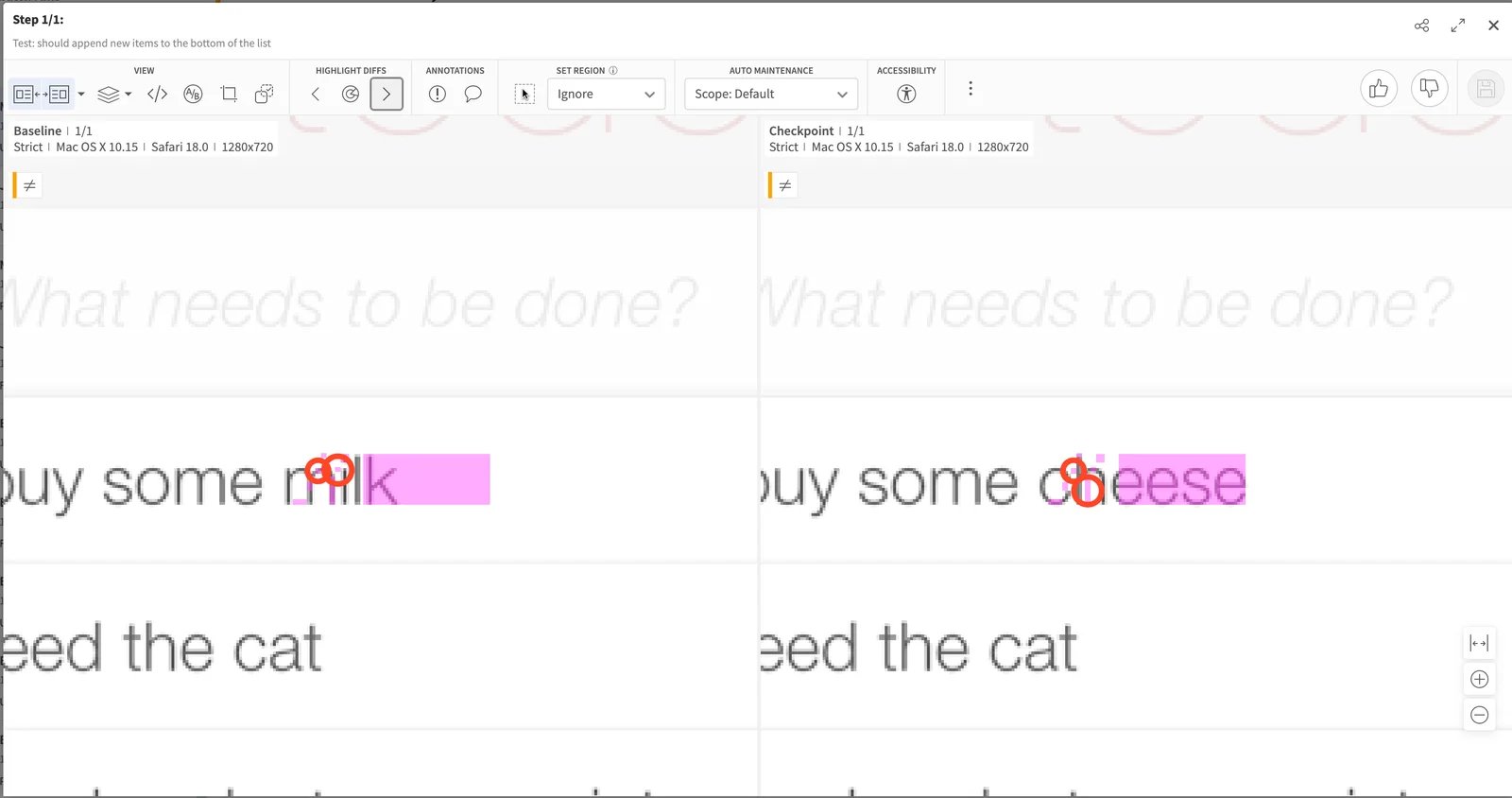
In the official example, the text changes from milk to cheese. Keep strict checks over important copy and totals before loosening comparison elsewhere. Applitools documentation
Skip if. Pinning the runner and using fixed fixtures already removes most noise. The annual Starter commitment and checkpoint model are a different decision from per-screenshot pricing. Its public page lists allowances of 100,000 component checkpoints or 1,000 page checkpoints. Confirm how your runs and environments are counted before purchasing. Applitools platform pricing
First test. Make one expected content change and one real overlap in the same widget. Verify the selected match rule ignores only the variation you meant to allow. Review the result before adopting any region-wide ignore rule.
A small pilot before rollout
- Pick three states where a visual failure matters. Start with the mobile checkout, an error message and one heavily reused component. Write down which pixels need approval and who owns each decision.
- Make the capture repeatable. Fix fixtures, viewport, locale, fonts and browser. Wait for layout to settle. Use dummy account data for screenshots uploaded to a service.
- Prove approval and rejection. Run with no changes, then make one intentional change and introduce one known regression. Verify that a rejected image does not become the next baseline.
- Measure review work and spend. Count actual renders and time spent resolving diffs. Add browsers or page states where the pilot reveals a gap. Keep functional and accessibility tests in place.
This comparison uses vendor documentation and public interface examples checked on November 19, 2026. The pilot is a proposal for your application. It does not represent a side-by-side benchmark.
Frequently asked questions
Is Playwright enough for visual regression testing?
Yes, if a small set of screenshots covers the important states and your team can run and review them consistently in CI. Consider hosted review when people struggle to locate diffs or keep baselines aligned across branches.
Should I check the whole page or one component?
Check a component when the layout or styling can fail on its own. Add a page screenshot when spacing, overlays, fonts or interactions with surrounding components change what people can see. Capture an explicit state after the page settles.
How can I avoid flaky screenshots?
Start with fixed fixtures and a consistent runner, then stabilize the clock or wait for the page to settle. Mask only the part you intend to exclude and deliberately introduce a nearby defect to verify you can still catch it.
Get ToolWorthy Weekly
New AI tools, practical guides, and selected AI signals in one weekly brief.
For AI tool founders
Built a tool that belongs in this decision set?
Request an editorial evaluation for possible inclusion in ToolWorthy.
Submit your tool for reviewPaid submission does not guarantee a ranking, recommendation, inclusion, or editorial outcome.