

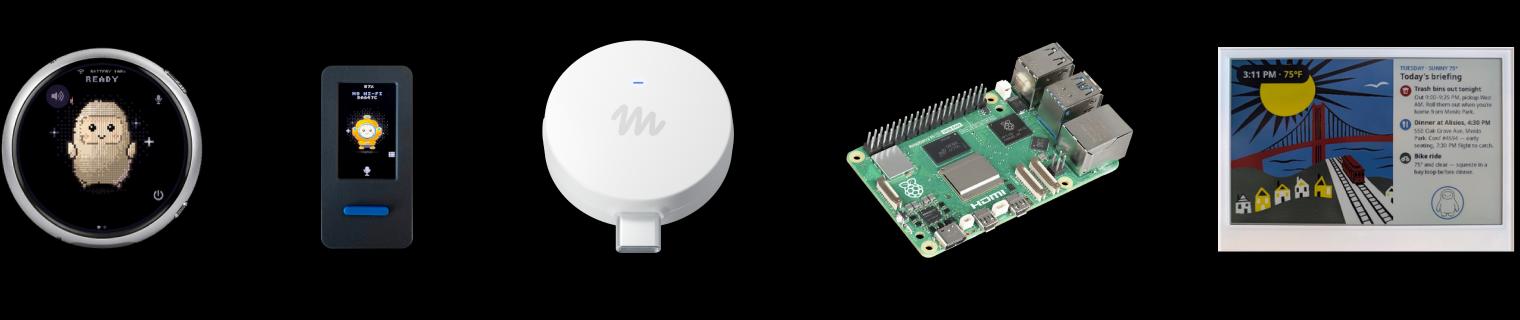


What Is Muse Gadgets?
Muse Gadgets is Meta's open-source device project for connecting the Muse personal AI agent to hardware. It provides firmware for ESP32 boards and a Linux SDK for computers such as Raspberry Pi. It is a companion to Muse, rather than a downloadable Muse model or a standalone offline assistant.
The practical choice is between building a custom device, giving Muse access to a Linux computer, and using Meta's Muse Home Link bridge. These paths have different hardware requirements and permissions. Source code is available under Apache 2.0 with third-party exceptions, but access to Muse remains governed by separate SDK-token terms.
Choose Between ESP32 and Linux
| Path | Useful when | Requirements and limits |
|---|---|---|
| ESP32 Device SDK | Building a status display, button, sensor interface, or supported push-to-talk device | The documented build uses macOS or Linux, a data-capable USB cable, ESP-IDF 6.0.1, an SDK token, and the Muse phone app. Board capabilities vary. |
| Linux Device SDK | Letting Muse inspect a Pi, manage files, or run custom commands | Requires Bluetooth LE, a supported Linux distribution, network access, a sudo-capable installation account, an SDK token, and the Muse phone app. Runtime permissions follow the selected account. |
The ESP32 documentation identifies ESP32-C5 DevKitC-1 as the simplest starting board. It also lists display and voice boards, but support is not uniform: classic ESP32 and ESP32-C6 boards without PSRAM cannot run the home-network tunnel. They can still connect to Muse and expose their own controls.
Push-to-talk does not imply built-in spoken answers. The firmware documentation describes voice input being transcribed and replies returned as text; adding spoken output requires integrating a text-to-speech API. This matters when choosing a board for a voice-assistant project.
The Linux SDK supports Raspberry Pi OS Bullseye or later, Debian 11 or later, and Ubuntu 22.04 or later, with both 32-bit and 64-bit systems. Its commands cover shell execution, file reads and writes, and device-health reporting. Custom commands and outbound messages can connect local sensors or services to Muse.
Pairing and Linux Permissions
Every DIY gadget needs an SDK token. After flashing the ESP32 firmware or installing the Linux service, enable Developer mode under Settings > Devices in the Muse iOS or Android app and add the device. The documentation provides separate instructions for each hardware path.
On Linux, Muse operates with the permissions of the account selected during installation. If that account can use sudo, Muse can too; the installer offers a --run-as option to select another account. Choose the Linux path only if command execution and file access are part of the intended job. It grants substantially more access than a simple status display.
Open Source Code and Token Access
The SDK-token terms govern access to Muse separately from the source license. Tokens are for personal, non-commercial use, with no more than 50 total linked devices per token. The terms restrict selling, publicly listing, and promotional distribution of devices using a token; other distribution requires Meta's written permission.
Meta also states that the SDK and tokens are unsupported and may change or become unavailable, and token access can be withdrawn. Apache 2.0 availability therefore does not make this a supported commercial hardware platform or guarantee lasting connectivity to Muse.
The SDK code is publicly available. Boards, optional peripherals, and Muse service access are separate costs or requirements; the official SDK materials do not establish a universal free-use quota or paid starting price for DIY access. Home Link's subscriber offer should not be applied to every DIY device.
Muse Home Link: The Device Meta Makes
Muse Home Link is a USB-powered ESP32-C5 bridge to compatible devices on a home network. It pairs through the Muse app using Bluetooth LE. Community skills can connect devices such as lights, TVs, speakers, and printers, depending on the setup.
Home Link runs official firmware and cannot be reflashed, although its firmware is based on the open-source ESP32 SDK. Pick this path for its network-bridge role; use a DIY board when custom firmware is the goal.
As checked on October 3, 2026, the official offer is free with an active Muse subscription in the United States, limited to one device per subscriber, with shipping listed for October on a first-come basis. A claim reserves a place in line and is not an order. Community integrations can change or break; Meta says they should not be relied on for safety-critical tasks.
Best For
Muse Gadgets fits personal projects where an existing Muse user wants a custom physical interface or a Pi that the agent can operate. ESP32 is the more relevant path for displays and buttons; Linux fits command and file workflows. Eligible subscribers interested in the home-network bridge can consider Home Link instead of building that bridge themselves.
Avoid If
- The project requires selling or publicly distributing token-enabled devices without separate permission from Meta.
- The assistant must work fully offline or retain Muse access independently of Meta's token service.
- Giving an agent the selected Linux account's file and command permissions exceeds the intended use.
- The project needs guaranteed service continuity, official SDK support, or dependable safety-critical device control.
- The goal is a prebuilt voice assistant with spoken answers and no firmware or API integration work.
Sources & Verification
- Last verified: 2026-10-03
- Evaluation scope: SDK identity, documented hardware paths, pairing, Linux permissions, token restrictions, and Home Link eligibility.
- Method: Source-based research from the official product materials below. No hands-on testing was performed for this update. The image is Meta's official product illustration.
- Official sources: Muse Gadgets, SDK repository, ESP32 README, Linux README, SDK-token terms, and Muse Home Link.