
6 Evernote Alternatives for Moving Your Notes in 2026
Find a home for your Evernote archive. Compare what each importer preserves, what can fail on your second device, and how to run a safe pilot.
On this page
A replacement can import every note title and still leave you hunting for a scanned receipt, a linked reference, or a PDF that opened only on the computer you used for the import. Pick the new app by what your archive has to do on day two.
Start with UpNote for a familiar notebook workflow, Joplin for an archive with scans, or Obsidian for a folder of Markdown files. Notesnook is worth a pilot when encrypted sync is the reason for switching. Apple Notes fits a Mac-to-iPhone workflow, and Notion fits notebooks that are becoming a shared workspace.
Evernote alternatives at a glance
| Tool | Best reason to try it | First thing to test |
|---|---|---|
| UpNote | Keep notebooks and a familiar editor | Check large attachments and old note links |
| Joplin | Rebuild searchable scans and choose your sync setup | Search a scanned PDF on a second device |
| Obsidian | Own notes as ordinary Markdown files | Open a converted notebook and test its heaviest PDF in sync |
| Notesnook | Sync notes with end-to-end encryption | Measure the pilot's attachment size and check links |
| Apple Notes | Capture and read notes on Mac and iPhone | Import on Mac and open the same files on iPhone |
| Notion | Turn selected notebooks into a shared workspace | Check database layout, access, dates and images |
What actually changes when you move
ENEX is Evernote's XML export format. A file importer and an account connection give you different migration paths. Check the result on each device you need before paying for sync or moving the full archive.
| Tool | How notes move | Where they land | Limit or repair to plan for |
|---|---|---|---|
| UpNote | Import ENEX on desktop with Premium | Notebooks or hashtags | Old Evernote links stay pointed at Evernote. Large notes may fail. |
| Joplin | Import ENEX as Markdown or HTML on desktop | Notebooks in Joplin | Original OCR data is dropped. Cloud Basic has a 10 MB per-note or attachment limit. |
| Obsidian | Convert ENEX with the official Importer | Markdown files and assets in a vault | Rebuild stack and tag hierarchy where needed. Sync Standard has a 5 MB per-file cap. |
| Notesnook | Import ENEX in the web or desktop app | Notes and notebooks with encrypted sync | Free allows 10 MB per file and 50 MB in attachments per month. Internal link matching depends on titles. |
| Apple Notes | Import ENEX into Notes on Mac | iCloud or On My Mac notes | Unsupported attachments and features are omitted. Use iCloud for a phone pilot. |
| Notion | Connect the Evernote account | Notebook pages containing lists of database items | The documented route excludes Evernote Teams. Images and dates can need cleanup. |
When keeping Evernote makes sense
If the Web Clipper, scan search, and years of links already work well for you, compare the cost of renewal with the time it will take to replace those habits. Evernote's current Free plan allows 50 notes, one notebook and one connected device. Starter allows 1,000 notes, 20 notebooks and three connected devices. It also caps total storage at 5 GB and attachments at 1,000. Hitting those caps can prevent new uploads. Storage limits · Starter downgrade and attachment limits Above the creation limits, existing notes can still be viewed, edited and exported, subject to device access. Check your actual renewal price and archive usage before choosing a plan. Note limits · Device limits · Plan comparison
If AI is your reason for leaving, Evernote v11 lets you disable individual AI features in Preferences. If you use its AI Assistant to find notes, add two questions you routinely ask it to your pilot. The ability to open an imported note tells you little about whether you can retrieve it the same way. Evernote v11 · AI Assistant
The six alternatives
UpNote
Best for: a cross-platform notebook app with rich text and a direct ENEX import. Each export can become a notebook using the filename. You can map tags to hashtags or notebooks. The app works offline and offers sync across its supported devices. Import guide · Product and pricing
Skip if: your archive depends on Evernote's internal links, very large files, or end-to-end encrypted sync. UpNote documents notes with attachments over 20 MB or over 300,000 characters as potential import failures. It leaves Evernote links as links to the old service. If an import would take the account past 20,000 notes or 10 GB of attachments, UpNote limits the batch to 50 notes. Evernote import requires Premium. The free plan allows 50 notes for trying the editor. Premium lists $1.99/month or $39.99 lifetime, with regional variation, and includes export formats such as Markdown and HTML. Premium details · Sync and security FAQ
First test: import one notebook as its own file and verify its name, tags, largest attachment and a pair of linked notes. Check the debug log for skipped notes.
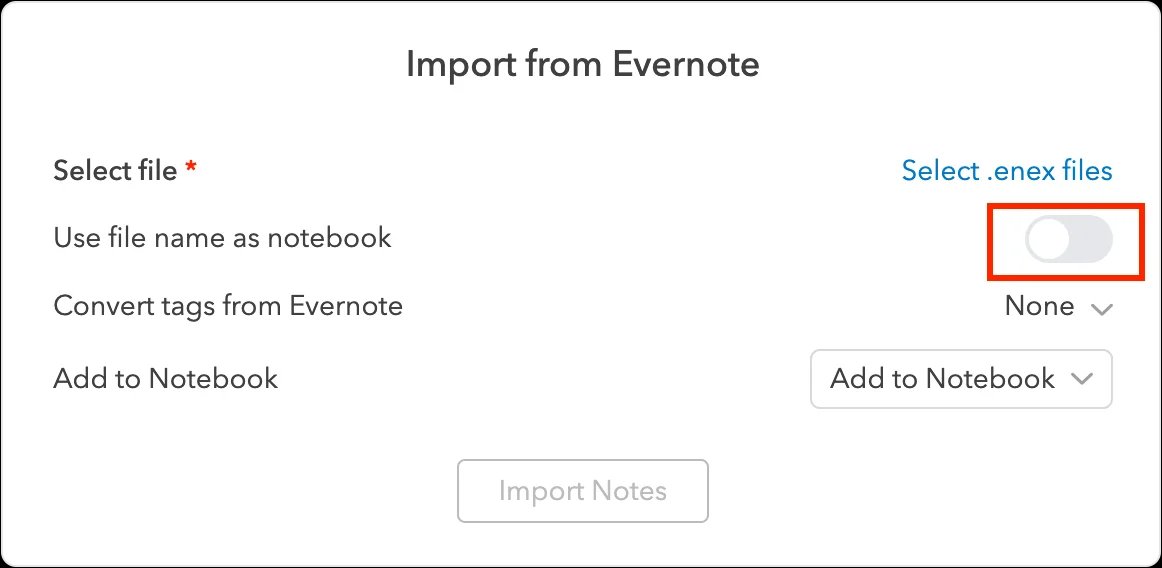
Source: UpNote's official import documentation.
Joplin
Best for: maintaining an offline notebook archive, especially if you need to recover search inside scans. Joplin's ENEX importer brings in notes, attachments, tags and supported metadata. It can regenerate OCR on desktop for supported images and PDFs and make that OCR data available on mobile through sync. ENEX import · OCR
Skip if: matching complex layouts and every link is essential without review. Markdown import can simplify rich formatting. HTML import is worth a separate pilot if layout matters. Joplin attempts to recover links from titles, so duplicate titles deserve a check. Joplin Cloud Basic lists €2.99/month on monthly billing, with 2 GB storage and a 10 MB per-note or attachment cap. Pro raises that cloud cap to 200 MB. Joplin’s separate mobile attachment guide warns about resources over 10 MB on mobile, so verify your phone client before buying a higher cloud tier for large scans. Other sync targets are available, and sync encryption can be enabled in Joplin. Cloud plans · Mobile attachments · Sync · Encryption setup
First test: import a scanned receipt, let OCR finish, search for a word visible only inside the scan, and then repeat on your phone after sync.
Obsidian
Best for: turning a collection of notes into Markdown files you can inspect and back up as a folder. The official Importer converts ENEX files, with documented options for rebuilding nested tags and recreating notebook stacks from filenames. Evernote import guide
Skip if: you depend on Evernote-style scan search or want to avoid managing files and sync settings. Obsidian has an official Web Clipper. Try the same source page in both apps before switching your daily capture. The core app is free. Optional Sync starts at $4/user/month billed annually. The 5 MB per-file cap on Standard and 200 MB cap on Plus apply to Obsidian Sync, so an attachment can be present in the local vault and still miss your phone. Pricing · Sync limits
First test: import to an empty vault. Open a converted note and its attachment outside Obsidian, then test the same pair on your second device. See our Obsidian alternatives guide if you want to compare the vault workflow itself.
Notesnook
Best for: an ENEX import into a note app with end-to-end encrypted sync on the free plan. Notesnook documents on-device processing for the import. It lists support for notes, tags, notebooks and attachments, with limits on internal link resolution and task metadata. Evernote import guide
Skip if: your attachment-heavy archive depends on the free sync allowance. The free plan lists 50 MB of attachment storage per month, a 10 MB maximum file size, and up to 50 notebooks and 50 tags. Paid plans raise those limits. Essential or higher is required to keep all attachments automatically downloaded for full offline access. Plans and limits
First test: select a note whose link text differs from the title of its target and a batch of real PDFs. Check link resolution, the account's attachment allowance and whether each PDF opens on a second device.
Apple Notes
Best for: a personal archive used mainly on Mac, iPhone and iPad. Apple documents ENEX import on Mac into iCloud Notes or On My Mac. On macOS 13 or later the importer can also import Evernote tags. Mac import guide
Skip if: desktop import must happen on Windows, or your archive relies on attachments and features the Notes importer cannot carry. iCloud's standard free 5 GB is shared with other iCloud data. Check available storage before moving a large library. Import and attachment caveats · iCloud storage
First test: import a notebook to the account you intend to use. For cross-device use, choose iCloud and verify a scan, a tag and a file on your iPhone. Keep a separate HTML copy for notes where formatting matters.

Best for: a team that wants selected Evernote notebooks to become shared project or reference pages. The documented importer connects to Evernote and maps notebooks to pages and notes to database items. Start in a private space and set access after reviewing the result. Import guide
Skip if: you need an export-file-only transfer, an Evernote Teams import through this connector, or a local folder as the working source. Notion describes the import as reliable up to around 5,000 notes and warns that images or dates can need repair. Free's 5 MB limit applies to file uploads. Verify large imported files directly instead of assuming an upload limit predicts how the connector handles them. Pricing and limits
First test: connect one notebook, inspect a dated note with an image and a PDF, and have a second person verify the intended access. If you are weighing a shared workspace more broadly, compare Notion alternatives.
How to move a notebook and check the result
-
Make a source backup. On Evernote for Mac or Windows, export one ENEX per notebook and include the attributes you use. Free accounts can export. Evernote documents a 100-note limit for a selected batch and a separate whole-notebook export. Keep a separate HTML export for visual reference and retain its resource folder. Evernote export instructions
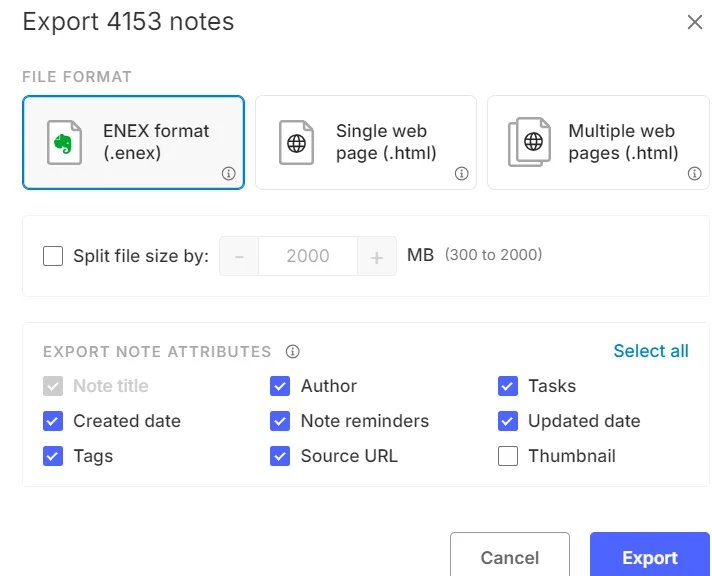
Evernote desktop export dialog, February 2025. Screenshot from the Evernote Community.
-
Choose a pilot with difficult notes. Include a scan you find by its text, the largest file you need on mobile, a clipped page, a note with an important date or tag, a linked pair with a duplicate title, and a task or shared note. Write down what a successful result looks like for each.
-
Import to a clean destination. Compare counts, open attachments, follow the links and check dates. Search for the scan by words inside the document. Check whether sharing and reminders work as you need them, and rebuild them separately where required.
-
Run a second-device test and an exit test. Open the same files after sync, including with the connection off if offline access matters. Export the pilot from the new app and open it outside the app. Retain the source exports and keep Evernote accessible until the archive and your daily capture workflow pass.
Other candidates worth knowing: Zoho Notebook offers both direct migration and ENEX, and is a reasonable test if you want its card-based organization. Bear can import ENEX if you prefer a tag-led editor. OneNote is an option for new notes in a Microsoft workflow. Microsoft retired its legacy Evernote importer in September 2022, so plan a separate migration route for an existing library.
Frequently asked questions
Can I export notes from Evernote Free?
Yes. Use Evernote for Mac or Windows to export ENEX or HTML. If your account hits a device limit, follow Evernote's device management steps to reach the desktop app.
Which Evernote alternative is free for a large archive?
Try Joplin for an offline archive or Obsidian for a local folder of files. Both separate local use from optional paid sync. Estimate the largest file and total size before choosing a sync plan. Notesnook also offers free encrypted sync, with attachment and organization limits to check first.
Will Evernote links and OCR survive ENEX import?
Check each importer with your own notes. UpNote leaves old internal links pointing to Evernote. Joplin attempts to match links by title and can regenerate OCR from supported files. Test a linked pair and find a scan by its text before moving the whole library.
Editorial note: This guide compares documented features and migration paths, checked November 9–10, 2026. Prices are shown in the vendor's listed currency and billing period. The pilot is a procedure for readers to run with their own archive.
Get ToolWorthy Weekly
New AI tools, practical guides, and selected AI signals in one weekly brief.
For AI tool founders
Built a tool that belongs in this decision set?
Request an editorial evaluation for possible inclusion in ToolWorthy.
Submit your tool for reviewPaid submission does not guarantee a ranking, recommendation, inclusion, or editorial outcome.