
6 Loom Alternatives 2026 — Before You Move Your Videos
Compare six Loom alternatives for async sharing, polished demos, sales video and local recording. Check what happens to your links, captions and permissions before switching.
On this page
If you want another record-and-send link, try Zight for quick support clips or Tella for videos that need editing before anyone sees them. If the hard part is mapping recordings to new owners and spaces, test Cap Pro's importer. If you also want to edit those videos in Tella, compare its migration route on the same sample. If you mainly want better Mac demos, test Screen Studio while leaving your existing Loom library in place.
Before you cancel, open one of your most important old recordings from the page where viewers actually find it. A new copy of the video won't repair the old Jira comment, Confluence embed or onboarding link. A file you can play and a library your team can still use are different deliverables.
We compared official product, pricing and support documentation on November 17, 2026. These are desk research recommendations, with trial steps you can run on your own recordings.
Loom alternatives at a glance
| Tool | Best fit | First reason to rule it out |
|---|---|---|
| Zight | Record a short update and send it alongside annotated screenshots or GIFs | Free Share videos stop at five minutes |
| Tella | Edit a screen-and-camera demo and share a hosted version | 4K file export and 4K hosted playback are on different tiers |
| Cap | Move a Loom library into a new hosted workspace, or record locally | The Loom importer needs Pro, and imported videos get new URLs |
| Screen Studio | Make a polished Mac walkthrough with cursor zooms and an editable project | Mac only for creators, and its hosted links have a 30-minute limit |
| Vidyard | Send prospecting videos and measure engagement | Check the CRM tier before moving a sales team |
| OBS Studio | Capture locally with control over sources, scenes and audio | You supply the editor and sharing workflow |
Compare the limits that affect a switch
Use this table to compare what viewers receive and what the creator must pay for. For example, a 4K export does little for you if customers only ever see the hosted link.
| Tool | What you hand to viewers | Free or paid boundary |
|---|---|---|
| Loom | Hosted link or embed with viewer discussion | Starter lists 25 recordings and five minutes per ordinary video. Download access depends on plan, role and settings. |
| Zight | Hosted link to a video, screenshot or GIF | Free Share: five minutes, 1 GB and access to the latest 50 captures. Restricted viewing starts on Collaborate. |
| Tella | Hosted page or exported file | Seven-day trial. Paid Pro exports up to 4K. Premium adds 4K link playback, password protection, domain restrictions and branding removal. |
| Cap | Local recording or hosted share link | Free is personal use. Commercial desktop use requires a license. Pro adds Loom import, AI transcription and unlimited cloud links. |
| Screen Studio | 1080p hosted link or a file up to 4K | Paid Mac app. Hosted links support videos up to 30 minutes. Editable Screen Studio projects can be shared separately. |
| Vidyard | Hosted video page with sales follow-up options | Free shares five new recordings per month, up to 30 minutes each. Existing-library hosting starts on Starter. Teams lists CRM/MAP integrations. |
| OBS Studio | Local recording for your own editor or host | Free and open source. Hosting, review comments and access controls come from the system you choose after recording. |
Check what moves before you choose
| What you rely on today | What to verify in the pilot |
|---|---|
| The recording | Can an authorized person export or import the full video? Check playback, audio and the last minute after transfer. |
| Corrected captions or a translated transcript | Save the SRT separately where permitted. Reimport it or compare regenerated captions with the corrected original. |
| Links and embeds | List the pages, tickets, docs and customer emails that point to the old URL. Replace editable links and decide how long old ones need to remain available. |
| Viewer access | Test an intended external viewer, an internal teammate and an unauthorized account. Carry over the intended access, even when the destination uses different settings. |
| Comments, analytics and chapters | Identify decisions or notes you still need and retain them separately. Test chapters and calls to action on the new player. |
| Editable source | Keep any source project and original footage you have. An MP4 provides a flattened copy for playback or further editing. |
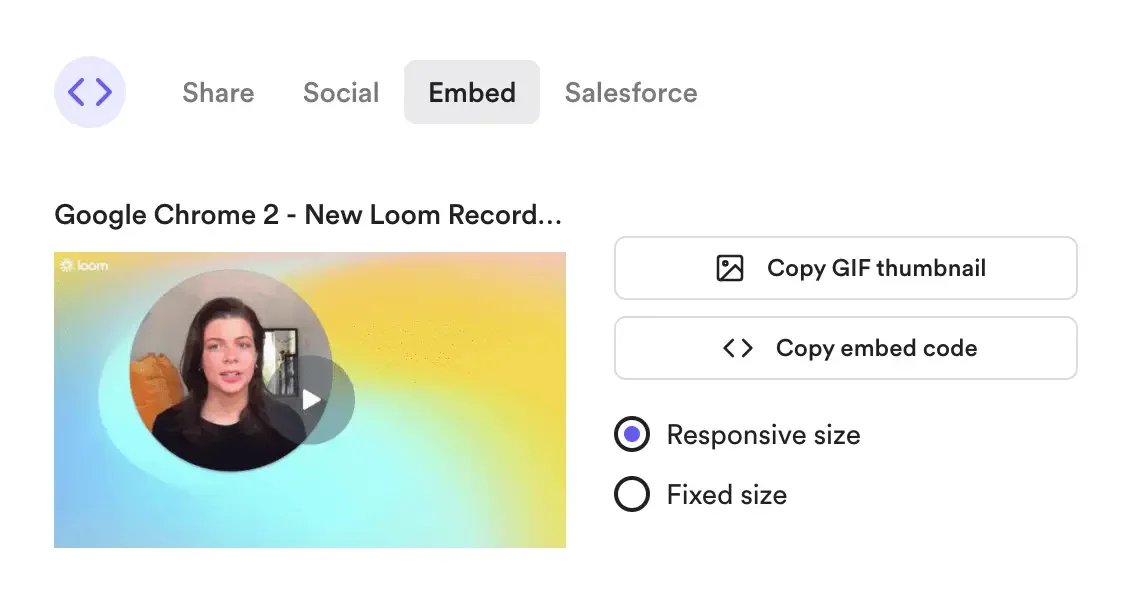
When checking an existing help page, note the original Loom embed. Replace it with the new provider's embed and retest as an intended viewer. Atlassian's Loom guide
Atlassian's Loom download guide says Starter cannot download videos and Creator Lite roles cannot download on any plan. Paid download eligibility varies by role and admin settings. The download guide says trims carry into the MP4 and chapters, closed captions and calls to action do not. Atlassian’s AI editing guide and download guide disagree on whether automatic filler and silence removal survives. Export a sample and listen to the affected sections before promising that the MP4 matches the hosted cut. SRT download has its own plan and role rules. Get those files while an eligible account still has access.
Before counting your library as portable, flag recordings that use Loom Variables, meeting recordings whose organizer must handle the download, and files over 20 GB that need support for download access. Keep an exceptions list and reconcile the destination count with completed transfers and unresolved recordings before canceling the source workspace.
Consider keeping the archive where it is. Atlassian's downgrade guide says you can still access videos above the 25-video Starter allowance after downgrading, though you cannot make new recordings until you're back under the limit or upgrade. That is a reason to try making new recordings elsewhere before moving the archive. Verify that the people who rely on old links can still view them and that any paid sharing settings you depend on will survive. A downgrade and a workspace deletion are separate actions.
Which migration route should you test first?
| What you need to move | Start here | Check before scaling |
|---|---|---|
| A library with named owners and spaces | Cap Pro CSV import | Map one batch of eligible links and compare owners, spaces and failed rows. |
| Private clips that need to stay private | Tella Transfer with an account authorized to access those recordings | Compare the original and destination viewer permissions on one restricted clip. |
| A local archive for playback | Loom's MP4 export and separate SRT export where eligible | Reopen both files and verify that the corrected captions match the recording. |
Choose by the job your recording needs to do
Zight
Best for: Support and engineering teams that send a mix of screenshots, GIFs and short screen recordings. Zight's product and plan pages put all three kinds of capture in the same workflow and list integrations such as Slack and Jira. The pricing table lists Slack from Create and Jira as an add-on on Create and Collaborate, included on Scale.
Skip if: You want longer walkthroughs on a free account. Zight's recording limits cap the free Share tier at five minutes per video. That's the same per-video boundary as Loom Starter for ordinary recordings. Create removes the length cap and lists 5 GB of storage. If you need private workspace links, named viewer restrictions or passwords, budget for Collaborate or Scale.
First test: Record an eight-minute explanation, annotate a screenshot and send both to the same test ticket. Confirm the plan you would buy handles the longer video and that an external recipient opens both assets with the intended permissions.
Tella
Best for: Creators who want a hosted product demo after cleaning up the narration, adjusting the layout and zooming in on a key action. Tella documents timeline and transcript editing and zoom controls.
Skip if: Your budget assumes the exported file and hosted player have the same resolution. Tella pricing lists 4K file export on Pro, while 4K sharing and branding removal are Premium features. Tella for Teams also puts password and domain restrictions on Premium and above. It also meters agent edits through credits. Verify the real editing workload in the trial if the agent is part of the reason to switch.
Tella’s migration guide documents importing public Loom links and folders. For recordings you’re authorized to move that must stay private, Tella Transfer signs in to Loom locally and can save MP4s or import to Tella. Test it with an approved account and a representative clip. A Tella import maps Loom folders to playlists. A local MP4 export puts files in the selected folder without recreating Loom subfolders. Check destination links, access and metadata separately. For long clips, the pricing table lists six hours per clip while the Teams FAQ says two hours per recording and 5 GB per uploaded file. Confirm the limits for the app and plan you’ll use and try your largest approved file.
First test: Re-record a two-minute onboarding clip. Replace one explanation, add a zoom and check the shared page and downloaded file separately. For a Loom MP4 you bring into Tella, test the exact zoom you need: Tella says auto zoom depends on click data unavailable on uploaded videos.
Cap
Best for: A team that wants a supported path to import a Loom library, or a creator who wants a separate local recording route. Cap documents individual link import, a CSV importer for up to 500 mapped videos at a time and a managed migration option. Cap Pro is required for Loom import. Its documented owner and space mapping and per-batch reconciliation make it useful when the project involves more than bringing over individual files.
Skip if: Old comments, view counts or URLs must carry over as-is. Cap's migration page describes new URLs and new comment threads, with transcripts and chapters generated in Cap. Private or unavailable source videos require an authorized route, and a space label in the CSV does not recreate a nested folder hierarchy.
First test: With permission, import one ordinary clip, one restricted clip and one that sits in an active help article. Compare ownership, destination access, playback and captions before replacing any production embed. Cap pricing separates personal free use, commercial desktop licensing and Pro cloud sharing. Check the commercial license even if you expect to record locally.
Screen Studio
Best for: Mac creators who want cursor zooms, clean framing and a shareable editable source project for new demos. The product page documents local recording and editing, optional cloud links, and separately downloadable Screen Studio projects.
Skip if: Any creator must record on Windows, or your standard deliverable is a hosted recording longer than 30 minutes. Screen Studio lists 1080p hosted links up to 30 minutes, even though an exported MP4 can reach 4K. Its product page lists paid monthly and annual plans.
First test: Record a click-heavy walkthrough and open its share link as a viewer. Then share the project with a teammate who uses Screen Studio and see whether they can change a cut. If you start with an old Loom MP4, budget for manual editing where the original cursor data is unavailable.
Vidyard
Best for: Sales teams that send short personalized recordings and act on engagement. Vidyard's plan comparison lists full video analytics, branded share pages and CTA templates on Starter, with CRM/MAP integrations on Teams. Check the specific CRM and integration action your team needs.
Skip if: You need to host a training library on a free account or mainly want an internal screen recording tool. Free's five-per-month allowance is for recording and sharing new videos. Vidyard's plan comparison excludes video hosting from Free and lists it on paid plans. Confirm hosting and access controls at your intended volume before you move existing files.
First test: Send one test demo to an authorized recipient outside your workspace. Check whether they can watch it without help, whether engagement is attributed as expected and whether the event reaches the CRM record on the actual plan you're evaluating.
OBS Studio
Best for: Local capture when scenes, audio control or keeping a file in storage you manage matter more than one-click sharing. OBS Studio is free and open source for Windows, macOS and Linux, with configurable sources and an audio mixer.
Skip if: The job ends only after a teammate can open a restricted link and comment at a timestamp. OBS supplies the capture. You still need an editor or approved storage and playback system to complete that handoff. If your real bottleneck is editing finished footage, compare the Clipchamp alternatives workflow first.
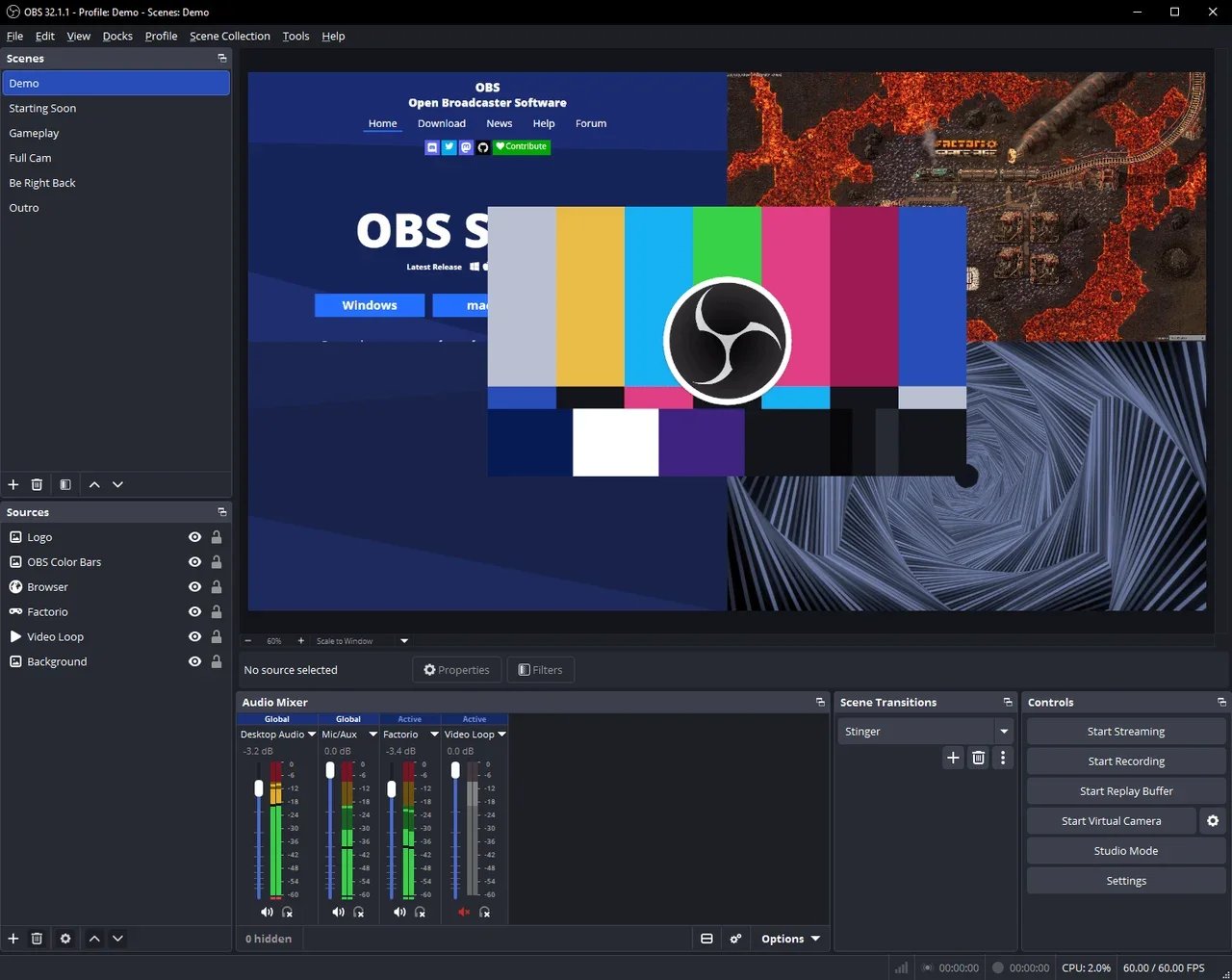
OBS Project’s official interface example shows the source and audio controls you’ll configure before capture.
First test: Record your screen, microphone and system audio on the hardware you actually use. Open the resulting file, then share it through your approved destination and have another person check access. Time the whole workflow, including the upload.
When to keep Loom
Stay with Loom if the existing library already works and people regularly record from Jira or Confluence Cloud. Atlassian documents those recording entry points for provisioned sites, with access and plan requirements for AI workflows. A second recorder can be enough if you only need better demos or local capture. Use it for new work while measuring whether the extra tool actually reduces editing time.
If everything already happens in Slack, try Slack Clips for internal clips up to five minutes before adding another subscription. For occasional hosted walkthroughs over five minutes, ScreenPal Free lists up to 15 minutes per recording. Its plan table lists 10 hosted videos, while the FAQ on the same page says unlimited hosting. Verify your account’s limit before using it for an archive. If viewers need a reusable step-by-step guide, compare the documentation workflow in Guidde separately.
If you do need a full switch, start with one small group and a few recordings that exercise different permissions and lengths. Compare the cost of creator seats, the plan needed for external viewing controls, and the time to replace embeds. Move the larger library only once the pilot passes both playback and access checks.
Frequently asked questions
What is the closest Loom alternative for quick screen sharing?
Start with Zight for short support clips and annotated screenshots. If the same clip needs a polished edit before you send it, try Tella. Check the length limit and test a shared link with someone outside your account.
Which free Loom alternative can record longer than five minutes?
OBS Studio records to a local file for free. ScreenPal lists up to 15 minutes per free recording. Vidyard's free tier lists five new recordings per month up to 30 minutes each and lets you share them by link. Hosting an existing library requires a paid plan. Choose based on whether you need a ready-made link for a new recording or already have a place to upload files.
Can I move my Loom videos and keep the same links?
Moving a video to another provider creates a new destination URL. An importer can move the video it can access, but plan to replace old URLs and embeds yourself. Maintain a source-to-destination list and check private videos as an intended viewer before switching.
Do Loom captions and comments come with an MP4?
Loom's MP4 download excludes closed captions. Save an SRT separately if your plan and role allow it. Comments are part of the hosted discussion, so keep any decisions or feedback you need separately and verify what your migration tool supports.
Should I cancel Loom before moving my library?
First export what you are allowed to keep, test new links and permissions, and confirm who still needs the old archive. Downgrading may preserve access to existing recordings, but Starter removes download eligibility and limits new recordings. Check the paid settings you depend on before making the change.
Get ToolWorthy Weekly
New AI tools, practical guides, and selected AI signals in one weekly brief.
Related Posts
- 5 OpusClip Alternatives 2026 — Before You Cancel
Moving from OpusClip means more than downloading an MP4. Compare five routes by clipping, editing, export limits and what you must save before cancelling.
- Descript Alternatives in 2026: Keep the Workflow You Actually Need
Compare six Descript alternatives by the job they replace: remote recording, transcript editing, professional finishing, offline audio, browser video, or mobile shorts.
- Clipchamp Alternatives in 2026: Pick the Workflow, Not Just the Editor
Choose a Clipchamp alternative by what you need to change: mobile shorts, browser captions, transcript editing, local files, or professional finishing.
For AI tool founders
Built a tool that belongs in this decision set?
Request an editorial evaluation for possible inclusion in ToolWorthy.
Submit your tool for reviewPaid submission does not guarantee a ranking, recommendation, inclusion, or editorial outcome.