
7 Viral Video AI Tools for Turning Photos Into Trends
Find a trend you can actually make from your photos. Compare seven tools by the photos you need, what you can preview and the cost of a finished clip.

On this page
Start with the clip you want to post. A solo dance needs one clear photo. A two-person performance may require two separate portraits in a fixed order. If timing matters to the joke or the performance, check whether the export comes with sound or you need to line it up in the posting app.
Viral Video AI is our featured pick for browsing a dated trend chart and making a clip straight from it. ToolWorthy provided this featured placement at no charge. The comparisons below use public product documentation and vendor examples.
Pick a tool by what matters to you
| Tool | Start here when |
|---|---|
| Viral Video AI | You want a dated chart with photo counts, runtimes and credit costs. |
| videosi | You remember a trend name or want to browse a broad effect catalog. |
| TokClip | You want new template launch dates and an RSS feed. |
| JUMP on the TREND | You want to see your own face in the opening still before paying. |
| Remix Motion | You want to compare 480p and 720p for a supported effect before buying. |
| Seadanse | You want a short duet with sound included and a 1080p option. |
| Starrd | You want a 30-second performance with a friend or pet. |
Compare audio and paid exports
These are documented outputs for the named examples. A different effect or quality selection can change the result.
| Tool | Output and sound |
|---|---|
| Viral Video AI | Silent vertical HD MP4. Add sound in your posting app. |
| videosi | Output and sound depend on the effect and settings. |
| TokClip | Standard paid clip is 15s without a watermark. Sound varies by template. |
| JUMP on the TREND | 5s or 10s vertical for templates. Audio varies by workflow. |
| Remix Motion | Featured example is 15s, 480p or 720p. Add sound unless the template says it keeps audio. |
| Seadanse | The 58th Floor duet is 15s at 720p or 1080p with a song excerpt. |
| Starrd | 58th Floor Extended runs 30s with sound. This example contains explicit language. |
What one clip costs
USD list prices for one-time packs. Start with the chosen effect's credit quote, then find the smallest pack that covers it.
| Tool | Example purchase with no existing balance |
|---|---|
| Viral Video AI | $9.99 for a 10-credit effect. Hotel Lobby and Tiny Desk are $14.99 each. |
| videosi | $8.90 covers 10 credits. A 13-credit quote needs more, and the 30-credit pack is $17.99. |
| TokClip | The standard $9.99 pack covers a 50-credit paid clip. |
| JUMP on the TREND | Its template guide quotes $6.99 for a 100-credit video template. |
| Remix Motion | The example needs 100 credits at 480p or 225 at 720p. The listed packs that cover those are $9.90 and $29.90, respectively. |
| Seadanse | The 58th Floor 720p option is $9.90. The 1080p option needs 1,480 credits. |
| Starrd | A 250-credit extended clip fits the $11.99 pack of 300 credits. |

Viral Video AI puts cast size, runtime and credits next to each item in its chart. Its chart describes ordering by search demand and recency. Use that order to browse the site's picks, then watch the example and check whether the supplied roles fit the people in your photos.

For Hotel Lobby, use two portraits for a 16-second clip. The left slot plays the rapper and the right slot plays the hype performer. Tiny Desk is 19 seconds with one required lead and up to four optional band photos. Those effects cost 20 credits and list a $14.99 single-video option. Most other entries use 10 credits. The homepage lists shared packs at $19.99 for 30 credits and $49.99 for 100.
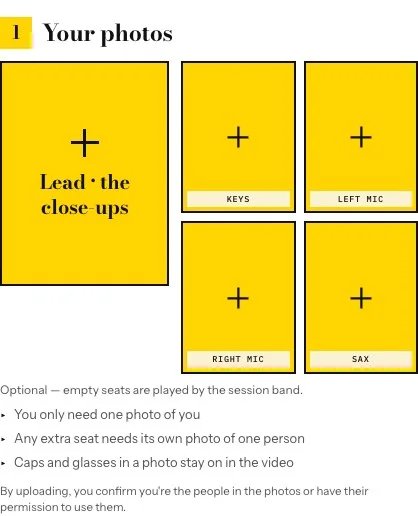
Tiny Desk requires the lead photo. The other four seats can be left to the preset band.
The download is silent. Open the trend’s sound instructions before you buy if the soundtrack matters to your post. Check the sound in the account and app where you plan to publish, then preview how it lines up.
videosi
videosi is useful when you remember a trend name, or want to compare a wider range of dances, transformations and other formats. Its catalog cards surface casting and credit cues, and effect pages let you see the available settings before rendering.
Read the specific effect page before choosing a pack. The pricing page lists 10 credits for $8.90 and 30 for $17.99 as one-time purchases. The chosen model, quality and length can change the credit requirement. For a template that quotes 13 credits, the 10-credit pack alone is insufficient.
TokClip
TokClip’s latest template feed is organized by template launch date and also offers RSS. That suits someone who follows new formats regularly and wants to move from discovery to a usable template. The separate trend wiki also contains entries you can read about, so check the availability label before planning a post.
The pricing page describes a standard 50-credit paid clip, with a $9.99 one-time starter pack and a watermark-free paid export. Sample details shown on that page vary by section. Confirm the current sign-in, length and watermark conditions before relying on the free option.
JUMP on the TREND
JUMP on the TREND puts a face preview ahead of the payment decision. The template guide says it creates an opening still from your photo and lets you try up to three previews per template. That gives you a way to assess the first frame before spending credits on motion.

The opening frame helps you check likeness and casting before buying the motion render.
Its template path makes a 5- or 10-second vertical clip and lists 100 credits for a render. The site separately offers source-clip remakes, which can follow a different motion and audio workflow. Start with the precise template or remake page and confirm what it will export.
Remix Motion
Remix Motion lets you browse by categories and cast size. Its featured example shows a 15-second clip at 480p for 100 credits or 720p for 225. Use the lower setting for a first try if that resolution suits your destination. If you need 720p, price that setting before buying. The credit packs list 100 credits for $9.90 and 330 for $29.90.
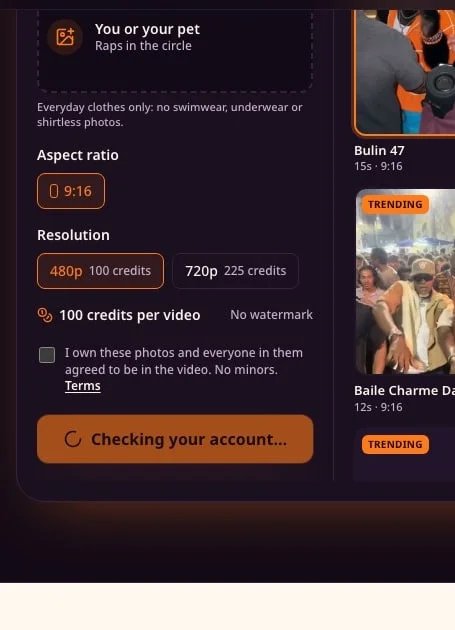
Changing resolution changes the credits this template needs. Select your output first.
Seadanse
Seadanse’s 58th Floor template takes two separate photos and produces a 15-second vertical clip with the song excerpt. It assigns the left photo to the hook and the right photo to the verse. The page lists 720p for $9.90 and 1080p for 1,480 credits. Select the resolution to see the live payment quote. This is a useful route if you want a short clip with the sound already placed and you can use that sound for your post.
Starrd
Starrd’s 58th Floor Extended gives the lead performer a longer verse and puts a friend or pet in the second role. The 30-second template takes two photos and uses 250 credits. The web pricing page lists a 300-credit pack for $11.99, leaving 50 credits after that render. The template contains explicit language, so listen to the example if the clip needs to suit a particular audience.
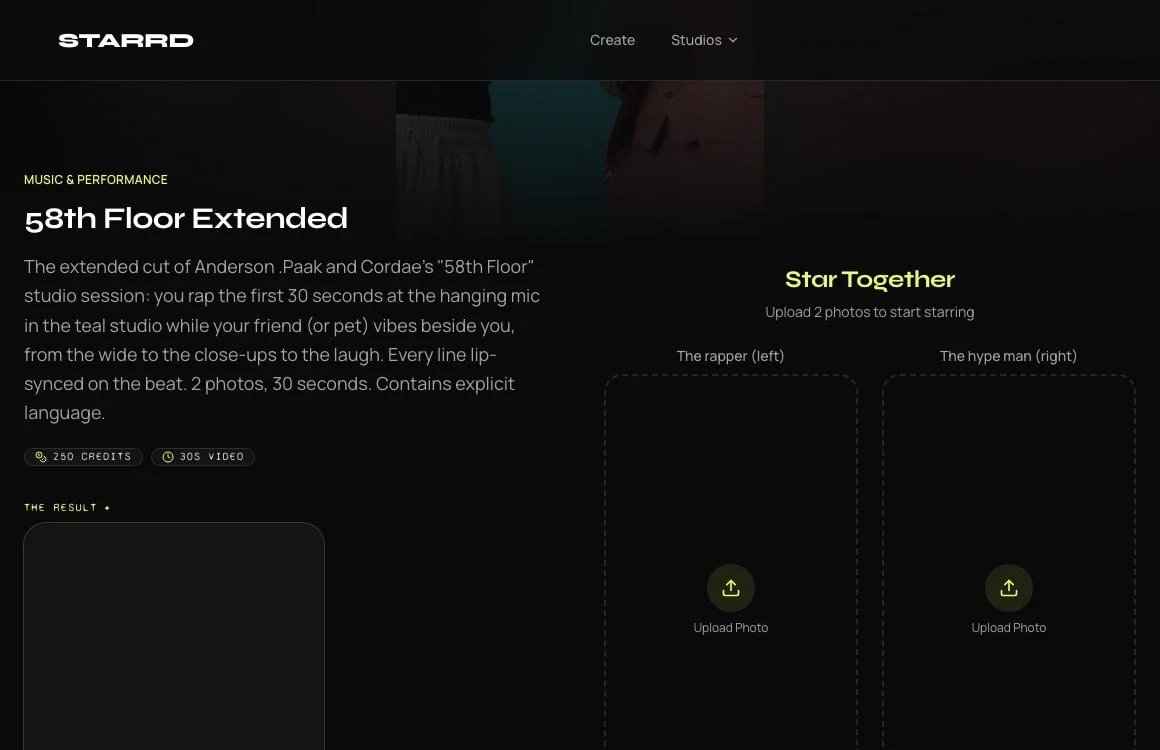
Check the runtime and credit requirement on the extended template before choosing a pack.
Before you pay for the first clip
- Match the cast. Use portraits you have permission to animate. Check the slots before assigning the lead and supporting roles.
- Check the posted version. Watch the sample for pacing and framing. If the clip is silent, find the sound in the account you plan to post from. A bundled song still needs suitable usage rights.
- Price one usable export. Compare the exact pack and output setting. Check whether your remaining credits can go toward a second clip before choosing a larger pack.
- Review before posting. Check faces, timing and crop in the destination app. Follow its AI-content labeling rules.
If your project starts from a script or a long recording, see ToolWorthy’s guide to making viral videos.
Get ToolWorthy Weekly
New AI tools, practical guides, and selected AI signals in one weekly brief.
Related Posts
- Best Bby Wow Guy AI Video Makers: Templates, Motion & Music
Make the bread-bite, camera stare and party exit from a portrait. Compare prepared templates, reference-video workflows and tools for adding the sound.
- 6 Best AI Crying Video Generators in 2026: Photos to Tears
Turn a selfie into a crying video. Compare six tools by scene controls, video packs, credits and editing workflow to find the format for your next post.
- Best Raindance AI Video Generators for Solo and Couple Clips
Choose a Raindance AI video workflow for your photos, with clear differences in solo and duet setup, scene control, output format, audio and payment.
For AI tool founders
Built a tool that belongs in this decision set?
Request an editorial evaluation for possible inclusion in ToolWorthy.
Submit your tool for reviewPaid submission does not guarantee a ranking, recommendation, inclusion, or editorial outcome.