



What Is Muse?
Muse is Meta's personal AI agent for delegating tasks that involve several steps, websites, or connected apps. It can browse the web, fill out forms, work with email and calendars, track longer-term goals, and return for approval when a task reaches a sensitive action. Meta says it can keep working after the app is closed. Unlike the Muse Spark model, Muse is the consumer-facing agent that uses the model to act on a person's behalf.
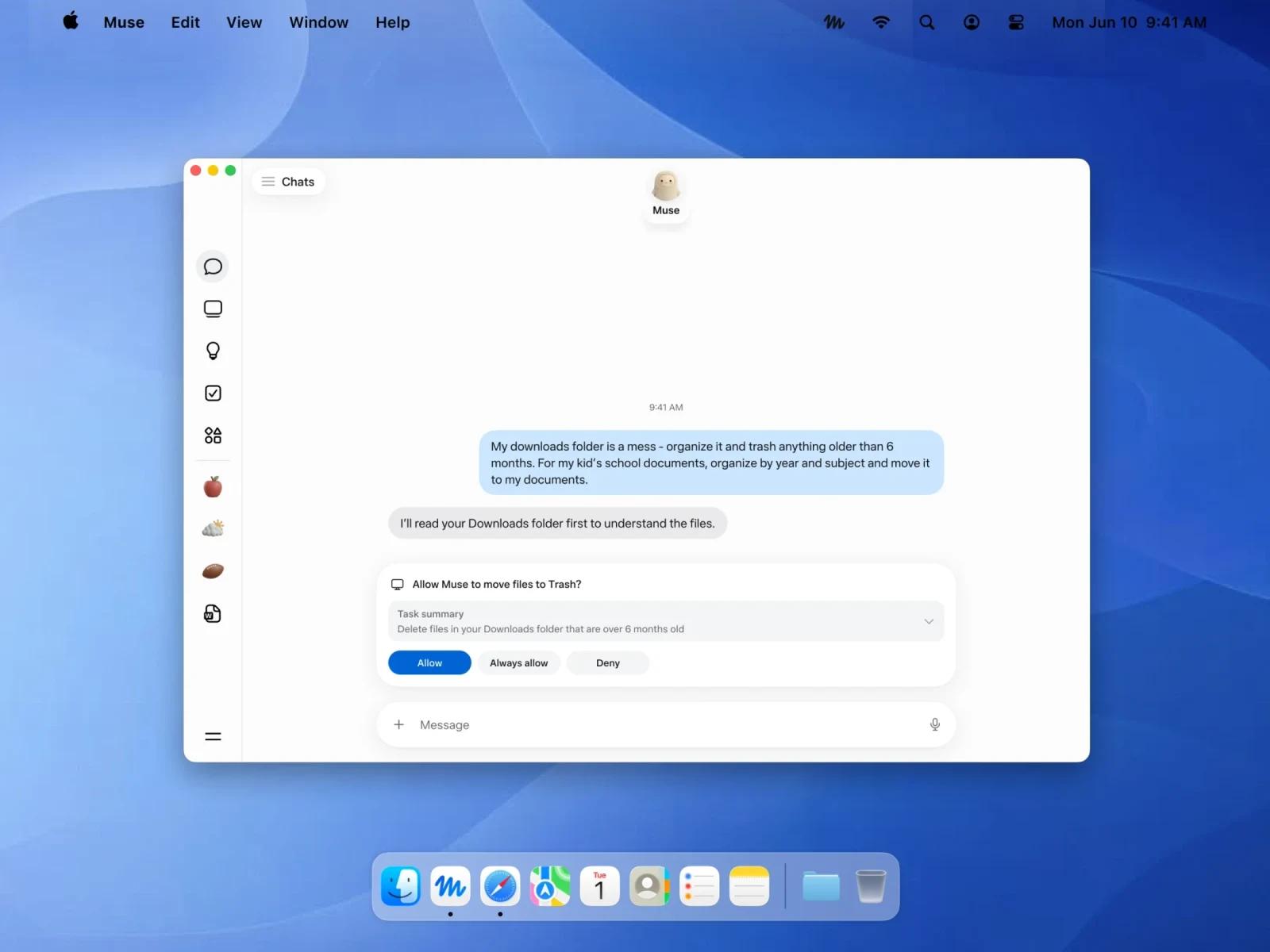
The useful distinction is its task flow: Muse can move from a conversation to a browser or connected service, then show what it did and ask before actions such as sending an email or making a purchase. That makes access settings and the quality of its approval trail central to the decision to try it. The official images above illustrate Meta's interface and are not independent test results.
Capabilities: Tasks, Connections, and Controls
- Persistent task work: Meta says Muse can continue multi-step tasks and goal plans in the background, then report progress or request input when needed.
- Dedicated browser: Muse runs in a dedicated cloud virtual machine with a browser for actions such as booking appointments, filling forms, and handling customer-service tasks.
- Connected apps: Users can choose whether to connect services such as email, calendar, and Instagram, and set the access granted to each connection.
- Approval and audit trail: Meta says Muse requests approval before sensitive actions such as sending an email or buying an item, and provides an activity trail of completed and planned actions.
- Cross-device access: Meta's product and download pages show mobile apps, a Mac app, and WhatsApp as ways to communicate with Muse. Feature and regional availability should be checked for the account used.
Pricing and Availability
Meta's Muse FAQ says the agent is free with a usage limit. A user who reaches that limit can wait for it to refresh or upgrade to a paid subscription. Meta has not published a clear Muse-specific starting price or a detailed free quota on the sources verified for this page, so no monthly amount is shown here. Prices for Meta One bundles should not be assumed to be Muse prices.
Meta's launch announcement describes a US rollout on iOS, Android, and muse.ai. Its current product page also advertises a Mac download. Availability of the agent, connections, and paid options may depend on location and account. Confirm access in the official app before relying on a particular workflow.
Privacy and Permission Boundaries
Muse's value depends on access to personal services, so its controls deserve close attention. Meta says connected credentials are stored separately from the agent, that users can change or disconnect app access, and that conversations and data in the Muse virtual machine are not shared with Meta's ad systems. Meta also says users can opt out of their interactions being used to train its AI models. These are Meta's published product claims, not findings from an independent security audit.
The purchase and file-management images above are official examples of permission prompts. They do not prove how reliably Muse handles every website or whether every action will require the same approval. Check the permissions and proposed action shown in the app before granting broad or persistent access.
Best For
Muse is worth considering if you have recurring personal tasks that span a browser and several apps, want an agent to continue work between conversations, and are comfortable reviewing its requested permissions and approvals. Its mobile and WhatsApp access may be especially useful for following a task away from a desktop.
Avoid If
- You need guaranteed access outside the current US rollout or a published Muse-specific quota and starting price before choosing a tool.
- You cannot give a cloud agent access to the accounts or data needed for the task, even with adjustable permissions.
- Your work requires proven reliability on a particular website or integration; Meta's examples and product images are not an independent success-rate test.
Sources & Verification
- Last verified: 2026-09-23
- Evaluation scope: Product identity, advertised capabilities, access, pricing model, and published permission controls.
- Method: Source-based research from the official product materials below. No hands-on testing was performed for this update. The images are official Meta product visuals.
- Official sources: Muse product page, Meta's Muse launch announcement, and Muse download page.