
4 Postman Alternatives 2026: Keep Your API Tests Working
Choose a Postman replacement by what must survive the move: scripts, environments, Git workflows and team access. An imported collection is only the beginning.
On this page
Moving a collection is easier than moving the behavior behind it. A replacement can import every URL and still break your login chain, environment values or automated test run.
Start with Bruno for files you manage in Git, Insomnia for a fuller client with selectable local, Git or cloud storage, Hoppscotch for a browser-led workflow, and HTTPie Desktop for manual HTTP or GraphQL work that does not depend on Postman scripts. These are workflow routes, not a universal ranking.
One important reason to pause before moving: Postman now offers Native Git, including on its Free plan. “I want Git” alone is no longer proof that you need another client. This guide uses official documentation checked November 5–6, 2026. It is desk research, not a hands-on compatibility benchmark.
Postman alternatives at a glance
| Tool | Choose it for | Reject it first if |
|---|---|---|
| Bruno | Local collection files reviewed alongside code in Git | You need a zero-rewrite guarantee for Postman-specific script packages |
| Insomnia | A desktop client with local, Git and cloud project choices | Your scripts rely heavily on unsupported Postman globals or deprecated APIs |
| Hoppscotch | Browser access and a cloud or self-hosted route | Experimental script compatibility is unacceptable for your test suite |
| HTTPie Desktop & Web | Manual HTTP/GraphQL requests with local desktop use | You need imported pre-request scripts or automated assertions |
Compare what survives the import
The useful comparison is not whether each product has an Import button. It is what you must rebuild after using it.
| Tool | Collection input | Script boundary | A migration task to budget for |
|---|---|---|---|
| Bruno | Postman v2/v2.1 JSON; bulk data-dump import is Ultimate | Translates common pm.* calls; Postman-only packages need rewriting | Check package/sandbox requirements and converted variable types or names |
| Insomnia | Postman v2.0/v2.1 collections and environments | Many scripts work, but compatibility has documented exceptions | Check global-variable access, variable scope and mocks separately |
| Hoppscotch | Postman v2.0/v2.1 JSON; 10 MB cloud / 50 MB self-hosted import limit | Experimental pre-request/test import with a compatibility layer | Rebuild unsupported advanced authorization and collection settings |
| HTTPie Desktop & Web | Collections, environments and supported requests | Scripts, tests and dynamic tags are not imported | Recreate any token/signing behavior elsewhere; inspect flattened folders |
Sources: Bruno migration guide, Insomnia import formats and script compatibility, Hoppscotch importer, and HTTPie import compatibility.
Postman v12 changes the export question. Native Git uses the v3 collection format in YAML. These alternatives' documented Postman import routes above use JSON formats, so do not assume they accept your Native Git folder. Check the current export instructions and produce a supported export for your pilot. Also distinguish the runtimes: Newman supports v2.1 collections, whereas Postman's guidance directs v3/Native Git users to the Postman CLI. See the Newman migration guide.
Compare running those tests in CI
Imported scripts are only useful if the intended runner executes them and your pipeline receives a meaningful failure. Choose the runner along with the client.
| Tool | Collection runner | Assertions and output | Check before moving CI |
|---|---|---|---|
| Bruno | bru run | Runs collection tests/assertions; JSON, JUnit and HTML reports | Match environment values and dependencies; CLI v3 defaults to Safe Mode |
| Insomnia | inso run collection | Executes collection requests/scripts; selectable reporters and JSON output | Use the converted Insomnia collection and selected environment; check failure behavior |
| Hoppscotch | hopp test — documented as alpha | Runs collection test scripts; failed assertions return nonzero; JUnit output available | Cloud-ID runs cannot use personal-workspace collections; distinguish a local exported file |
| HTTPie Desktop & Web | No imported Postman test suite to run | Its importer leaves scripts and assertions behind | Keep or rebuild automation separately; the terminal client is not an imported-test runner |
Sources: Bruno CLI, Inso collection runner, Insomnia import/execution reference, Hoppscotch CLI and HTTPie importer.
Before replacing the old CI job, use the new runner to demonstrate both an expected pass and an intentional assertion failure. Compare reports and injected secrets against the old workflow. CLI availability alone does not establish compatibility or production reliability; this guide has not tested these runners.
Compare local storage and the paid boundary
Local files, cloud collaboration and a self-hosted service solve different ownership problems. Include the people who need access in the cost comparison.
| Tool | Storage or sharing route | Free or paid boundary that matters |
|---|---|---|
| Postman baseline | Native Git alongside its platform workflows | Free includes Native Git; Solo is $9/month and Team $19/user/month, billed annually |
| Bruno | Local files you can manage with your own Git tools | Open-source edition is free; bulk Postman data-dump import needs Ultimate: $11/user/month billed annually |
| Insomnia | Choose local, Git Sync or Cloud Sync projects | Essentials is free with the three-user Git Sync boundary; Pro lists $12/user/month for larger Git teams (confirm billing cadence) |
| Hoppscotch | Browser client; cloud teams or a separate self-host deployment | Free personal workspace; cloud Business is $6/user/month billed annually |
| HTTPie Desktop & Web | Local desktop use, with optional account/sync | Desktop is currently public beta; do not assume the CLI's licensing establishes future Desktop pricing |
Price checks are the public USD offers on November 6, 2026, with annual billing only where stated. Taxes, region, billing cadence and enterprise terms can change the quote. Postman pricing, Bruno pricing, Insomnia pricing, Hoppscotch pricing, HTTPie Desktop.
For Insomnia Essentials, the storage documentation makes the scope important: enabling Git Sync limits the organization to three users; disabling it allows unlimited users. Do not budget it as three Git editors plus unlimited other members in that same Git-enabled organization. For Hoppscotch, the cloud price is not a self-hosting cost estimate: operating a deployment and matching its edition to your access requirements are separate decisions.
Before switching, preserve a representative workflow
Keep Postman available until one real collection works in the replacement. Use a staging account and a small collection containing your hardest dependencies, rather than starting with ten public GET requests.
- Export collections and their separate environments. Inventory globals, secret references, certificates, authorization inheritance and script packages. Inspect what the export actually contains; an exported file is not a backup of every account setting. Keep credentials out of shared repositories.
- Write down the behavior you need. Include token refresh, a dependent request, a failed assertion, environment switching and a data-driven run if you use one. Record the expected outcome, not just the request count.
- Import into the intended storage mode. A successful import into a cloud-synced project does not satisfy a local-only requirement. Check the project type before adding internal requests or secrets.
- Run the same flow and compare failures. Check resolved URLs, headers, variable scopes and assertions. A green HTTP response without the original tests is not equivalent coverage.
- Rebuild the surrounding workflow. Confirm your CI command, reports and secrets injection separately. Inventory mocks, monitors, documentation links and team permissions; do not assume a collection export recreates them.
Only then move a broader collection and onboard a second collaborator. Keep the original export and a rollback route until the new workflow has completed a normal development cycle.
The four primary alternatives
Bruno
Best for: developers who want collection files in a repository and review changes through their existing Git workflow.
Bruno is the strongest starting route here when local files are the requirement. Its value is the collection's relationship to your code, rather than an assumption that every Postman feature has a free equivalent.
The official migration guide distinguishes ordinary JSON collection imports from the Ultimate-only bulk data-dump importer. It also documents conversion of common Postman script APIs. That is useful assistance, not a promise that arbitrary packages or runtime behavior will carry over unchanged.
Main tradeoff: local control still leaves script and dependency repair. Check variable types and names too: Bruno's migration guide says non-string values become strings and nonconforming name characters are normalized. A boolean used by a script can therefore need attention even when the import completes.
For packages, match the app and CLI sandbox requirements. Developer Mode gives trusted scripts filesystem and system-command access; enable it only after reviewing the collection. An import warning is not a reason to grant that access automatically. Postman-specific packages can still require rewriting.
Skip if: you need those packages to work unchanged or your main requirement is an already configured hosted collaboration service.
First elimination test: import one collection with a token-refresh script and an external package. Check the resulting requests, assertions, converted variables and package warnings, then run the same sample with the intended CLI sandbox mode. If it works only after a rewrite you cannot maintain, reject the route before migrating everything.
Insomnia
Best for: teams wanting a desktop client with explicit local, Git and cloud project options, while keeping a meaningful portion of their existing scripting workflow.
Insomnia deserves a pilot when you want more than a manual request scratchpad. Its Postman migration walkthrough covers collections and environments, but its example uses Cloud Sync. Choose your actual storage requirement deliberately. The pricing page also offers a local Scratch Pad without login; that is a separate starting route from assuming every collaboration workflow is account-free.
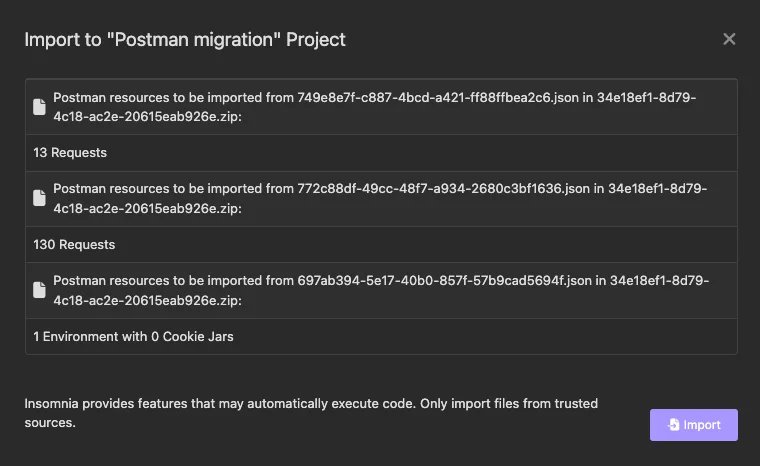
Official Kong documentation screenshot of Insomnia’s import scan. This is a vendor example, not a ToolWorthy hands-on migration test; your import results may differ.
insomnia.globals, scope mappings and deprecated Postman API exceptions. Imported global values and the script APIs that read them need separate checks. The migration guide also says Postman mocks need to be recreated.Skip if: a migration depends on unsupported globals/deprecated calls and no one will own the fixes, or your Git team exceeds the free tier and the paid quote removes your reason to switch.
First elimination test: import a collection that reads globals, changes a collection variable and refreshes a token. Verify values in the next request, not just the import summary. Then have the intended number of collaborators access the chosen project mode.
Hoppscotch
Best for: a browser-led API workflow where the request path and cloud-versus-self-host choice are part of the decision.
Hoppscotch is worth evaluating when opening a client in the browser is valuable, or your team wants to assess a self-hosted service. Those are separate deployment routes, not evidence that every edition includes the same controls.
Its importer documentation is unusually useful for rejecting a poor fit: pre-request and test-script import is experimental, and advanced authorization and collection settings are not imported. Start with those limitations if your collections do more than send straightforward requests.
Before importing: check the exported collection's file size. The official importer caps Hoppscotch Cloud imports at 10 MB, versus 50 MB for self-hosted editions. Do this before investing in script repair or treating self-hosting as a workaround; deployment has its own operating cost.
Main tradeoff: browser networking introduces another choice. For localhost or internal APIs, review the interceptor options and choose an approved route such as the local Agent where appropriate. An import does not demonstrate connectivity or prove where a request travels.
Skip if: the collection exceeds your chosen deployment’s import limit, your required scripts depend on unverified compatibility, or the client cannot reach your internal API through an acceptable route. For CI, weigh the documented alpha status and cloud-ID restrictions separately from the web client.
First elimination test: import a staging workflow that uses your actual authorization and a chained request. Test it through the intended network path, including a deliberately failing assertion. If a required auth flow or test cannot be preserved, stop the migration.
HTTPie Desktop & Web
Best for: developers who mainly inspect HTTP or GraphQL requests and want to evaluate a narrower desktop client, rather than move an automated Postman suite.
The distinction between HTTPie Desktop/Web and the terminal product matters. This recommendation is for the GUI documented at HTTPie Desktop, currently in public beta. It supports local desktop work and optional sync, but the terminal product is not proof of GUI feature parity or long-term pricing.
Main tradeoff: the import compatibility guide explicitly excludes scripts, tests and dynamic tags. It also excludes imported gRPC/WebSocket requests and file request bodies, and flattens nested folder organization. Those limitations make this a deliberate simplification route.
Skip if: signing, token creation or assertions live in Postman scripts, unless you are intentionally moving that behavior to another maintained system.
First elimination test: import a small collection that includes an environment, nested folders and your real request body type. If it loses behavior you use daily, keep it as a manual companion instead of calling it your Postman replacement.
When to stay with Postman
Stay if the pain is solved by a configuration or plan change and the existing tests already serve your team. Native Git makes the old “Postman cannot work with Git” argument obsolete. Evaluate your current version before paying the migration cost.
A switch is also harder to justify when your value comes from shared docs, mocks, monitors and team access working together. Compare the replacement cost of that whole workflow. A free request client does not make rebuilding it free.
For occasional requests without signing in, Postman's local-use guidance describes the Lightweight API Client, with substantial workspace-feature limits. Treat that as a narrow option, not an offline equivalent of the complete signed-in platform. Native Git is also not proof that every Postman service runs offline.
When to look beyond these four
Apidog is an adjacent route if the problem is coordinating API design, documentation, mocks and scenario testing rather than replacing just the request client. Its API testing page describes that integrated workflow. We could not reliably verify the current pricing table, so there is no savings claim or price recommendation here. Check a current quote and a real script import before choosing it over the four routes above.
Thunder Client is worth a separate pilot when staying inside VS Code or a JetBrains IDE is the actual requirement. Its official product page describes local collection storage and Git collaboration. It is an editor-centered route rather than one of the standalone client recommendations here; do not assume the same script migration behavior.
A different API provider will not fix a client migration problem. If the actual bottleneck is collecting third-party web data, our web scraping API comparison addresses that separate buying decision.
Frequently asked questions
Which free Postman alternative should I try first?
For local files managed in Git, start with Bruno's open-source edition. For a desktop client with several storage modes, try Insomnia Essentials, remembering its three-user Git Sync boundary. Choose based on the collection behavior and collaboration you need, rather than the free label alone.
Which Postman alternative works locally or offline?
Bruno is the local-file route in this shortlist. Insomnia offers local projects and a no-login Scratch Pad; HTTPie Desktop supports local use too. Offline access to saved requests does not make a remote API reachable without its network connection. Check login, sync and CI requirements separately.
Can I move Postman collections and keep all my tests?
A supported collection export is a starting point. Bruno translates common script calls, Insomnia documents compatibility exceptions, and Hoppscotch labels script import experimental. HTTPie does not import scripts or tests. Run a representative login-and-assertion flow before assuming equivalent behavior.
Will Newman still run my Postman v12 collections?
Newman supports the v2.1 JSON collection format, not the v3 format used by Native Git. Check the collection format and export options. Postman's current migration documentation directs v3 workflows to the Postman CLI; the application version alone does not tell you whether a particular exported collection works with Newman.
What is the simplest alternative if I only send manual requests?
HTTPie Desktop is worth trying for supported HTTP and GraphQL requests without imported scripts. That is a narrower recommendation than “easiest Postman replacement”: its importer leaves out tests and other behavior, and this guide has not benchmarked usability.
Get ToolWorthy Weekly
New AI tools, practical guides, and selected AI signals in one weekly brief.
Related Posts
- 7 AI Incident Response Tools 2026 — Page, Coordinate or Investigate
Compare AI incident response tools by paging, coordination and investigation. Check telemetry needs, paid AI boundaries and a practical pilot before buying.
- Best Text-to-Speech APIs in 2026: Choose by Workload, Not Demo Voice
Compare 10 text-to-speech APIs by realtime protocol, voice control, pricing meter, language coverage, cloud fit, and private-deployment needs.
- 10 Best Web Scraping APIs in 2026: Choose the Right Contract
Choose among 10 web scraping APIs by the contract you actually need: raw page requests, structured extraction, crawling, managed datasets, or a platform runtime.
For AI tool founders
Built a tool that belongs in this decision set?
Request an editorial evaluation for possible inclusion in ToolWorthy.
Submit your tool for reviewPaid submission does not guarantee a ranking, recommendation, inclusion, or editorial outcome.