
9 AI Zombie Video Generators for the Zombie Love Story
Make a zombie love story from photos or build your own scenes. Compare nine generators by inputs, real generation costs, creative control, and export limits.
On this page
A zombie love story needs more than an undead face: the character must be recognized, the threat must soften, and the ending must feel connected to the same person. Some generators package that story around your photos. Others give you the controls to direct it yourself.
Start with AI Zombie if you want a ready-made, silent vertical story from a loved one's photo. Choose Seadanse for a preset with native sound and selectable orientation, or imageat to recast its particular reference clip. For an original storyline, the remaining tools trade a simpler setup for more work on character references, shots, and editing.
This comparison uses official product, pricing, and support pages checked on October 4, 2026. We inspected public interfaces; we did not buy credits or run a comparative video-quality test. The selections reflect documented workflows, rather than a measured ranking of realism or likeness. AI Zombie's featured placement is disclosed at the end.
Compare the workflows before paying
The lowest subscription price is often not the cost of a finished story. Count the clips you need, resolution charges, retries, and any editing or music you still have to add.
| Tool | Starting inputs | Story control | Cost or access checkpoint | What you still finish |
|---|---|---|---|---|
| AI Zombie | Loved-one photo; optional self photo | Preset story, roles, and three settings | $7.99 for one video; one-time packs | Add music; advertised 12-second, 9:16 MP4 |
| Seadanse | Two adult photos; separate pet variant | Built-in reunion and memory location | Quote varies by model and duration; 40 starter credits are insufficient | Native sound; 9:16 or 16:9, 480p or 720p |
| imageat | Man and woman photos | Recasts a specific reference clip | 163 credits at 480p; Starter includes only 100 | Check source rights; roughly 24 seconds, portrait ~2:3 |
| Dreamina | Prompts, storyboard, and multimodal references | Original story; Seedance 2.5 native audio | Daily free-credit access; paid offers vary by market | Direct the emotional turn; assemble only if needed |
| Kling AI | Text, photos, and references | Multi-shot generation and character elements | Standard 660 credits/month; check model charges | Direct the story and check continuity |
| Pika | Prompts and reusable references | Multi-model video studio | Starter $10/month; commercial license starts at Creator $35/month | Choose model, shots, and rights tier |
| Runway | Images and other reference media | Model-dependent generation and editing | Standard $15/month or $12/month billed annually | Build references, direct shots, and assemble |
| Google Flow | Prompts, frames, and supported ingredients | Frames plus Scenebuilder sequencing | Daily AI credits documented; output count affects cost | Select supported models and build the sequence |
| Higgsfield | Existing reference video plus photos | Recast performance, camera movement, and setting | Check the credit quote before rendering | Supply a usable clip and verify its rights |
For broader model shopping, see our AI video generator directory. The distinction here is whether you want the existing zombie story or a story you direct yourself.
Dedicated zombie story generators

Visit AI Zombie a photo-based zombie love story through its preset creation form. Upload a loved-one photo, optionally add yourself, and choose a partner, pet, family member, or best-friend role. The available worlds are a snowed-in cabin, a rain-soaked city, and an overgrown supermarket. These options make it a sensible fit when you want the recognition-and-reunion premise without writing each shot.
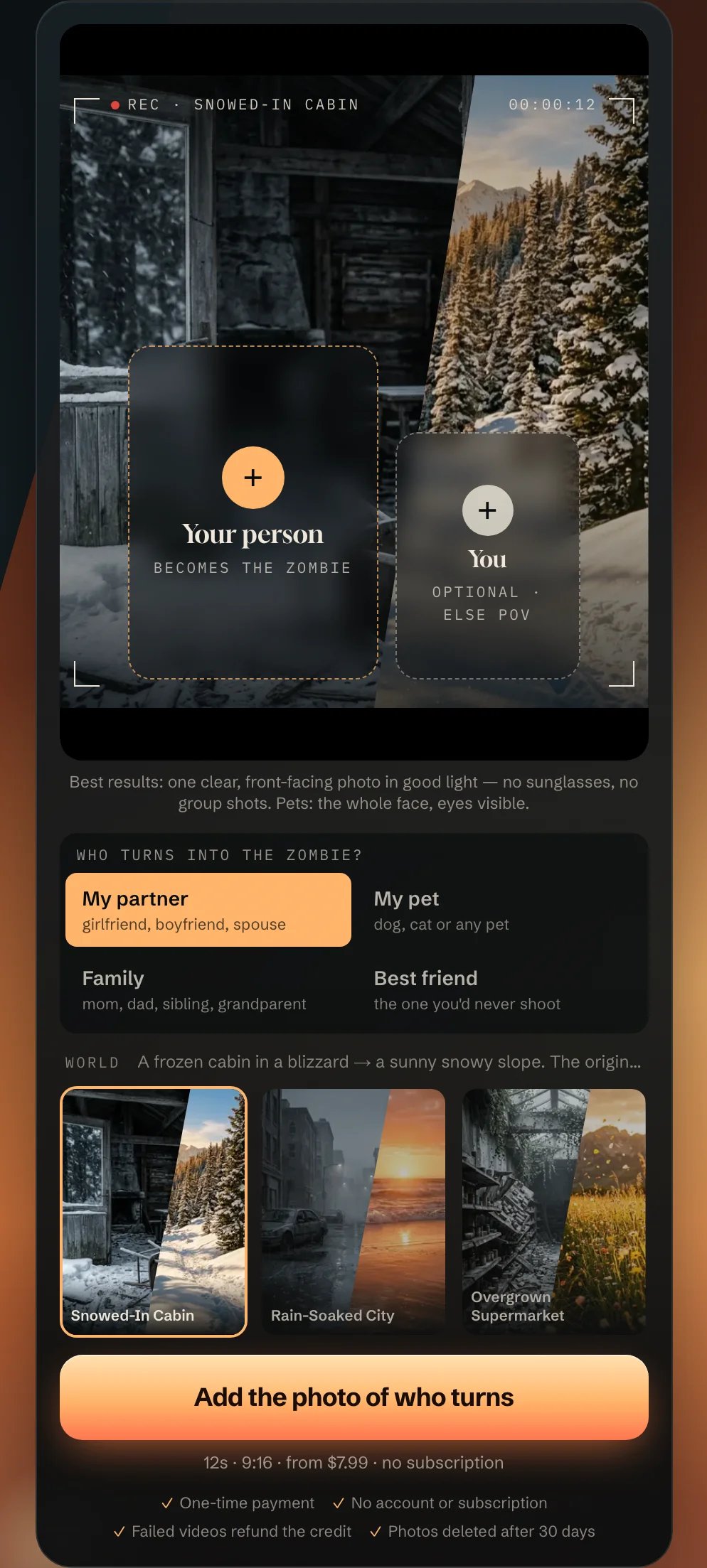
The site advertises a 12-second 9:16 MP4, no watermark, and an estimated five-to-ten-minute generation time. The output is silent: add your own soundtrack in your social app or editor. Its illustrated story timeline extends beyond the advertised duration, so treat those timestamps as illustrations rather than a verified shot schedule. Confirm the downloaded length if timing matters.
Price: $7.99 for one video, $17.99 for three, or $49.99 for ten. These are one-time credit packs, not subscriptions. The free prompt builder is a separate feature; it does not make video generation free. Pack credits do not expire and are tied to a private link, so keep that link.
Choose it when: you want one quick personal or social story, including a pet or family role, with little setup. Skip it when: you need an original shot sequence, synchronized dialogue, or clearly documented rights for an advertising campaign. The terms permit personal and social-media use, which is narrower than an explicit broad commercial license.
Before uploading, get the subject's permission. The privacy policy says photos and generated videos are deleted after 30 days, are sent to its AI provider for generation, and are not used to train models. Those are published policy commitments, not an independent privacy audit. A failed generation returns the credit; the terms also describe a seven-day likeness complaint window with one remake or a refund option. Download the result before the retention window ends.
Seadanse
Seadanse Zombie Match Cut adds a dedicated preset with sound, 9:16 or 16:9 output, and 480p or 720p choices. Supply two photos with one adult aged 18 or older in each, choose the memory location, and optionally add a note. A separate pet variant is linked from the page.
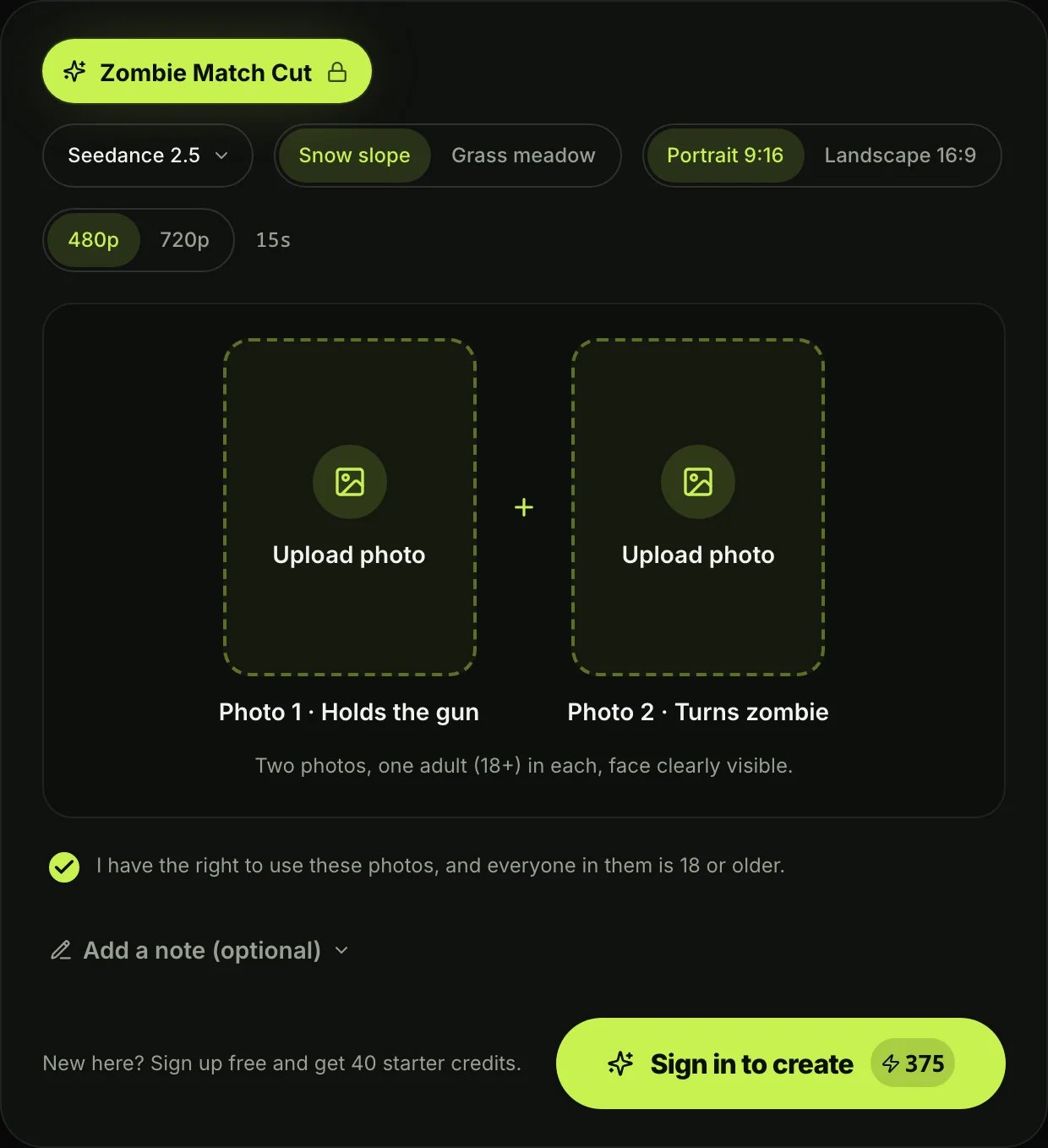
Cost checkpoint: the checked creation form quoted 375 credits for a 15-second Seedance 2.5 story at 480p, consistent with its FAQ; 720p is listed at 825 credits. Verify the selected model, duration, and final quote before rendering. The 40 starter credits cannot cover a full story. Its pricing page lists a $9.90 one-time 495-credit pack and Basic at $29.90/month for 2,000 credits; plan estimates of generic videos do not equal full zombie stories.
Choose it when: a preset with sound and orientation options matters. Skip it when: you need a freely directed plot or the displayed configuration does not match your intended full story. We have not verified its advertised face consistency by generation.
imageat
imageat's zombie love story template targets a more specific outcome: replace the man and woman in an existing reference story with two uploaded faces. It first creates an infected portrait and then uses Higgsfield Genjutsu motion transfer to reproduce the reference's movement and editing.
The template describes a roughly 24-second portrait video at about 2:3, rather than AI Zombie's advertised 9:16 output. Its displayed preview is explicitly the original source clip, not proof of a generated customer result. Choose this route for the reference performance, not because the preview establishes your eventual likeness quality.
Price: 163 credits at 480p or 345 credits at 720p, including the infected portrait step. On the checked pricing page, Starter is $9.99/month for 100 credits, Pro is $29.99/month for 340, and Premium is $49.99/month for 530. Starter alone cannot cover even one 480p template run; Pro's 340 credits are just short of the 345-credit 720p run. Top-ups require an active subscription. Budget against the template's credit quote, not the plan's generic estimate of short videos.
Choose it when: you have two consenting subjects and specifically want this existing clip's structure. Skip it when: you want a pet-led story, a different performance, or a straightforward 9:16 export without reframing. The service lists commercial rights in its plans, but that does not establish your rights to reference footage or its music; check those separately.
Tools for directing an original zombie story
Dreamina
Dreamina's AI video generator supports original stories from text, images, and other references. Its current Seedance 2.5 documentation describes storyboard inputs, native music, effects and dialogue, and up to 30 seconds in one generation. Separate long-video controls have different limits; check the selected route.
For a zombie reunion, establish the living and undead character references and describe encounter, recognition, and embrace as clear story beats. You can attempt a complete scene with native audio, or split the story into clips when you want separate control. Assembly and added sound are workflow choices, rather than universal requirements. We have not tested identity consistency across this story.
Cost checkpoint: Dreamina documents daily free credits; localized prices and introductory offers differ. Check your account's model quote, renewal price, and export benefits. Free credits do not guarantee a finished story or unlimited retries.
Choose it when: you want to direct a story with multimodal references and optional native sound. Skip it when: you want a specific preset without planning the action. Our Dreamina listing provides a broader overview; use official checkout for current prices.
Kling AI
Kling AI is a useful DIY option when multi-shot direction matters more than a fixed template. The official Kling 3.0 announcement describes reference-led creation, multi-shot storytelling, native audio, and videos up to 15 seconds. These capabilities are model-specific; they are not a promise that every mode or plan has identical limits.
Use character references or elements to establish the person, and describe the camera and emotional change for each shot. Native audio can help an original scene, but it does not provide permission to use a trending song.
Cost checkpoint: the public monthly membership screen showed Standard with 660 credits, a $6.99 first-month offer, and then $8.80/month under the displayed discount. Offers and credit consumption can change. Confirm the renewal amount and selected model's cost before buying. Do not treat the first-month number as the permanent monthly rate.
Choose it when: you want to direct a short original sequence with reference assets. Skip it when: you want the story assembled automatically around a photo. Multi-shot controls reduce some manual assembly work, but do not eliminate retries or continuity checks.

Pika Create now presents a multi-model video studio with reusable references and model-dependent audio and multi-shot options. For this task, that makes it a flexible place to stage a character across clips rather than simply apply a zombie effect to one image.
Price and rights: the current Pika pricing page lists Starter at $10/month with 900 credits and Creator at $35/month with 3,150 credits. Annual equivalents are $8 and $28/month respectively. Starter does not include a commercial license; Creator does. The Free tier lists zero monthly credits, with credit packs available, so “Free” is not a recurring generation allowance. These details apply to Pika Create, not automatically to the API, iOS app, or old.pika.art.
Choose it when: you want to compare supported generation models while keeping reusable character references in one studio. Skip it when: your only requirement is a preset reunion from two photos. If this is a monetized or client project, select a license tier before using the result commercially; watermark-free output alone does not settle that question.
Runway
Runway offers generation and editing workflows across multiple models. Its reference-media guidance explains how images, video, and audio can guide supported models. Reference support varies, so avoid assuming one universal reference limit across the platform.
This is a good fit for creators who want to approve the living and undead character designs first, animate chosen images, and assemble the story deliberately. Runway's image-to-video prompting guide separates the image's visual composition from the prompt's movement instructions—a useful distinction for a recognition scene.
Price: Standard is $15/month on monthly billing, or $12/month billed annually, with 625 monthly credits. The free allocation is 125 credits one time. The pricing page lists 60 credits for a five-second Gen-4.5 generation; four such clips use 240 credits before retries or reference-image generation. Different models and settings have different costs.
Choose it when: you care about shot planning and editing flexibility. Skip it when: you want a low-effort one-off preset. A larger creative toolkit is useful only if you plan to use those controls.
Google Flow
Google Flow supports frame-led creation and model-dependent reference inputs. Scenebuilder lets you sequence, trim, and preview scenes. Together these support a story built from a tense encounter and a separate warmer ending.
Cost checkpoint: Google's current AI-credit guidance documents daily credits and additional subscription allocations. Access and available models depend on account and region. Charges are per generated output, not simply per request: asking for two alternatives can cost twice as much as one. At the listed 20-credit Veo 3.1 Fast rate, four generated clips consume 80 credits before retries, more than the documented 50-credit daily allocation.
Choose it when: you want frame-guided shots with a scene-building workflow. Skip it when: you expect a dedicated zombie-love template or want to avoid selecting models, aspect ratios, and output counts. Check the supported-feature table for your chosen model before relying on a reference or frame control.
Higgsfield
Higgsfield Genjutsu takes a different input: an existing performance. It transfers a reference video's camera movement and timing while letting you rebuild the cast or setting from reference assets. The public page supports source clips up to 30 seconds.
This can be useful if you have already shot the recognition-and-embrace performance and want a zombie version. It is also the underlying motion-transfer approach used by imageat's template, so choosing it directly means taking responsibility for the source clip and setup.
Cost checkpoint: review the generation credit quote at your selected resolution and length. API per-second pricing and website subscription credits are different purchase routes; do not compare them as if they were interchangeable.
Choose it when: you want to preserve a performance you have permission to use while changing its appearance. Skip it when: you have only a headshot or need to invent a new action sequence. Recasting a clip does not inherently rewrite its action, pacing, or emotional performance.
A practical way to choose
For one personal post, start with the preset route: AI Zombie for its roles and vertical output, Seadanse for native sound and orientation choices, or imageat for its particular reference performance. Check silent-versus-audio expectations and the actual aspect ratio before paying.
For an original story, write three beats first: encounter, recognition, reunion. Pick a generator whose reference and frame controls match your assets, then budget for more than one attempt. If you already have suitable footage, Higgsfield offers a distinct recasting route; if you have only photos, start with image-led generation instead.
Finish in an AI video editor or your social app. Review faces, hands, contact between characters, and the final duration. Add music you have permission to use. A successful export, a paid plan, and permission to use someone's likeness are separate requirements.
Disclosure
AI Zombie appears first at the publisher's direction as part of its ToolWorthy listing and featured-placement arrangement. That placement and a ToolWorthy Verified Listing badge do not establish superior generation quality or an independent quality award. Other tools were selected for their documented workflows. Prices, features, policies, and generation results can change; verify the current quote and terms before purchasing.
Get ToolWorthy Weekly
New AI tools, practical guides, and selected AI signals in one weekly brief.
Related Posts
- 5 Gas Station Dance AI Video Generators Compared in 2026
Choose a gas station dance video maker by photo count, output format, preview, credits, and whether it creates the whole three-shot trend or swaps one face.
- 8 Best Hotel Lobby AI Generators for the Orange-Booth Trend
Put your duo in the orange booth: compare eight Hotel Lobby AI tools by photo inputs, preview limits, video costs, audio, and how much control you need.
- 10 Best Runway Alternatives 2026 - After Unlimited Ends
Runway's Unlimited-to-Max switch changed the economics for heavy AI video users. Compare Kling, Google Flow, Pika, Luma, Vidu, and more alternatives.
For AI tool founders
Built a tool that belongs in this decision set?
Request an editorial evaluation for possible inclusion in ToolWorthy.
Submit your tool for reviewPaid submission does not guarantee a ranking, recommendation, inclusion, or editorial outcome.