
Best Bulin 47 AI Video Makers: Photo, Motion and Editing
Make a Bulin 47 red-door freestyle from one photo, or build a creative version with your own motion video. Compare inputs, sound, format and pricing.
On this page
The Bulin 47 AI video maker search starts with a recognizable scene: a red door, freestyle hand gestures and the Dame Hombro shoulder bounce. The useful choice is how much of that scene you want prepared for you, and how much you want to direct yourself.
Bulin 47 AI Video Maker at bulin47video.net comes first here for its one-photo, prepared nineteen-second freestyle. Kling and Viggle animate a character using motion references; Wan replaces a performer in supplied footage; Higgsfield changes selected elements or rebuilds a scene; Runway transfers your recorded performance. CapCut handles the sound and final edit. These are different creative routes, with different inputs and purchase units.
Compare the Routes Before You Generate
Start with what you already have: a photo, a performance clip, or a completed video awaiting sound. Prices are USD, checked October 11, 2026. Each service has its own credit system.
| Tool | Choose it for | What you supply | Delivery or motion scope | Purchase or render unit |
|---|---|---|---|---|
| Bulin 47 AI Video Maker · bulin47video.net | The prepared red-door freestyle | One consenting adult's photo | 19s; silent, watermark-free 9:16 MP4; documented 1080×1920 download | $9.99/1, $19.99/3, $59.99/10 videos |
| Kling Motion Control | One character following your gestures | Character image + action video | VIDEO 3.0 Motion Control; video-orientation references up to 30s | Standard 9 / Professional 12 credits per second |
| Viggle | Character animation and group casting | Character images + motion template or video | Single-character motion; Multi-Track for up to 7 characters/objects | 5 free videos/day; Pro $9.99/month, 80 credits |
| Wan 2.2 Animate Replace | Recasting a performer in your footage | Source video + replacement-character image | 480p/720p settings; optional source-audio merge | Replicate lists $0.02–$0.05 per output second; check the setting-specific quote |
| Higgsfield Genjutsu | A wardrobe, character or scene change | 4–30s clip + reference images | Object Swap or Motion Transfer; up to 1080p | Web-app credit quote before generation |
| Runway Act-Two | Your own expressive freestyle performance | Driving performance + character image/video | Up to 30s; 9:16 at 720×1280; performance audio | 5 credits/second; Standard $15/month, 625 credits |
| CapCut | Sound timing and the finished social post | Generated video + permitted audio | Timeline editing, captions and export | Free core editing; optional paid features |
The first entry supplies the prepared Bulin 47 scene. The other generators use references you provide to make a creative version. For the straightforward photo workflow, start with the first entry; for an original performer, wardrobe or setting, choose the matching reference-driven route below.
Make the Prepared Red-Door Freestyle

Bulin 47 AI Video Maker supplies the red-door scene and its nineteen-second gesture sequence. Upload a clear, camera-facing chest-up or half-body photo of yourself or another consenting adult. The pictured person takes the lead's place through the pointing, hand-to-head and shoulder movements.
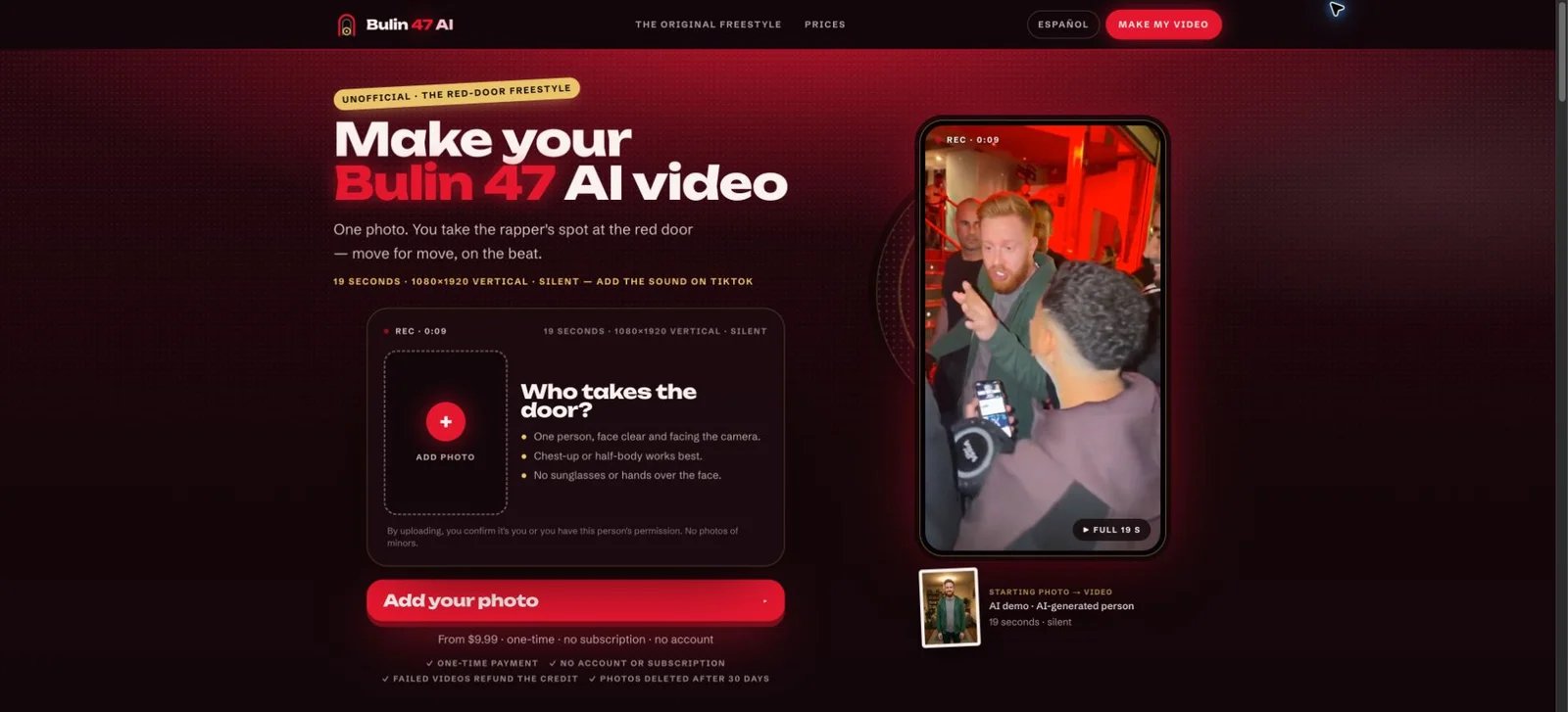
The public creator and provider's demonstration, captured October 11, 2026.
The documented download is a silent, watermark-free 1080×1920 vertical MP4. Add the original sound available for your intended use in TikTok, Reels or CapCut. The website's 0:09 cue refers to the source audio: align that point with the first frame of the generated clip.
One-time packs cost $9.99 for one video, $19.99 for three, or $59.99 for ten. One credit creates one video; unused credits never expire and stay with a private pack link. The browser workflow works without an account or subscription. The provider estimates about eight minutes and emails a result link.
Choose it when you want the prepared sequence with one photo. Its terms describe personal, non-commercial and social-media parody use, with an AI-generated label. It is independently operated. The privacy policy describes generation-only photo processing and automatic deletion of uploaded photos and generated media after thirty days.
Direct the Motion with Your Own Reference
Kling Motion Control
Kling VIDEO 3.0 Motion Control combines a character image with an action video. It is a useful route when you want to record your own freestyle gestures, then have an image-based character perform them. Match the body framing between your photo and reference, and keep the lead clearly visible in a continuous shot.
For a nineteen-second reference, use Character Orientation Matches Video. The Motion Control 3.0 input specification supports references up to thirty seconds in video orientation; image orientation supports up to ten. Optional facial-element binding adds facial references in the video-orientation workflow.
The specific VIDEO 3.0 Motion Control rates are 9 credits/second in Standard and 12 credits/second in Professional, rounded to whole seconds. A nineteen-second billed result therefore uses 171 or 228 Kling credits. Your plan determines the cash cost of those credits. Choose this route for a character performing your supplied actions, with scene direction supplied by your own image and prompt.
Viggle
Viggle's animation tools accept a character image and a library motion or uploaded reference video. That makes Viggle a practical option for a selfie, avatar or stylized character following a freestyle you select or record.
Multi-Track adds a distinct group workflow: assign characters or objects across up to seven tracks. Choose single-character animation for a lead performer, or Multi-Track when you want to design a cast around your reference footage.
The pricing page lists five free videos per day. Pro costs $9.99 monthly, or $7.99/month billed annually, and includes 80 monthly credits, watermark-free output and unlimited Multi-Track sessions. The credit deduction depends on the tool, model and output. Select the motion and mode first, then check the generation quote for that specific clip.
Wan 2.2 Animate Replace
Wan 2.2 Animate Replace on Replicate uses a source video and replacement-character image. Its documented job is to replace a performer while carrying over the source movement, expressions and scene context. This suits a creator who already has permitted performance footage and wants control over the replacement person.
The hosted interface offers 480p and 720p processing and a merge_audio option for retaining source sound. Set the audio option to match your intended finishing workflow: retain your recorded sound, or add the selected passage separately in an editor.
Replicate's public model page lists $0.02–$0.05 per output-video second, with the applicable rate determined by the selected settings. Confirm the quote for your run. This is a metered model workflow: duration, processing settings and additional generations determine the total. Choose it for direct access to the model's character-replacement controls through the hosted playground or API.
Change the Scene or Perform It Yourself
Higgsfield Genjutsu
Higgsfield Genjutsu provides two ways to work from existing video. Object Swap targets a selected person, outfit, object or setting; Motion Transfer uses the performance as a guide for a rebuilt character or scene. Choose the mode according to how much of your shot you want to change.
The official guide documents one 4–30-second input clip, up to thirty reference images and output up to 1080p. A nineteen-second source falls within that documented input range. Your references can direct the performer's look, wardrobe or a new setting around the freestyle.
The consumer workflow shows a credit quote before generation. Use that quote for your selected duration and resolution. Choose Genjutsu when the creative decision includes the scene itself as well as the performer.
Runway Act-Two
Runway Act-Two transfers a recorded driving performance to a character image or video. It is a useful route for performing your own freestyle, with the expression and timing coming from your recording.
For hand and body gesture control, choose a character image. A character-video input uses the driving performance for facial animation while retaining motion from the character video. Act-Two supports up to thirty seconds, with 9:16 output at 720×1280 and 24fps, and performance audio.
Act-Two is available on Standard or higher and costs 5 credits per second, with a three-second minimum. A nineteen-second generation uses 95 Runway credits. Standard costs $15/month, or $12/month billed annually, with 625 monthly credits. Choose it when your own acting, expression and gestures are the creative starting point.
Add Sound and Prepare the Post

CapCut's audio editor is the finishing step for your generated MP4. Import the clip, add an audio track available and permitted for your post, trim the passage and align the timeline. You can also add captions and frame the video for your destination.
For the prepared Bulin 47 clip, use the site's source-audio cue: the sound at 0:09 should begin at video time 0:00. Preview the hand gesture and shoulder-bounce passage with sound before exporting. This is a sound-editing step; precise lip-sync generation is a separate creative task.
Core manual editing is available free, with optional premium assets and features. CapCut Pro pricing varies by region, device and offer. Choose CapCut after generation when you want to finish the sound, captions and timing in one timeline.
A Practical Route for Your First Video
For a personal red-door remix, start with one clear photo in Bulin 47 AI Video Maker, save the private pack link and download the vertical MP4. Add the available sound from its 0:09 cue, preview the complete nineteen-second sequence and post with an AI label.
For your own interpretation, begin with a permitted performance reference. Kling or Viggle can drive an image-based character; Wan offers a source-footage replacement workflow; Genjutsu adds scene changes; Act-Two starts with your own acting. Finish with the sound and framing you want. Explore the AI video generator category for broader creative workflows.
How This Collection Was Researched
This collection uses official product, feature and pricing documentation checked October 11, 2026. The selection covers distinct creation and finishing workflows. Format and turnaround figures are provider documentation; screenshots show public interfaces and provider demonstrations. The documented 1080×1920 figure for the first tool is its download size. No paid generation or hands-on export testing was performed for this article.
Get ToolWorthy Weekly
New AI tools, practical guides, and selected AI signals in one weekly brief.
Related Posts
- 8 Best Tools to Make Rumpelstiltskin AI Videos in 2026
Put yourself in the Rumpelstiltskin tiptoe meme, transfer a dance to your own character, or finish a green-screen remix with these eight video tools.
- Best Burning Bridges AI Video Generators: Choose Your Route
Turn a photo into a Burning Bridges party clip. Compare party presets, character motion, scene changes and final editing by inputs, output and cost.
- 10 AI Zombie Video Generators for the Zombie Love Story
Make a zombie love story from photos or direct your own scenes. Compare ten generators by inputs, pricing, creative controls, audio, and video formats.
For AI tool founders
Built a tool that belongs in this decision set?
Request an editorial evaluation for possible inclusion in ToolWorthy.
Submit your tool for reviewPaid submission does not guarantee a ranking, recommendation, inclusion, or editorial outcome.