
6 Best AI Hairstyle Try-On Tools 2026 — Before the Salon
Compare six AI hairstyle try-on tools by reference photos, phone workflows, free limits and photo privacy. Find a look worth discussing with your stylist.

On this page
A convincing hair makeover is not necessarily a useful haircut preview. If the app changes your face, invents extra hair density or makes every option look salon-styled, it may help you imagine a look without helping you decide what to ask for.
Start with MyEdit for a browser-based reference haircut, AI Ease or LightX for preset and prompt exploration, and YouCam Makeup or FaceApp for a phone-based beauty or portrait workflow. If keeping your natural color while trying a reference cut is the priority, check YouCam Makeup's iOS Custom Hair Try On first. HairstyleAI takes a different approach: a paid batch of ideas, not an editor you keep adjusting.
These are workflow recommendations from current official documentation, checked October 7, 2026—not hands-on winners or predictions of how a real haircut will turn out. No tool here earns an accuracy, speed or ease-of-use score.
AI hairstyle try-on tools at a glance
Choose the input and buying boundary first. The table is a shortlist router, not a best-to-worst ranking. On a phone, swipe the table to read the last column.
| Tool | Best starting job | Input/control | Free or payment boundary | First reason to rule it out |
|---|---|---|---|---|
| MyEdit | Recreate a reference cut | Preset, prompt or reference photo | Daily credits; more use needs credits/paid access | You need prompt and reference together |
| AI Ease | Explore preset cuts online | Default presets and custom mode | Marketed free entry; check the chosen mode | You require proven unlimited premium generation |
| LightX | Describe an unusual cut | Presets and text prompts | Limited free access; paid plans/credits | Free export does not meet your needs |
| YouCam Makeup | Reference cut, keep natural color | iOS reference try-on; hairstyle/color tools | Free download; feature access may be paid | You want a browser-only or guaranteed offline route |
| FaceApp | Refine existing hair or try a new shape | Hair filters; reference transfer | PRO subscriptions; local in-app pricing | Cloud processing is unacceptable |
| HairstyleAI | Get a batch of hairstyle ideas | Uploaded selfies → generated pack | Advertised $9 one-time pack | You need interactive, per-cut adjustments |
Exact credit costs, export entitlements and app offers can change. “Free download,” “free credits” and “free finished image” are three different promises. Confirm the last one before buying the first two.
Decide what you want to change
A haircut preview changes length, fringe, volume or shape. A color preview should leave the cut alone. A portrait retouch can improve the photograph without representing a feasible new haircut. Ask which of those jobs you are actually trying to do.
For color only, use your current cut and change one shade at a time. For a new cut, hold color constant initially. If you change length, density, texture, color and facial features together, you will not know which change you liked.
You do not need an AI subscription if you only want to show your stylist a reference picture. A side-by-side of your current hair and the desired cut may be enough. Use AI when seeing the approximate silhouette on your own photograph would help you eliminate options.
Pick a workflow, then try one representative look
MyEdit
Best for: a specific reference haircut, especially when describing it in words is the problem. MyEdit's hairstyle tool accepts presets, a text prompt or one reference image. Its documentation says reference and prompt are alternatives, not inputs you combine in the same generation.
The pricing page lists three claimable free credits per day; hairstyle generation uses credits. Creator Pro currently shows $7/month equivalent, billed $84 yearly, with 500 monthly bonus credits. That is an annual commitment, not a $7 monthly checkout. The hairstyle page advertises watermark-free downloads; verify your actual allowance before running a batch.
Skip if: you need detailed prompt instructions layered over a reference in the same attempt. First elimination test: use a reference with a color close to your own; the documented reference mode transfers both cut and color, and we have not verified a separate keep-original-color control. Reject the result if it changes your face or misses the parting/length you care about.
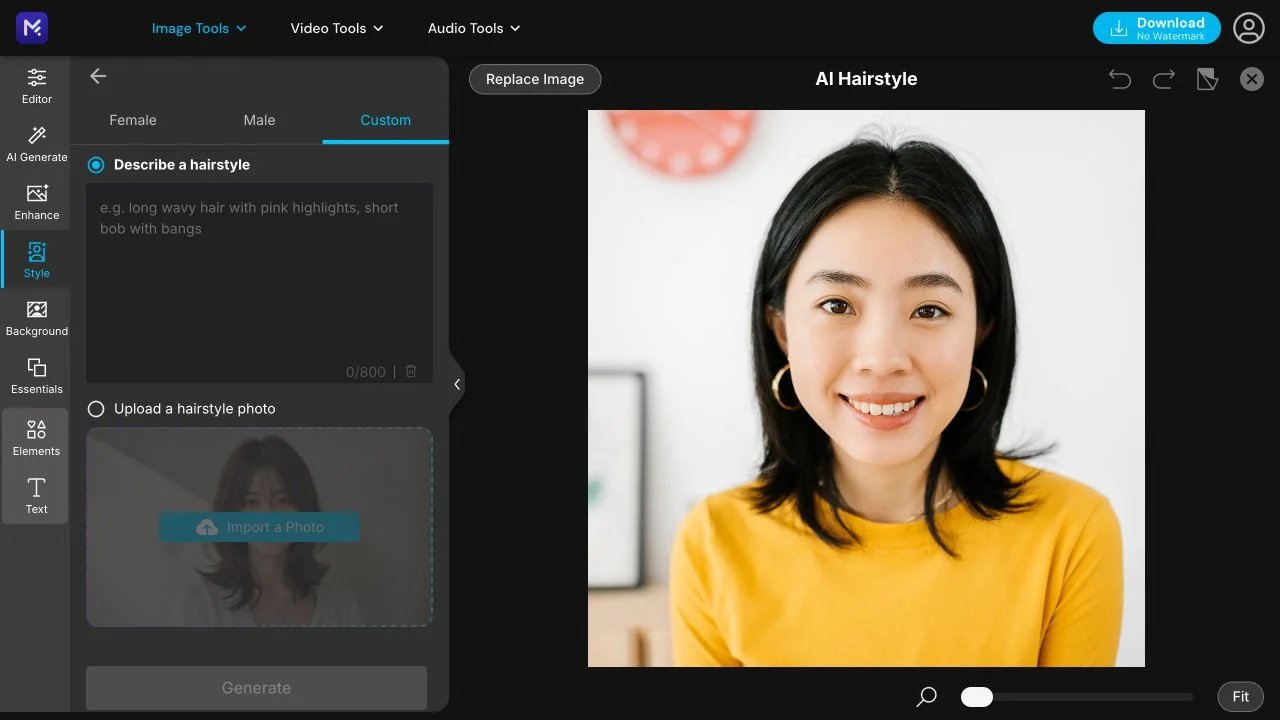
The Custom tab offers prompt or reference-photo input. The portrait is a vendor sample; we did not generate or evaluate a hairstyle result.
AI Ease
Best for: exploring preset haircuts in a browser before describing a custom look. The dedicated hairstyle page separates Default presets from Custom mode; its current Custom copy names a premium image-editing model.
The page markets free use, but the editor has an Upgrade entry and the platform also sells membership and credits. We would not turn that into a promise that every mode, model and export is unlimited and free.
Skip if: guaranteed unlimited premium generation is your deciding requirement. First elimination test: inspect the charge for one chosen preset, then a custom attempt, and try the download. Eliminate the route if the usable export is gated beyond your budget—or if the result changes your hairline rather than the intended haircut.
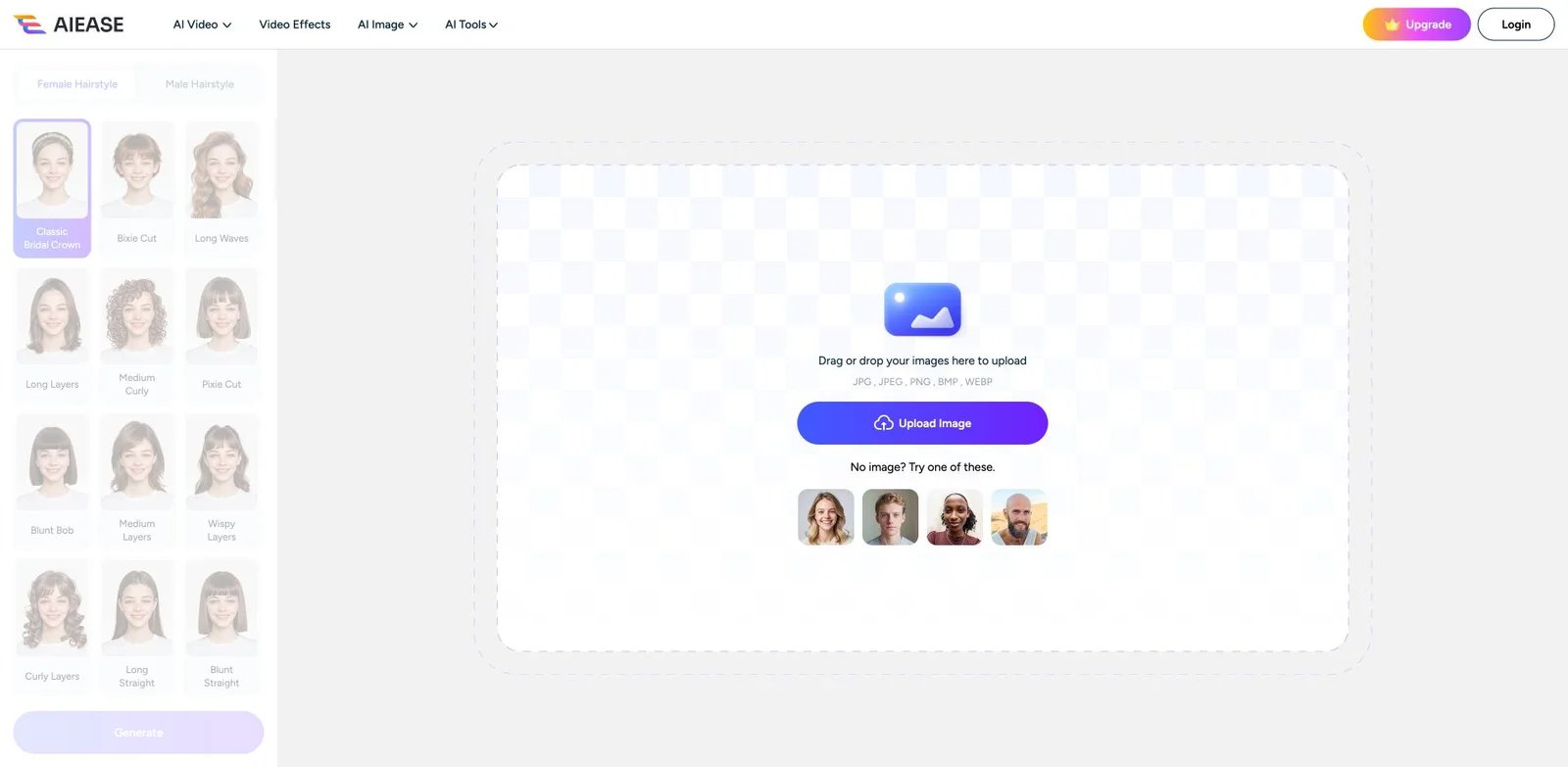
The public preset editor shows named cuts and an Upgrade entry. Example portraits are the vendor's, not our test results; this screenshot does not show Custom mode.

Best for: a browser preview driven by a preset or a short, specific description. LightX's consumer hairstyle generator supports both approaches and requests an in-focus JPEG or PNG.
Its pricing page distinguishes Starter, Pro and credit packs, including export and watermark benefits. Published free-credit numbers are inconsistent across its pages, so an exact daily allowance would be false precision. Also, an API signup offer is not the allowance for the consumer editor.
Skip if: you need a confirmed, unrestricted high-resolution free export. First elimination test: request one cut with two concrete features—such as jaw-length bob and no bangs—then inspect both the silhouette and downloaded file. Reject the route if the control or export boundary fails your job, regardless of how polished the preview looks.
YouCam Makeup
Best for: comparing haircuts and colors within a phone-based beauty workflow. The consumer hairstyle guide documents photo-based haircut previews; the YouCam Makeup app page also covers beauty and portrait editing.
Use the right product: YouCam Makeup is not YouCam Perfect, the online editor or the developer API. A live color or makeup preview also does not establish that every generative haircut mode runs live or offline.
The developer's US App Store listing specifically describes Custom Hair Try On with a reference photo and an option to keep your natural color. That makes it relevant when you want a new cut without also changing color. The listing shows free download and in-app purchases; confirm that control and its subscription/credit offer on your device rather than assuming iOS and Android have identical access.
Skip if: browser-only access or verified on-device processing is mandatory. First elimination test: turn off unrelated face/skin reshaping; on the documented iOS route, try a reference cut with natural color retained. Compare a color change separately. Stop if you cannot judge the hair without a broader face makeover.
FaceApp
Best for: refining the hair already in a portrait, with the option to explore a different shape. The current official hairstyle guide describes volume, smoothing and wave filters, haircut changes and reference transfer; available controls differ between interfaces.
PRO billing is monthly or yearly, with local prices and available plans displayed in-app. Check whether the hair control you need is accessible before subscribing.
This is not an offline recommendation. FaceApp says selected edits use encrypted cloud caching, deleted 24–48 hours after the last edit, and provides Settings → Privacy & Legal → Delete Cloud Photo Cache for a manual deletion request. That is the vendor's stated behavior, not our security audit. Official cache explanation.
Skip if: sending the selected photograph to cloud processing is unacceptable. First elimination test: use a low-strength hair adjustment without face filters. Reject it for haircut planning if it only beautifies the portrait rather than showing the change you need.
HairstyleAI
Best for: someone who wants a collection of ideas rather than a recurring editor. HairstyleAI currently advertises a $9 one-time pack, 30 hairstyles and 120 HD photos. Its workflow starts with uploaded selfies and ends with downloading favorites. Those are advertised package quantities, not 120 independently tested haircut predictions.
Skip if: you need to adjust the fringe or hairline interactively, or test one exact cut before paying. The pack's value depends on whether enough results remain recognizable and relevant—not on the size of the gallery.
First elimination test: check the upload requirements, sample gallery and payment scope before purchase. After delivery, keep only images that still look like you. Its privacy policy describes deletion within 14 days after a submitted and confirmed request, with legal-retention exceptions; do not assume instant automatic deletion.
What to check before uploading a selfie
A mobile interface does not prove local processing, and “secure” on a feature page is not a complete retention policy. Before uploading, locate the service's actual privacy terms and deletion route. Check what is retained, for how long, whether generation uses remote processing and whether an account is necessary. If an important answer is missing, use a sample image first or do not upload.
Use only a photograph you have permission to process. Keep other people, identifying background details and sensitive documents out of the frame. For another person's portrait—especially a client's—get their permission rather than treating a free try-on as permission to send their image to a vendor.
This shortlist does not establish a fully offline, no-upload winner. If that is a hard requirement, rule out the unverified routes instead of accepting a privacy slogan.
Make the preview useful at the salon
Use one clear photograph, the same lighting and the same camera angle for your initial comparisons. Keep a copy of the unedited original. Then:
- Try one realistic change and one more ambitious option—not twenty unrelated looks.
- Check face identity, hairline, ears, parting, fringe length and whether the preview invents density or hides thinning.
- Keep your real texture visible when evaluating curls, coils, braids or a fade. A convincing render is not evidence that your natural hair behaves that way.
- Save the original plus two or three acceptable previews at a usable size. Write down the features you liked; do not hand over only a beautified image.
- Ask your stylist what is feasible with your current length, density, growth pattern and maintenance routine. Treat simulated dye as a visual direction, not a guarantee of a salon color result.
For budget planning, count attempts rather than styles: three cuts with two attempts each means six generations, before any reruns or exports. Read the current per-attempt credit charge; a monthly credit balance alone cannot tell you how many useful looks you will get.
If your task is broader photo cleanup, browse the AI image-editor directory or the image-editor workflow comparison. If you want a finished profile portrait rather than a haircut reference, see the separate AI headshot-generator comparison.
Frequently asked questions
Which AI hairstyle try-on tool should I start with?
Choose by input: MyEdit for a browser reference haircut, AI Ease or LightX for browser presets/prompts, YouCam Makeup or FaceApp for a phone workflow. YouCam Makeup's iOS reference mode also documents keeping natural hair color. HairstyleAI is a paid batch route. There is no tested universal quality winner here.
Is there a free AI hairstyle changer without a watermark?
MyEdit advertises watermark-free hairstyle downloads with free daily credits. That does not mean unlimited generations. For any tool, test the actual download and selected mode before relying on a “free” landing-page label.
Can AI show bangs, a buzz cut or curly hair on my photo?
These workflows include presets, prompts or filters for different shapes and textures. Check the specific cut in the tool you choose. Reject a preview that changes your face or invents hair density; use an acceptable result as a conversation starter, not a physical prediction.
Can I use these tools without uploading my photo?
You can inspect public samples and controls before submitting your own picture. Personalized previews may require remote processing; none of these recommendations establishes an offline winner. FaceApp explicitly describes cloud caching for selected edits.
Should I show an AI hairstyle result to my stylist?
Yes, as a reference alongside your original photo and notes about the length, fringe, color or shape you want. Ask what is achievable with your actual hair and maintenance routine. Do not ask the stylist to reproduce an AI image as a guaranteed outcome.
Get ToolWorthy Weekly
New AI tools, practical guides, and selected AI signals in one weekly brief.
Related Posts
- 14 Best AI Outfit Generator Tools 2026 - Closet, Try-On & Styling
Compare 14 AI outfit generator tools for digital closets, virtual try-on, weather-aware styling, pricing, mobile workflow and real wardrobe fit.
- 11 Best AI Tattoo Generators 2026 — Preview Before You Commit
We tested 20+ AI tattoo generators and narrowed it to 11 that actually help you plan ink — with body visualization, stencil export, and transparent pricing.
- 10 Best AI Background Remover Tools 2026 - Tested & Compared
10 AI background removers compared for product photos, portraits, and video without green screen — free tools, API options, and paid plans all covered.
For AI tool founders
Built a tool that belongs in this decision set?
Request an editorial evaluation for possible inclusion in ToolWorthy.
Submit your tool for reviewPaid submission does not guarantee a ranking, recommendation, inclusion, or editorial outcome.