

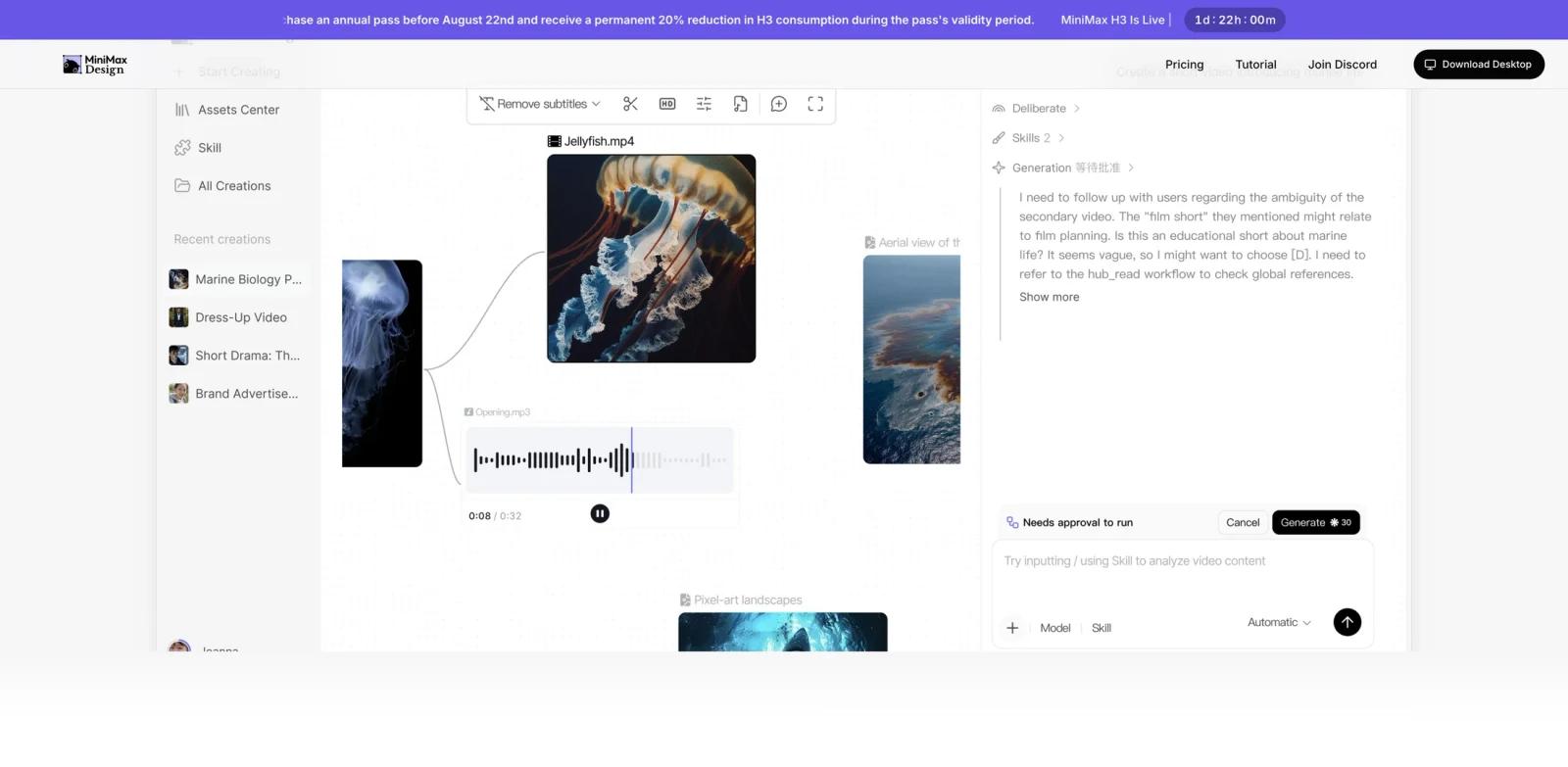


Overview
MiniMax Design is an AI-native creative production workspace from MiniMax. Instead of treating text, image, video, and audio generation as separate tools, it presents a desktop command center where a user starts with a creative brief, lets the main agent decompose the work, and coordinates specialized agents through production and export.
The official product page positions MiniMax Design around end-to-end creative direction. A brief can become scripts, visuals, voiceover, video assembly, and platform-ready campaign assets inside one workflow. That makes it more specific than a general AI agent workspace and broader than a single-purpose AI video generator. It is closer to a production layer for creators, marketers, ecommerce teams, educators, and agencies that need multiple media formats from the same idea.
MiniMax Design is currently distributed as a desktop app for macOS 13+ and Windows 10+ x64. The product is tied to MiniMax's broader model stack, including H3 for video-focused multimodal generation, but the buying decision should focus on workflow fit: whether one coordinated creative environment reduces the handoff cost between prompt writing, image generation, video production, audio work, and final packaging.
Key Features
Creative brief intake - Users can start from a written idea or structured brief. The main agent interprets the goal, breaks it into production tasks, and routes work to the appropriate creative agents.
Multi-agent production - MiniMax Design describes parallel agents for copy, image, video, and audio work. This is useful when a campaign needs a script, visual assets, narration, and edited clips instead of one isolated output.
Short-form video workflows - The official examples emphasize social and commercial video production, including product ads, creator-led clips, short dramas, explainers, and vertical assets for fast-moving channels.
Brand marketing output - Teams can move from one brand brief to posters, videos, copy, and multi-platform creative variants. That places MiniMax Design near AI graphic design tools, but with stronger video and agent orchestration.
Skill ecosystem - MiniMax Design includes shared Skills for repeatable creative workflows, such as product ad generation, hand-drawn live video, stop-motion explainers, and other packaged production formats.
Desktop app delivery - The global and China pages both promote native downloads rather than a browser-only interface, with macOS 13+ and Windows 10+ x64 listed as supported starting points.
How to Get Started
- Open the official MiniMax Design site and choose the macOS or Windows download that matches your system.
- Start with one real creative brief, not a toy prompt. Product launch, short-form ad, educational explainer, and social campaign briefs are good first tests.
- Let the agent break the brief into tasks, then inspect the generated task map before committing time or credits to asset generation.
- Review each output track separately: copy accuracy, visual consistency, video timing, voiceover quality, and export requirements.
- Compare the final handoff with your current stack. The tool is worth adopting when it removes repeated context transfer between image, video, audio, and editing tools.
Pricing & Plans
MiniMax Design is best treated as free-to-start until the live checkout confirms exact account limits. The official pages show "Start creating free" and desktop downloads, while the Media Plan area frames paid use around media generation credits. Enterprise and custom production options are also presented for brands, studios, and agencies.
| Access path | What the official pages indicate | Best fit |
|---|---|---|
| Free start | Download the desktop app and begin testing the creative agent workflow. | Individual creators and teams validating workflow fit. |
| Media credits | Media generation plans and credits may apply for video, image, music, or speech usage. | Users producing recurring multimedia assets. |
| Enterprise / commissioned production | The enterprise lane mentions industrial-grade delivery, named support, custom Skills, and deployment options. | Studios, agencies, and brands with governance or scale needs. |
Before budgeting, confirm current region, account, credit balance, generation limits, commercial terms, and whether H3-powered video usage is included in your selected plan. Do not assume that a general MiniMax token plan and the MiniMax Design media plan have the same limits.
Best For
- Marketing teams turning one campaign brief into copy, product visuals, short videos, and platform-specific variants.
- Ecommerce operators creating product ads, KOC-style clips, launch teasers, and seasonal creative refreshes.
- Short-form creators who want agent help across scripting, visual planning, voiceover, and edit assembly.
- Agencies that need a repeatable workflow for client creative, especially when briefs require multiple media formats.
- Educators and internal content teams producing explainers that combine script, visuals, narration, and final packaging.
How It Compares
MiniMax Design competes with several adjacent tool categories, but it is not a direct one-for-one replacement for every tool in them. Compared with Pika or Runway Gen-4.5, MiniMax Design is less about a single video model interface and more about coordinating the full creative workflow around a brief. Compared with Canva-style AI design tools, it places more emphasis on agent execution and video/audio output rather than template-first graphic design.
The practical comparison question is where your bottleneck lives. If your team only needs a polished image, a dedicated AI image generator may be faster. If the bottleneck is coordinating script, visual assets, narration, video, and export settings for repeated campaigns, MiniMax Design is more relevant.
FAQ
What is MiniMax Design?
MiniMax Design is a desktop creative agent workspace from MiniMax. It helps users turn a brief into coordinated copy, image, video, audio, and export work through specialized AI agents.
Is MiniMax Design the same as MiniMax Agent?
No. The existing MiniMax Agent product focuses more broadly on MiniMax models and agentic tasks. MiniMax Design is positioned as a creative production environment for multimodal assets, especially video, brand marketing, education, and campaign workflows.
Is MiniMax Design free?
The official homepage promotes free starting access and downloads. Paid media credits, generation limits, or enterprise terms may still apply depending on account, region, workload, and checkout state. Verify the live Media Plan before committing to a production budget.
What platforms does MiniMax Design support?
The official pages list downloads for macOS 13+ and Windows 10+ x64. Check the live download page for the latest installer and system requirements before rollout.
What kinds of content can MiniMax Design create?
The official examples cover short-form video, brand marketing production, ecommerce product ads, educational content, creator-led clips, copy, visual assets, voiceover, and export packaging.
Does MiniMax Design replace video editors?
Not completely. It can coordinate and accelerate production, but teams should still review timing, brand fit, rights, final polish, and platform-specific export requirements. For precision editing, a dedicated AI video editor or professional NLE may still be needed.
Who should avoid MiniMax Design?
Teams that only need a single still image, a pure chat agent, or a highly controlled professional editing pipeline may not need the full workspace. It is most valuable when the work spans several media types and repeated handoffs slow the team down.
What should teams test first?
Test one real campaign brief from your current workflow. Measure how much time is saved after review, revisions, exports, and stakeholder approval, not just how quickly the first AI draft appears.