
7 CapCut Alternatives 2026 — Before You Move Your Projects
Choose a CapCut replacement for the work you need to keep: phone editing, a local timeline, clean exports or spoken-video editing. Check what moves before you cancel.
On this page
A CapCut alternative needs to replace the part of your workflow that is failing—not just display another attractive editing demo. A phone creator facing an export restriction, a Windows editor wanting local files and a team revising interviews have different reasons to move.
Start with Edits or VN for phone-led social videos. Check Adobe Premiere's mobile app for a free 4K route, and its separate desktop subscription for professional editing. Compare Kdenlive and DaVinci Resolve for installed desktop timelines, Clipchamp for straightforward browser editing, or Descript when spoken words drive the cut.
This is an official-source comparison checked on October 30, 2026, not a hands-on speed, stability or caption-accuracy benchmark. The order groups switching routes. For general discovery, use our AI video editor category; this guide starts with a CapCut project you already need to preserve.
CapCut alternatives at a glance
| Tool | Switch for this workflow | First reason to rule it out |
|---|---|---|
| Edits | Record, cut and deliver social videos on a phone | You want to avoid an Instagram account |
| VN | Manual mobile editing with tracks, keyframes and speed curves | You expect CapCut templates or drafts to open unchanged |
| Adobe Premiere | Free mobile exports, or a separate professional desktop workflow | You assume the free mobile app includes desktop access |
| Kdenlive | A free local desktop timeline with configurable subtitles | You need a ready-made phone-template workflow |
| DaVinci Resolve | Desktop editing, color and audio finishing in one suite | Your requirement is an exact CapCut effect or unsupported source codec |
| Clipchamp | Browser editing with a clear basic 1080p export boundary | You need free personal-account 4K or a local-only workflow |
| Descript | Revise interviews and explainers through their transcript | Your hard requirement is free, clean 4K delivery |
Check whether you need to leave CapCut
Do one export audit before rebuilding anything. CapCut's watermark guidance distinguishes ordinary manual projects from templates and premium materials. A branded ending clip, a Pro-tagged effect and a resolution restriction are different problems. Removing an ending clip does not unlock a paid asset.
Its 4K help also makes platform, source footage and hardware relevant. Another export help page describes plan checks when premium materials or export settings are used. Those pages do not support a universal claim that every free CapCut export is watermarked, or that 4K is always free on every device.
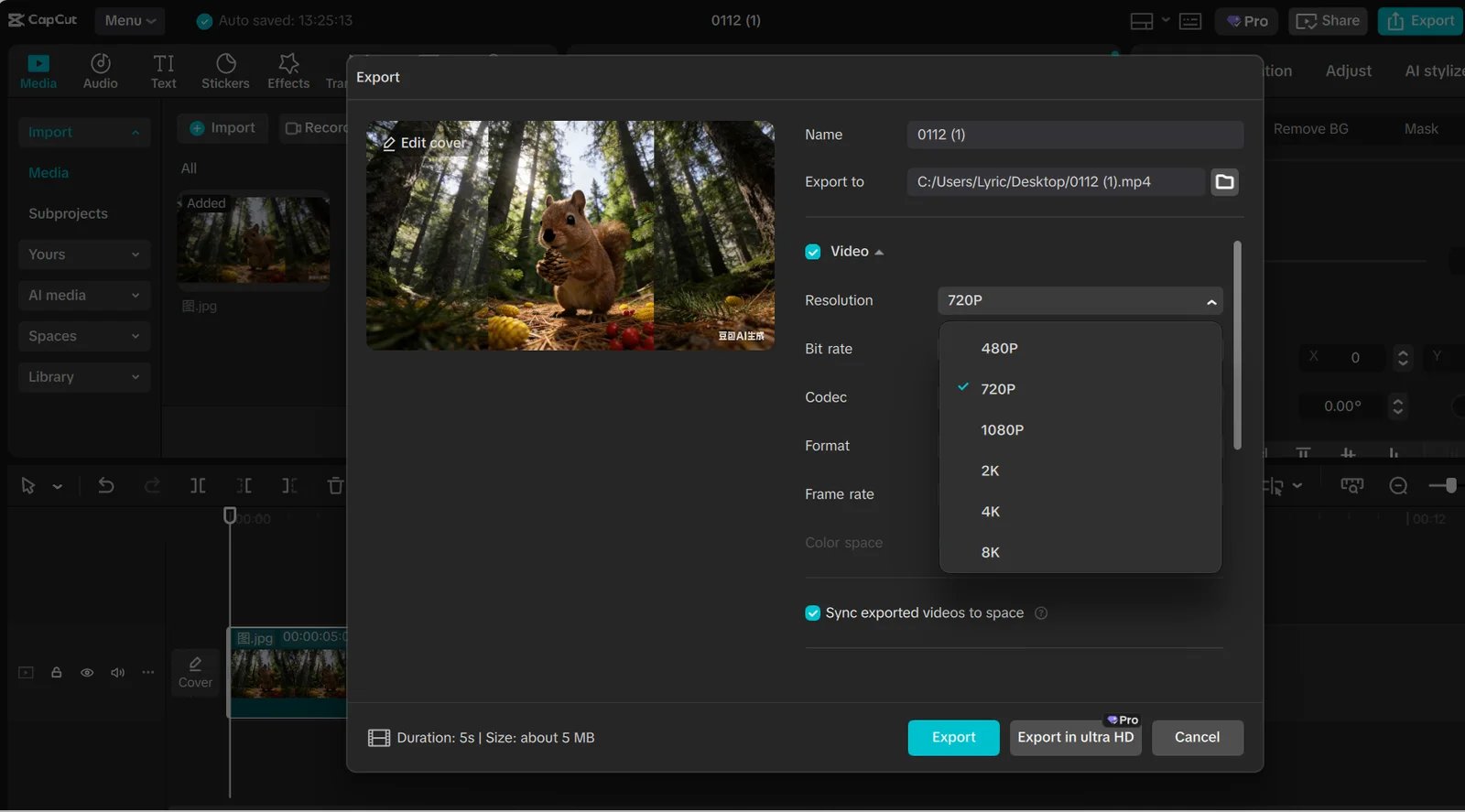
Official CapCut help-center example, not a ToolWorthy account test. An available export control is not proof that your account and chosen materials have the same entitlement.
Stay with CapCut if your actual project already exports cleanly at the required resolution and its templates or effects save rebuilding work. If only one premium item blocks delivery, compare replacing that item with the cost of changing editors. Check the current account offer rather than an old universal Pro price; region, billing channel and promotions can differ.
Switch when a recurring constraint remains: you need a different phone workflow, local project control, a predictable export entitlement, deeper finishing tools or transcript-led revision. Compare that requirement below before moving the archive.
Compare the usable export, not the free-download label
These are documented boundaries at this check, not identical-workload or quality results. “Up to 4K” is a maximum—not a guarantee for every source format, device or setting.
| Tool | Free-entry export boundary | What changes the purchase |
|---|---|---|
| Edits | Developer lists 4K exports without a watermark | Instagram sign-in; App Store lists in-app purchases |
| VN | Core editor advertised without watermarks; iOS listing says up to 4K60 | In-app purchases exist; do not assume every AI feature is unlimited |
| Adobe Premiere | Mobile: unlimited watermark-free 4K exports in the free core editor | Generative AI credits and the paid desktop subscription are separate |
| Kdenlive | Free/open-source desktop editor; supports UHD/4K workflows | Your machine, codec and export configuration; no paid editor tier |
| DaVinci Resolve | Free edition: virtually all 8-bit formats, up to UHD 3840×2160 at 60 fps | Studio features, source-format support and computer requirements |
| Clipchamp | Personal Free: watermark-free exports up to 1080p | Personal 4K and premium assets need the applicable entitlement |
| Descript | Free: 720p with watermark | Hobbyist: clean 1080p; Creator: clean 4K; processing allowances also apply |
Sources: Edits developer listing, VN and its iOS listing, Premiere mobile, Kdenlive manual, Resolve versions, Clipchamp plans and Descript plans.
For a free mobile output, compare Edits, VN and Premiere mobile using the same source clip and delivery setting. For a free desktop workflow, compare Kdenlive with Resolve's actual Free-format boundary. For clean browser 1080p, Clipchamp starts with a different proposition from Descript's watermarked Free tier. A transcript workflow can justify a paid plan, but it does not become a free-export winner because its download is free.
No single dollar comparison would price these routes fairly: a free editor, optional AI credits, a desktop license and a per-editor subscription buy different things. Check the local checkout and renewal commitment before paying; this guide keeps the plan restrictions that change the decision rather than copying transient discounts.
Compare how the next revision gets made
| Tool | Where the edit continues | What you gain—and rebuild |
|---|---|---|
| Edits | Phone timeline, drafts and creator tools | Keep a phone-led process; recreate CapCut-specific templates and effects |
| VN | Mobile multitrack, keyframe and speed controls | Build the cut explicitly; transfer source media rather than assume draft compatibility |
| Adobe Premiere | Mobile app or paid desktop editor | Choose the appropriate edition; a CapCut draft is not a Premiere sequence |
| Kdenlive | Installed desktop project and source files | Direct timeline control; configure speech models and rebuild styling |
| DaVinci Resolve | Desktop edit, color, effects and audio workspaces | Deeper finishing scope; rebuild effects and verify source-format support |
| Clipchamp | Browser/Windows application with Microsoft account | Basic cuts and delivery in a different ecosystem; verify its storage workflow |
| Descript | Transcript-led project | Revise speech through text; rebuild visual timing that is not driven by dialogue |
The first split is phone versus desktop/browser. The second is whether your time goes into timed visual edits or repeated changes to spoken content. A replacement does not have to resemble CapCut to fit, but it must preserve the task that matters. None of these recommendations promises automatic conversion of a layered CapCut project.
Preserve the project before you change editors
An MP4 is a finished picture and sound file, not an editable timeline. You can import it into another editor, but the original independent titles, cuts, transitions and sound layers are not restored simply by importing the rendered result.
CapCut's project-interchange help says it does not directly import or export third-party project files; its example concerns Premiere projects entering CapCut. We found no official universal route that transfers a CapCut timeline, effects and templates into every replacement above. Treat a migration as a rebuild unless a documented route is verified for your exact source and destination.
Before cancelling or removing anything, keep:
- Original video, audio, images and other source media in a folder you control.
- The CapCut project/draft and any available project backup, with the version and device needed to reopen it. Verify the backup; do not assume a rendered export is one.
- A high-quality reference export, plus a clean reference without burned-in captions if your workflow can produce one.
- Caption text or subtitle files where your version allows export; otherwise retain an editable transcript and timing reference.
- Notes on fonts, aspect ratio, frame rate, speed changes, masks, effects and asset licenses that matter to the edit.
A downloaded music track or template is not automatically cleared for every destination or commercial use. CapCut's licensing explanation makes commercial-use labels important. Verify the relevant asset terms before reusing materials outside their original workflow.
Rebuild one representative 30–60 second project first. Include your real footage format, a speed change, captions, music and one late client revision. Export on the intended device and plan, then reopen the project and change it again. Compare the total work, not just the first render. These are proposed checks, not tests we performed.
The switching routes in detail
Edits
Best for: creators who want to capture, assemble and deliver social video on a phone while keeping an Instagram-linked workflow.
Meta's product introduction describes precise timeline editing, drafts and direct sharing or export to other platforms. The current developer listing supports the 4K/no-watermark boundary above. Exporting to another platform is distinct from being independent of Instagram: sign-in still matters.
Skip if: the reason you are leaving is to avoid a social-platform account, or your required work is a full desktop finishing session. Free core editing is not a promise that every in-app purchase or future feature is free.
First elimination test: rebuild a captioned vertical clip, save it to the device and open the file outside Instagram. Reopen the draft and replace one shot. Rule it out if the account dependency or the exact revision you need remains a blocker.
VN
Best for: phone editors who want to assemble their own layered cut, rather than depend on one CapCut template.
VN's core workflow includes multiple tracks, keyframes and speed curves. Its developer's iOS listing documents up-to-4K60 export; that is not evidence that every device or desktop version behaves identically. The vendor advertises core editing without a watermark, while storefront in-app purchases mean “everything forever is free” would be too broad.
Skip if: you need a supported way to carry over CapCut's precise template, effect settings or editable draft. We have not verified such a converter.
First elimination test: recreate your overlay, speed ramp and caption style from original clips, then export with the required frame rate. Judge whether the manual rebuild is acceptable; we have not measured which phone editor is fastest or easiest.
Adobe Premiere
Best for: a creator evaluating a free mobile editor now, with a separate desktop route if the work later needs it.
The mobile product page lists free core editing and unlimited watermark-free 4K exports on iOS and Android. Feature availability can differ by platform; generative credits are a separate entitlement. This mobile app should not be confused with an old Premiere Rush recommendation.
The desktop plan is a separate subscription with a trial. A monthly installment on an annual commitment is not a cancel-any-month contract. Free mobile access does not include the full desktop application.
Skip if: your plan assumes desktop access at the mobile price, or you need CapCut effects to translate automatically.
First elimination test: finish the clip in the edition you will actually use. If mobile-to-desktop continuation matters, verify the supported handoff and receiving license before relying on it; do not infer universal two-way sync from the shared name.
Kdenlive
Best for: someone moving to an installed, free desktop timeline who is willing to manage media, captions and project backups.
Kdenlive runs on Linux, Windows and macOS, with platform-specific caveats in its manual. It gives you tracks, keyframes and a project built around source files. Its speech-to-text workflow requires model setup; that is a meaningful difference from expecting every caption feature to work immediately after installation.
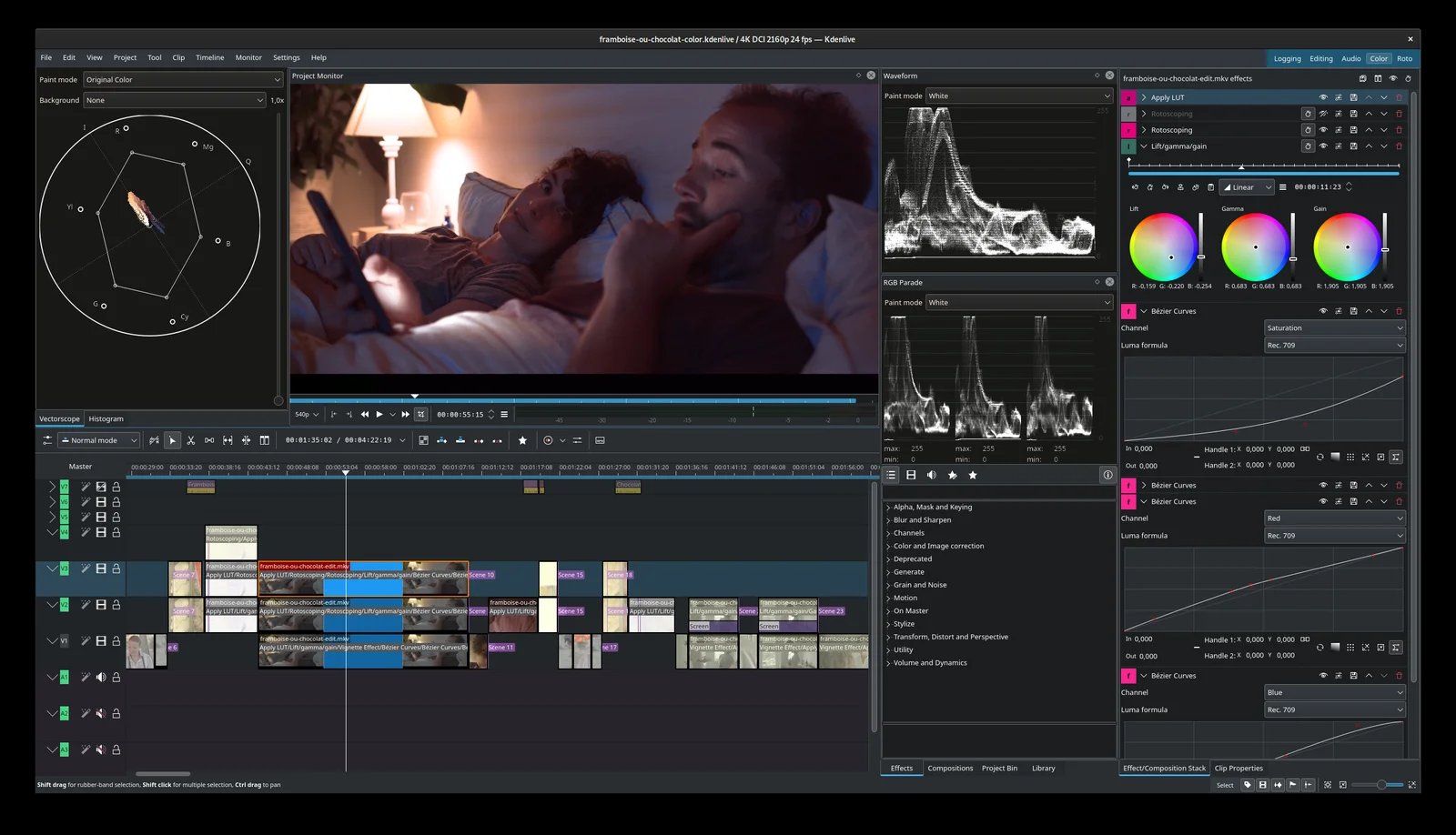
Official Kdenlive application screenshot. The separate tracks illustrate the project structure you rebuild; this is not our own CapCut import test.
Skip if: an installed desktop workflow is itself the problem, or you want a library of matching CapCut phone templates.
First elimination test: link the original media, create captions using the configured engine, export the target format and reopen the saved project. Test your actual phone footage before committing a backlog.
DaVinci Resolve
Best for: a desktop project whose recurring work involves editing, color and audio finishing rather than just substituting a mobile template.
DaVinci Resolve combines those workspaces. The official Free-format and resolution boundary above matters with phone footage: an “up to UHD” statement does not settle support for your particular 10-bit/HDR file. Further Neural Engine and effects capabilities belong to the paid Studio offering; do not budget every advertised AI feature as free.
Skip if: you only need the same CapCut template again, or your machine/source-format combination fails the delivery requirement. We have not benchmarked hardware performance.
First elimination test: import original footage, recreate a captioned segment, export and reopen it. Identify whether any required tool or format calls for Studio before buying; a paid license does not recreate the old CapCut edit.

Best for: ordinary browser or Windows editing when clean 1080p output is enough and a Microsoft-account workflow is acceptable.
The personal plan boundary is useful because it makes a basic clean export possible without purchasing 4K. Personal, Family and work/school entitlements are different; confirm the account you will actually use. Check where its project and media are stored before treating it as a replacement for local desktop editing.
Skip if: free personal-account 4K, phone-first editing or avoiding the Microsoft ecosystem is non-negotiable.
First elimination test: make a 1080p clip using only included resources, then reopen and revise it in the same account. See the Clipchamp switching guide for the limitations that might otherwise send you looking for another replacement.

Best for: interviews, tutorials and talking-head clips where repeated dialogue changes are the editing bottleneck.
Descript's editing workflow is based on the transcript. That can be a useful change of method, rather than a close imitation of CapCut's visual timing. Its processing allowance and AI credits are separate from clean-export resolution. The Free/Hobbyist/Creator distinctions above matter before you migrate a video series.
Skip if: your principal need is free watermark-free delivery, intricate beat-synced visual effects or an equivalent collection of phone templates.
First elimination test: correct a transcript, remove a sentence and inspect the resulting cut, captions and export. If speech is only a small part of your work, compare the rebuild burden with a timeline editor. For other speech and recording routes, use our Descript alternatives guide.
Check what you already have before buying again
On Apple devices, iMovie is worth trying for basic edits; Apple documents project handoff within its ecosystem. Existing Final Cut Pro users should test their current editor before buying another professional suite. Shotcut is another free local-timeline option if that workflow fits better than Kdenlive.
For branded campaign templates, Canva's video workspace may address a different bottleneck. Filmora is a paid/trial route to evaluate if you like its workflow; its ordinary trial watermark makes it a different proposition from a persistent free clean-export option. These are relevant alternatives, not reasons to turn the shortlist into fifteen interchangeable editors.
If your actual need is to find highlights inside a long recording, that is a different purchase from replacing a manual timeline. Our AI clip generator comparison covers that job.
Make the switch only after the second edit
Move one new project first. Keep the CapCut originals available until the replacement handles export and a later revision. Cancel any renewing subscription through the CapCut, Apple or Google billing account that actually charges you; downloading another editor does not cancel the old one.
A hybrid can be sensible: finish older CapCut projects where they already work and start new material in the replacement. The useful outcome is fewer recurring constraints, not a complete archive migration on day one.
Frequently asked questions
What is the easiest CapCut alternative?
Keep the device and task constant. Compare Edits, VN and Premiere mobile for phone editing; try Clipchamp for basic browser cuts. We have not measured ease of use. If the current CapCut project already meets your export needs, staying avoids the largest rebuild.
Which CapCut alternative is free without a watermark?
Edits and Premiere mobile document clean exports; VN advertises its core editor without a watermark. Clipchamp Personal Free covers clean 1080p. Check the exact materials, device and output first. A free download or trial does not prove unlimited AI use or clean 4K export—Descript Free, for example, has a watermark.
Can I transfer an editable CapCut project to another editor?
Do not assume so. A rendered MP4 can be reused as video, but it does not recover independent layers, titles or effect settings. Preserve original media, the CapCut draft and a reference export, then rebuild a representative project. Verify any claimed converter against your exact versions before trusting an archive to it.
What should I use for local desktop editing?
Start with Kdenlive for a free timeline, or evaluate Resolve when color, audio and finishing are central. Shotcut is another local option. Installation does not guarantee support for every codec or that model downloads and other online features work without a connection. Test your own files and the exact offline workflow.
Which CapCut alternative should I try if Resolve is too much?
Choose by what you need to finish. Kdenlive or Shotcut offers another local desktop route; Clipchamp may fit basic browser edits. If you mainly edit on your phone, compare the mobile choices instead. None is claimed to be universally easier, faster or an automatic home for your CapCut templates.
Get ToolWorthy Weekly
New AI tools, practical guides, and selected AI signals in one weekly brief.
For AI tool founders
Built a tool that belongs in this decision set?
Request an editorial evaluation for possible inclusion in ToolWorthy.
Submit your tool for reviewPaid submission does not guarantee a ranking, recommendation, inclusion, or editorial outcome.