
6 AI Accessibility Testing Tools 2026 — For Web Teams
A clean scan is not a usable checkout. Compare six accessibility tools by the states they inspect, the fixes developers receive and the work people must still verify.
On this page
The best AI accessibility testing tool is the one that fits where barriers appear and who can fix them. A public landing-page scan, a checkout behind a login and a Figma component require different evidence. Buying an AI feature does not automatically cover all three.
Start with Axe DevTools for developer-led checks, Evinced for dynamic flows in an existing test suite, and BrowserStack or TestMu AI when accessibility must sit alongside cloud testing. Stark belongs in the comparison when design and development share the work. accessFlow is another web-development route for turning findings into a remediation backlog.
This is a comparison for web product teams selecting accessibility testing and developer handoff, not a ranking of every accessibility service. Native-app audits and PDF remediation need their own scope. Official sources were checked on November 2, 2026. We have not benchmarked these tools against the same barriers or measured their detection accuracy, usability or repair quality. The order groups workflows; it is not a tested leaderboard.
AI accessibility testing tools at a glance
| Tool | Start here when | First reason to rule it out |
|---|---|---|
| Axe DevTools | Developers want a browser-to-CI path | You expect the free extension to include paid AI and guided testing |
| Evinced | Your app changes state throughout a user journey | You cannot trial it against your real test framework |
| BrowserStack | Cloud QA and screen-reader access belong in one purchase | Your budget assumes Free includes the AI agents |
| TestMu AI | Your testing team already uses the former LambdaTest stack | You assume a general cloud subscription covers every accessibility feature |
| Stark | Figma, code and live pages need shared ownership | You only need a lightweight check on a few static pages |
| accessFlow | A web team needs an actionable repair backlog | You cannot establish where automated changes are applied |
For a small static site, start with a free checker and human review before buying AI. For a dynamic application, choose a tool that can inspect the actual states people use. For a design system, test the component before release and again in its implemented context.
Already have Playwright? Start with the open-source baseline. Playwright documents @axe-core/playwright checks on states your tests already reach, including an opened menu. You do not need a paid Axe DevTools Bundle simply to add those assertions. Your team still maintains the journey and human checks; commercial tools become a comparison when you need additional detection, guided work, reporting or remediation.
A passing functional test proves a different thing from an accessible interaction. Our AI test automation comparison covers broader regression-test platforms; this guide focuses on barriers such as focus behavior, accessible names and keyboard operation.
Compare interaction states, automation and the entry boundary
| Tool | How it reaches states · entry boundary | Existing tests and developer handoff |
|---|---|---|
| Axe DevTools | Browser user-flow analysis: Pro; basic page scans: Free | Web Bundle adds CI/API integrations. The open-source Playwright route is a separate no-license-cost option |
| Evinced | Flow Analyzer records a browser journey; SDK continuously scans DOM changes. Exact commercial entitlement: confirm in proposal | SDK runs within existing frameworks and exports JSON/JUnit/CSV; findings grouped by component |
| BrowserStack | Workflow Analyzer: Free up to five pages; AI detection/remediation agents: Ultimate | Automate adds CI/test-framework integration; browser workflow access alone does not establish automated-suite access |
| TestMu AI | Free extension records workflows; Free scheduling: 25 lifetime scans; paid Accessibility: listed $159/month billed annually | Paid card lists automation and DOM-change detection. Extension gives element context; confirm paid quotas and AI access |
| Stark | Figma/code/URL checks: plan-dependent; a design scan is not a runtime journey | Grow lists CI/CD and private URLs. Confirm the test surface; do not infer continuous DOM scanning from design support |
| accessFlow | Recorded web journeys; product-tour/quote route, exact license boundary unverified | SDK and CI support documented; confirm capture mode. Distinguish source fixes from no-code auto-resolve |
Sources: Axe plans, Evinced flow recording and SDKs, BrowserStack web accessibility, TestMu DevTools, Stark plans and accessFlow.
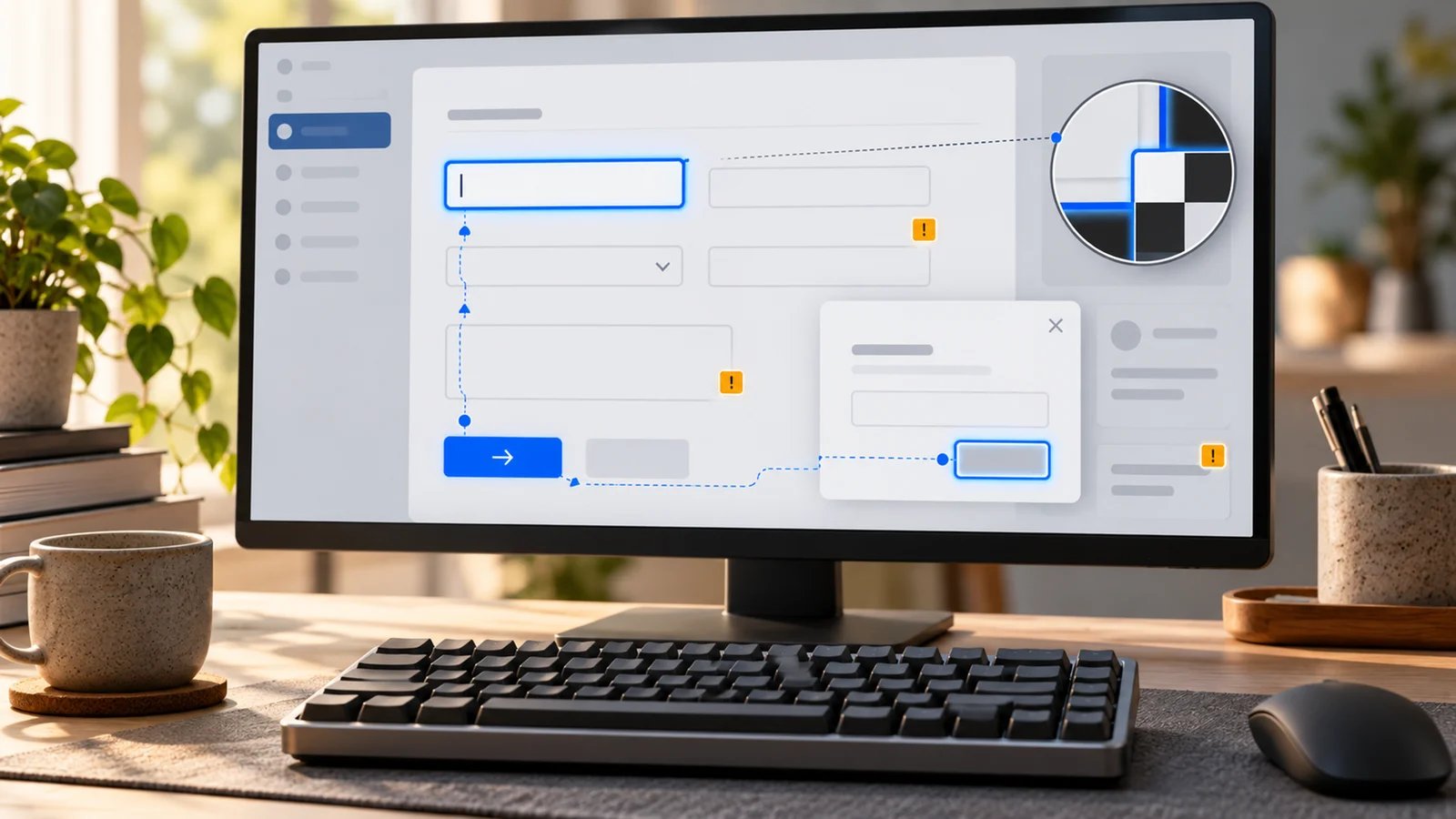
The important distinction is a URL versus an interaction state. One URL can contain a closed menu, an open modal, validation errors and a completed transaction. Confirm which states your configuration inspects. A site crawler reaching the URL is not proof that it exercised those states.
Figma checks also do not establish the behavior of the shipped DOM. Use them to prevent problems early, then validate the implemented keyboard and screen-reader experience.
Compare free access and the purchase that actually unlocks your workflow
| Tool | Practical entry point | Boundary to check before buying |
|---|---|---|
| Axe DevTools | Free extension for basic page scans; Pro trial available | Pro adds AI/guided features; Web Bundle adds CI/API/MCP. AI features have credits and configuration requirements |
| Evinced | Demo-led evaluation; no numeric price established in this check | Request the exact Flow Analyzer, SDK and MCP scope; do not assume all are one entitlement |
| BrowserStack | Free workflow/scanner access up to five unique pages | AI detection/remediation agents are in Ultimate; current paid web tiers say inquire for pricing |
| TestMu AI | Free extension; 25 lifetime Accessibility Scheduling scans | Accessibility listed $159/month billed annually; paid quotas, overages and AI entitlements need confirmation |
| Stark | Free team account advertised; Premium Pack from $198/user/year, minimum three seats | Free feature scope unverified; Launch from $2,500/year, Grow from $8,000/year with private URLs/CI among supported assets |
| accessFlow | Product-tour entry; no numeric price or free entitlement established here | Obtain an accessFlow-specific proposal; accessWidget pricing is a different product |
Pricing and packaging were checked on November 2, 2026 using public English-language pages. Stark's figures and TestMu's displayed paid offer are annual commitments, not month-to-month offers; taxes, region, configuration and additional scope may change checkout. The minimum Premium Pack is therefore $594/year for three seats. It is not the same purchase as Launch's project monitoring, or the minimum price just to create a free account. TestMu's listed paid base annualizes to $1,908/year; its 25 free scheduled scans are a lifetime allowance, not a monthly renewal or a cap on the separate free extension. Sources: Axe, AI credit allocation, BrowserStack, TestMu plans, Stark and accessFlow.
Compare the cost of your covered workflow, including seats, environments, monitored pages, automation, AI allowance and any manual audit. A cheap general browser-testing plan is not a verified quote for an accessibility AI agent. A free extension is not a promise of free organizational reporting or unlimited cloud testing.
Where AI helps—and where it does not settle the decision
Rules-based checks, AI assistance, guided tests and human evaluation are different layers. Some products combine them; do not label every reported issue an AI discovery.
Deque documents contextual Advanced Rules and AI-assisted remediation, with different infrastructure and credit requirements. Evinced describes AI detection and groups findings by underlying component. BrowserStack separates its detection and remediation agents. TestMu's extension uses axe-core for scans, while its MCP route connects findings to AI coding tools. Stark adds AI suggestions to design/code workflows. accessFlow documents suggestions, generated alt text and selected automated repairs. These are documented capabilities, not an independent accuracy comparison. See the Deque availability guide, Evinced AI overview and TestMu extension explanation.
W3C's evaluation guidance is the useful boundary: tools assist evaluation, some checks require human judgment, and results can be misleading. Keep keyboard operation, meaningful screen-reader output and task completion in the evaluation. A high score, an AI-written fix or zero automated findings is not a complete conformance determination.
Choose a workflow, then eliminate the wrong tools
Axe DevTools
Best for: developers who want a basic browser check now and a documented route into deeper development tooling.
The Free extension is a sensible baseline for page-by-page automated checks. Pro adds guided/user-flow testing; the Web Bundle extends into the development lifecycle. Separate those purchases rather than calling the entire Axe platform free. Deque's AI feature documentation also distinguishes ordinary scanning from AI operations and infrastructure.
Skip if: your only requirement is a recurring estate-wide crawl and nobody will act on developer findings. Compare a monitoring program instead, and scope Deque's other products separately.
First elimination test: in a trial, open your application's modal, trigger a form error and test the changed state. Ask a developer to turn one finding into a code change. Rule it out for that workflow if required flow checks or integrations sit outside the proposed license, or if the report cannot support a reproducible repair. This is a proposed evaluation, not a test we performed.
Evinced
Best for: a web app with repeated state changes and an existing automated test suite.
The Web Flow Analyzer records a journey into one report. The SDK documents continuous DOM scanning, configurable build failure and structured outputs. That makes framework compatibility and deduplication more relevant purchase questions than a homepage score. Its MCP tools provide another route for AI coding workflows.
Skip if: your budget requires a verified self-service price before vendor contact; none was established from these pages. Vendor statements about finding more issues are not our measured finding.
First elimination test: run an existing journey that changes content without navigation. Confirm a known component issue is reproducible, its occurrences are grouped usefully, and the exported result fits your issue-tracking process. Compare actionable unique findings and repair effort, not raw violation totals.
BrowserStack
Best for: QA teams combining web accessibility checks with cloud and assistive-technology testing.
The web product combines workflow analysis, assisted testing and screen-reader routes. Its current plan page puts AI agents in Ultimate. Free's five-page boundary is useful for a pilot, but it does not establish access to those agents or every screen-reader environment.
Skip if: a free-agent assumption is the purchase rationale, or the proposal covers browser testing without the accessibility features you need.
First elimination test: ask for the exact browser/OS/screen-reader combination used by your audience. Run a login-to-form journey and inspect the error and confirmation states. Reject a configuration that misses required states or cannot reproduce a barrier for the person who owns the fix. Evaluate the web plan separately from native App Accessibility.
Explore BrowserStack Accessibility
TestMu AI
Best for: teams already using the former LambdaTest environment and seeking an accessibility workflow in that stack.
Its free extension documents workflow scans, Needs Review findings and element-level context. The keyboard scan is labelled Beta and combines simulated tabbing with manual verification. That is distinct from assuming its rule engine is generative AI: the page names axe-core. The platform adds cloud and automation routes. Its dedicated Accessibility card lists $159/month billed annually, and Free lists 25 lifetime scheduled scans. Confirm paid scan volumes, overages and AI access; this price does not establish every AI feature is included.
Skip if: you cannot establish the quota and data handling for the specific automation or AI connection you intend to use. An existing cloud account is not sufficient proof of entitlement.
First elimination test: record a journey with a dynamic menu and form failure. Confirm the report includes the state, failing element and information a developer needs. Review anything marked Needs Review yourself. Then check whether that same workflow can run where your team actually tests, under the quoted access.
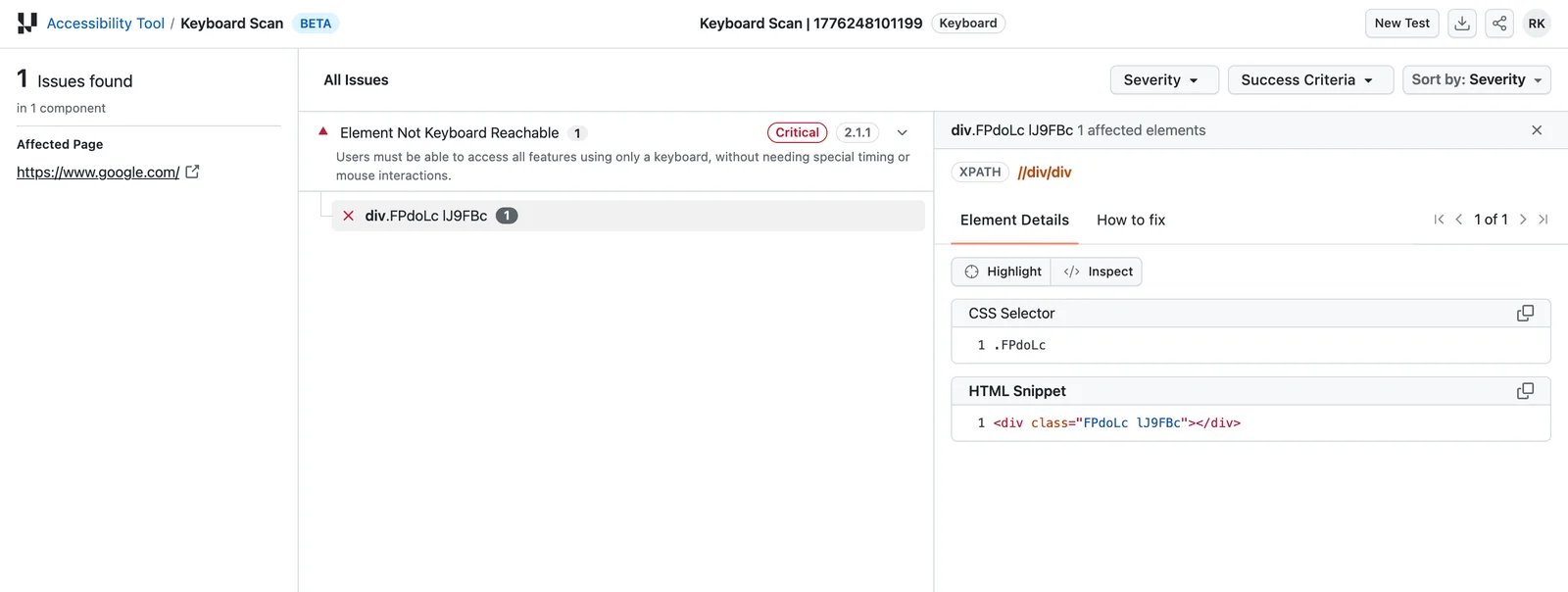
First-party example from TestMu's Keyboard Scan documentation, checked November 2, 2026. It illustrates the report's element context, not a scan we performed or a current assessment of the example website.
Explore TestMu AI Accessibility

Best for: product teams coordinating accessibility work between designers and developers.
Stark connects design, code and live-site work. Its plan boundary matters: Figma tooling is not the same entitlement as project monitoring or private-URL/CI support. Check the annual commitments above before choosing it for a solo one-off scan.
Skip if: a design-file pass would be treated as sign-off on the shipped application, or you need a runtime-only check without the collaboration workflow.
First elimination test: take one component from Figma into staging. Check whether the relevant plan lets both owners see and act on findings. Verify the implemented component's focus and accessible name independently. The useful result is an accountable fix that survives handoff, not agreement between two scores. Stark's AI overview describes third-party models and data-use boundaries; review it before providing private designs.
accessFlow
Best for: a web development team that wants audits, prioritized work and suggested repairs in a shared backlog.
The official product documents recorded journeys, ticket integrations, an SDK and MCP. accessFlow is distinct from accessWidget. In a demo, establish which fix changes source code and which uses the product's auto-resolve mechanism; the page describes both code suggestions and selected changes without touching code. Do not treat these as identical deliverables.
Skip if: you require a verified public price or a particular framework/standard version that the proposal does not specify. The reviewed FAQ names WCAG 2.1 AA; confirm the exact ruleset needed for your project.
First elimination test: request a demonstration on a representative component. Inspect the proposed fix, where it is applied, how it is reviewed and what happens after redeployment. Rule it out if your team cannot maintain or verify that repair through its normal release process.
When a free checker or a different service is the better choice
For a few pages, begin with WAVE or the free Axe extension, then inspect the experience with a keyboard and appropriate assistive technology. WAVE offers a public URL checker and browser extensions; private or dynamic pages require a suitable evaluation route. These tools remain useful without pretending they are all AI products.
For a large content estate, compare Siteimprove Accessibility and Silktide Accessibility. Siteimprove describes monitoring, remediation and specialist services across content types. Silktide combines recurring checks, guidance, task assignment and retesting; its pricing is proposal-based. They are credible alternatives when ownership sits with a web/content operations team, rather than interchangeable replacements for every pre-release SDK workflow.
For a developer-run baseline beyond spot checks, combine the official open-source Axe integrations with your existing test framework. This can include dynamic states when your test opens them before scanning; it is not restricted to static websites. The trade-off is owning the journey, results handling and manual follow-up. Accessibility Insights for Web is another guided assessment route alongside WAVE.
Other direct developer options to include in a pilot
The six detailed options are selected routes, not the whole market. Two more vendors directly serve this same developer/QA task; they should not be dismissed as only broad consulting programs.
Level Access Level CI integrates scans, PR feedback and remediation work into development pipelines. Its current documentation describes invitation-based onboarding, and its October 2026 release notes add AI-assisted test creation. Include it alongside Axe Bundle and Evinced when your organization already uses Level Access. We have not verified a comparable public software price or pilot entitlement, so it is a direct contender to scope rather than a numerically priced recommendation here; that is not a finding of lower quality.
UsableNet AQA documents SPA and transactional-journey testing, AI-assisted findings, developer context and CI integration, with an evaluation route. Include it alongside Evinced and accessFlow when checkout or login flows are the main problem. Public commercial price and exact evaluation allowances were not established in this check. Its service/software scope needs a proposal comparison; we do not infer a worse detection result from that evidence boundary.
Full-service audit contracts, native-app specialists and document-remediation specialists remain outside this web-product comparison.
Do not buy a widget, AI badge or generic chatbot response as a substitute for understanding the actual barrier. Keep the existing UX design category for broader design-stack discovery; this decision is about accessibility testing and repair, not generating a new interface.
A pilot that answers the purchase question
Use a staging copy and synthetic data. Choose one real journey: login, open a menu or modal, submit an invalid form, correct it and reach confirmation. Include your mobile-web layout. Mark the states and barriers already known to your team; do not assume every additional warning is a useful discovery.
Compare candidates on the same journey:
- Reach: which authenticated, dynamic and responsive states were inspected?
- Explain: can a developer reproduce the finding from the report?
- Repair: does the proposed change improve the interaction without breaking behavior?
- Retest: does the issue remain fixed after a component change and redeployment?
- Operate: what seats, pages, automation runs, AI credits and human work does that workflow cost?
Have a person verify keyboard and screen-reader behavior, and involve users with relevant disabilities where practical. Preserve accepted findings, code changes and unresolved human-review work. For automated edits, inspect the diff before shipping. Before connecting staging or an AI integration, check what screenshots, DOM, code and credentials leave your environment and which third parties process them.
If the need is general PR feedback rather than accessibility evidence, use our AI code review comparison. Buying both can make sense; treating one as proof of the other's coverage does not.
Frequently asked questions
Can AI accessibility testing prove that my site is compliant?
No. Automated and AI-assisted findings help evaluation; they do not settle every accessibility criterion or a legal determination. Review real interactions and unresolved human checks. W3C explicitly says evaluation tools cannot check every accessibility aspect automatically.
What is a useful free starting point?
The free Axe extension and WAVE are useful baseline routes; TestMu also offers a free accessibility extension. BrowserStack's Free web workflow/scanner offering covers up to five unique pages; TestMu also lists 25 lifetime free Accessibility Scheduling scans. For an existing Playwright suite, the open-source Axe integration is a no-license-cost CI baseline. Free does not automatically include paid AI, cloud automation or your required assistive-technology environment.
Why can a clean page scan miss a broken checkout?
The barrier may appear only after an interaction: a modal opens, focus moves, an error appears or content updates without a new URL. Check which states were scanned and test whether a person can complete the task. A crawler reaching a page is not the same as exercising its journey.
Is an AI-generated accessibility fix safe to deploy automatically?
Treat it as a proposed change. Review where it applies, check that it preserves the intended interaction, and retest after deployment. Source edits, runtime adjustments and generated recommendations require different maintenance; keep a responsible owner for each.
Do I need an accessibility tool if I already have AI test automation?
Check the accessibility checks your current stack actually runs. Functional regression, visual comparison and accessibility evaluation answer different questions. Extend the existing stack when it covers your states and handoff; add specialist tooling when a material gap remains. Keep human verification in either case.
Get ToolWorthy Weekly
New AI tools, practical guides, and selected AI signals in one weekly brief.
For AI tool founders
Built a tool that belongs in this decision set?
Request an editorial evaluation for possible inclusion in ToolWorthy.
Submit your tool for reviewPaid submission does not guarantee a ranking, recommendation, inclusion, or editorial outcome.