
7 Custom Chatbot Builders 2026 — From Docs to a Live Bot
A demo answer is only the start. Compare custom chatbot builders by source updates, public deployment, human handoff and the unit you actually pay for.

On this page
Uploading a PDF and getting a sensible answer is the easy part of a custom chatbot demo. The harder decision is what happens when the source changes, a visitor asks something unsupported, or a conversation needs a person.
Start with Chatling for a budget-conscious website bot with scheduled source refresh. Compare Chatbase, CustomGPT.ai and DocsBot for other managed content-to-answer routes. Evaluate Botpress and Voiceflow when you need explicit procedures and conversational control. Consider Dify when your team needs to control the application and retrieval pipeline, including a self-hosted deployment.
This is a comparison of official sources checked on October 27, 2026, not a hands-on answer-quality, latency or resolution-rate benchmark. The order groups launch requirements. We focus on a website chatbot built from your sources; our AI chatbots guide covers assistants you use yourself, and our AI agent builder comparison covers the broader automation stack.
Custom chatbot builders at a glance
| Tool | Start with this requirement | First boundary to check |
|---|---|---|
| Chatling | Launch a modest-budget website bot with automatic source updates | Weekly sync starts at Starter; daily sync requires Growth |
| Chatbase | Launch a hosted customer-facing agent from business content | Auto-resync, API access and branding have plan or add-on costs |
| CustomGPT.ai | Publish source-linked answers from documents and websites | Website auto-sync and removing branding require Premium |
| DocsBot | Run a source bot with planned monthly or weekly refresh | Free is personal-use testing; business features need paid tiers |
| Botpress | Combine answers with procedures, actions and human escalation | Conversation allowance and included AI usage are different limits |
| Voiceflow | Design and manage a conversational experience across chat and voice | Current pricing is usage-based and quote-led for businesses |
| Dify | Control retrieval, workflow logic and hosting | Cloud credits, provider costs and self-host operations remain distinct |
A knowledge chatbot retrieves relevant content and produces an answer. It does not permanently teach a foundation model everything in your files, and retrieval does not guarantee a correct answer. The launch decision is whether you can keep answers grounded and handle the cases the sources do not resolve.
Compare source freshness and branding
| Tool | Automatic source-refresh boundary | Unbranded website requirement |
|---|---|---|
| Chatling | Weekly: Starter $25/month; daily: Growth $75/month, monthly billing | Add $35/month for removal, or choose a tier that includes it |
| Chatbase | Auto-resync starts at Basic: $150 monthly or $120/month billed yearly | Separate $1,188/year branding-removal add-on |
| CustomGPT.ai | Website auto-sync needs Premium: $499 monthly or $449/month billed yearly | Included on Premium; Standard is not white-label |
| DocsBot | Personal: monthly refresh; Standard: weekly. Free excludes refresh | Business: $499/month; entry paid plan remains branded |
| Botpress | Studio website sources support scheduled recrawl, including daily; manual resync also available | Whitelabel webchat starts at Plus |
| Voiceflow | Supported URL/integration sources: Never, Daily, Weekly or Monthly refresh; confirm plan eligibility | Agency offering lists white-label tools; confirm your business/channel quote |
| Dify | You configure ingestion and reindexing; publishing app changes does not itself refresh stale sources | Dify frontend branding has license conditions; a custom API frontend is a separate route |
For managed source bots, compare refresh frequency before headline subscription price. Chatling offers a lower-cost scheduled-refresh route; DocsBot's monthly or weekly allowance may be too slow if policies change daily. For Chatbase Basic, the separately billed branding add-on changes an unbranded-bot budget. CustomGPT.ai combines website auto-sync and branding removal on Premium. A citation should lead the visitor to useful evidence. Botpress and Voiceflow also document scheduled website-source updates; confirm the source type, plan and live-publishing path rather than treating them as manual-only.
Compare the unit you will pay for
These are public list-price references, not quotes. US-dollar prices were checked on October 27, 2026; taxes, promotions and regional checkout can differ. Annual equivalents require an annual commitment.
| Tool | Published entry or trial | What changes the real bill |
|---|---|---|
| Chatling | Free: 200 AI credits/month; Starter: $25/month, 1,750 credits | Model-dependent credits; extra 1,000 credits listed at $10/month |
| Chatbase | Hobby: $40 monthly or $32/month billed yearly; 700 message credits/month | Model/action usage affects credits; recharge listed at $40/1,000 credits |
| CustomGPT.ai | Standard: $99 monthly or $89/month billed yearly; 1,000 queries/month | Context depth and agentic actions can use extra credits; new replies stop at the limit |
| DocsBot | Personal-use Free: 100 AI credits/month, 50 source pages; Personal: $49/month | Larger models and actions use extra AI credits; page and team limits also differ |
| Botpress | Free: 100 conversations; Plus: $150/month billed annually with 250 conversations/month | Paid conversation packs and AI credits auto-recharge; conversation-pack recharge cannot be disabled |
| Voiceflow | Agency trial without a card; business pricing on request | Usage, model selection, channels, team and client-management requirements |
| Dify | Cloud Sandbox: 200 trial message credits; Professional: $590/year per workspace | Credits depend on model; own API key usage and self-host infrastructure are separate costs |
Do not divide a subscription by its headline credits and call the result a cost per customer. A message credit, a query and a conversation are different units. Ask each vendor to price the same workload: for example, your expected sessions, turns per session, model choice, source updates and escalation rate. Treat an unanswered or escalated session as work that still has a cost.
Sources: Chatling pricing, Chatbase pricing, CustomGPT.ai plans, DocsBot plans, Botpress pricing, Voiceflow pricing, and Dify pricing.
Production-budget examples: with monthly plan billing, Chatling Starter's weekly sync plus branding removal totals $60/month ($25 + $35); Growth's daily-sync equivalent totals $110/month ($75 + $35). Chatbase Basic requires $150/month plus a separate $1,188/year branding add-on. CustomGPT.ai Premium combines website auto-sync and branding removal at $499/month; DocsBot Business combines weekly refresh and an unbranded widget at $499/month. These are configurations, not equal-workload quotes: allowances, refresh cadence, taxes and overages differ. Chatbase and CustomGPT.ai's exact automatic-refresh intervals were not established here.
Compare the handoff you actually get
All seven can be evaluated for a website chat application, but a contact link, a support ticket and live takeover are different outcomes. These are documented routes, not completed handoff tests.
| Tool | Human continuation route | What you must still arrange |
|---|---|---|
| Chatling | Native live chat; guided flows can route a visitor to staff | Staff availability, routing and the exact plan's handoff options |
| Chatbase | Built-in helpdesk supports async tickets and live handoff | Basic or higher for the inbox; configure which action the bot invokes |
| CustomGPT.ai | External integration route; Intercom deployment is documented through Zapier | Existing helpdesk, integration costs and human takeover behavior; Lead Capture alone is not handoff |
| DocsBot | Standard includes escalation ticket creation | A ticket is async follow-up; live takeover was not verified as equivalent |
| Botpress | New workspaces route handoff to Desk; legacy workspaces may use HITL | Enable escalation and staff the destination; legacy HITL needs Plus |
| Voiceflow | Native handoff connections for Genesys, UJET, Kustomer, Dixa and Zendesk; custom connection API for others | Existing support platform, plan eligibility and configuration; no standalone staffed inbox verified |
| Dify | An integration you implement around the chat application | Connect and operate the human destination; a bundled inbox was not verified |
Sources: Chatling's website flow, Chatbase helpdesk, CustomGPT.ai Intercom deployment and Lead Capture boundary, DocsBot plans, Botpress handoff, Voiceflow handoff platforms, and Dify publishing routes.
If you already operate Microsoft Copilot Studio or a working Flowise application, test that existing setup before buying another platform. This shortlist targets a first public website bot; it does not claim those broader builders cannot do the job. For a full helpdesk purchase, follow the customer-service guide below.
Another relevant hosted option is SiteGPT: Starter uses manual refresh, while Growth adds monthly automatic refresh. Consider it if that cadence fits; it is not a substitute for daily updates at its entry price. These seven are a focused shortlist, not the entire market.
Wonderchat is also worth considering when a shared inbox and live human takeover are priorities. Its Free plan lists 50 AI replies/month and up to 20 resolutions, with manual recrawling; Starter adds monthly automatic webpage retraining. It is a direct additional option, particularly for a small integrated support pilot, rather than proof that one of the seven is universally best.
Detailed choices
Chatling
Best for: a small team buying a website-source bot where scheduled updates must fit a modest budget.
Chatling's website offering combines business-content ingestion, guided conversation flows, an embeddable widget and human continuation. Those capabilities overlap the simple source-bot and procedural-chat routes; this is not a clean divide between products that answer and products that act.
The current plans put weekly auto-sync on Starter and daily auto-sync on Growth. Free credits recur monthly, but model choice changes their consumption. Removing the vendor's branding costs extra unless included in the chosen tier; do not confuse visual customization with white-labeling.
Skip if: even a daily scheduled refresh is too slow for the information you publish, or you need a self-hosted application rather than a managed widget.
First elimination test: change a small public FAQ, verify the proposed refresh cadence and credit use, then request a person. Check that your actual support destination receives the conversation and that somebody owns it. Do not treat a vendor's resolution claim as your measured result.
Chatbase
Best for: a team that wants a hosted customer-facing agent and can choose its plan around the sources and integrations it actually needs.
Chatbase's product workflow connects sources, configures the agent, tests customer scenarios and deploys across channels. That makes it relevant when the deliverable is a public bot rather than an internal automation pipeline.
Plan boundaries matter immediately. Hobby includes basic integrations and analytics; auto-resync and API require Basic or higher. Removing Chatbase branding is a separate $1,188/year add-on. A low entry price therefore does not establish the cost of a frequently updated, unbranded production bot.
Skip if: you require self-hosting, or you have not budgeted the plan needed to keep your content current. No self-hosted edition was verified for this comparison.
First elimination test: connect a small public FAQ, change one important answer, and establish how the revised source reaches the bot on the proposed plan. Then ask an unsupported question and trigger a human-support route. Eliminate a configuration that meets the demo but cannot maintain the required freshness or escalation behavior. Plan details.
CustomGPT.ai
Best for: a source-grounded document or website bot where users need to inspect where answers came from.
CustomGPT.ai is a separate vendor, not a subscription to ChatGPT's custom GPT feature. Its product and website widget offering focuses on business sources and citations. Source links are useful for checking an answer; they are not independent proof that every statement is supported.
Standard provides a paid starting point after a seven-day trial. The current plan comparison reserves automatic website content sync and removing its branding for Premium. If freshness or white-labeling is mandatory, compare that tier rather than Standard. The trial requires a card and converts to the selected paid plan unless canceled.
Skip if: your hard requirement is a persistent free production plan, or you need broad custom workflow logic and assume citations alone supply it.
First elimination test: use two public source pages that disagree, plus one answer absent from both. Inspect the cited passage and refusal behavior. Then establish how an updated page gets reprocessed on the exact tier. Stop if you cannot distinguish a supported answer from plausible text with a nearby link.
DocsBot
Best for: a small documentation bot where paid refresh and support features can be chosen around a known publishing schedule.
DocsBot's product page describes agents built from your content, including customer-facing use. Free is advertised for personal use with 100 monthly AI credits; Personal at $49/month is the published small-business starting tier. Credits do not equal complete customer conversations.
Treat Free as testing access. The pricing comparison says there is no 30-day expiry, but the published terms still permit free-bot data deletion after 30 days. That conflict prevents a confident indefinite-hosting promise; confirm eligibility and retention before relying on it for a business.
The plan comparison excludes source refresh on Free. Personal includes monthly refresh; Standard weekly refresh and escalation ticket creation. An unbranded widget requires Business. Evaluate those boundaries before importing an entire help center.
Skip if: scheduled refresh on those tiers is too slow for your changing policies, or you require a private bot on the free plan. Private bots start on paid plans.
First elimination test: use a small public FAQ, check what consumes its credits, and change one page. Verify the plan's refresh behavior and whether a visitor can reach your existing support route. A successful free demonstration does not prove the ongoing configuration meets your needs.

Best for: a support or qualification bot that needs procedures, tool actions and a defined handoff to a person.
Current Botpress behavior documentation separates enduring instructions from Playbooks for ordered or conditional procedures. That distinction helps when a bot must gather information and follow a business process rather than answer from documents alone.
For freshness, Studio website sources support scheduled recrawling, including daily, plus manual resync. In Viber, Preview uses working knowledge and live channels use published knowledge. Confirm the update has reached the live version before relying on it for policy changes.
Handoff is an operational feature to configure, not a promise created by writing “contact a person” in a prompt. Official docs route new workspaces toward Botpress Desk, while existing workspaces may retain legacy HITL setup. The legacy HITL integration requires Plus or higher; verify the current Desk route and its costs separately for the workspace you will deploy.
Paid plans automatically buy conversation packs at 95% of quota; conversation-pack auto-recharge cannot currently be disabled. Added pack capacity renews until removed; unused conversations expire monthly. AI usage separately triggers $10 credit purchases at 95%; configurable spend caps are not yet available. This is not a hard-capped subscription.
Its billing definition also matters: at least two end-user messages constitute a conversation; threads spanning two billing months count in both, and emulator conversations count too. Model realistic traffic and testing rather than equating one visitor with one billed unit. See the current pricing FAQ.
Skip if: you only need a static document widget and cannot assign anyone to maintain procedures or handle escalations.
First elimination test: create one real support procedure with an absent order number and an unavailable external service. Confirm the bot does not fabricate a successful lookup, and that the human receives useful context. Test the working version before publishing. Handoff setup.
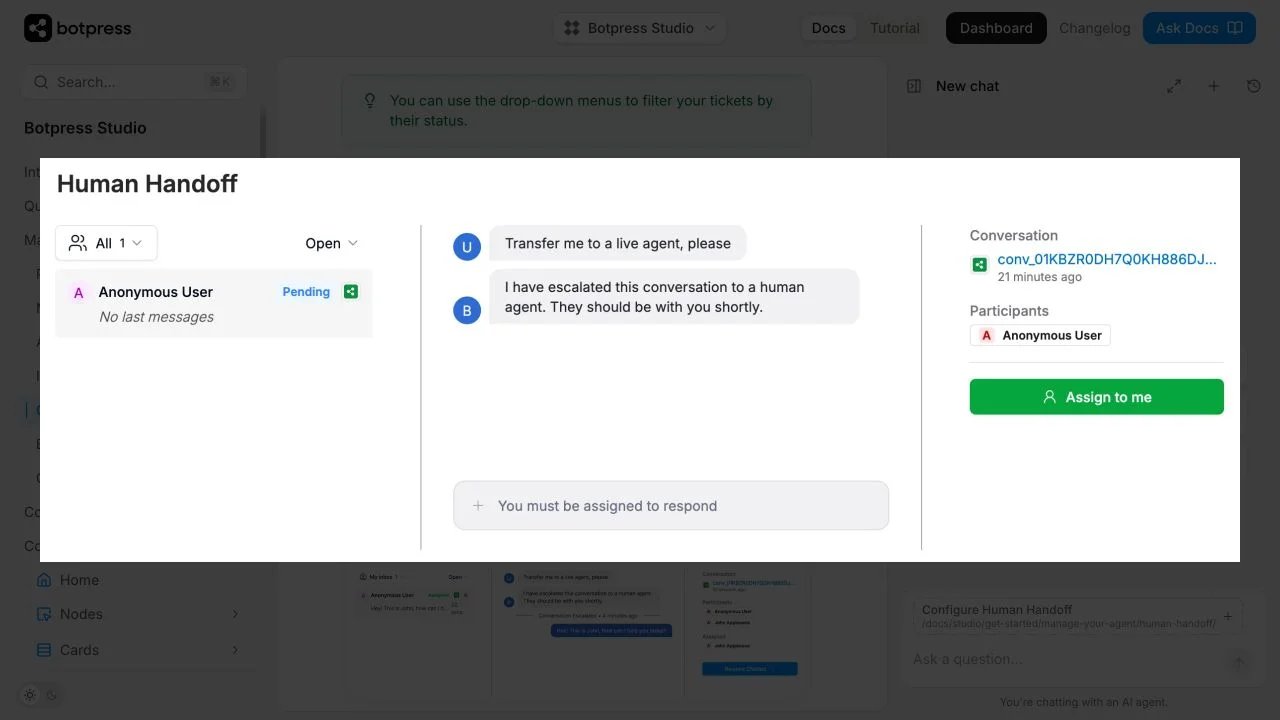
Browser capture of the official legacy handoff illustration. New Desk deployments differ; this is not our account or a completed support test.
Voiceflow
Best for: a team or agency designing and maintaining a conversational experience with explicit logic, integrations and more than one delivery channel.
Voiceflow's current platform and pricing material describes chat/voice deployments, model choice, team roles and API integration. It also distinguishes agencies managing client workspaces from businesses buying a customer-experience deployment. Those are different purchasing contexts.
The public pricing page currently offers a no-card agency trial and business pricing on request. Do not build a budget from an old per-editor figure or assumed free-credit amount. Obtain the current usage definition, channel charges, required seats and overage treatment for your configuration.
Its knowledge-source settings support daily, weekly or monthly refresh for supported URLs and integrations, alongside Never. Sitemap sync can add and remove pages; LLM-based chunking can consume credits on sync. Knowledge edits reach users when the relevant environment is published, so checking the refreshed editor alone is insufficient.
For live human replies, native connections cover Genesys, UJET, Kustomer, Dixa and Zendesk. Other destinations use a service implementing the handoff API. This connects to your support platform; it does not establish a bundled staffed inbox or included integration costs.
Skip if: you require a fully verified public fixed-price quote today, or have nobody responsible for the ongoing conversational design.
First elimination test: prototype a required branch that uses an API response, then simulate a failure and a request to speak to a person. Check the path and transcript, not just a successful FAQ answer. Ask for a quote using that exact flow and projected usage before treating a demo as an affordable deployment.

Best for: a developer or technically supported team that wants to configure retrieval and application logic, with a choice between hosted service and its own infrastructure.
Dify combines knowledge retrieval, model management and workflows. Its publishing documentation supports a web app, website widget or inline frame, as well as API delivery. This gives a team control of the application rather than only buying a document widget. A bundled live-agent inbox was not verified here; if human continuation is required, budget and test that integration separately.
Cloud Sandbox has limited trial message credits, not an unlimited inference allowance. Paid Cloud plans set workspace and knowledge limits; model-dependent credits and your own provider-key usage remain different cost paths. Self-hosting adds infrastructure, monitoring, updates and model-serving or API costs.
The Dify license is a modified Apache 2.0 license with additional conditions, including multi-tenant use and frontend branding. Check those conditions before offering separate client workspaces or stripping branding. Downloadable source is not an unrestricted white-label resale license.
Skip if: nobody will own deployment, updates and debugging, or you want a no-maintenance self-hosted product.
First elimination test: build one bot from a small public dataset, inspect which retrieved material supports its answer, change the source and redeploy. Estimate model usage and the work needed to restore a failed deployment. Eliminate this route if that responsibility exceeds the team's capacity, even if its software entry cost is low.
What counts as a successful first deployment?
Use a small public dataset and a written set of representative questions. Include questions whose answers are missing, ambiguous or contradicted by another page. This is a pilot you should run, not a claim that we executed it for all seven vendors.
Check these outcomes together:
- Supported answer: a reviewer can locate the source that actually supports it.
- Unknown answer: the bot explains the limit or routes the conversation instead of inventing policy.
- Changed source: an update or removal stops stale content being used through the intended refresh process.
- Human continuation: a real destination receives context and has an owner during advertised support hours.
- Public boundary: visitors cannot access content intended only for staff. Keep private material outside a public pilot.
- Cost observation: the usage meter can be reconciled with the model and actual steps taken.
If your main requirement is permission-aware internal search across workplace apps, start with our AI knowledge base comparison. If you need an entire support suite, see AI customer service tools. Those are broader buying decisions than adding a website bot.
Keep your exit path outside the bot
Retain the source documents, approved answers, test questions, escalation rules and integration specifications in systems you control. A transcript export is useful history, but it does not establish that a vendor's retrieval index, workflow runtime or channel configuration transfers to another platform.
Before signing a long contract, confirm source and conversation export, access controls, deletion behavior and the process for replacing the widget. Test the migration of one small bot. For self-hosting, separately check the license, infrastructure and model-provider obligations. The practical goal is to preserve the knowledge and operating procedure even if the implementation must be rebuilt.
Frequently asked questions
What is the easiest custom chatbot builder?
For a simple hosted document or website bot, evaluate Chatling, Chatbase, CustomGPT.ai and DocsBot. Their managed workflow avoids running the application stack yourself. We did not conduct a usability benchmark, so ease is a workflow fit hypothesis rather than a tested winner. Check source refresh and the actual plan before choosing.
Can I build a custom chatbot for free?
Chatling offers 200 AI credits/month; DocsBot has a small personal-use free allowance. Botpress has limited free conversations and Dify Cloud Sandbox has trial credits. None means unlimited production traffic. CustomGPT.ai's trial converts to a paid subscription unless canceled. Check current Chatbase availability and quotas directly rather than assuming an older free-plan description still applies.
Is a custom GPT the same as a chatbot on my website?
No. A conversational assistant inside another product and an independently deployed website widget are different delivery surfaces. Check who can access the bot, where conversations occur, and which subscription or API powers it. CustomGPT.ai is also a separate vendor despite its name.
Should I self-host a chatbot to lower costs?
Only after including infrastructure, model usage, maintenance, security and recovery work. Dify provides a self-hosted route, but its license has additional conditions. Hosted subscription cost and self-hosted total cost cannot be compared using software price alone.
Can I trust a chatbot because it shows citations?
Citations make verification easier; they do not guarantee correct interpretation. Check whether the cited passage supports the answer, whether stale documents are removed, and how the bot handles missing information. A polished response without that review is insufficient evidence for launch.
Get ToolWorthy Weekly
New AI tools, practical guides, and selected AI signals in one weekly brief.
For AI tool founders
Built a tool that belongs in this decision set?
Request an editorial evaluation for possible inclusion in ToolWorthy.
Submit your tool for reviewPaid submission does not guarantee a ranking, recommendation, inclusion, or editorial outcome.