
6 Replit Alternatives 2026: Keep Your App, Change the Layer
Compare six Replit alternatives by what they replace: AI building, coding, a browser workspace or hosting. Check migration risks before moving a working app.
On this page
If your Replit app already works, you do not necessarily need a different app builder. You may need a different editor, a reproducible development environment or somewhere else to host it. Rebuilding everything to solve one billing or deployment problem can create a larger problem than it removes.
Start with Bolt.new for a compatible JavaScript project you want to keep building through prompts; Lovable when you are willing to rebuild a web app; v0 for a web application aligned with its Vercel workflow; Cursor for code-first development; GitHub Codespaces for a browser-accessible development environment; or Railway when hosting—not the editor—is what needs replacing. These are six switching routes, not six interchangeable all-in-one platforms.
For the anchor's broader scope, see our Replit overview. This article focuses on the decision to leave an existing Replit workflow, rather than ranking every AI app builder.
Research boundary: Official product, pricing and support documentation checked October 4, 2026. This is desk research, not hands-on testing; the tests below are suggested checks for your own project, not tests we performed. Prices are public USD monthly-billing rates, before applicable taxes; regional checkout, annual billing and usage charges can change the total.
Replit alternatives at a glance
Choose the layer first, then read its elimination test. On mobile, swipe the table horizontally to see migration boundaries and cost meters.
| Route | What it replaces | Existing-code boundary | Hosting responsibility | Cost meter to watch |
|---|---|---|---|---|
| Bolt.new | Prompt-led JS building | GitHub import; Node.js backend support, not Python/PHP | Bolt hosting or a separate host; data still needs a plan | AI tokens plus hosting limits |
| Lovable | Rebuilding a web app | GitHub sync exports Lovable projects; no arbitrary repo import | Managed Cloud or separately configured infrastructure | Build credits and app-runtime usage |
| v0 | Web building with Vercel | GitHub import; Next.js is the default full-stack path | Connected Vercel project and its billing | v0 credits plus deployment costs |
| Cursor | AI-assisted code editing | Work on a cloned repository; configure its runtime | Your chosen host, separate from the local editor | Agent allowance and optional on-demand usage |
| GitHub Codespaces | Cloud development workspace | Repository plus Linux dev-container configuration | Development environment, not your production host | Compute core-hours and retained storage |
| Railway | Running the exported app | Deploy a compatible repo or container; configure services | Railway runs services; you manage application configuration | Plan minimum plus resource usage |
Keep a Python backend? Start with Cursor or Codespaces for development and assess Railway for hosting. Bolt's Node.js-only backend boundary is an early exclusion, not a reason to rewrite working Python. Want to keep prompting a compatible JS app? Try Bolt's repository import before considering a rebuild. Only unhappy with hosting? You can change that layer without replacing the editor.
Why people switch—and when to stay with Replit
A useful switch solves a specific constraint:
- Cost control: Separate AI-building charges from the cost of keeping the application online. A different token or credit system is not automatically a cheaper system.
- More control over code: You want repository-based reviews, local debugging or a development setup you can reproduce elsewhere.
- Runtime requirements: Your app needs a language, dependency or background process that the proposed builder cannot preserve.
- Hosting ownership: You want to choose infrastructure independently of the tool used to create the app.
Stay when Replit's integrated build-and-publish workflow saves more setup work than a move would save in fees. Replit now offers Free Mode within its allowance; paid Power and Max modes use effort-based billing, and paid actions require confirmation. Core is listed at $20/month on monthly billing, with $20 in usage credits. Those credits also cover services such as publishing, storage and databases—not just AI. Do not compare the subscription sticker price with another tool's editor-only price. Replit pricing, Agent billing.
For a small learning project, check the free publishing boundary before migrating: Starter allows one published app, whose publication expires after 30 days. If your only issue is account-based login, Replit also supports a separate Clerk Auth option; changing authentication within Replit may be less disruptive than changing platforms. Starter plan, authentication options.
Before moving: a Git export is not the whole app
Replit's Git integration can put source code and its commit history in your repository. Its checkpoints also cover state beyond Git, including database and AI context. Replit's database and App Storage are separate services for structured records and uploaded files. A successful clone therefore does not prove that users, files or production behavior have moved. Version control, storage and databases.
Save a small migration inventory before choosing a destination:
- Code and runtime: Repository, lockfiles, language version, install/build/start commands and any Replit-specific configuration.
- Secrets: Names and purposes of environment variables; transfer values securely, never in a public repository or prompt.
- State: Database schema and verified data backup, uploaded files and a restore plan. Existing external databases may be retained if their access and ownership permit it.
- Identity and integrations: Login provider, redirect URLs, payment webhooks, email services and scheduled/background jobs. Code import does not automatically transfer user accounts.
- Traffic: Domains, DNS access, health checks and the rollback route to the existing app.
Move a copy first. Validate sign-in, one database write/read, one upload, one critical integration and a restart on the proposed host. Check that data survives. Keep the original service available until those tests pass and the cutover is planned; avoid two production copies accepting writes without a reconciliation strategy.
Prompt-led building: preserve compatible code or rebuild deliberately

Best for: A JavaScript/Node.js web project whose owner wants a browser-based, prompt-led workflow with access to the code.
Bolt can import an existing GitHub repository and keep code synchronized. Its supported backend is JavaScript on Node.js; Python and PHP backends are not supported. That makes it a plausible continuation route for a compatible Replit app, not a drop-in replacement for every Replit runtime. Repository import does not migrate database records, storage or authentication by itself. Supported technologies, GitHub integration.
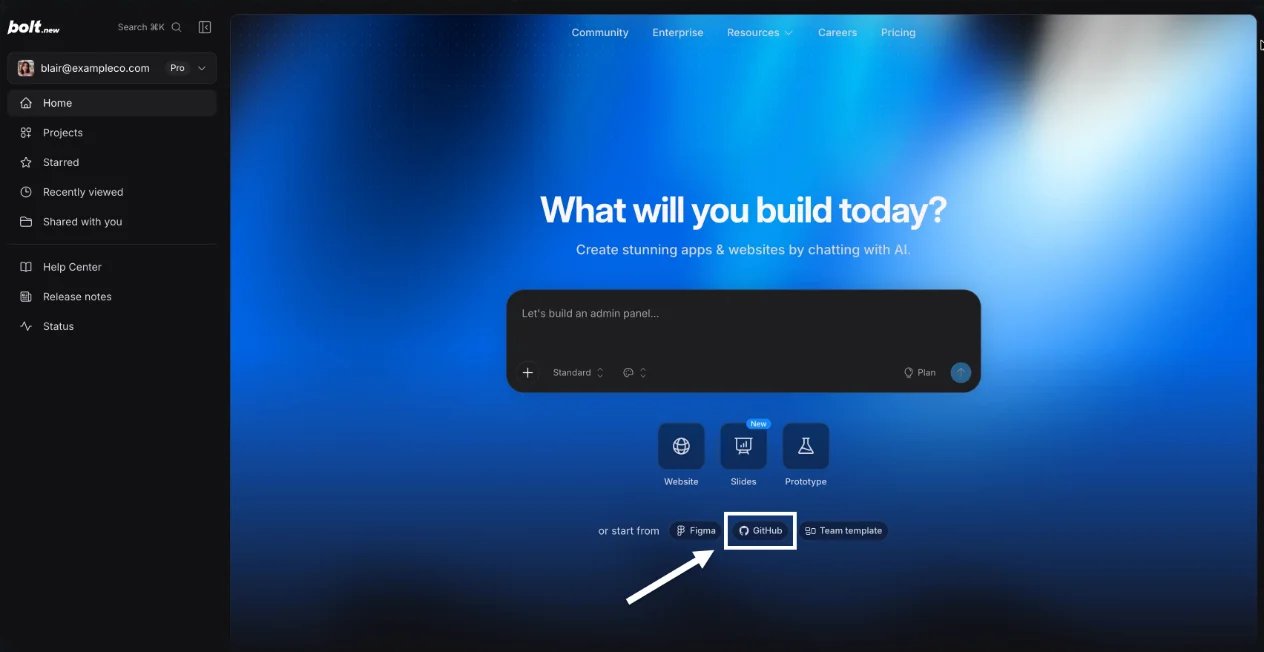
Official Bolt documentation example, not our migrated project. The GitHub entry matters because it distinguishes importing compatible code from generating a replacement app.
Skip if: Keeping your Python backend is non-negotiable, or you expect the Git connection to transfer all managed services.
Trial / first elimination test: Import a copy of the repository, start it with its actual dependencies, and make one bounded change on a test branch. Verify the resulting commit and external service connections before treating the import as a migration.
Cost boundary: Free has 300,000 tokens/day and 1 million/month, with Bolt branding. Pro starts at $25/month, with 10 million monthly tokens and custom-domain support. Larger project context can consume more tokens per message; “no daily limit” on Pro does not mean unlimited monthly AI usage or hosting. Official pricing.

Best for: A founder who wants to rebuild a web app from its requirements rather than preserve the old repository unchanged.
Lovable combines natural-language development with managed backend services. Its GitHub integration can export and synchronize a Lovable project, but the documentation explicitly says it cannot import an arbitrary existing GitHub repository. A Replit export is therefore not a one-click handoff into Lovable. Lovable supports moving code and services out later, but that portability does not remove the work of rebuilding and validating your existing app now. GitHub boundary, ownership and hosting.
Skip if: Your goal is to keep a mature backend and make small code changes without a rebuild. For choices within this builder workflow, see our Lovable alternatives comparison.
Trial / first elimination test: Recreate one representative feature using synthetic data, including its access rules—not just its screen. Export the generated code and identify what would need replacing or migrating before importing real customer data.
Cost boundary: Free includes 5 daily build credits, capped at 30 per calendar month. Pro starts at $25/month for 100 monthly subscription credits; code download and custom domains are paid features, while Git sync is available on Free. Building and app-runtime usage both need budgeting; included grants are not unlimited hosting. Plans, current pricing.
v0
Best for: A web app whose team wants prompt-based iteration, visual refinement and a Git/Vercel release workflow.
v0 is not just a UI snippet generator: it supports full-stack applications and defaults to Next.js. It can import an existing GitHub repository and work through branches and preview deployments. That makes it worth evaluating for compatible web projects, but importing code does not prove that an existing runtime, database or background worker fits the deployment target. Full-stack documentation, GitHub workflow.

Official v0 documentation example of visual editing—not a hands-on migration result. Design mode refines the running preview; it does not establish backend portability.
Skip if: Your main requirement is a general-purpose cloud development machine or preserving a backend without assessing its hosting model.
Trial / first elimination test: Import a test branch and deploy one feature that calls the real backend in a safe test environment. Check build logs, environment variables and authentication callbacks, not just the preview's appearance.
Cost boundary: Free currently allows 7 messages/day. Plus is listed at $30/user/month, including $30 in monthly credits. Budget the connected Vercel infrastructure separately; Vercel Hobby is restricted to personal, non-commercial use. Do not assume v0 Free means free hosting for a commercial Replit replacement. v0 pricing, Vercel Hobby terms.
Keep the app: replace the development environment

Best for: A developer who wants to own the repository and use AI while inspecting and changing the code directly.
The local Cursor workflow lets you work on a cloned project with codebase context, multi-file edits and terminal tools. You supply a working runtime, dependency setup and deployment path. Cursor also has cloud agents, so “local editor” should not be confused with an entirely offline or automatically private AI system. Agent documentation, cloud agents.
Skip if: You want one platform to generate, configure and host the whole application without managing those pieces.
Trial / first elimination test: Start the exported app from a clean checkout before asking AI to change it. If installation, secrets or platform-specific dependencies block that step, solve those first; a more capable editor will not transfer your production environment for you.
Cost boundary: Hobby is free with limited Agent usage; individual Pro is $20/month, with optional on-demand usage beyond included allowances. Hosting and external APIs remain separate costs. Official pricing.
GitHub Codespaces
Best for: Someone who wants to keep working in a browser while preserving a repository-based development setup, including a Python project.
Codespaces runs a Linux development container on a cloud VM, accessible through the browser or a local editor. Define the repository's environment in a dev-container configuration instead of expecting Replit-specific defaults to appear automatically. It replaces the development workspace; plan a separate production host. Do not treat an AI assistant subscription as included merely because the workspace is on GitHub. What Codespaces provides.
Skip if: You need an always-on production deployment or a remotely hosted macOS/Windows desktop rather than a Linux development container.
Trial / first elimination test: Open a fresh codespace, install dependencies and run the app. Recreate it from the repository configuration and confirm another workspace can reproduce the setup without undocumented manual fixes.
Cost boundary: Personal GitHub Free accounts include 120 core-hours and 15 GB-month of storage each month. On a two-core machine, that is 60 running hours—not 120. Organizations do not receive that personal free quota. Stopped codespaces still incur storage usage while retained; check compute and storage separately. Official billing documentation.
Keep the editor: replace only the hosting layer
Railway
Best for: An exported app that already works and needs a deployment destination for its application services, including a supported Python backend.
Railway can deploy from GitHub, local code or a Docker image, and documents Node.js and Python frameworks. It is a hosting route here, not a substitute for Replit Agent or a browser IDE. You still configure start commands, environment variables, database connections and any persistent storage or workers your app requires. Services, language/framework support.
Skip if: You mainly want prompt-to-app creation, or no one can maintain application configuration after the move.
Trial / first elimination test: Deploy a copy from the exported repository. Confirm startup, health checks, database connectivity, file persistence and a restart before moving the domain. Importing a repo or image does not import Replit's managed data.
Cost boundary: Railway offers a $5 trial credit for 30 days, then a constrained Free allowance of $1/month. Hobby has a $5/month minimum, including $5 of usage; usage above that is additional. It is not a flat $5 promise for every app, database and worker. Estimate the whole service set using measured test usage. Official pricing.
Which route should you try first?
For a working app, the lowest-risk trial usually preserves its language and services. Try Cursor or Codespaces for development control; add Railway only if hosting also needs to move. For a compatible JavaScript app, Bolt.new deserves an import trial. Use v0 when the web stack and Vercel workflow fit. Choose Lovable when a deliberate rebuild is acceptable—not because “GitHub sync” sounds like an import feature.
There are narrower options beyond these six. Base44 belongs to the managed-builder route, not a promise to preserve every Replit service. CodeSandbox remains worth checking for specialized sandbox workflows. Firebase Studio is not a new-workspace destination at this check date: Google says new workspace creation and signups are no longer supported. Windsurf's current successor is Devin Desktop; consider that in the code-first lane rather than relying on an old product name. Base44 features, CodeSandbox, Firebase Studio availability, Devin Desktop.
For a broader greenfield shortlist, use our AI app-builder comparison; for other platform-specific switching guides, browse the alternatives collection. For this switch, judge one representative project: can it run, retain its data, authenticate users and stay inside the budget on the new route? If not, a longer alternatives list will not make it ready to migrate.
Get ToolWorthy Weekly
New AI tools, practical guides, and selected AI signals in one weekly brief.
Related Posts
- 5 Lovable Alternatives in 2026: Choose for Your Website or App
Compare five Lovable alternatives for your next website or web app. Find the right workflow, check real costs, and learn what survives an existing-project move.
- Base44 Alternatives 2026: Choose by What Must Move
Compare nine Base44 alternatives by app type, code and data control, mobile needs, backend ownership, and the real work required to migrate a live app.
For AI tool founders
Built a tool that belongs in this decision set?
Request an editorial evaluation for possible inclusion in ToolWorthy.
Submit your tool for reviewPaid submission does not guarantee a ranking, recommendation, inclusion, or editorial outcome.