
5 Lovable Alternatives in 2026: Choose for Your Website or App
Compare five Lovable alternatives for your next website or web app. Find the right workflow, check real costs, and learn what survives an existing-project move.

On this page
Start with Bolt.new if you want another prompt-led builder, Replit if you want a cloud coding workspace, or v0 if Git and a web deployment workflow should lead. Base44 fits a managed-platform move; Cursor fits taking over the exported code yourself. None is a universal upgrade, and moving the repository is not the same as moving the running app.
Whether you are choosing a first builder or leaving a Lovable project, start with the job: publish a website, operate a web app, or deliver a native mobile app. Those are different decisions. For an existing project, changing the editor need not mean replacing its working backend.
This is desk research from official documentation checked on September 30, 2026, not a same-project hands-on benchmark. Fit judgments below are editorial recommendations; speed, reliability, and total cost have not been measured across these tools.
First Choose What You Are Building
- A company website, landing page, or content site: prioritize content editing, forms, mobile layout, and search visibility. If CMS publishing is the bottleneck rather than app logic, see the Framer route below; a full-stack builder may be more than you need.
- A web app with users and data: compare the five primary routes below. Test login, permissions, data writes, and a real deployment—not just the generated first screen. A new project can start with synthetic data; an existing app needs a separate migration check.
- An installable iOS/Android app: choose a mobile development route explicitly. A responsive website, a PWA, and a store-distributed native app are not interchangeable. See the mobile boundary below before choosing by a desktop preview.
Lovable itself supports websites and full-stack web applications; these are task distinctions, not claims that it only makes prototypes. Source: Lovable product scope.
Lovable Alternatives at a Glance
On a phone, swipe across the table to see the entry path, limits, and cost gates.
| Route | Best switching reason | Existing-app entry | Main boundary | Cost to check first |
|---|---|---|---|---|
| Bolt.new | Keep conversational JavaScript building | Documented Lovable → GitHub → Bolt path | Code import is not backend migration | Tokens; paid plan for external Supabase |
| Replit | Work on the app in a cloud code workspace | Lovable repository import | Database records and secrets are not imported | Free Mode limits; paid Agent and runtime usage |
| v0 | Put web changes through Git and preview deployments | Import an existing GitHub repository | Verify your framework and connected services | v0 credits or eligible ChatGPT usage; hosting extra |
| Base44 | Move toward an integrated managed backend | Supabase-backed data and GitHub frontend import | Permissions, identities, and runtime behavior need validation | Message and integration credits |
| Cursor | Keep the code and own development decisions | Open a local clone of the exported repository | You assemble and operate the application stack | Agent usage plus your infrastructure |
Use the AI app builder landscape for broader discovery. Here the decision is narrower: which workflow addresses your reason for considering an alternative, and what does switching cost?
Before You Switch: Lovable May Already Have the Exit You Need
Lovable supports exporting and two-way syncing code with GitHub. Standard github.com sync is available on all plans; downloading the codebase directly is a paid-plan feature. Needing a repository does not, by itself, require another builder. Source: Lovable GitHub documentation.
There is also a middle route: keep Lovable for iteration, but move hosting or backend components separately. Lovable's ownership documentation distinguishes older React + Vite projects from new apps created from May 13, 2026, which use TanStack Start and run server code. The latter need a host that runs the server, not just a static-file upload. Check your actual repository before following an old migration tutorial. Source: deployment and ownership options.
If repeated fixes are the problem: stop blind retries. Lovable's guide recommends describing the exact failure, investigating in Plan mode, and reverting to a working version when needed. An expired integration key, incorrect permission rule, or broken application logic can follow you into another editor. Switch for a concrete workflow limitation, not an assumption that another AI will fix the same bug automatically. Source: debugging guide.
If design or search visibility is the problem: first try the preview toolbar for targeted visual changes and the SEO & AI search review for indexing, metadata, and sitemap issues. The SEO review is free on all plans; applying fixes uses message credits. For older Vite projects, Lovable documents pre-rendering for verified crawlers on deployed public URLs; a third-party scanner may see a different result. Do not infer that leaving is necessary from one scanner warning. None of these features guarantees rankings. Sources: preview toolbar, SEO documentation.
Price alone needs a workload test. Lovable's current pricing describes a shared workspace credit balance usable for building, Cloud, and app AI, with included grants. Default-mode build costs vary with task complexity. Another tool's “credit” or token allowance is not an equivalent unit. Compare one feature change, one debugging cycle, and the app's ongoing runtime bill—not the two cheapest subscription labels. Source: Lovable pricing.
Separate initial construction, later edits/debugging, ongoing hosting/backend/API usage, and switching labor. Ask what happens when each allowance runs out: pause, extra charge, or a disabled live app. Use the same small change and your real domain/database requirements in each trial; do not choose a “cheaper” plan by comparing unlike credit counts. Free access can mean a limited hosted allowance, a free local editor with separately paid AI, or self-managed models and infrastructure—not free production operation.
For non-coders: a prompt-first tool can reduce setup, but someone still needs to verify permissions, integrations, and recovery. Replit/v0 involve more explicit code or deployment review in these routes; Cursor assumes engineering ownership. If nobody can do that work, a cheaper editor subscription may create a more expensive support problem.
What Actually Needs to Move?
A repository preserves source files. It is not a backup of every service those files call. Before authorizing any migration, inventory:
- Code and runtime: framework, lockfile, build/start commands, server routes, deployment settings, and a known working commit.
- Data: schema, records, constraints, relationships, row-level access rules, and a tested backup.
- Identity and files: login providers, users, roles, recovery flows, uploaded binaries, access rules, and URLs.
- External behavior: secrets, webhooks, scheduled jobs, payments, email, AI providers, and callback domains.
The lowest-risk first trial changes the editor while leaving working services connected in an isolated test environment. Moving the backend is a separate project. Lovable's external-hosting guide documents a Cloud-to-Supabase route, including schema/data, storage, authentication configuration, and functions; do not reduce it to copying a database connection string. Source: external deployment guide.
For a web app, test two users, a private record, file access, one integration, and deployment with synthetic or approved test data. For a website, preserve important URLs, content, forms, and analytics; plan redirects where routes change. The goal is continuity of the required behavior, not merely matching a screenshot.
If You Want to Keep Prompt-Led Building

Bolt is the closest route here to trying a different builder without first choosing a completely different development model. Its official Lovable import guide uses a concrete sequence: sync the Lovable project to GitHub, connect Bolt to GitHub, and import that repository. That establishes a code-entry path, not a guarantee that every existing app runs unchanged. Source: importing from Lovable.
Bolt's documented technology boundary is JavaScript: browser frontend frameworks and Node.js backends, not Python or PHP backends. It also documents Expo for mobile projects. That can justify selecting Bolt for a new mobile build; it does not establish that an existing Lovable web app becomes native automatically. Source: supported technologies.
Best for: someone who wants to keep chat-driven web development and has a JavaScript project they can inspect. Skip if: your hard requirement is a non-JavaScript backend, or nobody can debug the imported build and service connections.
Free/paid boundary: free projects can publish to a Bolt address, but show a badge and lack custom domains. Connecting an external Supabase database requires Pro or Teams. Token allowances and hosted usage are separate constraints; free hosting can go offline after its monthly allowance is exceeded. Source: Bolt billing.
First elimination test: import a copy of your repository, run its real start command, and make one change that writes to the intended test backend. Stop if the agent produces a replacement mock database or silently drops a server route instead of preserving the required behavior.

Base44 deserves consideration for a managed-platform move, not just a visual rebuild. Its migration documentation now explicitly lists Lovable: user-created public-schema tables and data, column schemas, primary/foreign keys, an RLS flag, and frontend code from GitHub. The documented connection uses a Supabase URL and service-role key, and begins with 100 items per entity for preview. Source: Base44 migration guide.
Do not read “RLS flag” as proof that every policy is translated. The list does not establish preservation of authentication identities, storage binaries, Edge Functions, or equivalent authorization logic. It describes an accessible Supabase source; it does not prove that every Lovable Cloud project can supply those credentials directly. Verify the source boundary before choosing this route. A service-role key is privileged: share it only through the verified product flow, never in screenshots or a general chat transcript.
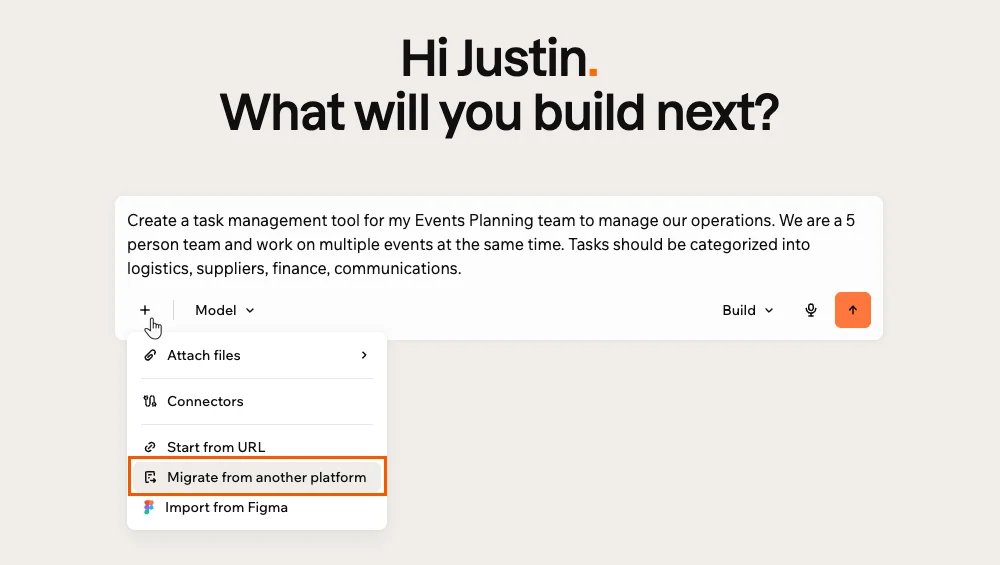
Official Base44 documentation screenshot. The import route is a starting point; test the resulting data and permissions before cutover.
Best for: a builder who wants Base44 to manage more of the app stack and accepts destination-specific adaptation. Skip if: the main goal is minimizing dependence on managed platform services.
Base44's public plans meter message and integration credits separately. The free plan has limited allowances; two-way GitHub sync requires Builder or higher. A lower starting plan is therefore not the full price of a repository-centered workflow. Sources: pricing, GitHub integration.
First elimination test: preview one relational dataset, then compare a forbidden-read case, one existing user's sign-in, and a file-dependent workflow. Do not migrate all records merely because the first 100 rows appear. For the opposite switching direction, our Base44 alternatives guide explains what leaving that platform entails.
If You Want More Explicit Code and Deployment Control

Replit has a named Lovable import flow using the GitHub-exported project. Its documentation lists code, styles, assets, backend logic, and schema among import inputs, but explicitly excludes existing Supabase records and secret values. Agent-assisted adaptation can consume credits. This is a useful distinction between “continue the code” and “move the live service.” Source: Replit provider imports.
The Replit product overview fits a different operating preference: a cloud workspace where code, Agent, database/auth services, and deployment can be assembled together. It is not simply Lovable with another chat box. Replit's Agent documentation supports connecting built-in services and third-party integrations; those still need to be configured for your imported app. Source: Replit Agent.
Best for: someone willing to inspect code and run configuration, but wanting a hosted development environment. Skip if: you expect an import to preserve database contents, secret values, and every production behavior automatically.
Budget boundary: Replit has Free Mode with plan-specific limits; check Settings → Usage for remaining allowance and reset timing. Power and Max are paid modes, so do not treat every trial iteration as billable—or every Agent task as free. Its official pricing surfaces showed different included-credit figures during this check, so verify the logged-in bundle before paying. Budget live app usage separately. Sources: Agent modes, current pricing.
First elimination test: import into a test project, add test secrets, connect the chosen backend, and deploy the authenticated workflow. Record the cost of one debugging cycle, not just the first successful launch.
v0
v0 is a route for web teams that want changes to remain visible in Git. It supports importing an existing GitHub repository. In a connected project, chats work on branches; the documentation describes preview deployments, pull requests, and repository protections that can block merging. Source: v0 GitHub workflow.
That does not turn your app into a migration-free Next.js project. First verify whether v0 can build and preview your current framework. Then decide which backend services to keep. Rewriting a working TanStack Start or Vite app solely to match a preferred deployment recipe is an architectural change, not a routine import.
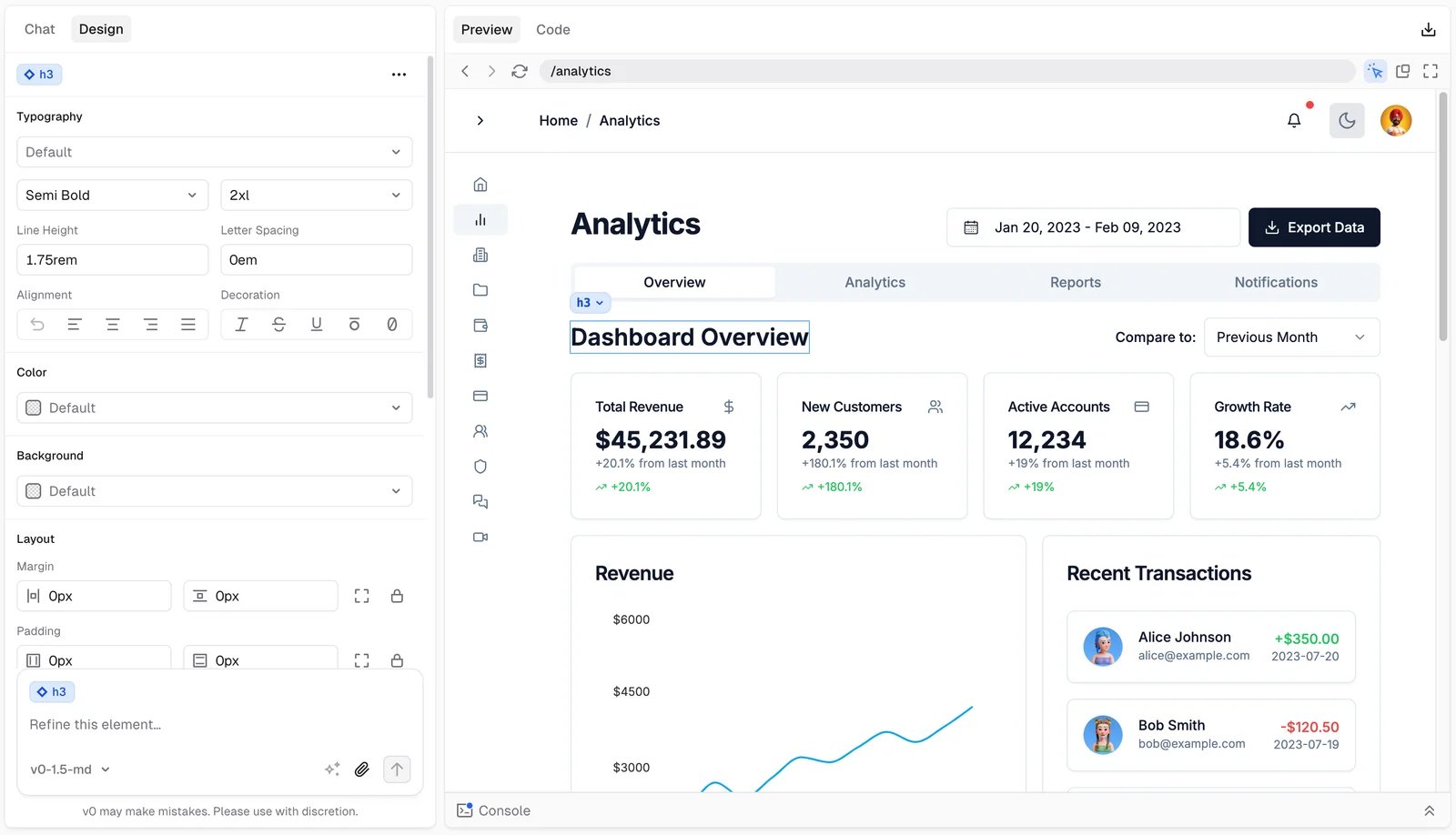
Official v0 documentation screenshot. Design mode edits the running preview and applies changes back to source; it is not available in every chat/runtime or on mobile viewports.
v0 is not limited to generating isolated UI snippets: its visual design mode can select elements and apply edits back to source. But the decision advantage here is the repository/review workflow, not an unmeasured claim that its output looks better. Source: design mode.
Best for: a web team comfortable reviewing diffs and managing deployment plus connected services. Skip if: you want one vendor to eliminate backend configuration, or must preserve a framework without first validating compatibility.
Free/paid boundary: the docs list Free with $5 monthly credits and seven daily messages; Plus is $30 per user/month. Premium is being retired and is unavailable to new users, so “v0 starts at $20” is not a safe new-customer recommendation. Hosting and external services need their own budget. Source: v0 pricing documentation.
Existing ChatGPT Plus/Pro subscribers can connect their account to cover eligible responses from supported OpenAI models. Images, delegated subagents, and supporting agent work may still consume v0 credits. Hitting the ChatGPT limit pauses generation rather than automatically changing billing. This is a scoped trial option, not unlimited v0 usage. Source: current billing options.
First elimination test: import a repository copy, create one branch change, inspect its preview, and confirm the intended merge checks. Reject the route if making the preview work requires an unplanned framework rewrite or removing a critical integration.

Cursor is the workflow-change option, not another fully managed no-code platform. Its quickstart starts with a local folder, understanding the codebase, making a small edit, reviewing the diff, and running the project's existing checks. For a Lovable app, that folder can be a clone of your GitHub-exported code. Source: Cursor quickstart.
Best for: a developer or founder with engineering help who wants to keep the app's code and choose its services independently. Skip if: you want an agent subscription to include all the database, authentication, hosting, and operational decisions of an app builder.
Leaving the Lovable editor does not require replacing its backend on day one. You can first establish a reproducible build and reviewable changes, then move infrastructure only for a concrete requirement. The tradeoff is responsibility: somebody must handle deploys, backups, secrets, permissions, and recovery. A local coding workspace is also not a promise of offline AI.
Cursor's Hobby tier has limited Agent requests. Pro is listed at $20/month, with additional on-demand model usage possible beyond the included amount. Your chosen hosting and backend remain additional costs. USD figures here reflect the public English pricing checked September 30, 2026, before applicable taxes; local checkout terms may differ. Source: Cursor pricing.
First elimination test: clone a known-good commit, reproduce the build, make one narrowly scoped fix, review the diff, and deploy to staging. If you cannot distinguish a code bug from a permissions or environment problem, adding a developer may be more valuable than changing AI tools again.
When a Different Kind of Builder Fits Better
Framer — marketing websites and CMS publishing. Its official guide documents a CMS, page/CMS metadata, sitemaps, and indexing/redirect controls. Consider it when maintaining public content and layouts matters more than custom logged-in application logic. Trial one real content page, a form, metadata, and a redirect. This is a website-workflow recommendation, not a claim that Framer imports or preserves a Lovable application. Source: Framer SEO and CMS guide.
Dyad — local, open-source app building. Dyad runs on your computer and supports your own model-provider setup, including local-model options. It is relevant when the requirement is control of the builder and model choice, rather than another hosted credit plan. The free editor does not make external AI, hosting, or a backend free; sending requests to a cloud model is not fully local processing. Trial the required build, provider budget, and deployment path before adopting it. No complete Lovable migration is assumed. Sources: Dyad overview, model setup.
Bubble — visual workflows rather than source-code continuity. Bubble documents visual application logic and an integrated database. Trial a form-to-record-to-permission workflow if you want that development model and accept rebuilding. Its apps cannot be exported as runnable application code, so it is not the route for an independent code/runtime exit. “No code” changes how you express logic, not whether somebody must verify it. Sources: building web apps, application ownership.
Native mobile is a separate route. Lovable publishes web URLs, not built-in App Store/Play Store packages, and does not generate React Native projects. Its own mobile client is for using the builder from your phone. PWA or external-wrapper approaches have different requirements; Bolt's documented Expo path is another build decision, not an automatic conversion of an existing app. Test the needed camera/push/offline behavior and store-release path before committing. Sources: Lovable publishing FAQ, Bolt technology boundary.
If you are starting from scratch rather than moving an existing project, the broader AI app builder comparison serves that selection task. Keeping this distinction prevents migration advice from becoming a generic product list.
A Safer Switching Sequence
- Preserve a working baseline. Save source, backups, service configuration, and an acceptance checklist. Do not cancel the existing environment yet.
- Change one boundary first. Trial the new editor against isolated services or test credentials. Avoid simultaneous editor, framework, database, and identity changes.
- Prove one representative workflow. For a website, publish a content page, submit a form, and verify metadata and mobile layout. For a web app, test denied access, login/recovery, a data write, files, and one integration. For native mobile, test the hardest device feature on a device and confirm the release path. Continue only if the required workflow survives a later edit; eliminate a route that needs an unplanned rebuild or unsupported workaround.
- Plan cutover and rollback. Decide how late writes, domains, sessions, callbacks, and billing will be handled. Keep the working app available until the destination is verified.
Frequently Asked Questions
Which Lovable alternative should a non-coder try first?
Bolt.new is a sensible first trial for a similar prompt-led JavaScript workflow; Base44 fits a managed-platform preference. Neither is a measured ease-of-use winner. Trial one complete workflow and see whether you can maintain it. For a public content website, consider the Framer route rather than automatically choosing another full-stack builder. Cursor is not a direct no-code substitute.
Can I move my Lovable app without rebuilding it?
You can export the code and try it in another environment. Whether a rebuild is needed depends on framework compatibility and service dependencies. Replit explicitly excludes existing Supabase records and secrets from import; Base44 documents a different data-import route. Neither claim proves complete identity, file, or permission continuity.
Which alternative is free?
All five primary tools offer free entry points, but not equivalent production capacity. Dyad adds a free local-editor route with separately configured AI and infrastructure. Check paid gates for databases, domains, branding, Agent limits, and running costs. Lovable's own free plan supports Git sync, so free repository access alone is not a reason to migrate.
Do I have to move off Lovable Cloud when I change editors?
Not necessarily. Treat the editor and backend as separate boundaries. Keeping the current backend can reduce the first move's scope, provided your new environment is correctly configured. If you migrate it later, follow the official external-hosting guidance and test data, identities, files, and functions independently.
Can I turn a Lovable project into a native mobile app?
Not through a built-in native packaging/store-submission flow. Lovable's publishing FAQ distinguishes web publishing, PWA or external-wrapper approaches, and rebuilding outside Lovable for React Native. Being usable in a phone browser does not prove the device features or distribution you need. See the mobile boundary above before choosing another builder.
Get ToolWorthy Weekly
New AI tools, practical guides, and selected AI signals in one weekly brief.
Related Posts
- Base44 Alternatives 2026: Choose by What Must Move
Compare nine Base44 alternatives by app type, code and data control, mobile needs, backend ownership, and the real work required to migrate a live app.
For AI tool founders
Built a tool that belongs in this decision set?
Request an editorial evaluation for possible inclusion in ToolWorthy.
Submit your tool for reviewPaid submission does not guarantee a ranking, recommendation, inclusion, or editorial outcome.