
5 OpusClip Alternatives 2026 — Before You Cancel
Moving from OpusClip means more than downloading an MP4. Compare five routes by clipping, editing, export limits and what you must save before cancelling.

On this page
The best OpusClip alternative depends on what you want to stop doing: paying for source minutes, repairing suggested clips, working around export limits, or keeping projects in someone else's cloud. Those are different switching decisions.
Start with Vizard or Klap to keep automatic long-to-short clipping, quso.ai to combine clipping with a broader social publishing workflow, Descript when the edit needs more attention than the initial clip selection, or DaVinci Resolve when local project control matters more than automated highlight discovery. None is a verified one-click importer for an OpusClip workspace.
Research boundary: Official product, pricing and help pages checked October 22, 2026. This is desk research, not a comparative clipping or rendering test. We did not buy plans, upload private footage, measure edit time or test cross-editor imports. Prices below are displayed USD amounts before applicable tax; billing term, allowance and account-specific offers matter.
OpusClip alternatives at a glance
Pick the job you need to preserve. Links jump to each tool's switching test; swipe within tables on a phone.
| Tool | Preserve this workflow | Main reason to rule it out |
|---|---|---|
| Vizard | Upload long videos, generate clips, then edit | Watermarked 720p Free; confirm your individual source fits the account's upload limits |
| Klap | Automatic clipping with clip-count plan allowances | Older official guidance caps Basic sources at 45 minutes; current eligibility needs confirmation |
| quso.ai | Clip and manage a wider social-content pipeline | Multi-platform scheduling sits above the entry paid plan |
| Descript | Edit the source through its transcript, then make clips | Media allowance and AI credits are separate limits |
| DaVinci Resolve | Keep source media and an editable local timeline | You take over selecting, reframing and finishing the excerpts |
If you are still choosing a clipper from scratch, our AI clip generator comparison covers that broader purchase. This page is for someone leaving an existing OpusClip workflow—and avoiding a needless rebuild.
Why switch—and when staying costs less
Free output is not production-ready output by default. OpusClip Free currently lists 60 credits a month, a watermark, no editing and a three-day export window. Starter lists $15 monthly for 150 credits and watermark removal. If the watermark is your only problem, compare that upgrade with the full cost of moving; do not assume another free plan removes the same restriction. Official OpusClip plans.
The meter may be the problem, not the monthly price. OpusClip bills clipping at one credit per source minute. Four 60-minute uploads consume 240 clipping credits before any other charged actions: too much for Starter, but within Pro's advertised 300 credits at $29 monthly. Upgrading can cost less disruption than switching. Processing only the useful section can also reduce demand. A tool billing finished clips needs a different calculation—not a claim that its credits are cheaper. OpusClip credit rules.
Your clips may need a different kind of editing. A wrong opening, missing context, an obscured demonstration or a caption correction is a reason to test the actual editing workflow. It is not evidence that one vendor's highlight model is universally better. Keep a representative difficult source, not just a clean talking-head demo, for your comparison.
Stay with OpusClip if its suggestions already need little correction, your plan fits the workload and its publishing or team setup saves more work than a replacement removes. Pro also offers a route into Premiere or Resolve. Using that handoff may solve an editing problem without replacing the clipper. A claimed virality score, from any vendor, is not a forecast of your channel's results.
Save the right things before cancelling
An MP4 preserves the finished picture and sound. It does not preserve independently editable captions, source handles, your entire workspace or a publishing queue.
OpusClip's XML export documentation describes a Pro-only package for Premiere and DaVinci Resolve containing XML, SRT and original video segments. This is a real handoff route, not proof that another cloud clipper can import the project.
The Premiere import FAQ makes the important distinction: styled captions and animations export as overlays; the separate SRT is the route for rebuilding editable subtitles. XML exports are made one short at a time. OpusClip documents XML support for videos up to 1.5 hours, also calling that the recommended maximum for stable performance; do not assume longer sources are supported. A successful MP4 download does not prove those editing requirements are met.
| What you want to keep | Save before changing plans | What still needs attention |
|---|---|---|
| Finished clips | Download final MP4s and check playback | Burned-in captions and framing stay baked in |
| Re-editable work | Keep full original media; export eligible XML packages and SRT | Relink media and check caption/overlay behavior in the destination |
| Brand consistency | Keep authorized logos, fonts, colors and layout references | Rebuild and check the new tool's templates |
| Publication continuity | Record pending posts, destinations and dates | Reconnect accounts and avoid scheduling the same clip twice |
Check the project's actual expiry date, not just its plan name. OpusClip's pricing page and its project-saving help do not present retention identically: help describes default expiry and an explicit Pro cloud-save option. Its cloud-storage rules say downgrading can remove saved projects from cloud storage and uploaded assets from the asset library. Export and verify important work first; “saved in the app” is not an independent backup.
Cancellation and an immediate downgrade are not the same action. The plan-change guide describes cancellation taking effect at the next billing cycle, while an eligible change to Free removes paid features immediately. Its credit guide says unused credits retain their original expiry after cancellation, but another live help page says they expire at the billing-cycle end. That conflict is unresolved: confirm the effective date and important credit balances with your account or support. Complete Pro-only XML exports before losing access; do not base a migration on assumed post-cancellation credits.
Compare the limits that change a switch
These are plan boundaries, not quality scores. A paid plan's ability to export 4K does not restore detail absent from the source.
| Tool | Free or entry export boundary | What you pay or manage next |
|---|---|---|
| OpusClip — stay baseline | Free: 60 credits/month, watermark, no editing; Starter $15 monthly/150 credits | Pro $29 monthly/300 credits and XML; compare upgrading before rebuilding |
| Vizard | Free: 60 source-minute credits/month; watermarked 720p; three-day storage; individual upload limits need account confirmation | Creator starts at 600 monthly credits, watermark-free 4K and 100 GB; paid quote not verified |
| Klap | Free trial advertised; older official guidance lists Basic sources up to 45 minutes—confirm current eligibility | Basic: 100 clips/month, $29 monthly or $14/month billed yearly; clip count alone does not qualify an hour-long source |
| quso.ai | Free: 75 credits/month; watermarked 720p; seven-day retention | Lite $29 monthly/100 credits; Essential $39 monthly/300 credits and seven-platform scheduling |
| Descript | Free: 60 media minutes/month, but only 100 one-time AI credits; watermarked 720p | Monthly per editor: Hobbyist $24/10 media hours/400 AI credits/1080p; Creator $35/30 hours/800 credits/4K and timeline export |
| DaVinci Resolve | Free desktop edition; ordinary supported-format editing up to UHD/60 fps | Your editing time, hardware and backups; selected AI tools belong to Studio |
Sources: Vizard plans, Klap plans, quso.ai plans, Descript plans, Resolve editions. Vizard's public pricing text returned placeholder paid amounts during this check, so no dollar price is inferred from those placeholders. Confirm the rendered allowance and quote in your account.
For a useful workload comparison, write down source minutes, longest source, usable clips needed and destinations. Four hour-long recordings need 240 clipping credits: OpusClip Pro covers that input before other charged actions, so exceeding Starter alone is not a reason to leave. Vizard Creator starts at 600 monthly credits; quso.ai Essential lists 300 shared across processing operations. Klap Basic may fail the hour-long-source requirement under its older 45-minute guidance, regardless of 100 advertised clips. Descript Hobbyist covers four media hours, but repeat AI clipping spends a separate 400-credit allowance. These are capacity checks, not predictions of accepted clips or equal feature value.
Keep automatic long-to-short clipping
Vizard
Choose Vizard when you want to keep the upload → suggested clips → correction workflow but need editing access before paying. Its Free plan includes the editor, unlike OpusClip Free's advertised no-editing boundary. That makes the free tier useful for testing correction work—not for assuming watermark-free client delivery.
Check the input before planning that trial. The 60 monthly credits do not establish a per-file entitlement. Vizard's upload help gives a general ceiling of 10 GB and ten hours, without establishing Free-specific limits. We could not verify the current Free comparison-grid limits in the live page. Confirm your file's size and duration in the intended account; do not assume an unchanged hour-long, high-bitrate source will be accepted just because 60 credits remain.
Creator adds watermark-free 4K export, scheduling and 100 GB storage. Shared workspace and project sharing are Business distinctions, so a solo Creator allowance is not a substitute for checking your agency's handoff requirements. Vizard describes one credit as one uploaded source minute. Product workflow.
First elimination test: Upload a source you own with two speakers or a screen demonstration. Correct the cut and framing, then inspect the actual downloaded file. Eliminate this route if the required plan still cannot preserve your content or collaborator handoff. We have not tested its highlight selection against OpusClip.
Migration cost: Bring the original recording and rebuild the selected clips and templates. We found no verified OpusClip-project import; an old MP4 is a reference output, not the new editable source.
Klap
Klap is worth comparing when you want another automatic clipping workflow with a different billing unit. Its current pricing page describes 100, 300 and 1,000 monthly clips rather than presenting the plans primarily as source-minute bundles. That can make forecasting different—not automatically cheaper.
The official product page shows upload/link ingestion, automated clipping, captions and scene-aware reframing. Basic is $29 on the actual monthly toggle; the displayed $14 monthly equivalent requires annual billing. A Klap-hosted 2025 guide lists Basic as ten uploads up to 45 minutes with HD output, versus Pro's 30 uploads up to two hours and 4K. The current main pricing cards emphasize clip counts without reconciling those source limits. Treat the older caps as a warning requiring current account or checkout confirmation—not a verified current contract or an assumption of unlimited input. For hour-long recordings, Basic is not yet a qualified purchase.
First elimination test: Submit one representative full-length source, not a short teaser. Confirm it is accepted, correct one awkward frame and download one finished clip. Rule Klap out if a source-length or export gate forces an unsuitable tier—even when the clip allowance looks generous.
Migration cost: Reprocess originals and rebuild branding and social connections. There is no verified transfer of OpusClip scores, chosen clip boundaries or editing history.
quso.ai
Choose quso.ai when leaving OpusClip is also a decision to consolidate social planning and distribution. Its paid tiers distinguish TikTok-only entry publishing from Essential's seven-platform scheduling and Growth's brand kit and analytics. That is a more useful distinction than calling every tier an all-in-one replacement.
The official clipping product covers automated extraction, reframing and captioning. Free is explicitly watermarked 720p with seven-day retention. One credit is approximately one processed minute, and clipping, captioning and editing draw from the allowance; “unlimited 1080p clips” on a paid card does not mean unlimited source processing.
First elimination test: Check the exact social destinations you need in your proposed tier, then run one source through clipping, correction and export while watching usage. Eliminate the route if switching only moves you into another unsuitable meter or a publishing tier you do not need.
Migration cost: Rebuild templates, reconnect social profiles and reconcile scheduled posts. Do not assume an OpusClip queue, authorization or analytics history follows the video files. For product context, see our quso.ai overview.
Change who owns the edit

Choose Descript when the bottleneck is correcting the story, not generating more candidate excerpts. You import a source, work through its transcript and can generate clips from that editing environment. This moves the center of the workflow toward an editable source rather than treating every suggested short as the finished decision. See our Descript product overview.
Its official getting-started workflow documents file import and text editing. Free's 60 media minutes renew monthly, but its 100 AI credits are one-time, not a renewable clipping allowance. Hobbyist and Creator have recurring monthly AI budgets; their lower displayed $16/$24 per-editor equivalents require annual billing, unlike the $24/$35 monthly prices in the table. The usage guide lists Create clips at 30 AI credits per use, with additional reasoning costs possible through Underlord. Do not price repeated AI operations from media hours alone.
First elimination test: Correct a factual sentence and the opening of one proposed clip. Then confirm the export and how much AI usage that revision required. Rule Descript out if a fuller source-editing environment adds work without reducing the corrections you currently make.
Migration cost: Import original media and rebuild the source edit. OpusClip XML compatibility with Premiere or Resolve does not establish Descript import compatibility; no such project migration was verified here.
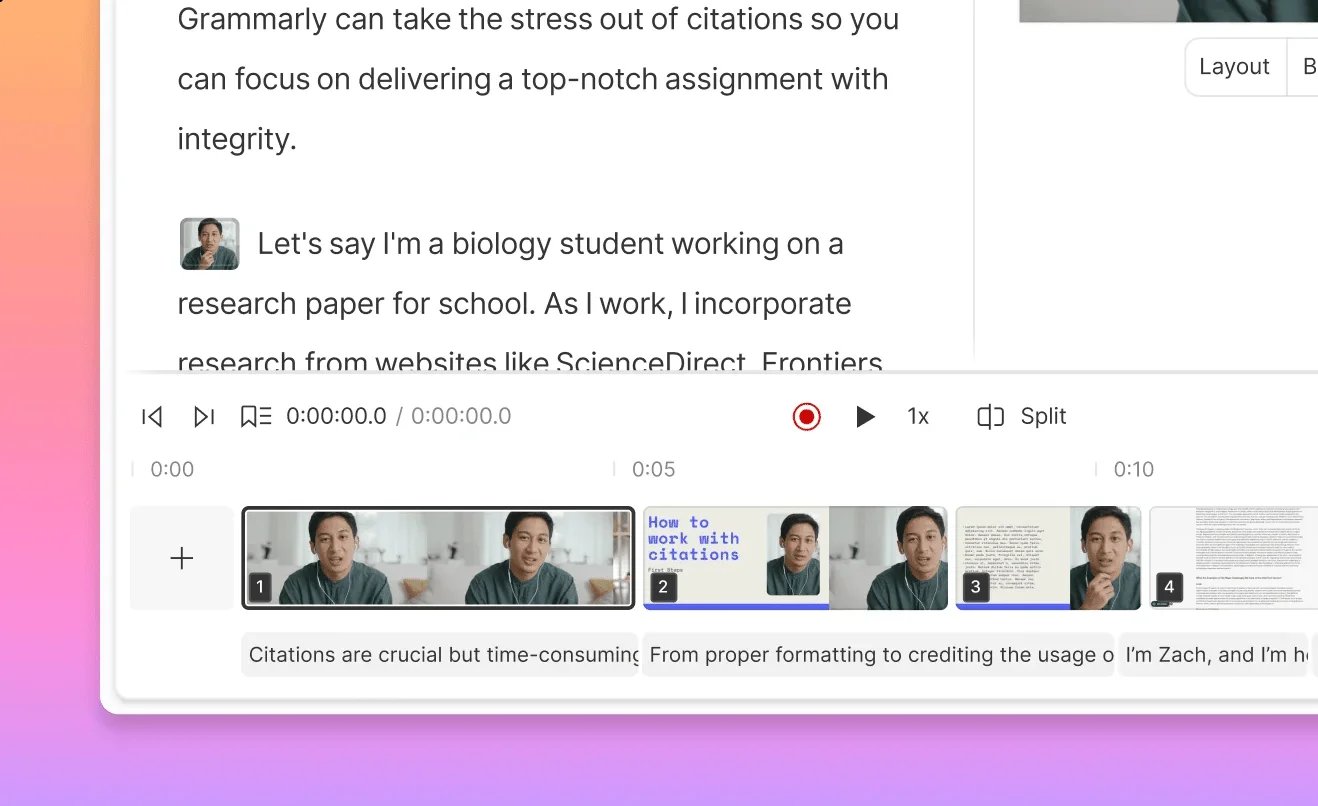
Official Descript documentation screenshot: transcript and clip sequence remain part of the source-editing workflow. This is not a completed OpusClip migration or our own test account.
DaVinci Resolve
Resolve is the workflow change for someone who wants to keep editing projects locally rather than buy another cloud highlight selector. Its free edition runs on Mac, Windows and Linux and supports virtually all 8-bit video formats up to UHD 3840 × 2160 at 60 fps. Blackmagic separates Studio-only tools—including text-based editing and additional AI features—from the free edition. Do not treat a Studio demonstration as a promise about Free.
The strongest switching route may be OpusClip plus Resolve, not an immediate replacement. OpusClip's Resolve import instructions describe XML, media and SRT handoff and a relinking step when media is not found. Validate one export, especially captions and audio, before relying on it for the archive.
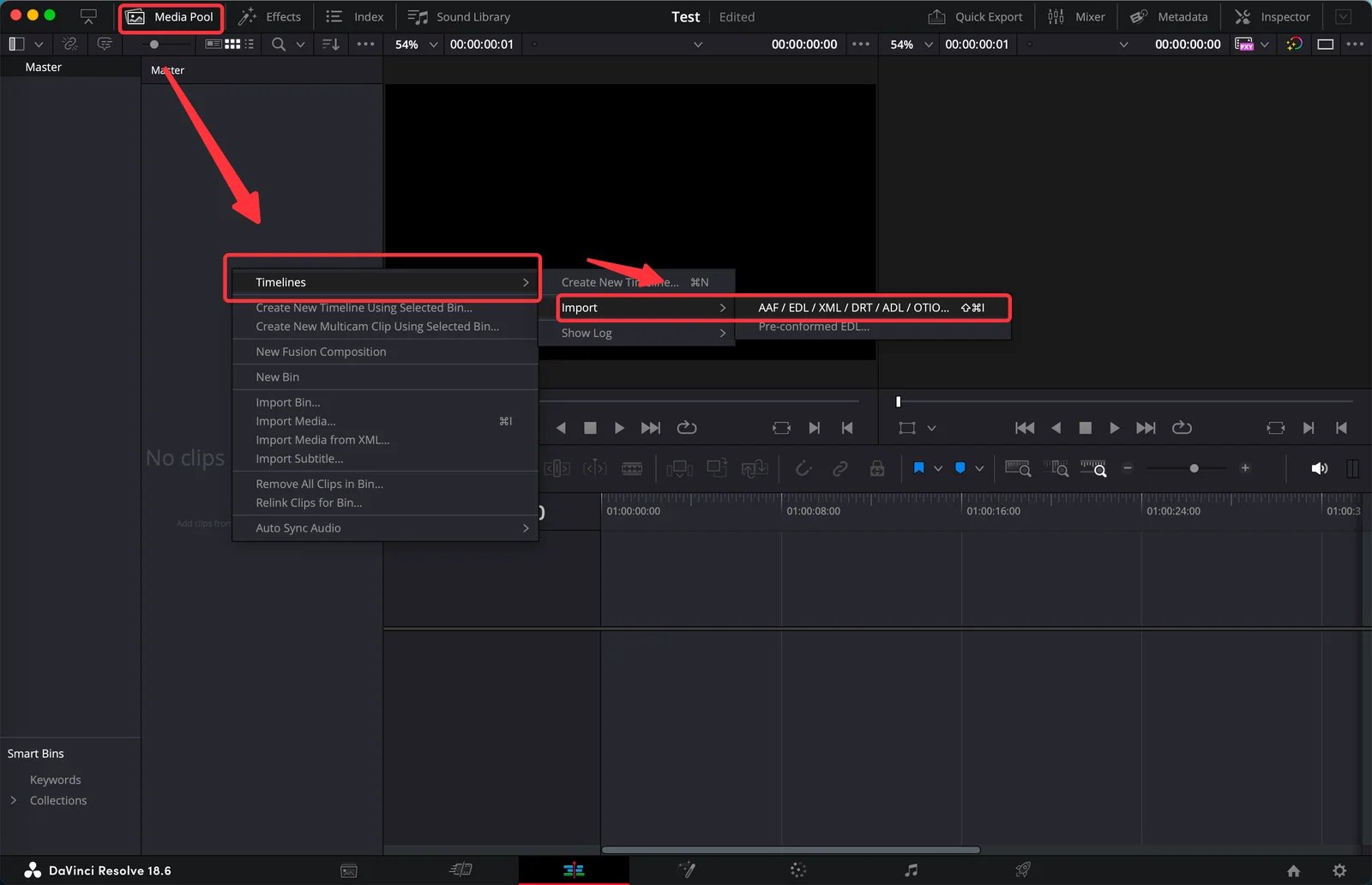
Official OpusClip documentation screenshot, showing Resolve 18.6—not our hands-on import test or a claim about the latest interface. The destination timeline/media step is why saving only a finished MP4 is a different decision.
First elimination test: Import or rebuild one representative short from its original media and finish your required vertical export. Check your codec, machine and editing effort. Eliminate this route if you need automatic batch highlight selection with almost no editorial work; Resolve's inclusion here is about project control, not a claim that it reproduces OpusClip's service.
Migration cost: Keep a project plus its media and backups. You gain control of the edit but take responsibility for organizing assets, selecting excerpts and scheduling delivery. A free editor is not zero labor.
What about CapCut, Submagic and Riverside?
They are legitimate adjacent choices, not three more mandatory rows. CapCut's long-video workflow is worth checking if you already use its editor; verify premium assets, account/region and the actual export before calling your workflow free. Submagic is worth a separate check when polishing short-form captions and effects is the central problem; its video-duration and credit limits matter as much as the plan headline. Riverside Magic Clips is most relevant if recording and clipping can live together, rather than adding a recording platform solely to replace an otherwise working clipper.
None is excluded because it failed a hands-on benchmark. These routes were not needed to create a second generic clipper list; start with an adjacent product you already pay for before adding another subscription.
Move one representative project, not the entire archive
- Export before changing the subscription. Keep originals, approved MP4s and any eligible XML/SRT packages. Open them outside OpusClip and back up the files.
- Rebuild one difficult but typical job. Include the actual language, speaker changes, aspect ratio, captions, logo and client review requirement. Preserve enough surrounding context to judge whether a selected excerpt is misleading.
- Count accepted output and correction work. Track which candidates you would publish, what you had to repair and the meter charged. This is your trial measurement, not a vendor's virality score.
- Move publishing last. Check queued posts, reconnect only the required accounts, confirm the first export in its destination and avoid running duplicate schedules. Then decide whether to cancel, downgrade or keep OpusClip for discovery and finish elsewhere.
For the anchor's documented capabilities rather than switching advice, see our OpusClip overview. If the real need is a wider editor rather than long-to-short extraction, browse the AI video editor landscape with that different job in mind.
Frequently asked questions
Which OpusClip alternative is closest to the same workflow?
Vizard and Klap are the first routes to compare for uploading long videos and receiving suggested short clips. quso.ai adds a broader publishing decision. No clipping-quality winner was tested here: compare your own source, correction work and required export before moving.
Is there a free OpusClip alternative without a watermark?
Do not assume another cloud clipper's free allowance delivers watermark-free work. Vizard, quso.ai and Descript document watermarked free exports; Klap advertises a trial rather than a verified ongoing free production allowance here. Resolve Free is a local editing route, not free automated highlight selection. Use supported formats and avoid Studio-only effects that require a paid license.
Can I move OpusClip projects into another editor?
Pro offers documented XML handoff to Premiere and Resolve, with media and SRT. Caption styles and animations can be overlays rather than editable subtitles, so check the destination result. This is not a verified whole-workspace import into Vizard, Klap, quso.ai or Descript; keep originals and expect to rebuild there.
Should I cancel OpusClip before trying a replacement?
Export and verify important files first. Project expiry and cloud-save eligibility depend on plan and saving behavior, and a downgrade can affect saved projects and uploaded assets. Rebuild one representative project and reconcile scheduled posts before removing the workflow you still need.
Which route works locally instead of uploading to another clipper?
DaVinci Resolve is the desktop project-control route in this shortlist. Keep the full source, project and media backups, and check any cloud or collaboration features you enable separately. You still need to select and finish the excerpts; local editing is not the same service as automatic cloud clipping.
Get ToolWorthy Weekly
New AI tools, practical guides, and selected AI signals in one weekly brief.
Related Posts
- Descript Alternatives in 2026: Keep the Workflow You Actually Need
Compare six Descript alternatives by the job they replace: remote recording, transcript editing, professional finishing, offline audio, browser video, or mobile shorts.
- Clipchamp Alternatives in 2026: Pick the Workflow, Not Just the Editor
Choose a Clipchamp alternative by what you need to change: mobile shorts, browser captions, transcript editing, local files, or professional finishing.
- Best AI Clip Generators 2026: Pick by Workflow
Compare AI clip generators by source workflow, editing control, publishing finish, team needs, and usage meter—without pretending there is one universal winner.
For AI tool founders
Built a tool that belongs in this decision set?
Request an editorial evaluation for possible inclusion in ToolWorthy.
Submit your tool for reviewPaid submission does not guarantee a ranking, recommendation, inclusion, or editorial outcome.