
6 Grammarly Alternatives 2026 — What Is Worth Switching?
Choose a Grammarly replacement for the work you actually do: basic corrections, manuscript editing, multilingual revision or sentence rewrites.
On this page
The useful question is not which writing app has the longest feature list. It is which part of Grammarly you need to replace: corrections inside everyday apps, deeper manuscript editing, multilingual revision, or help expressing a difficult sentence.
Start with Microsoft Editor or QuillBot for basic corrections, ProWritingAid for structured long-form revision, LanguageTool or DeepL Write for a particular multilingual workflow, and Wordtune for choosing between sentence rewrites. None is an automatic replacement for every Grammarly integration, team setting and saved document.
This comparison uses official product, pricing and support material checked on October 25, 2026. We did not benchmark error-detection accuracy or buy every plan. The order follows switching needs, not a quality ranking. For broader drafting choices, see our AI writing tools comparison.
The recommendations cover individual writing workflows. An organization-wide migration of permissions, style policies and retention controls needs a separate team comparison.
Grammarly alternatives at a glance
| Tool | Consider switching for | First reason to rule it out |
|---|---|---|
| Microsoft Editor | Corrections within Word or Microsoft Edge | Its standalone Chrome/Edge extensions were retired |
| QuillBot | Free basic checks, including a Chrome extension | Advanced recommendations still require Premium |
| ProWritingAid | English manuscript revision and writing reports | You mainly need multilingual everyday corrections |
| LanguageTool | Multilingual checking with a specified app or deployment | You require a free hosted browser extension |
| DeepL Write | Revising wording in a supported language | You expect a Translator subscription to include Write Pro |
| Wordtune | Alternative sentence phrasing while writing | Your rewrite volume outgrows the free daily allowance |
Before installing anything, identify your three most-used writing surfaces. A replacement that works in an editor but misses your email composer can add more copying than it saves.
Check what your current platform already provides. Google Docs and Gmail have built-in spelling and grammar suggestions. On eligible Apple devices, Writing Tools offers proofreading and rewrites across many apps, subject to device, language and regional availability. Try the capability already present in your workflow before adding another subscription.
When to stay with Grammarly
Stay if its current integrations already cover your work and basic corrections are enough. The Free plan may remove the reason to maintain a separate paid writing subscription. Grammarly's plans page distinguishes basic corrections from Pro rewrites and team capabilities.
Also revisit your reason for leaving. Grammarly is no longer English-only. Its current language support includes multiple additional languages. Support depth and availability can vary by language and surface; a language count alone does not establish a better replacement.
For a US-dollar reference, official Pro billing guidance lists $30 per member on monthly billing or $144 per member for a year, equivalent to $12 a month. The latter is an annual commitment. Regional currencies and taxes can change the checkout total. Compare your actual renewal with the replacement's equivalent workflow, not a monthly rate against somebody else's annual discount.
Compare the limits that affect a switch
The following two tables separate access limits from the editing job. Free grammar checks, free rewrites and a free browser extension are different entitlements.
| Tool | Useful free entry | Paid or usage boundary |
|---|---|---|
| Microsoft Editor | Basic spelling and grammar in Word for the web with a Microsoft account | Microsoft 365 refinements vary by language; no supported standalone Chrome extension |
| QuillBot | Basic corrections on the web and in its free Chrome extension | Advanced recommendations and tone insights require Premium; paraphrasing has separate limits |
| ProWritingAid | 500-word report runs; two runs per line-editing report daily | Paid line-editing runs are unlimited; Chapter Critiques and Story Credits have separate allowances |
| LanguageTool | Free website and basic desktop checking in supported apps | Hosted browser extension requires Premium; desktop compatibility is limited |
| DeepL Write | Up to 1,500 characters without a paid account | Translator Pro is not Write Pro; paid Write access or a bundle is separate |
| Wordtune | 10 rewrites and AI suggestions daily; unlimited spelling and grammar checks | Higher rewriting allowance or unlimited use requires a paid plan |
| Tool | Where you can write | Language or workflow boundary |
|---|---|---|
| Microsoft Editor | Word; built-in Edge proofing | Language-specific refinements; standalone Chrome extension retired |
| QuillBot | Web; Chrome extension in Google Docs and Gmail | Extension supports six listed languages; advanced recommendations are paid |
| ProWritingAid | Web editor; Desktop Everywhere on Mac/Windows | English only; verify your app and free-plan limits rather than assuming every integration is identical |
| LanguageTool | Mac: Mail and Notes; Windows: Outlook and Notepad; web editor | In-place support varies; Notepad requires Windows 11; desktop is not a verified offline route |
| DeepL Write | Web, desktop and supported Google Docs/Gmail/Word integrations | Use its Write-specific language list; confirm entitlement on the chosen surface |
| Wordtune | Web app; Chrome/Edge extension, including Google Docs | English revision; Google Docs must use Pages rather than Pageless mode |
Surface details: ProWritingAid Desktop Everywhere, LanguageTool for Mac and Windows, plus Wordtune extension requirements. These are documented compatibility boundaries, not our own installation tests.
Sources: Microsoft support, QuillBot grammar guidance, ProWritingAid pricing, LanguageTool's extension notice, DeepL Write limits, and Wordtune plans.
Choose the workflow worth moving
Microsoft Editor
Best for: people whose documents already live in Microsoft Word and who mainly want corrections without another writing subscription.
The main gain is less workflow change. Microsoft documents free basic spelling and grammar in Word for the web when you sign in, with further style refinements under Microsoft 365. Check the language-specific feature list: spelling support does not imply the same grammar or style coverage in every language.
This is the closest route to trying less software before buying more. It is not evidence that every Microsoft app or account includes all premium assistance. Microsoft retired its standalone Editor extensions for Chrome and Edge on October 31, 2025. Edge has built-in proofing tools, but an old Editor extension is not a supported replacement for Grammarly in Chrome. Start with your actual Word or Edge workflow.
Skip if: you need the same assistant across unrelated desktop apps, or want dedicated fiction reports rather than document corrections.
First elimination test: open a copy of a normal document in your actual Word account. Check one known grammar error, a specialist term and a deliberate stylistic choice. Eliminate this route if the required corrections or refinements are unavailable in that edition. Official availability.

Best for: a writer who wants free basic grammar checking and sometimes needs a different way to express a sentence.
QuillBot separates correction from paraphrasing. Its Grammar Checker guidance makes basic corrections free, while advanced recommendations and tone insights require Premium. That distinction matters more than a headline about unlimited writing.
For in-place writing, its free Chrome extension documents support for Google Docs, Gmail and other sites. This is a concrete route to evaluate when a free hosted extension is the requirement; it does not make every Premium feature free.
Its current upgrade page lists a limited free paraphrasing allowance and a paid subscription. The captured upgrade page showed 100 words while older descriptions commonly say 125; use the allowance displayed in your actual account rather than planning a workflow around the older number. Grammar access and paraphrase limits must not be conflated.
Skip if: a requirement is automatically importing Grammarly preferences or preserving every document layout element through copy-and-paste. No such migration was verified.
First elimination test: check a paragraph containing a number, a qualification and a technical term. Compare correction and paraphrase modes separately. Reject the rewrite if it changes any of those meanings, even when it reads more fluently. For rewrite-focused choices, use our paraphrasing comparison.

Best for: English-language authors who want revision reports across a manuscript, rather than just a stream of inline corrections.
The useful change is from fixing a sentence to examining patterns: repeated wording, readability and other report-driven editing. Its current plans distinguish line editing from story critiques and separate Story Credits. A paid editing plan should not be read as unlimited whole-manuscript analysis of every kind.
It is not restricted to a separate manuscript editor: Desktop Everywhere provides Mac and Windows integration. Check your writing app and entitlement before assuming you must copy each passage into a website.
The Free plan is sufficient to inspect report usefulness on a 500-word passage. Paid billing can be monthly, annual or lifetime; a lifetime option does not imply every separately metered service is included. ProWritingAid's billing explanation distinguishes these payment schedules.
Skip if: multilingual email correction is the main problem, or your goal is to accept all suggestions without editorial review.
First elimination test: use a passage mixing narration and dialogue. Run the relevant reports and keep intentional fragments or voice choices. Eliminate the tool if the reports do not lead to specific revisions you would actually make. Check your writing-app integration before moving a manuscript master.

Best for: users selecting a specific multilingual checking workflow, including technically capable users investigating a self-hosted route.
LanguageTool documents broad language coverage and a Premium plan, but language count is not equal checking depth. Evaluate your required language and your specific app. The most important current limitation is explicit: the hosted browser extension is Premium-only, while the website remains free.
Free basic desktop checking is another route: the Mac app lists in-place support including Apple Mail and Notes; Windows guidance lists Outlook and Notepad, with Notepad requiring Windows 11. This is limited app compatibility, not universal system-wide coverage.
Official offline guidance conflicts: a help article says desktop apps work offline, while the Mac product page and October 2026 Windows guidance require internet access. We therefore do not recommend the standard desktop apps as a verified offline solution. The extension notice separately documents a self-hosted server, with different capabilities and upkeep from hosted Premium.
Skip if: you want a no-cost hosted extension. It does not meet that requirement. The Premium price did not render reliably during this check, so no old regional rate is presented as a current quote.
First elimination test: check a real paragraph in each language you need on the intended surface. Confirm the entitlement before judging suggestions. Reject the route if it requires copying text into a separate editor when your requirement is in-place correction.
DeepL Write
Best for: a writer revising phrasing in a supported language who prefers comparing alternatives to generating a fresh draft.
DeepL Write offers spelling, grammar and wording assistance. Its support page lists supported languages and platform access. These are Write capabilities, not a promise that every Translator integration provides identical writing features.
The entitlement distinction is unusually important: without a paid account, the stated limit is 1,500 characters at a time; Translator Pro users have a different limit, and Translator Pro does not itself include Write Pro. Write Pro's expanded text access and data protections belong to that product or an appropriate bundle. Check the region-specific offer before purchasing.
Skip if: your required language is unsupported, or you need a manuscript-analysis system with structural reports.
First elimination test: revise a short professional message containing a deadline and a conditional promise. Inspect the alternative wording for those commitments. Eliminate any workflow that makes it hard to compare against the original. Use approved nonsensitive text when evaluating a free service.

Best for: people who know what they want to say but need several phrasings to choose from.
Wordtune's value is the rewrite decision itself. That is a narrower replacement than adopting an entire document environment. Its plans page separates daily rewrites and AI suggestions from spelling and grammar checks, which are unlimited on Basic.
Use the current limits rather than older summaries: Basic lists 10 rewrites and AI suggestions a day and three AI summarizations per month. A paid plan changes the usage allowance; check the selected billing interval before comparing it with Grammarly. Do not assume that a rewrite subscription also supplies plagiarism checking, an organizational style guide or every Grammarly surface.
Skip if: you need passive corrections everywhere but rarely choose alternative wording, or require deep manuscript reports.
First elimination test: rewrite an actual customer email in two tones. Retain names, dates, conditions and the intended level of certainty. Reject a polished variant if it promises something the original did not. Count the suggestions used during a normal writing session before paying for more.
Move documents before canceling
Keep the original Word, Google Docs or manuscript file as the master. A corrected text export is not a transferable editing environment: it does not demonstrate migration of dictionaries, style guides, ignored suggestions, permissions or account history. Record the settings that matter and verify their equivalents individually.
Grammarly has more than one document surface. Its new Docs export guidance describes Word/PDF export and warns that some imported formatting and elements are not retained. The classic document workflow has different upload/download behavior. Identify which editor you are using before relying on an export recipe.
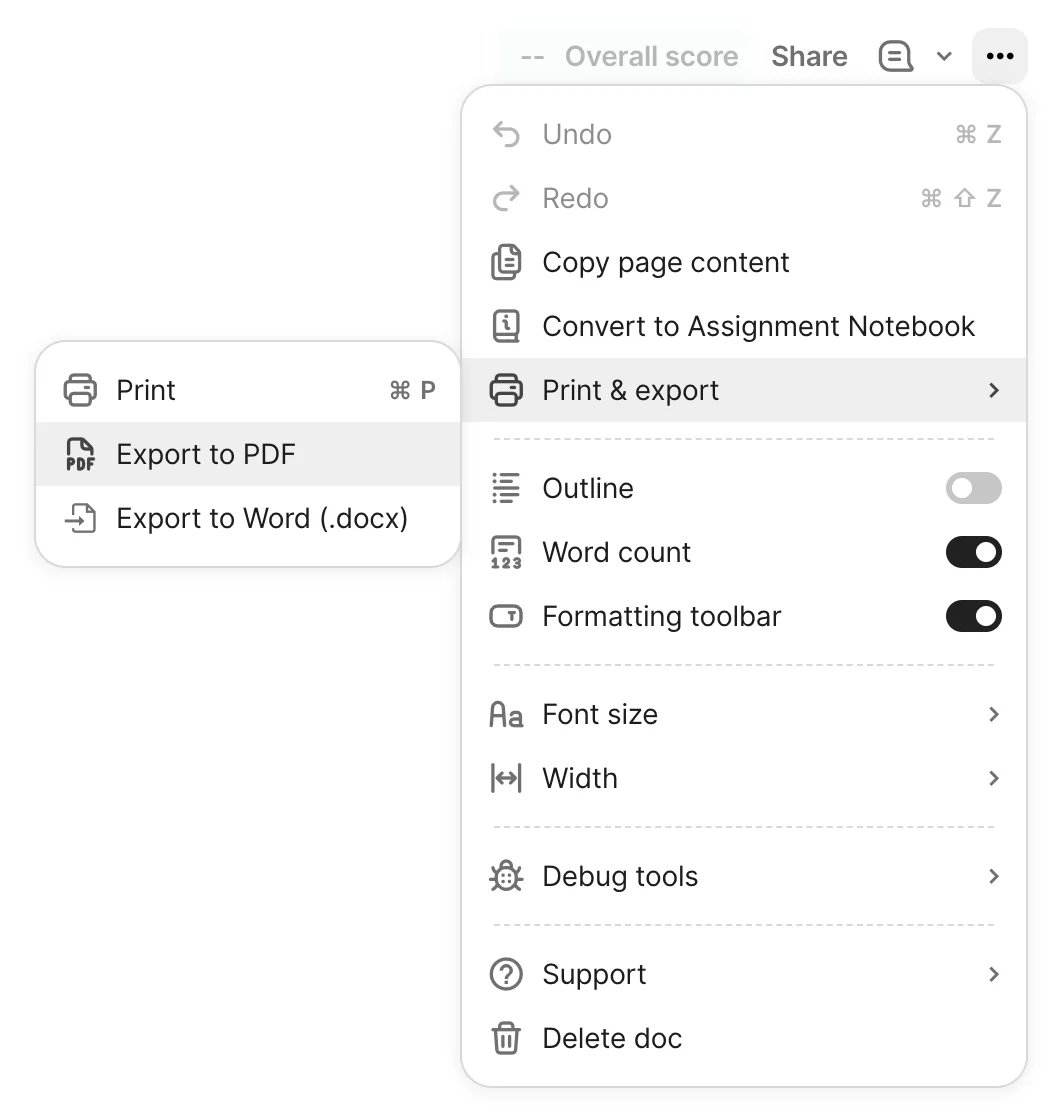
Official Grammarly support illustration of its export controls, not a screenshot of our own account or a completed migration test.
Before a full switch:
- Save originals plus exported copies of documents held only in Grammarly.
- Record important dictionary terms, tone preferences and team rules. Confirm import support rather than assuming it exists.
- Recreate one representative document in the replacement, including headings, links and specialist language.
- Check both the output file and your daily writing app. Cancel a renewal only after the replacement meets those requirements.
For a team, compare permission and retention requirements separately from editing features. A consumer editor supporting the same file type does not prove equivalent organizational controls.
Frequently asked questions
What is the best free Grammarly alternative?
Start with Microsoft Editor if you already write in Word, or QuillBot for free basic grammar checks. Pick by the actual writing surface. LanguageTool's free website should not be confused with its now-paid hosted extension. None of these statements establishes equal error-detection accuracy.
Which alternative is best for long documents or fiction?
ProWritingAid is the most directly relevant route here for report-led English manuscript revision. Try its reports on a representative passage before buying. Its limited free report runs and separate Story Credits mean that free access is not an unlimited full-book review.
Is Grammarly still English-only?
No. Current official documentation lists additional supported languages. Consider switching for a particular language-and-app requirement that Grammarly does not satisfy for you, rather than an outdated English-only assumption. Check suggestion depth as well as whether a language is listed.
Can I move my Grammarly documents and settings automatically?
Documents can be exported using the controls for your editor, but formatting needs checking. We did not verify a complete cross-vendor transfer of dictionaries, style rules, suggestion history or account permissions. Keep originals and test one complete document before committing.
Is there an offline Grammarly alternative?
Most hosted writing assistance in this comparison processes text remotely. LanguageTool's standard desktop documentation conflicts about offline access, so we do not count that as verified. Its self-hosted server is a separate technical route with its own available checks.
For a narrower offline readability editor, Hemingway Editor Classic for Mac and Windows lists a $19.99 one-time purchase and no internet requirement. It explicitly excludes the newer AI features; it is not an offline equivalent of Grammarly's full grammar and rewriting service.
Get ToolWorthy Weekly
New AI tools, practical guides, and selected AI signals in one weekly brief.
For AI tool founders
Built a tool that belongs in this decision set?
Request an editorial evaluation for possible inclusion in ToolWorthy.
Submit your tool for reviewPaid submission does not guarantee a ranking, recommendation, inclusion, or editorial outcome.