

Overview
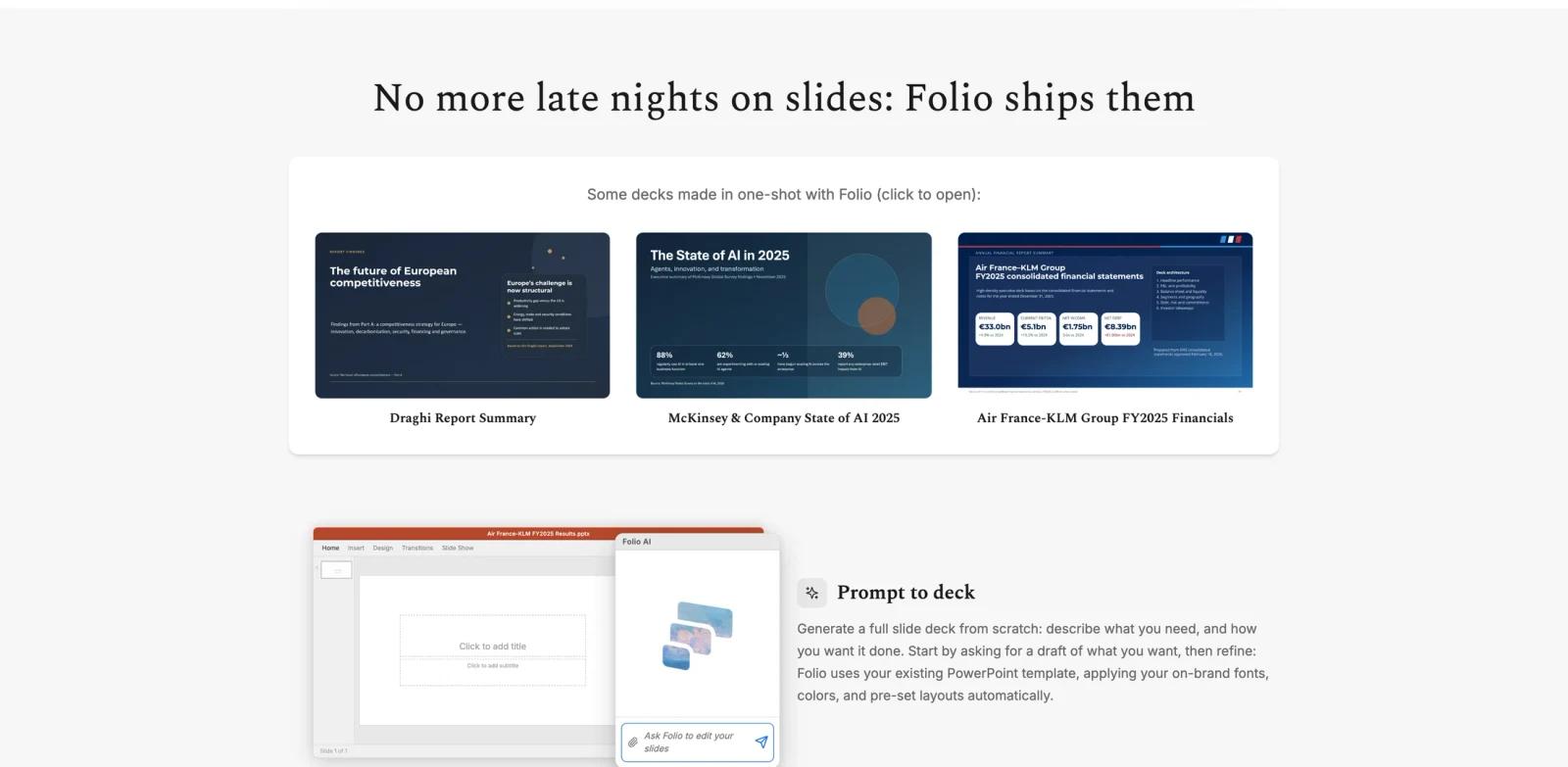
Folio AI is an AI presentation copilot for creating and editing PowerPoint and Google Slides decks. Its core promise is that generated slides remain editable: the tool works with real shapes, objects, templates, fonts, colors, and layouts rather than exporting flat slide images that teams cannot refine.
The Product Hunt launch on June 14, 2026 described Folio as "Claude for PowerPoint on steroids." The official site positions it for consulting, strategy, finance, and professional teams where every slide counts. Folio can generate decks from prompts, edit existing decks, use uploaded files, and work inside PowerPoint and Google Slides.
Folio is relevant for ToolWorthy readers looking beyond generic AI content generator tools. It targets the high-friction part of slide work: turning context, files, and templates into professional decks while keeping every element editable for human review.
Key Features
Prompt-to-deck generation - Describe the deck you need and ask Folio to generate a full presentation draft from scratch.
Editable slide objects - Keep PowerPoint shapes, text boxes, charts, and visual elements editable instead of receiving images pretending to be slides.
Existing deck editing - Open an existing deck and prompt Folio to modify slides while preserving the human editing loop.
Template-aware output - Use existing templates, brand fonts, colors, and preset layouts so generated slides match team standards.
File uploads - Upload supporting material such as logos, images, source documents, or inspiration files to guide the generated deck.
PowerPoint and Google Slides support - Work through a PowerPoint add-in and Google Slides add-on, with multi-format exports listed on the pricing page.
How to Get Started
Start with the free credits to test whether Folio understands your preferred deck style. The official pricing page says new users can start with 500 free credits and no credit card required. A practical first test is to upload a short source document, apply your template, and ask Folio to create a 6-10 slide deck.
For teams, the key evaluation point is editability. Open the generated file in PowerPoint or Google Slides and check whether text, shapes, layouts, charts, and brand elements can be adjusted manually. This is the main reason to use Folio instead of a screenshot-based slide generator.
Folio also fits AI productivity workflows where analysts, consultants, and founders already have the raw material but need faster deck assembly, cleanup, and iteration.
Pricing & Plans
Folio uses credits. The official pricing page says a complete 10-slide presentation typically uses about 100-200 credits depending on complexity and content length.
| Plan | Price | Notes |
|---|---|---|
| Starter | $0/month | 500 credits to start, Folio Fast, PowerPoint add-in, Google Slides add-on, multi-format exports, then $0.03/credit afterwards |
| Plus | $10/month | 2,000 credits/month, $0.025/credit afterwards, unlocks Folio Medium |
| Pro | $49/month | 5,000 credits/month, $0.02/credit afterwards, unlocks Folio Max |
| Enterprise | $199/month | 20,000 credits/month, $0.015/credit afterwards, everything in Pro, stored instructions, and agent external research |
| Ultimate | $499/month | 50,000 credits/month, $0.01/credit afterwards, everything in Enterprise, SSO & MFA login, and dedicated account manager |
| Unlimited | Custom quote | Unlimited Folio access for teams that want no limits |
Credits do not expire, and unused credits roll over according to the pricing FAQ, subject to the product's fair-use policy.
Best For
- Consultants building client-ready decks under tight deadlines
- Finance and strategy teams turning source documents into board or leadership presentations
- Founders preparing investor, product, or market decks
- Analysts who need editable slide drafts rather than static AI images
- Teams with strict templates and brand layouts that generic slide generators struggle to follow
FAQ
What does Folio AI do?
Folio AI creates and edits PowerPoint and Google Slides decks from prompts, uploaded files, and existing templates while keeping slide elements editable.
Is Folio AI free?
Yes. The official pricing page lists a Starter plan with 500 credits to start and no monthly fee.
How much does Folio AI cost?
Plus is listed at $10 per month for 2,000 credits, Pro is $49 per month for 5,000 credits, Enterprise is $199 per month for 20,000 credits, and Ultimate is $499 per month for 50,000 credits. Additional credits are charged at plan-specific rates.
How many credits does a deck use?
The pricing FAQ says a complete 10-slide presentation typically uses about 100-200 credits, depending on complexity and content length.
Does Folio output editable slides?
Yes. Folio's official site emphasizes that it works with real PowerPoint shapes and objects, not images masquerading as slides.
Who should use Folio AI?
Folio is best for teams that build professional decks regularly and need editable output, especially consulting, finance, strategy, product, and founder workflows.