



Overview
Yard AI takes a photo of an outdoor space and returns a landscape plan you can actually act on. Upload a picture of a backyard, front yard, or patio, answer a few questions about goals and style, and the tool produces a photorealistic redesign alongside the practical scaffolding around it — what the work costs, which plants suit the local climate, what materials to buy, and who nearby can build it.
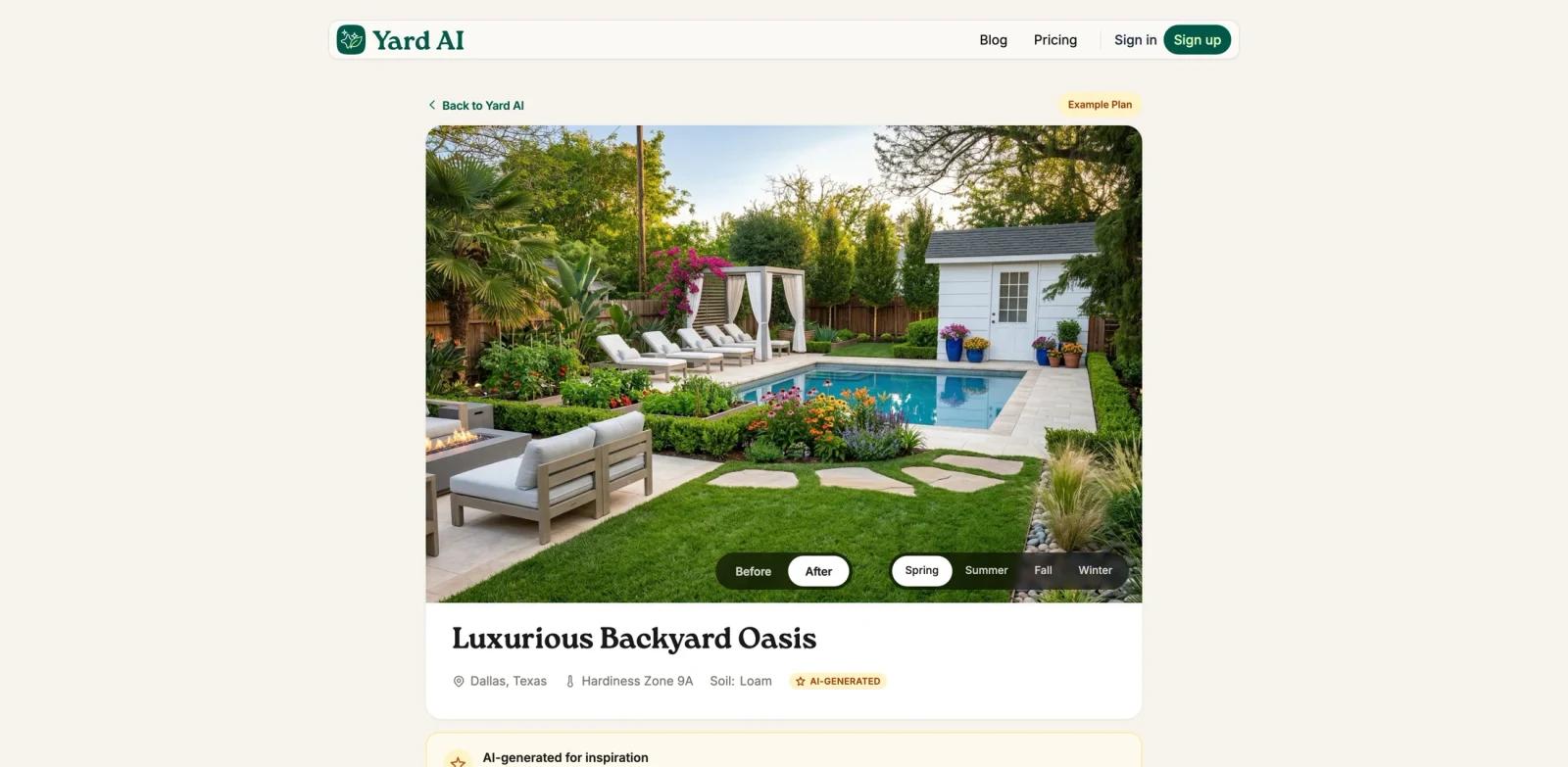
The distinction that matters here is between a design and a plan. The design is the visual: a before-and-after rendering of the actual yard, with seasonal previews showing how the space reads in spring, summer, fall, and winter. The plan is everything needed to execute it — DIY versus professional cost estimates, a phased action plan, a climate-matched plant guide, an itemized shopping list, and local contractor matches. Most tools in the AI architecture rendering space stop at the first part, treating the image as the deliverable rather than the starting point.
That framing shapes who it fits. Homeowners exploring ideas get a realistic picture instead of an aspirational one, DIY builders get a sequence and a budget, and landscape professionals get client-ready material without spending an afternoon in general-purpose AI design tools. It also sits deliberately outdoors — most AI room and home design tools point their cameras at interiors.
Key Features
- Photo-to-design rendering with seasonal previews — Generates photorealistic before-and-after views of the actual yard across all four seasons, so the space can be judged year-round rather than at its single best moment.
- DIY versus professional cost estimates — Prices each design two ways, making the build-it-yourself trade-off explicit before any money is committed.
- Phased step-by-step action plan — Breaks the project into ordered stages with timelines, turning a rendering into a sequence someone can actually start on.
- Climate-matched plant guide — Recommends planting based on the property's hardiness zone, which is the difference between a plan that survives the first winter and one that doesn't.
- Itemized materials list with retailer links — Enumerates hardscaping, plants, soil, and lighting with places to buy them, closing the gap between plan and purchase.
- Local contractor matching — Surfaces nearby professionals for the parts of a project that warrant hiring out.
- 51 preset design directions — Covers front and back yards across styles from Desert Modern and Zen Garden to Raised Garden Beds and Pool Paradise, including practical categories like fencing and driveways that style-only tools skip.
Pricing & Plans
| Plan | Price | What's included |
|---|---|---|
| Free | $0 | Your first yard design — the AI visualization of the transformed space |
| Pro | $9 / month | 60 yard designs and 20 full Landscape Plans per month, plus design goals, shareable links, PDF export (beta), action plans, plant guides, materials lists, and contractor matching |
The free entry point covers a single design, not a recurring monthly allowance, and it delivers the visualization only. Landscape Plans — the cost estimates, action plan, plant guide, materials list, and contractor matches — require the subscription. Billing is monthly and can be cancelled at any time.
At $9 per month, the pricing sits well below what a single consultation with a landscape designer typically costs, which is the comparison the product is implicitly making.
Best For
- Homeowners planning a DIY project who need a budget and a sequence, not just inspiration photos
- Landscape professionals preparing client-facing concepts and proposals without committing design hours upfront
- Sellers improving curb appeal who want to see the return on a front-yard change before spending on it
- Anyone comparing DIY against hiring out — the side-by-side estimate is the clearest use case
If you're evaluating options in this category, AILandscape.Design covers similar photo-to-render ground; the practical difference is how much of the post-visual planning layer — budgets, sequencing, sourcing — comes with the output.
FAQ
What's the difference between a yard design and a yard plan?
A yard design is the AI visualization — the photorealistic before-and-after of the space. A yard plan is the full package: cost estimates, seasonal previews, a step-by-step action plan, plant guide, materials list, and local contractor matches. The design is what you get for free; the plan requires a subscription.
Is Yard AI free?
You can generate your first personalized yard design at no cost. Beyond that first design, and for any Landscape Plan, a $9 per month subscription applies, which includes 60 designs and 20 full plans monthly.
Can I see what the output looks like before subscribing?
Yes. Yard AI publishes complete example plans on its site — including the renderings, cost breakdowns, plant guides, shopping lists, and contractor recommendations — so the actual deliverable can be reviewed before signing up.
Are the cost estimates reliable?
Estimates are provided in both DIY and professional-installation form and are intended for budgeting and planning. Treat them as a planning range rather than a contractor's quote, which will reflect local labor rates and site conditions.
Does it work for front yards, not just backyards?
Yes. The style library covers front-yard scenarios specifically, including curb appeal, walkways, drought-tolerant frontage, and low-maintenance layouts, alongside backyard and patio projects.
Do the plant recommendations account for my climate?
Plant selections are matched to the property's hardiness zone rather than drawn from a generic list, which is what makes the planting portion of the plan usable rather than decorative.


