



Overview
Notion is an all-in-one workspace for docs, knowledge bases, projects, databases, forms, publishing, and AI-assisted work. The product has evolved well beyond the note-taking tool many people still associate it with. Its current positioning is much broader: a shared operating layer where teams can write, plan, organize information, run workflows, and increasingly offload repetitive work to AI agents.
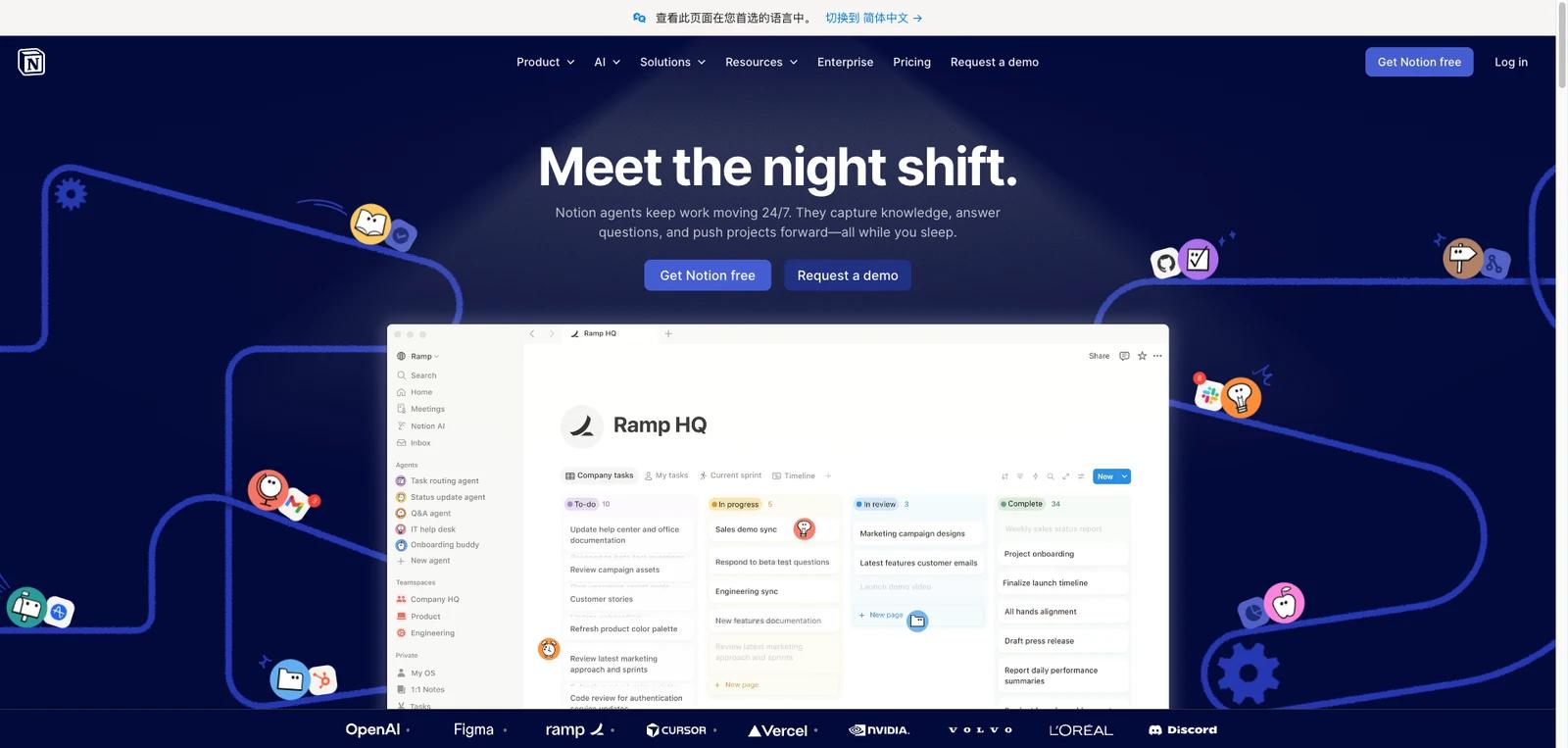
That shift matters because Notion is no longer selling just flexible pages and databases. The official site now frames it as an AI workspace, with Notion Agent, AI meeting notes, enterprise search, and custom agents sitting alongside the core docs-and-projects product. For buyers, the key question is not whether Notion can store knowledge, but whether consolidating multiple work tools into one workspace is worth the tradeoffs in structure, governance, and depth.
As of April 25, 2026, Notion publicly highlights docs, wikis, projects, team knowledge, forms, websites, API automations, Notion Calendar, Notion Mail, and AI capabilities such as Notion Agent, enterprise search, meeting notes, and custom agents. It also keeps a transparent seat-based pricing model, with AI trials on lower tiers and broader AI features on higher tiers. The practical fit is strongest for teams that want one collaborative system rather than a stack of disconnected point tools.
For adjacent research, compare AI design tools, AI UI design tools, AI website design tools.
Key Features
Docs, wikis, and knowledge base in one workspace — Notion remains strongest as a shared place for writing, documentation, and internal knowledge, with flexible pages, blocks, and database-backed content.
Projects and task management — The product supports projects, subtasks, dependencies, dashboards, timelines, and database workflows, making it viable for teams that want planning and execution in the same tool as documentation.
Database-driven workspace model — Custom properties, linked views, filters, forms, charts, and automations let teams build lightweight internal systems without buying separate software for every process.
AI workspace positioning — Notion now markets AI chat, generation, autofill, translation, AI meeting notes, enterprise search, and Notion Agent as part of the broader platform story rather than as a completely separate side feature.
Custom agents and connected work — Business and Enterprise introduce broader AI workspace features such as Notion Agent, AI Meeting Notes, and Enterprise Search, while Custom Agents run on Notion credits for teams that need scheduled or triggered automation.
Publishing and ecosystem extensions — Notion supports sites, public pages, APIs, integrations, Notion Calendar, and Notion Mail, which makes it relevant as a workspace hub rather than only a note app.
Pricing & Plans
Notion publishes seat-based pricing on its official pricing page, but buyers should distinguish annual per-member prices from higher month-to-month billing and should treat Custom Agent usage as a separate Notion credits cost.
| Plan | Pricing | Best fit |
|---|---|---|
| Free | $0 per member/month | Individuals who want personal organization, basic forms and sites, databases, Calendar, Mail sync, and a trial of Notion AI; note that the Free plan has limits such as limited blocks for 2+ member workspaces, 5 MB file uploads, 7-day page history, 10 external guests, and 1 chart |
| Plus | $10 per member/month billed annually; monthly billing is higher | Small teams and professionals that need unlimited collaborative blocks, unlimited file uploads with a per-file upload cap, custom forms and sites, unlimited charts, and basic integrations |
| Business | $20 per member/month billed annually; monthly billing is higher | Growing businesses that want stronger teamwork controls plus included Notion AI features such as Notion Agent, AI Meeting Notes, Enterprise Search, SAML SSO, private teamspaces, and advanced integrations |
| Enterprise | Custom pricing | Organizations that need advanced security, SCIM, audit logs, data-retention controls, domain management, and custom agents |
| Notion credits for Custom Agents | Free to try during the rollout period, then $10 per 1,000 monthly Notion credits | Business and Enterprise workspaces using Custom Agents; credits are shared at the workspace level, reset monthly, and agents can pause if credits run out |
This structure makes Notion easy to start with, but buyers should not treat the Free or Plus tiers as equivalent to the full AI-heavy product that appears on the homepage. The more your use case depends on agents, enterprise search, meeting notes, and governance, the more likely you are comparing Business or Enterprise rather than a basic seat-only subscription.
Best For
- Teams that want docs, planning, and knowledge management in one tool
- Startups and SMBs consolidating multiple collaboration apps
- Organizations building lightweight internal systems with databases and automations
- Teams exploring AI agents inside an existing collaborative workspace
- Companies that want a strong self-serve starting point before enterprise rollout
FAQ
What is Notion?
Notion is a workspace platform that combines docs, wikis, projects, databases, publishing, and AI-assisted workflows in one product.
Is Notion just a note-taking app?
No. That description is now too narrow. Notion still supports note-taking, but its current product positioning is much broader and includes project management, knowledge management, forms, sites, automations, and AI agents.
Does Notion have a free plan?
Yes. Notion offers a free tier for individuals, with core workspace features plus a trial of Notion AI.
How much does Notion cost?
Public pricing starts at $10 per member/month for Plus and $20 per member/month for Business when billed annually; month-to-month billing is higher, and Enterprise remains custom priced.
What AI features does Notion include?
Notion publicly markets AI chat, generation, autofill, translation, AI meeting notes, enterprise search, Notion Agent, and custom agents, though access depth varies by plan and usage.
Who should buy Notion?
Notion is best for teams that want one flexible workspace for writing, planning, knowledge, and increasingly AI-assisted operations. Teams that only need one narrow function may still prefer a more specialized tool.


