
6 Otter.ai Alternatives in 2026: Choose What You Need to Replace
Leaving Otter? Compare six alternatives by free limits, bot-free capture, cloud versus local processing, language needs, and the archive you can actually move.
On this page
The best Otter.ai alternative depends on what you need to replace: a free meeting recorder, a shared meeting archive, a notepad without a visible bot, or transcription for files you already own. Those are different purchases.
Start with Fathom for free meeting capture, Fireflies.ai for an archive that feeds downstream work, and Granola for notes you shape while attending the meeting. Use Notta when the language and translation workflow is the deciding constraint, TurboScribe for uploaded interviews, or MacWhisper for a local-model workflow on a Mac.
Before switching, check two outdated assumptions: Otter already offers bot-free desktop capture, and its current pricing page lists six transcription languages, not just three. You may need a settings or plan change rather than a new product. Otter desktop documentation, current Otter plans.
This is desk research checked October 1, 2026, not a hands-on transcription benchmark. The trials below are tests for you to run; we do not score accuracy, speed, or ease of use without controlled evidence.
Otter.ai alternatives at a glance
Choose a route by its first disqualifier, not by the largest feature list. On mobile, swipe the table horizontally; tool names jump to the relevant section.
| Tool | Replace this part of Otter | Capture / processing | Free boundary | Main tradeoff |
|---|---|---|---|---|
| Fathom | Individual meeting capture | Zoom, Meet, Teams; cloud; bot-free Mac beta | Unlimited recording/transcription; advanced AI limited | Free capture is not a free team workspace |
| Fireflies.ai | Shared archive and CRM handoff | Meeting assistant and cloud archive | New-account unlimited transcripts require Auto-join; 400 min storage/team | Recording scope, AI credits, and downloads need attention |
| Granola | Notes shaped while you attend | Device audio without a meeting bot; cloud processing | Basic history: 30 days | No retained audio for replay; not an unattended agent |
| Notta | Broader language / translation workflow | Standard cloud route; separate Mac/Windows Privacy Mode beta | Cloud: 120 min/month, only 3 min/recording | Translation limits and local-model languages differ |
| TurboScribe | Uploaded interviews and recordings | Browser file upload; cloud | 3 files/day, each up to 30 min | You supply the recording; not calendar capture |
| MacWhisper | Local file transcription | Mac app; local models or optional cloud services | Free version; Pro unlocks more capabilities | A local transcript is not a shared meeting workspace |
Plan boundaries are explained and linked below. “Bot-free,” “no stored audio,” and “offline” are not interchangeable.
Why leave Otter—and when should you stay?
Four concrete failures justify looking elsewhere:
- Your recordings outgrow the free plan. Otter Basic lists 300 transcription minutes per month, 30 minutes per conversation, and three lifetime file imports. A 45-minute meeting or recurring interview uploads can hit a different limit than the monthly allowance.
- Your capture method is wrong. A calendar assistant, desktop audio recorder, and file uploader do different jobs. If a visible bot is the only objection, try Otter's desktop route before moving your archive.
- The required language or output is missing. Otter currently lists English, Spanish, French, German, Japanese, and Chinese. Test your actual language, speaker mix, export, and translation requirement—not the length of a vendor's language list.
- Your processing or handoff requirement has changed. A no-cloud workflow is different from a quieter cloud recorder. A CRM logo is different from the right note reaching the right customer record.
Stay with Otter if your existing capture method, languages, notes, sharing, and exports work and the relevant allowance is sufficient. Its Business plan already offers unlimited meeting and in-app recording transcription; imported-file transcription remains a separate 6,000-minute monthly allowance per user. Do not change products solely because an old comparison says all Otter plans cap meeting minutes.
For the product's baseline capabilities, see our Otter.ai product overview. This article answers the narrower question: what should you keep, and what is worth replacing?
Preserve the archive before you replace the recorder
An exported transcript is not a portable Otter workspace. Otter documents text and audio exports, with available formats depending on the plan; bulk export is for Business and Enterprise. Neither an MP3 nor a TXT file proves that another app can restore speaker edits, comments, channels, ownership, access controls, or integration history. Single-conversation export, bulk export.
Before downgrading or disconnecting anything:
- Inventory the conversations you can access and export. Separate your own records from shared records and workspaces managed by someone else. Ask the owner for missing export access; do not assume a shared link is a backup.
- Keep the source recording and usable transcript. Where permitted, save audio, text, speaker labels, timestamps, summaries, and important decisions. Otter's bulk “Select all” selects only conversations loaded on the page; bulk audio export is unavailable from Channels/Direct Messages. Verify the actual export inventory rather than checking a box for the whole account.
- Recreate one representative workflow. Use one long call, one difficult-language recording, and one shared follow-up. Check capture, corrections, export, and access from a colleague's account. A tool can accept audio without importing Otter's existing workspace structure.
- Check recording and sharing defaults. Decide which calendars and meetings the replacement may capture, and who receives notes. Avoid two assistants recording the same meeting or a new auto-share rule exposing a private conversation.
- Keep the old archive available during the trial. Switch future capture only after your acceptance tests pass. Canceling a subscription and migrating historical data are separate decisions.
Choose the replacement by the failing workflow

Best for: an individual whose Otter Basic meeting-duration or monthly allowance is the main problem.
Fathom's Free plan includes unlimited recordings and transcription with basic call summaries. Its supported meeting platforms include Zoom, Google Meet, and Microsoft Teams. That makes it a sensible first trial for recurring calls, rather than an automatic winner for every note-taking task. Fathom meeting workflow.
Skip if: you need to automate uploaded interview files rather than meeting capture, or expect the individual free account to provide organization-wide search and governance. Bot-free capture is listed as a Mac beta, not a promise of equivalent availability everywhere.
Buying boundary: unlimited capture does not mean unlimited advanced AI. Premium lists advanced summaries, action items, and its conversational assistant; Team adds shared features and has a two-user minimum. Public USD pricing lists Premium at $16/user/month billed annually ($20 monthly). Compare the plan you actually need, not only the $0 recorder. Fathom pricing.
First elimination test: try one ordinary 45–60-minute call with permission. Check the final transcript and basic summary, then share the required output with a colleague. Reject the fit if your necessary summary, sharing, or platform route is unavailable on the intended plan.

Best for: teams replacing Otter's shared archive and downstream integrations, rather than merely changing the transcription engine.
Fireflies combines meeting capture, searchable records, and paid integrations. Its HubSpot documentation describes sending notes and linking transcripts to CRM records. Check your actual destination and owner: another dashboard does not solve incomplete follow-up.
The free-plan catch matters: for accounts created on or after September 1, 2026, its current help guide says unlimited meeting transcripts require Auto-join enabled; with it off, the default is three meeting transcriptions. The invite-only option does not unlock unlimited transcription. Existing accounts with unlimited free meetings are unaffected. AI summaries and other insights have separate credit boundaries. Current Auto-join rule.
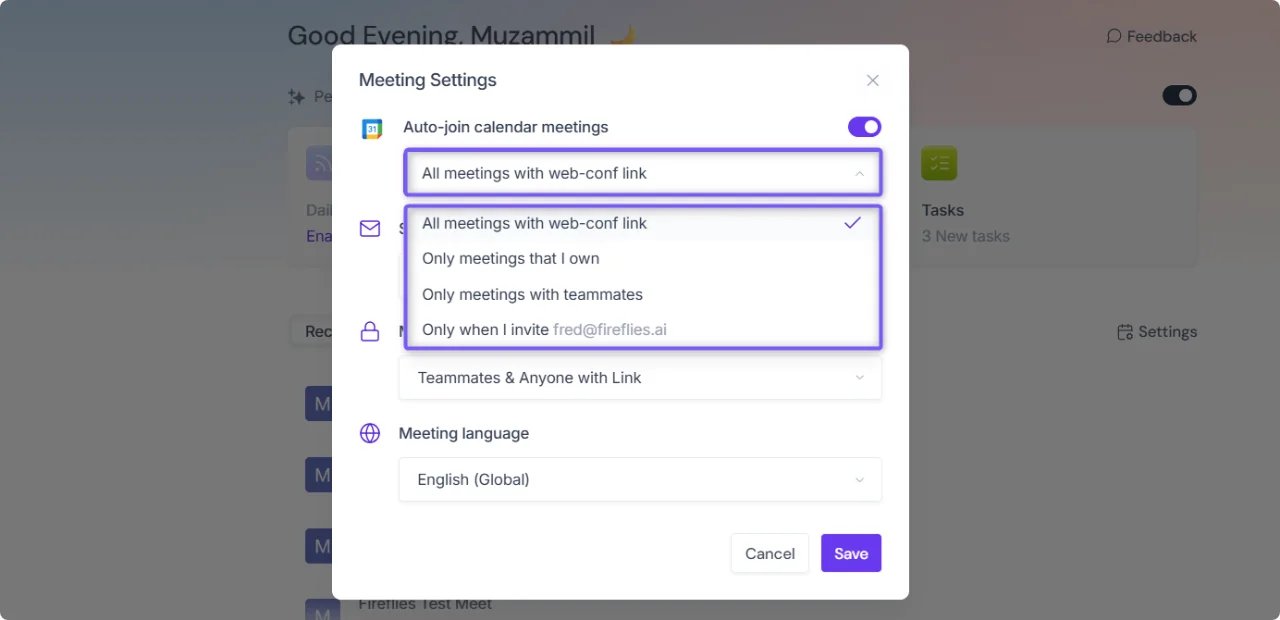
Public first-party help screenshot, not our logged-in workspace or a transcription test. Check the meeting-selection controls before enabling Auto-join.
Skip if: your organization cannot permit the necessary capture/sharing setup, or you want indefinitely stored free audio with unrestricted downloads. Current pricing lists 400 minutes of storage per team on Free. Pro adds downloads and integrations, with 8,000 storage minutes per seat, at $10/seat/month billed annually ($18 monthly). Storage, transcription, and AI credits are different meters. Fireflies pricing.
First elimination test: capture one permitted customer call and inspect the intended CRM record, owner, summary, and next step. Reject the fit if required fields still need manual reconstruction, or the working integration, export, or recording scope requires an unacceptable plan or setting.
Granola
Best for: people who attend the meeting and want to shape their notes while device-audio capture supplies context.
Granola is a bot-free notepad rather than an extra participant. Its desktop and mobile workflow is built around the notes you keep, not an audio replay library. It does not retain meeting audio, but it uses cloud transcription and AI providers; transcripts and notes can remain in the account. No visible bot does not mean no third-party processing. Granola security and processing.
Skip if: you need an assistant to attend without you, replay the original meeting audio later, or process everything offline. Compare Otter's own no-bot desktop capture first if that is your only switching reason.
Buying boundary: Basic shows only 30 days of meeting history. Business lists unlimited notes/history and advanced integrations at a displayed $14/user/month. If your notes are a long-term reference library, the history boundary matters more than “free notes.” Granola plans.
First elimination test: take sparse notes during a representative discussion, then check whether the enhanced output preserves the decision, owner, and deadline. Reject the fit if you must verify those details against retained audio, or the chosen plan cannot keep the history you need.

Best for: an Otter user whose required spoken language or translation workflow is outside the current Otter fit.
Notta documents 58 monolingual transcription languages. Translation and bilingual transcription are distinct features with their own language lists and quotas. A broader supported list is a reason to trial the route—not evidence that names, accents, or language switches will be transcribed more accurately. Notta language support.
Skip if: you need complete ordinary meetings on the free cloud plan. Its 120 monthly minutes come with a three-minute per-recording limit. That is a sampling allowance, not two hours of full-length calls.
Buying boundary: Pro lists 1,800 minutes/month, up to five hours per recording, and transcript export. The public annual plan is $97.99/year, shown as $8.17/month; do not mistake that equivalent for month-to-month billing. Translation/bilingual add-ons and included quotas must be checked separately. Notta pricing.
Local exception: Notta Desktop also has a Privacy Mode beta for Mac and Windows. After account setup and model download, it can transcribe offline and store files locally; Pro local usage does not consume cloud minutes. Local-model language support is narrower than the standard 58-language route. Test the chosen model and device rather than transferring cloud-language promises to this mode.
First elimination test: use a consented sample containing your actual language, names, and a language switch if relevant. Check both the source transcript and required translated output. Reject the fit if that language pair, export, or monthly translation workload is outside the selected plan.
TurboScribe
Best for: interviews, lectures, and other recordings you already have, when Otter's file-import allowance is the problem.
TurboScribe's workflow starts with an audio/video upload rather than a calendar invitation. Its public form exposes audio-language and speaker-recognition options, and its documented outputs include TXT, DOCX, PDF, SRT, and VTT. It is a file-transcription route, not proof of a native Otter workspace importer. TurboScribe upload workflow.
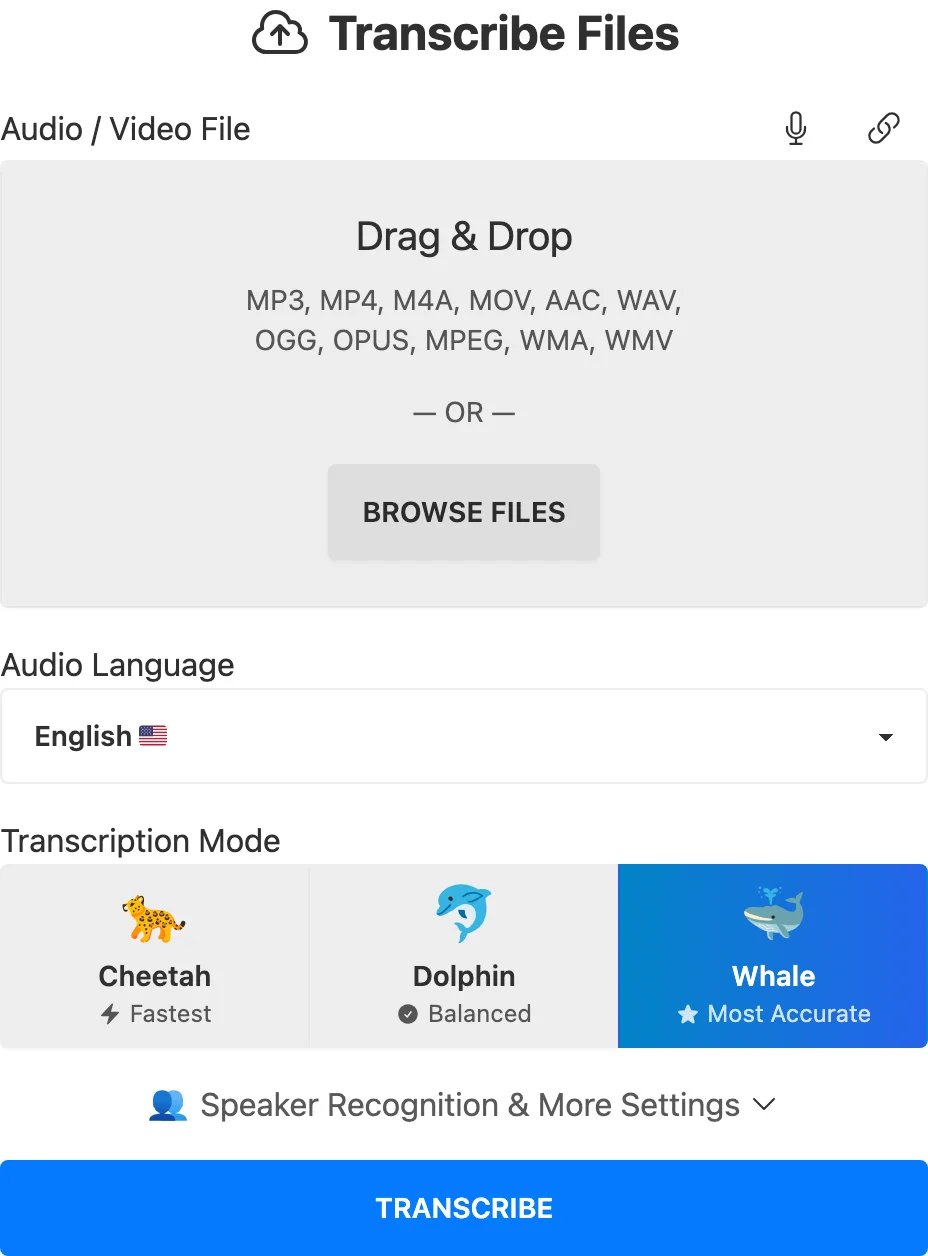
Public upload interface captured without submitting audio; this illustrates the workflow, not an accuracy or speed test.
Skip if: you need automatic meeting attendance, live shared notes, or CRM handoff without maintaining your own recording workflow. It is also a cloud service, not an offline route.
Buying boundary: Free permits three files per day, each up to 30 minutes, uploaded one at a time. Unlimited is for one person: $120/year ($10/month equivalent) or $20 month-to-month, with files up to ten hours / 5 GB. A one-hour interview is outside the free per-file limit even if you have daily uploads left. TurboScribe pricing.
First elimination test: upload a recording you are permitted to process, correct the speaker labels, and export the format your next task requires. Reject the fit if obtaining the source audio or rebuilding meeting follow-up costs more effort than the file-based route saves.
MacWhisper
Best for: a Mac user who needs a local-model transcription route for existing recordings instead of a cloud meeting archive.
MacWhisper documents on-device models for offline file transcription, alongside optional cloud transcription and AI services. The meaningful boundary is the selected processing route, not the application name: connecting a remote service can send content outside the Mac. MacWhisper local and cloud workflows.
Skip if: you need a Windows-first setup, an unattended calendar assistant, or a ready-made organization-wide meeting archive. Producing a local transcript does not recreate Otter channels, sharing permissions, or CRM automation.
Buying boundary: the official homepage displays Free and a one-time €64 Pro license, including lifetime updates. Model and feature availability differ, and optional remote services can add charges. This is a euro-denominated web observation, not a USD monthly subscription comparison; confirm checkout currency and tax before buying.
First elimination test: download the chosen local model, disconnect from the network, and transcribe a permitted sample recording with remote services disabled. Check the result and required export on your actual Mac. Reject the fit if the workflow needs remote processing or the missing collaboration layer is essential.
What about tl;dv, MeetGeek, or Avoma?
They are credible candidates, not products disqualified by a score. tl;dv is worth a separate trial when video clips are central, but its free recordings are scheduled for deletion after three months; do not treat free capture as an indefinite archive. tl;dv retention.
MeetGeek offers meeting automation with a free three-hour monthly allowance and different transcript/audio retention periods. Avoma deserves a deeper comparison when sales coaching or revenue intelligence becomes the primary purchase. Neither needs another nearly identical profile here merely to lengthen the list. MeetGeek plans, Avoma meeting workflow.
If you are choosing from scratch rather than migrating Otter, use the broader meeting-assistant comparison. For category exploration rather than a switching shortlist, browse the AI meeting notes directory.
A switch is worthwhile only if the output survives
Use three acceptance questions before buying: Can it capture the right conversation? Can you verify and keep the output? Can the right person use it afterward? Evaluate the plan that will remain after the trial, not only a temporarily unlocked demo.
Public price and plan observations above were checked October 1, 2026. USD web list prices exclude tax, negotiated contracts, app-store billing, and temporary or regional promotions unless explicitly stated; MacWhisper is explicitly quoted in euros. Confirm billing context at checkout. Free capture, AI generation, retained history, downloads, and integrations are separate buying boundaries.
Frequently asked questions
What is the best free Otter.ai alternative?
Fathom is the first trial for individual meetings when Otter Basic's limits are the constraint, because its free recording/transcription is unlimited. It is not automatically the best free route for uploaded files or team governance. For existing short recordings, TurboScribe's daily free-file allowance answers a different job.
Which alternative avoids a meeting bot?
Granola is designed around bot-free device capture. But Otter also offers a no-bot desktop route, and Fathom lists bot-free capture as a Mac beta. Check availability on your device; changing capture settings may be cheaper than migrating. None of those facts alone proves offline processing.
Can I move my Otter recordings and transcripts to another app?
You can export supported text/audio formats subject to your plan and permissions; bulk export requires Business or Enterprise. Keep your source files and test the destination's supported import or upload route. Do not assume an export transfers comments, channels, sharing, or native workspace state.
What is an offline Otter.ai alternative?
MacWhisper's local models are a relevant Mac route after model download, with remote services disabled. On Windows or Mac, Notta Desktop's Privacy Mode beta is another route to test after setup; check local-model languages and the applicable plan. Neither recreates Otter's entire workspace. A no-bot cloud recorder is not automatically offline.
Which option is better for multilingual meetings?
First check whether Otter's current six-language support already covers the job. Trial Notta when its broader language list and translation route match your needs. Verify the specific language pair, mixed-language behavior, output quality, and paid quota before switching; language-count marketing cannot settle those questions.
Get ToolWorthy Weekly
New AI tools, practical guides, and selected AI signals in one weekly brief.
Related Posts
- 13 Best AI Note-Taking Apps in 2026 — Ranked for Real Meeting Loads
Transcription is the easy part. We compared 13 AI note-taking apps on the harder stuff: action item accuracy, bot visibility, CRM integration depth, and pricing traps.
For AI tool founders
Built a tool that belongs in this decision set?
Request an editorial evaluation for possible inclusion in ToolWorthy.
Submit your tool for reviewPaid submission does not guarantee a ranking, recommendation, inclusion, or editorial outcome.