
9 Best Ebook Creation Software Options 2026 — EPUB vs PDF
A finished manuscript still needs the right output. Compare nine ebook tools by EPUB or PDF workflow, platform, export cost, and the ability to revise later.
On this page
The best ebook creation software depends on what you need to deliver: a book whose text adapts to an e-reader, or a designed PDF whose pages stay in place. Buying the wrong kind of editor can mean rebuilding the same content twice.
For a text-led book with no formatting budget, start by evaluating Reedsy Studio. Compare Atticus and Vellum when you want a paid book-formatting workflow; Vellum requires a Mac. For a downloadable visual guide, compare Canva and Designrr instead. Affinity, InDesign, and calibre serve readers who need more direct production control, not a universal upgrade for everyone.
This is a desk-research comparison, using official product and support sources checked on October 17, 2026. We did not run cross-vendor manuscript imports, exports, accessibility tests, or retailer submissions. The recommendations below are based on documented workflow fit; the elimination tests tell you what still needs checking with your own book.
If you still need help producing the manuscript, use our separate AI book writer comparison. This page starts after you have content worth formatting.
Ebook creation software at a glance
These are workflow routes, not an overall quality ranking. Click a tool to jump to its limits and first elimination test.
- Reedsy Studio — a text-led book without a formatting subscription. Reflowable EPUB 3 and print-ready PDF; browser-based; core writing and formatting free.
- Atticus — one project for ebook and print across desktop systems. EPUB and PDF; browser/PWA; advertised $147 one-time. Import/export needs internet.
- Vellum — a Mac-based book-formatting workflow. EPUB; print PDF requires Press. macOS 13+; $199.99 Ebooks or $249.99 Press.
- Kindle Create — free preparation centered on KDP. Windows/Mac; KPF plus EPUB for reflowable books only. Check supported manuscript languages first.
- Canva — a visually designed downloadable guide. PDF workflow, not a verified reflowable EPUB route; web/apps; free and paid features/assets.
- Designrr — repurposing existing posts and documents. Browser-based; PDF plus plan-gated, separate EPUB projects. Published monthly Standard $29; Pro $39.
- Affinity — desktop page layout without a core-app subscription. Reflowable/fixed-layout EPUB and PDF; Mac/Windows; core app free with a Canva account.
- Adobe InDesign — layout-led production with explicit EPUB control. Reflowable/fixed-layout EPUB and PDF workflows; desktop; paid subscription.
- calibre — converting and inspecting ebook files directly. Conversion plus EPUB/code editing; Windows/macOS/Linux; free and open source, with a technical editing burden.
Dollar figures are the advertised USD-facing offers checked on the date above, not worldwide checkout quotes. Taxes, regional prices, promotions, and contract terms can differ. Vellum explicitly excludes tax. The important distinction is free export, paid export, or continuing subscription, not whether a download button says “free.”
Choose the file before choosing the editor
A novel, memoir, or text-led nonfiction ebook usually needs reflowable EPUB. Text adapts to screen size and the reader's font settings. Do not require each paragraph to remain on the same numbered page.
A workbook, visual report, or lead magnet may need a fixed-page PDF. Design the page for its actual reading device: a desktop-sized PDF can be frustrating on a phone. A browser flipbook link is a different deliverable from a downloadable PDF or EPUB.
A print interior is a third specification. Trim size, margins, bleed, and printer requirements matter. A PDF exported for screen reading is not automatically a suitable print interior.
Amazon currently accepts EPUB and KPF, among other manuscript inputs, but its supported-format guidance does not make every exported file submission-ready. Check the converted book in the destination's previewer. Do not choose software because it promises MOBI: KDP no longer accepts MOBI submissions.
You may not need a new tool. If the manuscript is already in Google Docs, check its available EPUB/PDF export workflow for your platform. Apple Pages also exports EPUB: word-processing documents can use reflowable or fixed layouts; page-layout documents use fixed layout. Test existing output before moving the manuscript. Buy a dedicated formatter only for a concrete gap—such as repeatable styling, print editions, or controls your current editor cannot satisfy.
For general visual reports, forms, or automated PDFs rather than books, our AI PDF generator comparison covers those different workflows. The PDF tools here are included only to help an ebook buyer avoid the wrong format.
For a manuscript that needs ebook and print editions
Reedsy Studio
If your main obstacle is paying to format a conventional text-led book, test the free route before buying a formatter. Reedsy Studio's official formatting guide documents reflowable EPUB 3 and print-ready PDF exports. Core writing and formatting are free; paid planning/writing add-ons are separate from that core workflow.
The tradeoff is working within a book-oriented theme system rather than treating every page as an unrestricted design canvas. That can be the right constraint for prose and the wrong one for a visual workbook.
First elimination test: bring in a representative chapter containing your hardest footnote, image, list, and chapter break. Inspect both exports, not only the editor. Skip this route if the actual export themes cannot represent essential content without redesigning it.
Atticus
If you need the same formatting project across Windows and Mac, Atticus removes Vellum's Mac-only constraint. Its official site lists Windows, Mac, Linux, and Chromebook support, DOCX import, and EPUB/PDF output from the same book. It advertises a $147 one-time purchase rather than a monthly subscription.
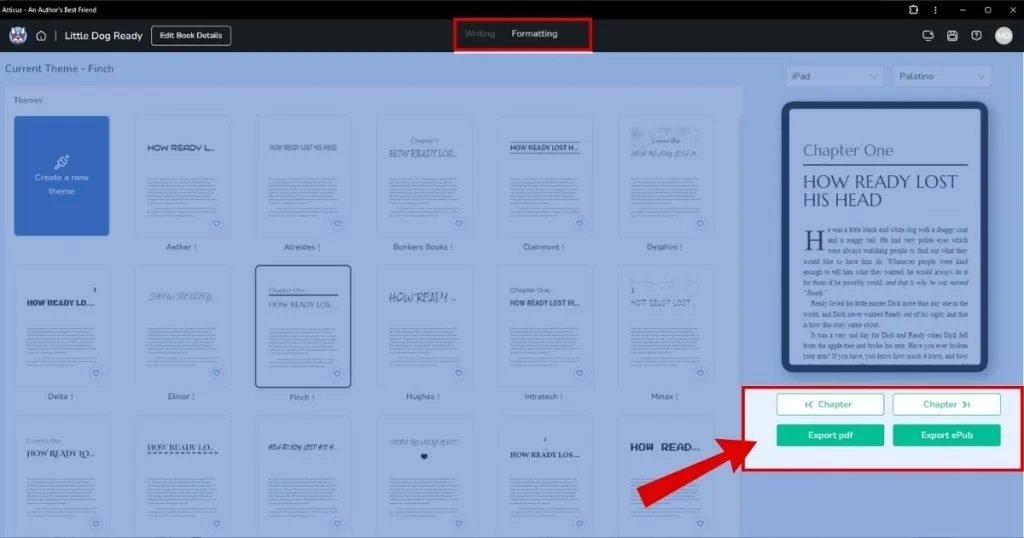
Official Atticus interface example; not an export performed for this comparison. Source: Atticus quick-start guide.
Choose it for a book-centered source you can maintain across digital and print editions. The official access guide draws an important boundary: offline writing is supported, but import and export require an internet connection. Log in and open the program before going offline. It is not an entirely offline production route.
First elimination test: import your difficult chapter, make a correction in the working project, and regenerate both formats. If you work offline, include disconnect, reopen, and backup recovery in your evaluation. The advertised refund policy is not the same thing as a no-payment trial.
Vellum
If the formatting workstation is already a supported Mac, Vellum is a purpose-built option for generating ebook editions and maintaining a matching print edition. Its current site requires macOS 13 or newer and lists Vellum Ebooks at $199.99 and Vellum Press at $249.99, excluding tax. Press adds print output; the cheaper package is not an ebook-plus-print license.
You can download, build, style, and preview before buying, but generating your publication files requires the relevant purchase. That makes “free download” a preview opportunity, not free ebook production. See the purchasing FAQ.
First elimination test: use the unpaid preview to inspect chapter structure and the book's awkward elements before choosing a package. Skip Vellum immediately if Windows/Linux editing is mandatory. If print is planned, compare the Press price upfront rather than budgeting only for Ebooks.
For a free, KDP-centered workflow
Kindle Create
For a book primarily headed to Amazon, Kindle Create is worth checking before paying for software. Amazon's current getting-started documentation supports Windows and Mac, KPF output, and EPUB export for reflowable books. Describing it as KPF-only is now outdated.
The distinction still matters: EPUB export does not preserve every Kindle formatting feature. Amazon documents limitations involving image bleed, tall drop caps, and chapter-start imagery. Its support table also does not promise publishing outside Kindle. An EPUB export therefore needs its own checks at any other destination.
Check the manuscript language before importing. Kindle Create's supported book languages differ from its interface languages and from KDP's broader language support. Amazon lists Japanese reflowable and Print Replica books as unsupported, and does not offer its print-book route for Gujarati, Hindi, Malayalam, Marathi, or Tamil. Indian-language ebook preparation is also listed under Early Access. Use the official language table as an early elimination check.
For revisions, keep the KCB project and its related resource folder, not just the publishable KPF. Amazon does not keep your editable project for you. Its reflowable-book guide also says tables, lists, and footnotes cannot be edited directly in Kindle Create.
First elimination test: import the chapter with those elements, then attempt the correction you are most likely to need after publication. Skip it if the required source-to-project editing cycle is unacceptable. If publishing widely, test the EPUB independently; do not assume a successful Kindle preview proves another store's compatibility.
For a designed PDF rather than a reading-app book

If the ebook is a branded download—such as a short workbook or illustrated guide—Canva's ebook templates provide a visual-design route. Canva also documents PDF creation. Treat it as a PDF choice here, not as a verified way to generate a reflowable EPUB for ebook stores.
Canva has free and paid capabilities; confirm the export and asset entitlements in the actual design. Do not assume every template, font, image, or brand feature is free because the editor is accessible.
First elimination test: download several finished pages and read them on a phone at normal size. Check links and text selection. If reading requires constant pinch-zoom, change the layout or choose a reflowable workflow. If EPUB is mandatory, eliminate this route before investing in a long layout.
Designrr
If your source is already a set of web posts or documents, Designrr deserves consideration for importing and packaging that material. Its published monthly-plan comparison lists web, Word, and Google Docs import on Standard; Pro adds PDF import and EPUB export. The listed monthly prices are $29 Standard and $39 Pro.
The buying trap is treating every Designrr offer as the same entitlement. A discounted or one-time offer should not be assumed to include Pro's EPUB export. Its EPUB guide uses a dedicated EPUB-project workflow: do not assume your designed PDF layout becomes the same reflowable book automatically. Confirm the exact entitlement and whether revisions must be repeated across projects.
First elimination test: import a post with real headings, images, and links; inspect the result in your required output format. Stop if source cleanup or corrections become more work than maintaining the book directly. Only import material you have the right to reuse.
For direct production control
Affinity
If you need page-layout control but cannot justify a design subscription, include the current Affinity app, not an old comparison of Affinity Publisher licenses. Its page-layout product page documents PDF and EPUB output; its export help includes both reflowable and fixed-layout EPUB workflows.
The core app is free on supported Mac and Windows systems with a Canva account. That does not mean every optional Canva AI feature is free, or that Canva's web editor has acquired the same EPUB exports. They are different products and workflows.
First elimination test: export your most complex chapter in the intended EPUB mode, enlarge the text in a separate reader, and check reading order and image placement. Skip this route if you need a guided author-formatter rather than owning page layout and export checks. We have not established output-quality equivalence with InDesign.
Adobe InDesign
If page layout is part of the publishing job—not merely decoration on a prose manuscript—InDesign gives you an explicit choice between reflowable and fixed-layout EPUB. Adobe's EPUB export documentation distinguishes adaptable text from precise fixed layouts.
That control brings a production responsibility: a layout that works on a fixed page still needs its reading order and behavior checked when exported for reflow. Do not buy it solely to avoid choosing a format.
Adobe's US individual plan currently advertises $22.99/month on an annual, billed-monthly contract. That is not the same commitment as cancel-anytime monthly billing; check the contract and cancellation terms for your region.
First elimination test: export the most complex spread in the format readers actually need. Inspect navigation and reading order outside InDesign. Skip it if nobody will own that export/quality-control work and a simpler book formatter already meets the specification.
calibre
If you need to inspect or repair an ebook's internals, calibre is a free, open-source route with conversion, library management, and an ebook editor. Its editor documentation shows HTML/CSS editing with live preview and explains that more sophisticated changes require knowing those languages.
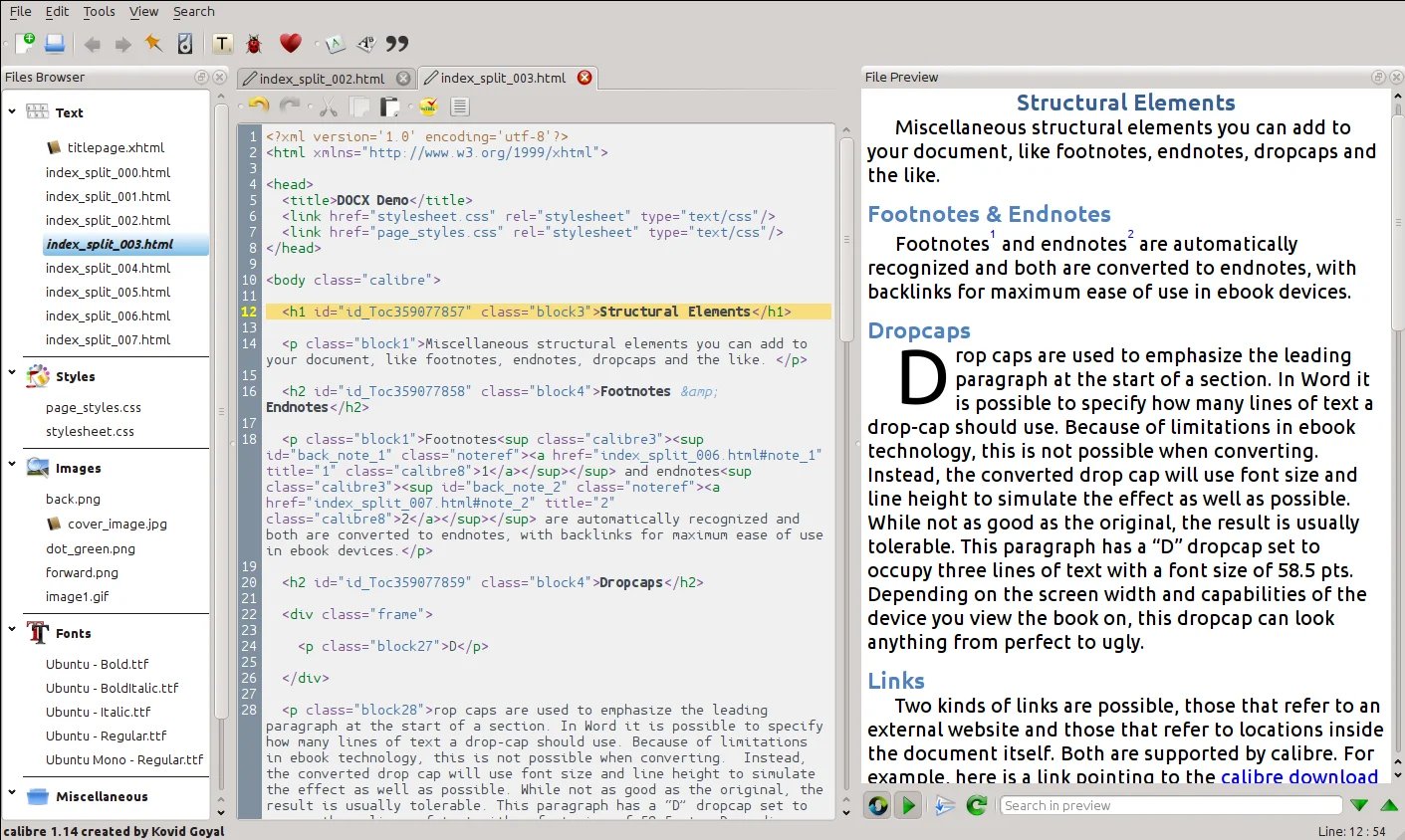
Official documentation screenshot; not a book converted or tested by ToolWorthy. Source: calibre user manual.
This is a different kind of control from picking a book theme. It fits someone willing to own the file structure; it is not our default recommendation for a first-time author seeking a guided layout workflow. Conversion cannot be assumed to recover a clean editable manuscript from a visually designed PDF.
First elimination test: make a small correction in a copy of a real EPUB, inspect the preview, and run the available checks. Skip direct code editing if maintaining the underlying HTML/CSS is outside your skill or support budget.
Check what you already own before moving
The shortlist is not exhaustive. Scrivener already exports EPUB and PDF; if your manuscript lives there, try its output before migrating. Sigil is another free, dedicated EPUB editor for a code-aware workflow. Neither needs to become an extra subscription just to increase the list length.
Draft2Digital offers conversion-file downloads without requiring distribution. Consider that route if its formatting fits your book, but distinguish conversion from its distribution service and current publishing fees. Pressbooks is worth a separate look for web-first or collaborative educational books; its hosted subscription and update model address a different ongoing publishing job. Beacon focuses on lead magnets and their delivery, rather than being a substitute for a portable retailer EPUB workflow.
For the separate cover task, compare book cover generators. An attractive cover does not solve interior formatting, and a book formatter's preview does not establish that your cover meets the destination's specifications.
Before paying: run one export-and-revision test
Use a representative sample, not the cleanest page in the manuscript:
- Include front matter, two chapters, an image with a caption, a link, a list or table, and any footnotes or non-English text you rely on.
- Confirm that chapter headings become usable navigation. In a reflowable ebook, enlarge the font and change orientation; do not judge it by fixed page numbers.
- Open the actual file outside the editor. For Kindle, use Kindle Previewer and the final KDP preview. Check other destinations separately.
- Make a correction, regenerate, and confirm that it survives in every edition. Keep the editable project, manuscript, linked assets, and a dated export together.
- If accessibility is required, test headings, reading order, alt text, links, and screen-reader behavior in the exported file. Export support is not accessibility certification.
The practical choice is the least complicated workflow that produces the right file and lets you repair it later. Start with a free formatting route for ordinary prose, pay for a specific platform or production advantage, and choose PDF design only when fixed pages are genuinely the deliverable.
Get ToolWorthy Weekly
New AI tools, practical guides, and selected AI signals in one weekly brief.
Related Posts
- 10 Best Book Cover Generators 2026 — Genre-Right & KDP-Ready
We tested 10 book cover generators on what actually sinks indie authors: genre fit, thumbnail legibility, KDP print specs, and real one-time vs subscription cost.
For AI tool founders
Built a tool that belongs in this decision set?
Request an editorial evaluation for possible inclusion in ToolWorthy.
Submit your tool for reviewPaid submission does not guarantee a ranking, recommendation, inclusion, or editorial outcome.