
Best Unforgettable Car AI Tools for the 24 Card Reveal
Choose a complete 24 card car reveal, direct your own AI shots, or edit footage you already have. Compare six tools by inputs, output and payment model.

On this page
The Unforgettable Car AI trend has three recognizable beats: show the 2 and 4 cards, cover the lens with a swipe, then reveal a car behind you. Choosing a tool starts with what you already have: a selfie and car photo, a custom shot idea, or footage ready to edit.
Unforgettable Car AI is our first pick for the complete prepared effect from photos. Dreamina provides an effect-specific creative guide; Runway and Higgsfield suit custom AI shots; Pollo Agent coordinates a custom production; CapCut handles recorded footage, assembly and sound. These routes give you different amounts of creative control and editing work.
Compare the Creative Routes
| Tool and starting material | Creative route | Output and finishing | Payment basis |
|---|---|---|---|
| Unforgettable Car AI — adult selfie + car photo or supplied car | Complete 2-and-4 reveal | 15s, 1080P, 16:9 silent MP4; add permitted sound | One-time: $9.99/1, $19.99/3, $59.99/10 videos |
| Dreamina — references + prompts | Guided custom card-to-car shots | Select and assemble generated clips | Credits; model and membership determine usage |
| Runway — text or starting image | Direct custom AI shots | Gen-4.5: 2–10s, 720p; assemble a longer edit | Standard $15/month, or $12/month billed annually; credits |
| Higgsfield — car photo or prompt | Cinematic automotive shots | Model-dependent clips for a car sequence | Starter listed at $15/month, 200 credits; confirm regional access |
| Pollo Agent — brief + assets | Conversational custom production | Coordinate and revise scenes into a video | Free trial; confirm workflow credit quote and membership |
| CapCut — existing clips + cleared audio | Edit and finish footage | Arrange framing, cuts and soundtrack | Free basic editing; paid assets/features have access requirements |
Choose the prepared format when you want the complete recognizable sequence from photos. Choose custom generation when you want to decide the setting, camera movement and reveal timing yourself. Choose editing when you have the before-and-after footage, or want to finish an AI-generated clip with sound and captions.
The Tools

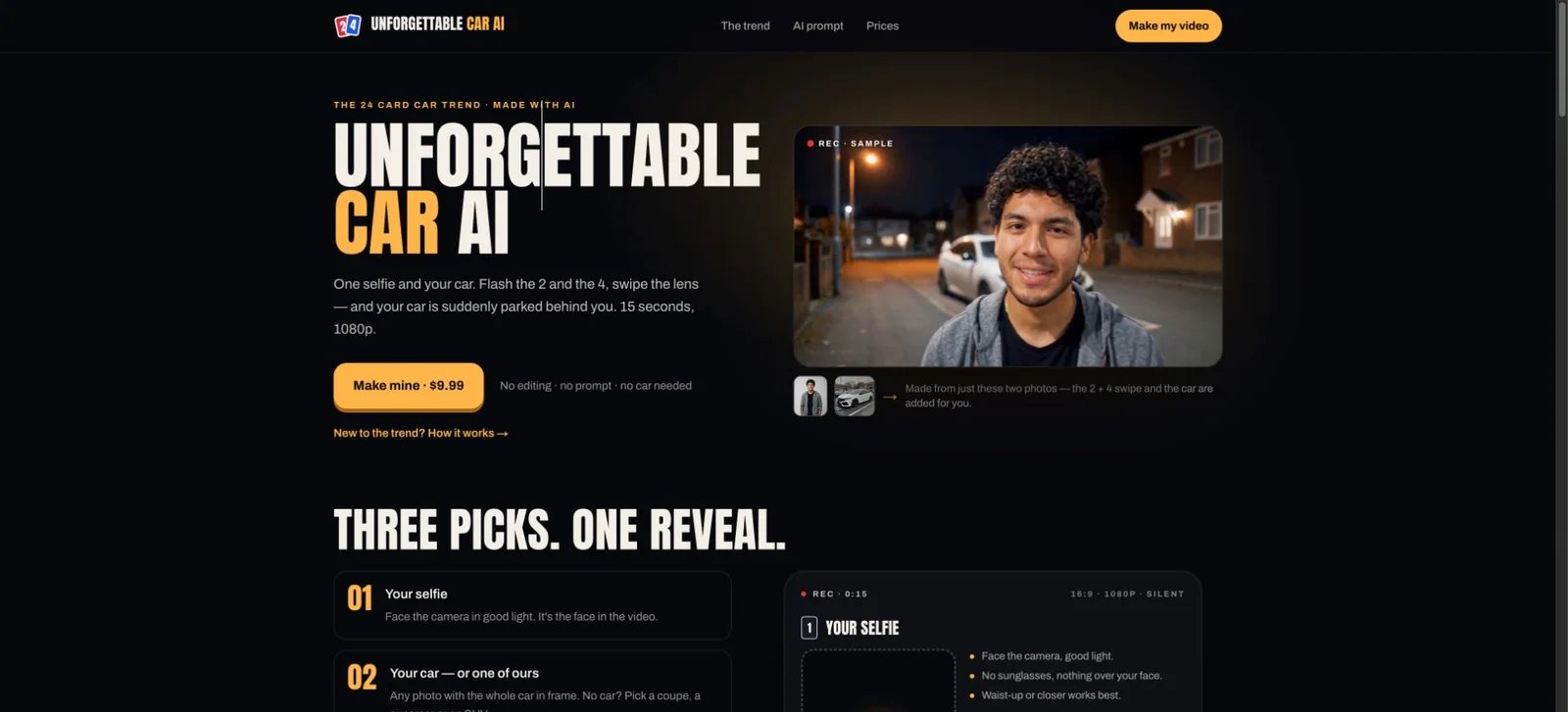
Unforgettable Car AI builds the specific 2-and-4 cards → lens swipe → car reveal sequence. Upload a clear, camera-facing adult selfie and a whole-car photo, or select a red coupe, green supercar or matte-black SUV. Pick a night car park, city street or rooftop scene.
The finished file is a 15-second, watermark-free 1080P MP4 in 16:9 landscape. It arrives silent, ready for sound to be added in your posting app or editor. The provider estimates about ten minutes for delivery by email.
Price: $9.99 for one video, $19.99 for three, or $59.99 for ten. These are one-time purchases; an account and subscription are unnecessary. Unused credits stay available through your private pack link.
Choose it when: you want the prepared trend from photos. For a custom shot sequence or framing, use one of the creative platforms below. Its terms allow personal sharing and commercial marketing with authorized photos, including vehicles you own or sell. Use a photo of the actual vehicle for a sales post; supplied cars suit creative concepts. Add cleared music and label AI content appropriately.
Dreamina
Dreamina's official UNO card-transition guide addresses the creative structure directly: establish the person, move a card across the lens, then reveal the parked car. This makes it a useful starting point for creators who want to design their own version.
The workflow is guided custom generation. Prepare references, describe the movement, generate takes and join the chosen shots in an editor. The guide's card-cover transition supplies a planning method; you direct the exact cards, car and timing in your own sequence.
Access: generation uses credits, with model and membership affecting the available settings and consumption. Confirm the credit quote for your chosen shot before generating; membership offers can depend on market and billing term.
Choose it when: you enjoy building and revising the shots yourself. Plan the before-and-after images with the same camera angle and car position, and use the covered-lens moment as the joining point. That gives the editor a clear place to connect the reveal.
Runway
Runway suits creators who want to direct a custom shot with a prompt and starting image. Its Gen-4.5 documentation supports text-to-video and image-to-video, with motion and sequenced actions described in the prompt.
Gen-4.5 produces 2–10-second, 720p shots and costs 12 credits per generated second. Image-to-video supports landscape, portrait and other aspect ratios; text-to-video lists 16:9. Choose the mode and framing for your intended edit. For a fifteen-second edit, plan multiple shots and assemble them around the lens-cover cut.
Price: Standard is $15 per month on monthly billing, or $12 per month billed annually, with 625 monthly credits. Gen-4.5 requires Standard or higher. A ten-second generation uses 120 credits; budget for the number of takes you intend to create as well as the final running time.
Choose it when: you want control over the action and camera movement within each shot. Start from a prepared image that already establishes the person, vehicle and composition, then describe the movement you want to animate.
Higgsfield
Higgsfield's AI car-video workflow turns a car photo or prompt into automotive footage, including rolling shots and directed cinematic scenes. It is a useful option when your reveal will lead into additional views of the vehicle.
Use it to create the car-focused part of a larger edit: for example, follow the card swipe with a parked-car reveal, then cut to a rolling or detail shot. Its automotive workflow supplies the car-shot tools, while you plan the cards and connecting transition.
Access: the official subscription guide lists Starter at $15/month with 200 credits. The selected model and settings determine duration, format and credit consumption. Confirm the active plan in the creator for your region.
Choose it when: the vehicle is the main subject and you want a small automotive sequence around the reveal. For a dealership post, compare the final vehicle details with the actual car and keep the sales description accurate.
Pollo Agent
Pollo Agent takes a brief, images, links and references, then coordinates assets and scenes into a complete video. It also lets you give feedback during production and revise individual parts while retaining the project context.
For a custom card reveal, describe the three beats explicitly and provide permitted person and car references. Use the conversation to direct the scene and transition, then review the assembled sequence before downloading. This route suits a broader creative brief with additional shots or a promotional message.
Access: the official product page offers a free trial. Check Pollo's current pricing and the generation quote for your selected workflow; model, resolution and duration affect the credits used. Plan the project around its scenes and revisions, rather than treating a credit allowance as a fixed number of complete trend videos.
Choose it when: you want a conversational production workflow for a customized social clip, with the ability to change an asset or scene along the way.

CapCut is the finishing route for filmed before-and-after shots or clips created in the tools above. Cut at the instant the cards fill the frame, position the reveal on the beat, then add captions and appropriately licensed audio.
Its public library includes an Uno card trend template with nine clips in 9:16 and a Car Reveal template with six clips in 9:16. Choose a template whose clip slots match your footage, or make a manual timeline for your own sequence.
Access: basic cutting, trimming, merging and audio editing are available free. Selected templates, effects and other features use paid access; check the labels in your app and the local subscription offer.
Choose it when: your main task is arranging existing material and sound. For a 16:9 generated clip, decide whether to preserve the landscape composition or create a separate portrait edit with the face, cards and vehicle kept in frame.
Plan the Reveal Before Choosing a Plan
A useful purchase decision follows the three visible beats of the video:
- Establish the person and car. For the prepared tool, use a clear adult selfie and a complete vehicle photo. For custom generation, prepare matching compositions for the start and reveal.
- Choose the joining moment. A card filling the frame gives a custom edit a natural cut point. Generate or film both sides with consistent framing.
- Finish for the destination. Choose landscape or portrait deliberately, then add captions and cleared audio. Keep a clean copy of the finished video for future edits.
Compare like-for-like costs. A $9.99 prepared video purchases one complete format. A subscription credit allowance purchases generation capacity, and a timeline editor purchases or supplies editing features. For custom AI work, estimate the clips and takes you plan to generate before comparing the total with a ready-made video pack.
For a personal trend post, choose an available sound that is permitted for your intended use. For a dealership or paid campaign, use music cleared for that commercial use. A video-generation purchase and a soundtrack license serve separate parts of the workflow.
Which Route Fits Your Post?
Start with Unforgettable Car AI for the complete two-photo 24 card reveal. Pick Dreamina for a guided custom interpretation, Runway for directing individual AI shots, or Higgsfield for a reveal that expands into a car-focused sequence. Choose Pollo Agent for a customized production directed through conversation. Use CapCut to assemble your footage and soundtrack.
For broader creative options beyond this trend, explore ToolWorthy's AI video generator category.
Research checked October 15, 2026, against official product, help and policy pages. Recommendations compare documented workflows and access; they are based on source research.
Get ToolWorthy Weekly
New AI tools, practical guides, and selected AI signals in one weekly brief.
For AI tool founders
Built a tool that belongs in this decision set?
Request an editorial evaluation for possible inclusion in ToolWorthy.
Submit your tool for reviewPaid submission does not guarantee a ranking, recommendation, inclusion, or editorial outcome.