
8 Best AI Gantt Chart Makers 2026 — Plans, Not Just Bars
A generated chart is only the start. Compare eight AI Gantt routes by live scheduling, existing workspace, editable handoff, and the paid limits that matter.

On this page
The best AI Gantt chart maker is not necessarily the one that draws a timeline fastest. It is the one that gives you the right thing to maintain afterward: a live schedule with linked tasks, a view of work your team already tracks, an editable project file, or a diagram for a document.
Start with GanttPRO or TeamGantt if the schedule itself is the workspace. Check ClickUp or monday.com before buying another tool if your tasks already live there. Smartsheet fits a spreadsheet-led planning process; Microsoft Planner deserves a license check if your organization uses Microsoft 365. Ingantt adds a file-oriented route for project handoffs. Mermaid Chart is the different choice: a maintainable diagram, not a team workload system.
This is an official-source, desk-research comparison refreshed on October 12, 2026. We have not benchmarked generated schedule accuracy or tested every paid account. The elimination tests below are steps for your trial, not claims that we performed those trials. For broader workspace discovery, use the AI project management category.
AI Gantt chart makers at a glance
Choose an output and ownership model before comparing prices. “AI included” and “Gantt included” are different purchase questions.
| Tool | Best fit | What you maintain | Free / paid boundary | First reason to rule it out |
|---|---|---|---|---|
| GanttPRO | A dedicated dependency-led plan | Tasks and schedule in GanttPRO | Free generation; continued editing after 14-day trial is paid; calendar exceptions Advanced+ | Your required calendar/workload tools exceed the plan budget |
| TeamGantt | One scheduler with stakeholders | A live chart, or a WBS CSV handoff | Free WBS CSV; Personal: one user/project, 40 tasks; paid Base: one manager | Many people need date-editing rights, not just collaboration |
| ClickUp | Work already tracked in ClickUp | Existing workspace tasks and Gantt view | Free Gantt 60 uses; Unlimited+ unlimited; Brain licensing separate; PDF/PNG Business+ | A Gantt upgrade still does not include your required AI/export access |
| monday.com | Board-led project operations | Board items, dates and dependency settings | Gantt Standard+; dependency column and project boards Pro/Enterprise | You need linked rescheduling but only budgeted for Standard |
| Smartsheet | Spreadsheet-led scheduling | Rows, durations and predecessors | Pro includes Gantt; Business starts at three Members; AI builder has its own eligibility | Your sheet formulas conflict with dependency-controlled dates |
| Microsoft Planner | Microsoft 365 teams | A premium plan, not only a basic board | Agent needs Copilot; Timeline/Gantt needs premium Planner access | Copilot access is being mistaken for a premium scheduling license |
| Ingantt | MS Project-style file handoffs | Schedule files, with a Drive-based web route | Web trial then per-user subscription; native apps priced separately | Your real file fails a round-trip or your policy disallows the storage route |
| Mermaid Chart | Schedules that belong in docs | Editable Mermaid diagram source | Free Basic has limited AI; paid allowances expand it | You need assignee progress, capacity or team execution rather than a diagram |
On a phone, swipe the table horizontally for the plan boundaries and elimination criteria. These are workflow fits, not an overall ranking.
Decide what happens after the first chart
A work breakdown structure (WBS) tells you what needs doing. A dated bar chart tells you when the work is drawn. A maintained schedule also needs rules for what happens when work slips. AI can draft the first two without validating the third.
Before opening a trial, decide who will update the plan and what must survive a handoff:
- Live execution: tasks, dependencies and working calendars need to remain inspectable. Move a predecessor and check its successors; an arrow alone is not proof of rescheduling.
- An existing workspace: prefer a view of the team's real tasks over a second copy of them. AI-generated tasks still need owners, dates and a dependency check.
- Editable files: retain the working source and test an import/export round-trip. A PDF, PNG or task CSV is not automatically a full schedule with resource calendars and links.
- A document diagram: text-based source can be enough if a person will revise the plan manually. If this is your main job, our AI diagram generator comparison covers the wider diagram market.
Treat AI estimates as proposals. A plausible duration is not evidence that the team has capacity, approvals are complete, or a fixed deadline is achievable. Have the responsible people verify durations and dependencies before using the draft as a commitment.
Choose a route, then run an elimination test
GanttPRO
If you need a schedule to remain editable after a brief becomes tasks, start here rather than with an image generator. GanttPRO's AI maker turns a brief into a WBS with suggested dependencies, then opens the plan in the app for review and adjustment.
Its current plans include AI, but scheduling depth is tiered. Core includes a project calendar and auto scheduling; calendar exceptions are an Advanced feature, while workload management sits in Business. The 14-day trial needs no card. Continued app editing and collaboration are paid afterward; the public “free generator” is not a permanent free team workspace. Rates vary with billing period and the selected team size, so quote your actual seat configuration.
First elimination test: use a real handoff with a holiday, one delayed predecessor and a fixed launch milestone. Confirm which changes reschedule successors and which violate the deadline. Repeat using the features of the plan you intend to buy—not just the trial's premium access. Skip GanttPRO if the calendar or workload tier you actually need is outside budget.
TeamGantt
If the first deliverable is a task breakdown you can share or move elsewhere, TeamGantt offers a useful split. Its public AI maker accepts a project description or WBS. You can download the WBS as CSV for free, or start a 14-day trial to turn it into a live chart you can edit and share. A CSV is a starting artifact, not a promise of full scheduling fidelity in another editor.
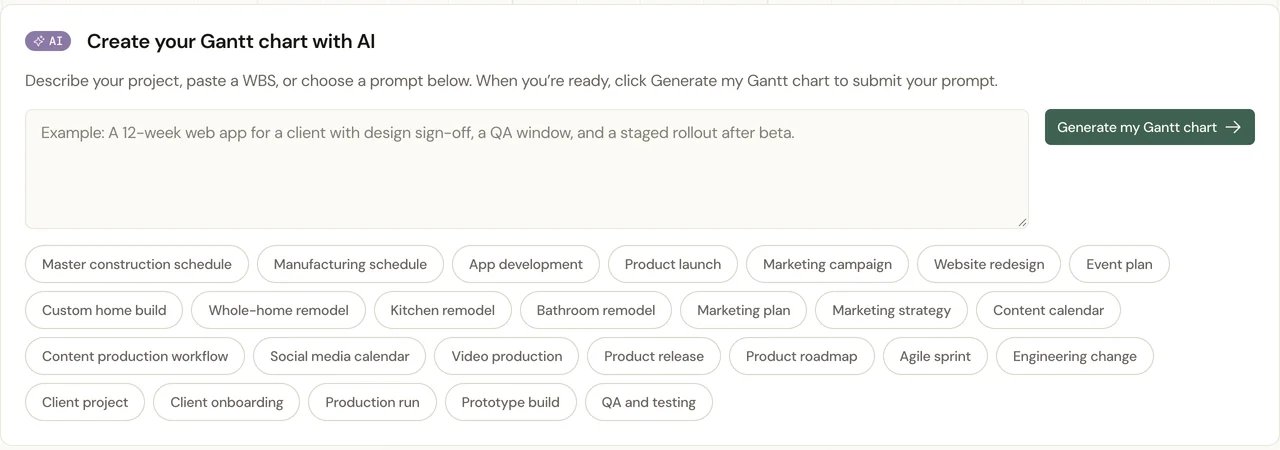
The public input screen illustrates the starting workflow. It is not a screenshot of a generated plan we tested.
The plan boundaries matter more than a low headline rate. Free Personal includes one user, one project and 40 tasks with basic dependencies and drag-and-drop scheduling; it is a limited solo route, not unlimited team AI access. Paid Base includes one manager, ten collaborators and five projects, with 150 tasks per project. Business changes manager access and project/task capacity. The paid 14-day trial requires a card and automatically bills afterward unless you cancel or downgrade. Under the documented role permissions, collaborators cannot change dates or edit task attributes.
First elimination test: invite the person who will actually reschedule work with the intended role. Can they change the dates they own, or only update progress/comment? Skip Base if several people need scheduling control. Do not confuse a shareable chart or collaborator allowance with multiple manager seats.
ClickUp
If your team already works in ClickUp, a second planning app can create unnecessary duplication. ClickUp Brain can create tasks and suggest subtasks; review those tasks before using their dates and dependencies in Gantt view. AI assistance and the view are related parts of the workflow, not proof of a complete automatically validated schedule.
The view limits give Free Forever 60 Gantt uses and Unlimited or higher unlimited Gantt use. Timeline is a separate view with different limits. Brain add-ons are generally purchased per workspace member, although some workspaces see new plans with more AI included. Also check the handoff: Gantt PDF/PNG export requires Business or higher.
First elimination test: generate a small task breakdown, inspect its dates, then link a real blocker and change its due date with dependency rescheduling configured. Export the chart using your intended plan. Skip this route if you would need to upgrade the workspace, buy AI and upgrade again for a required stakeholder export. Do not switch solely because the first AI draft omitted dates that a human must supply anyway.
monday.com
If your operating process is already owners, statuses and boards, monday AI can be a better starting point than importing another schedule copy. The project creation paths differ: Pro uses standalone project templates with Sidekick refinement; Enterprise offers a prompt-generated outline during creation.
The Gantt view is Standard or higher, but milestones and critical path require Pro/Enterprise. The Dependency column also requires Pro/Enterprise. That distinction prevents an expensive misunderstanding: being able to show bars on Standard does not provide the entire linked-scheduling workflow.
First elimination test: make a three-task chain and select the dependency behavior you want. Flexible, Strict and No action do not mean the same thing; No action displays relationships without moving dates. Verify the AI feature and plan in the actual account before committing. Skip this route if you need a dependency-driven project but cannot fund the necessary tier or configure the board's scheduling rules.

If your schedule already starts as rows and columns, Smartsheet lets you keep that working model. Its AI workspace builder creates a structured workspace from a plain-language description; the help page documents Pro and Business access. Do not infer this capability from an unrelated AI formula feature, or assume availability in every organizational environment.
The plan comparison includes Gantt on Pro, which supports one to ten Members. Business starts at three Members and adds the distinct Timeline view. Gantt and Timeline are not interchangeable purchase labels.
The important scheduling step is to enable dependencies and use predecessor/duration columns. Dates then recalculate with the linked work. When dependencies are enabled, formulas are not allowed in several schedule columns, including Start Date, End Date, Duration and Predecessors.
First elimination test: take an existing sheet, identify formula-controlled dates and rebuild a small predecessor chain. Change a duration and inspect downstream dates and parent rollups. Skip this approach if your working model depends on formulas that cannot coexist with dependency-controlled columns and you are not prepared to redesign them.
Microsoft Planner
If the organization already lives in Teams and Microsoft 365, check entitlement before evaluating a new schedule tool. Microsoft's current Planner Agent guidance requires a Microsoft Copilot license to interact with the Agent. Users with Planner Plan 1, Planner and Project Plan 3 or Plan 5 additionally get premium functionality.
The basic/premium comparison puts Timeline—the Gantt chart—dependencies, milestones and critical path in premium plans. Agent access in a shared basic plan does not change that boundary. Goal-based task generation is also documented as premium-only in the current Agent guidance.
First elimination test: ask an administrator to confirm your assigned licenses, then open a representative shared plan and verify Timeline and goal-based generation for your user. Skip this route if the decision assumes that ordinary Microsoft 365 or Copilot access alone unlocks premium Gantt scheduling. Do not purchase a replacement before checking whether the organization already owns the relevant premium seats.
Ingantt
If your handoff is a project file rather than a workspace invitation, Ingantt deserves a separate look. Its AI planning workflow produces tasks, durations, dependencies and a WBS. The web edition uses Google Drive for project files and offers offline editing after you preload a plan and enable offline mode. That is not a claim that AI generation works offline.
Its import/export documentation supports Microsoft Project files including MPP and XML, but changes are saved as XML rather than an edited MPP. Non-XML project imports require an internet connection and are sent to Ingantt's conversion service; the vendor says it does not store those files. Check that transfer against your policy even if later editing is offline. File-format support is not a tested guarantee of lossless migration.
The pricing models differ: Web has a seven-day trial then a per-user subscription; native platform apps use separate one-time purchases. Do not assume one purchase licenses every platform or provides identical cloud/AI behavior.
First elimination test: import one representative file, change a dependency, export XML and reopen it in the receiving editor. Compare durations, calendars, constraints and assignments. Skip this route if the real file loses essential meaning or the web storage model conflicts with policy. Treat claims of parity with larger enterprise schedulers as claims to test, not our verified verdict.
Mermaid Chart
If the schedule needs to live beside engineering documentation, editable text may matter more than a task dashboard. The commercial Mermaid AI product, associated with Mermaid Chart, supports Gantt diagrams from natural-language instructions. The open-source Mermaid renderer itself is not that AI assistant.
The Gantt syntax makes durations, task relationships and excluded dates visible in the source. Save that text, not only an exported image. You can review a change to a dependency in the source; this is useful for a manually maintained roadmap or release document, not a replacement for live assignee progress and capacity planning.
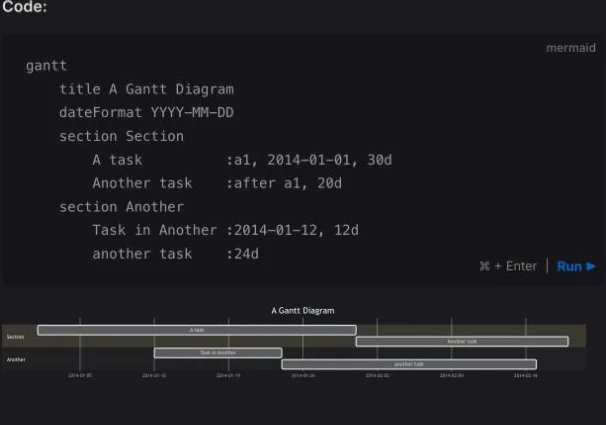
This is the official syntax example, not an AI-generated result from our testing. It shows what the editable handoff consists of.
The commercial Basic plan is free with limited AI. Paid plans expand allowances; the pricing page currently presents inconsistent diagram caps across sections, so check the account rather than relying on one exact free-diagram count.
First elimination test: regenerate the diagram from its saved source, change a predecessor and review the result. Skip Mermaid Chart if you need people to report completion, resolve resource conflicts or update a shared execution plan inside the diagram itself.
A trial brief that reveals the important differences
Use the same small, non-confidential project in the tools you shortlist. Here is a test brief, not a tested benchmark:
Plan a website launch. Research takes two working days. Design takes three days after research. Content and development can run in parallel after design. QA waits for both. Launch is a fixed milestone. One shared reviewer is unavailable on Friday. Identify missing inputs rather than silently inventing them.
Then check four things:
- Inspect the model. Can you see which dependencies are real links, which dates were inferred and who owns the work? Find one unreasonable duration before discussing the visual polish.
- Introduce a delay. Extend design by two days. Which tasks move? Does the fixed launch date become an explicit conflict, or does the chart merely look plausible?
- Check the working calendar and role. Can the intended plan represent Friday unavailability? Can the intended user—not only the trial administrator—make the required edits?
- Test the handoff and bill. Export the exact format your stakeholder needs. Check AI allowance, editor roles, seats, project limits and the post-trial plan together. Preserve the original brief and working source for later changes.
If the product cannot pass your must-have step, eliminate it early. Do not average away a failed editable handoff with a long list of unrelated features.
Before adding another workspace
Keep your current tool if it already handles the dependencies, calendar and handoff you need. This shortlist does not mean that Wrike or Asana users should migrate: Wrike's plan comparison includes dynamic Gantt, and Asana Smart Projects can help structure a project. Test those existing entitlements before duplicating tasks elsewhere.
For a one-off chart, the smallest sufficient output may be a CSV or saved Mermaid source. For ongoing delivery, the harder question is who will keep the schedule accurate after kickoff. AI can remove blank-page work; it does not remove that responsibility.
Frequently asked questions
Is there a free AI Gantt chart maker?
There are free starting points, but check what stays free. TeamGantt offers a free generated WBS CSV and a limited Personal plan with one user, one project and 40 tasks; do not assume unlimited AI on that plan. GanttPRO offers free generation with paid continued app work after its trial. ClickUp limits free Gantt uses, and Mermaid's free commercial tier has limited AI. None of those statements promises unlimited free team scheduling.
Can ChatGPT make a Gantt chart?
It can help draft task data or Mermaid source, but a generated answer is not automatically a maintained schedule. Choose a renderer or scheduler that supports your output, then verify dependencies, working days and dates. Do not treat a plausible diagram as an approved project commitment.
Which option should I try if my team already uses ClickUp, monday.com or Microsoft 365?
Check the existing workspace first. Verify Gantt access, dependency features, AI entitlement and who can edit. In Planner, premium Timeline access is separate from Agent interaction. A second app only makes sense if the existing tool fails a must-have scheduling or handoff requirement.
Can an AI Gantt chart be moved to another project tool?
Sometimes, but distinguish a view export from an editable project. PDF and PNG preserve a picture; a task CSV may omit scheduling relationships. XML or diagram source can preserve more structure, but test a representative round-trip before migrating every project. Keep the original working source until the receiving tool is verified.
Which route works for offline editing or files rather than a new workspace?
Consider Ingantt's documented file and platform routes. Its web offline mode requires loading the plan while online first, and web/native purchasing differs. Saved Mermaid source also makes a diagram portable to a compatible renderer, but it is not a live resource scheduler. Neither route implies offline AI generation.
Get ToolWorthy Weekly
New AI tools, practical guides, and selected AI signals in one weekly brief.
Related Posts
- Best Taskade Alternatives 2026: Pick by What You Need to Preserve
Taskade alternatives are not all replacing the same thing. Choose by project depth, docs, operations data, automation rebuilds, generated app ownership, or portal delivery.
- 10 Best Trello Alternatives 2026 — After Atlassian's Inbox, Planner, and AI Pivot
Atlassian's 2025 'New Trello' pivot left team-PM users without a roadmap. We mapped 10 alternatives — sorted by which migration trigger they actually solve.
For AI tool founders
Built a tool that belongs in this decision set?
Request an editorial evaluation for possible inclusion in ToolWorthy.
Submit your tool for reviewPaid submission does not guarantee a ranking, recommendation, inclusion, or editorial outcome.