
Best AI PDF Generators for Visual Docs and Automation
Compare AI PDF generators for visual documents, ebooks, form-to-PDF automation, and developer APIs by input, editing, export, limits, and price.
On this page
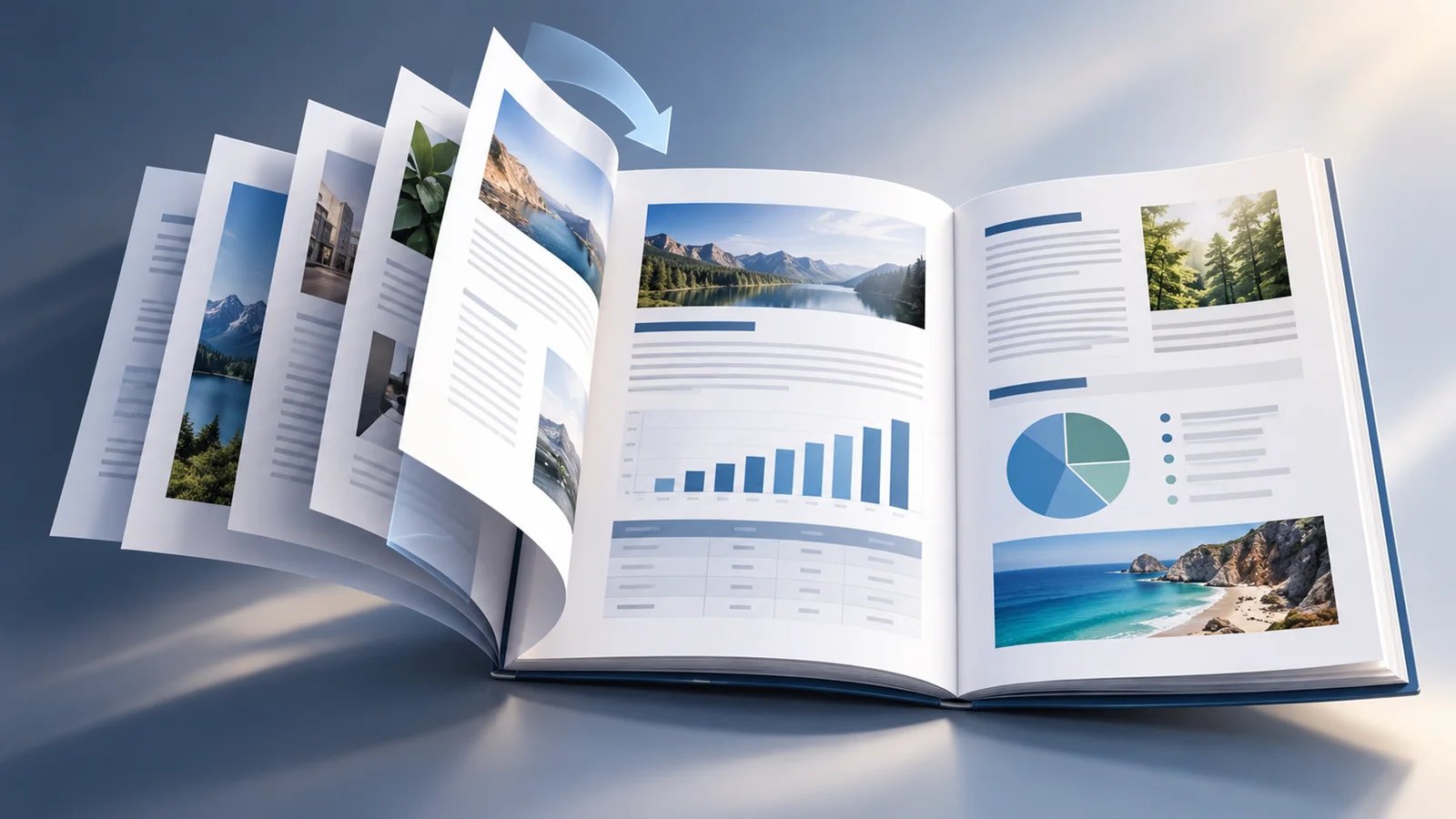
The best AI PDF generator depends on what has to happen before the PDF exists. A marketer turning a brief into a branded guide needs an editable visual workspace. An operations team merging CRM records into hundreds of proposals needs a reusable template and data automation. A developer shipping invoices from an application needs an API—not an AI writing assistant.
This guide separates those jobs before comparing products. It uses current official product, help-center, and pricing evidence. It does not claim a winner for design quality, prompt accuracy, accessibility, factual accuracy, or time saved because no controlled cross-vendor output benchmark was performed.
Short Answer: Choose the Creation Workflow First
| If you need to... | Shortlist... | Eliminate first if... |
|---|---|---|
| Turn a prompt or source document into an editable visual PDF | Canva, Gamma, Piktochart, Visme | The tool cannot accept your real source or meet your editing and export constraints |
| Repurpose an article or manuscript into an ebook or lead magnet | Designrr; also compare Gamma inside the visual-document lane | Realtime team design or API generation is required |
| Turn form responses into branded PDFs | Jotform, Documint | The source is arbitrary long-form prose rather than structured data |
| Merge CRM, spreadsheet, or database data without building a renderer | Documint, Jotform | AI must write and visually invent the document |
| Generate PDFs from an application or automation | CraftMyPDF, PDFMonkey, Placid | A nontechnical editor must own the full writing workflow |
| Edit, summarize, or organize an existing PDF | Adobe Acrobat or a PDF summarizer/editor | The job is creating a new designed document from source material |
Before You Trial Anything
Freeze four requirements: the input route, who must edit the source, the final delivery constraint, and the billing meter. Eliminate any tool that cannot accept your real input, preserve the level of control you need, export an acceptable PDF on the intended plan, or support your representative workload. Only then compare its AI claims.
What Kind of PDF Are You Creating?
“AI PDF generator” describes four different markets:
- AI-first visual document creators turn prompts, pasted text, files, or URLs into an editable design. Compare Canva, Gamma, Piktochart, and Visme here.
- Publishing and repurposing tools turn existing long-form content or an AI manuscript into an ebook or lead magnet. Designrr is the specialist route in this guide.
- No-code document automation maps forms, CRM fields, or database records into reusable templates. Jotform and Documint solve this operational job.
- Developer-owned PDF generation renders structured payloads through templates and APIs. CraftMyPDF, PDFMonkey, and Placid belong here.
.pdf, but they differ in who writes the content, who owns layout, how edits happen, and what the bill measures.If the deliverable is primarily a word-processing document rather than a designed PDF, compare AI document generators. If it is a slide deck, start with AI presentation makers.
AI-First Visual Documents: Canva, Gamma, Piktochart, or Visme?
These four products are the closest comparison for a non-designer creating a report, guide, proposal, workbook, or lead magnet. The important difference is not one universal design number. It is how each tool handles source material, editing, brand control, and export.
| Decision factor | Canva | Gamma | Piktochart | Visme |
|---|---|---|---|---|
| Main starting point | Templates, editable docs, and AI-assisted creation | Prompt, paste, import, or blank document | Prompt, paste, TXT, DOCX, or text-based PDF | Prompt, source document, or source link |
| Main editing model | Broad drag-and-drop visual workspace | Structured editable cards | Visual editor with source-preservation route | Visual editor with Verbatim, Enhance, or Rewrite modes |
| Brand path | Brand Kit and Brand Templates on eligible plans | Themes and higher-tier brand controls | Brand Kit on Business | Brand Kit on Pro and above |
| Pricing signal | Free plus paid individual/business tiers | Free export carries Gamma branding; paid expands capacity | AI credits plus plan-gated downloads and branding | Seat price plus monthly AI credits |
| Remove it if | Data/API automation owns the decision | Exact source/page fidelity is mandatory | Scanned PDF or API input is mandatory | More than 10 AI-generated pages in one pass is mandatory |

Canva is the broad visual-workspace choice. Its PDF workflow combines templates, drag-and-drop editing, AI-assisted writing and media generation, collaboration, and PDF download. That makes it useful when the first AI draft is only the beginning and a team still expects to edit layout, imagery, typography, and brand treatment.
For a wider comparison of creative workspaces beyond PDFs, see our guide to the best AI design tools.
Canva's brand controls matter more than a generic “has AI” checkbox. Brand Kit and Brand Templates let eligible plans centralize logos, colors, fonts, imagery, and reusable design rules. Current plans separate a free route from paid individual and business tiers, with AI allowances, storage, and organizational controls changing by plan and region.
Choose Canva when several people need to shape a branded visual document inside a familiar design workspace. Skip it when your real requirement is repeatable CRM data merge, application-controlled rendering, or a simple per-document automation meter.
Trial note: build one representative 10-page guide with your real font, logo, table, chart, and image requirements. Confirm the intended plan's AI allowance and PDF export path, then check the exported file rather than judging only the editor canvas.
Gamma
Gamma turns source material into an editable visual structure. Its document workflow can generate from a prompt, paste existing text, import Word, PDF, or Google Docs, or start blank. For ebooks and PDF guides, Gamma documents A4 and Letter page formats, multipage chapters, a table of contents, headers, footers, and PDF export.
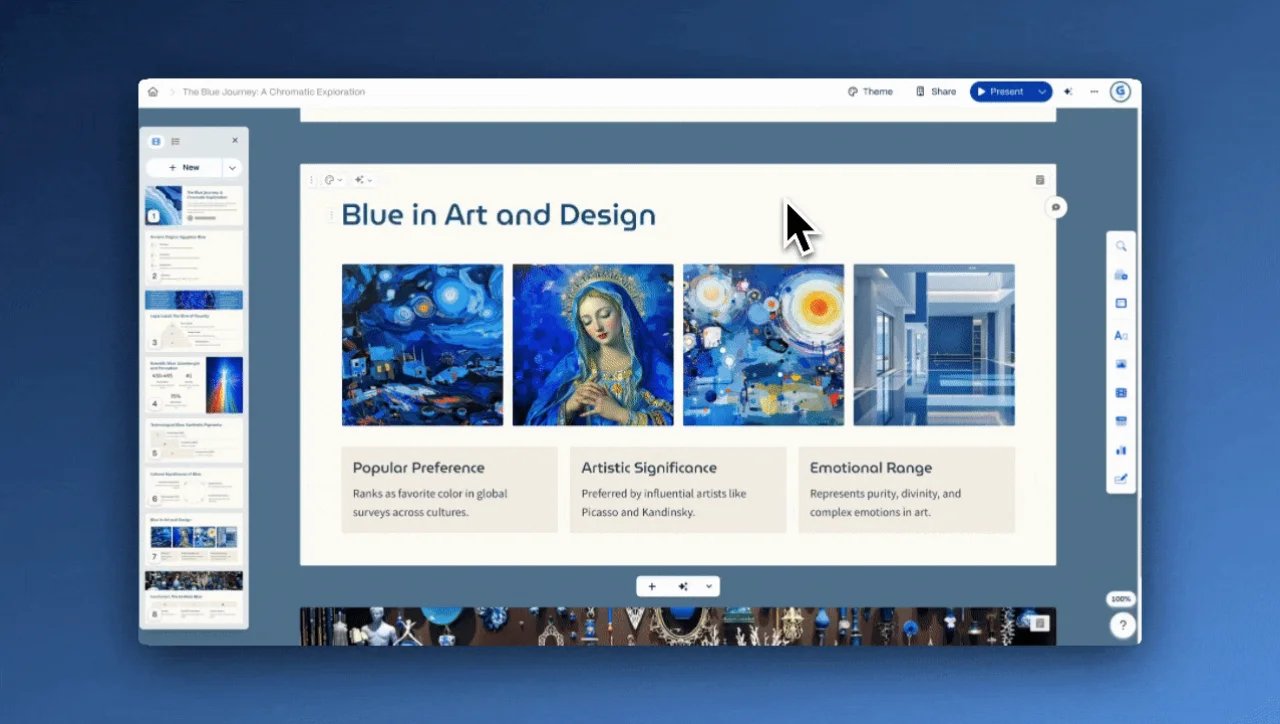
Gamma's AI may restructure or rephrase content pasted through its AI generation flow; its Help Center recommends using a Text block or file import when exact wording matters. Export follows Present Mode rather than Edit Mode, and its Help Center recommends checking scaling and image quality. Free-account exports carry Gamma branding; paid tiers generally remove it and increase per-prompt capacity and brand controls.
Choose Gamma when its prompt, paste, and file-import routes fit your source and you are willing to review every page. Skip its AI paste-generation route when exact wording must survive without manual correction, and skip the product when page geometry, citations, or desktop-publishing fidelity must survive automatically. Gamma's current official surfaces also disagree on Word export, so this guide does not rely on Word output as part of the recommendation.

Piktochart is useful when the source already exists and preserving its core content matters. The AI Document Generator accepts prompts, pasted content, TXT, DOCX, and text-based PDF files. Its Preserve Content route is explicitly intended to retain source text, images, and tables while applying a new layout in Piktochart's visual editor.
The input boundary is concrete: a scanned or image-only PDF is not equivalent to a text-based PDF. Piktochart also does not document an API route for this workflow. Free accounts currently receive 60 AI credits each month; generating from a prompt costs one credit, while uploading or pasting source content costs three. Pro includes 500 monthly AI credits, while Business includes 1,000 and adds broader brand and download controls.
There is a current official-source inconsistency around free PDF export: the AI-generator page advertises high-resolution PDF export, while the pricing table places PDF/PPT downloads on Business and gives Free and Pro different download entitlements. Treat the actual export button on your intended plan as a purchase gate.
Choose Piktochart for a source-led visual redesign. Skip it when you need scanned-PDF ingestion, developer automation, or an unambiguous free-to-PDF route before signup.

Visme gives source-guided buyers an unusually explicit content-control choice. Its AI Designer can start from a prompt, source document, or source link, then use Verbatim, Enhance, or Rewrite modes before the result enters Visme's editable visual workspace. That can help a team distinguish “preserve my approved copy” from “let AI rewrite the draft.”
Visme currently lists Basic at $0, Starter at $12.25 per person per month billed annually, Pro at $24.75 billed annually, and Enterprise by quote. The pricing table grants 10 monthly AI credits on Basic, 200 on Starter, and 500 on Pro; an AI Designer generation uses two credits. PDF download begins on an eligible paid route, while Pro adds Brand Kit and broader collaboration/privacy controls.
One operational limit should drive the trial: Visme documents a 10-page ceiling for a single AI Designer generation. You can edit and add pages afterward, but a buyer expecting a 30-page first pass should not treat that as the same workflow.
Choose Visme when transform control and branded editing matter. Skip it when long single-pass generation or API rendering owns the job.
Long-Form Publishing: Designrr
Designrr
Designrr is not a general-purpose design workspace. It is a publishing route for turning existing web pages, Word or Google documents, plan-eligible textual PDFs, or an AI-generated nonfiction manuscript into an ebook or lead magnet.
That specialization changes the useful questions. Instead of asking whether Designrr has the same canvas as Canva, check whether it can import your real source, preserve headings and images, create the table of contents and pagination you need, and export the required format. PDF publishing is available across Designrr plans, while source-import options, formatting controls, and WordGenie allowances vary.
Current Designrr sales and Help Center pages use changing plan names, promotions, and AI book-generation allowances, so this guide does not quote a durable headline price. Verify the checkout entitlement for the exact import route and WordGenie volume you plan to use.
Choose Designrr when the job is repurposing substantial existing content into a long-form download. Skip it when realtime team design, enterprise brand governance, or API-driven document generation is non-negotiable.
Form and Data-to-PDF Automation: Jotform or Documint?
Jotform and Documint begin with structured data rather than a blank creative brief. Both can create branded PDFs without a custom rendering stack, but the source system differs.
| Decision factor | Jotform | Documint |
|---|---|---|
| Natural source | Jotform form submissions | Airtable, CRM, database, webhook, app, or API data |
| Template/editing model | PDF Editor plus AI-assisted submission-report layout | Visual template with variables, conditions, loops, and calculations |
| Delivery continuity | Attach generated documents to form emails | Integrations and REST API for automated generation |
| Economic shape | Product-plan limits; AI document allowance varies by tier | Annual document allowance plus add-on packs |
| Remove it if | The source is an arbitrary manuscript or URL | AI must write and visually invent the document |
Jotform
Jotform is the form-to-document route. Its PDF Editor turns form responses into customizable PDFs; the current Documents workflow can also use Document Copilot AI to generate a submission-report layout from a description. After generation, the user can edit the layout, attach the PDF to notification emails, or start from one of more than 1,900 templates.
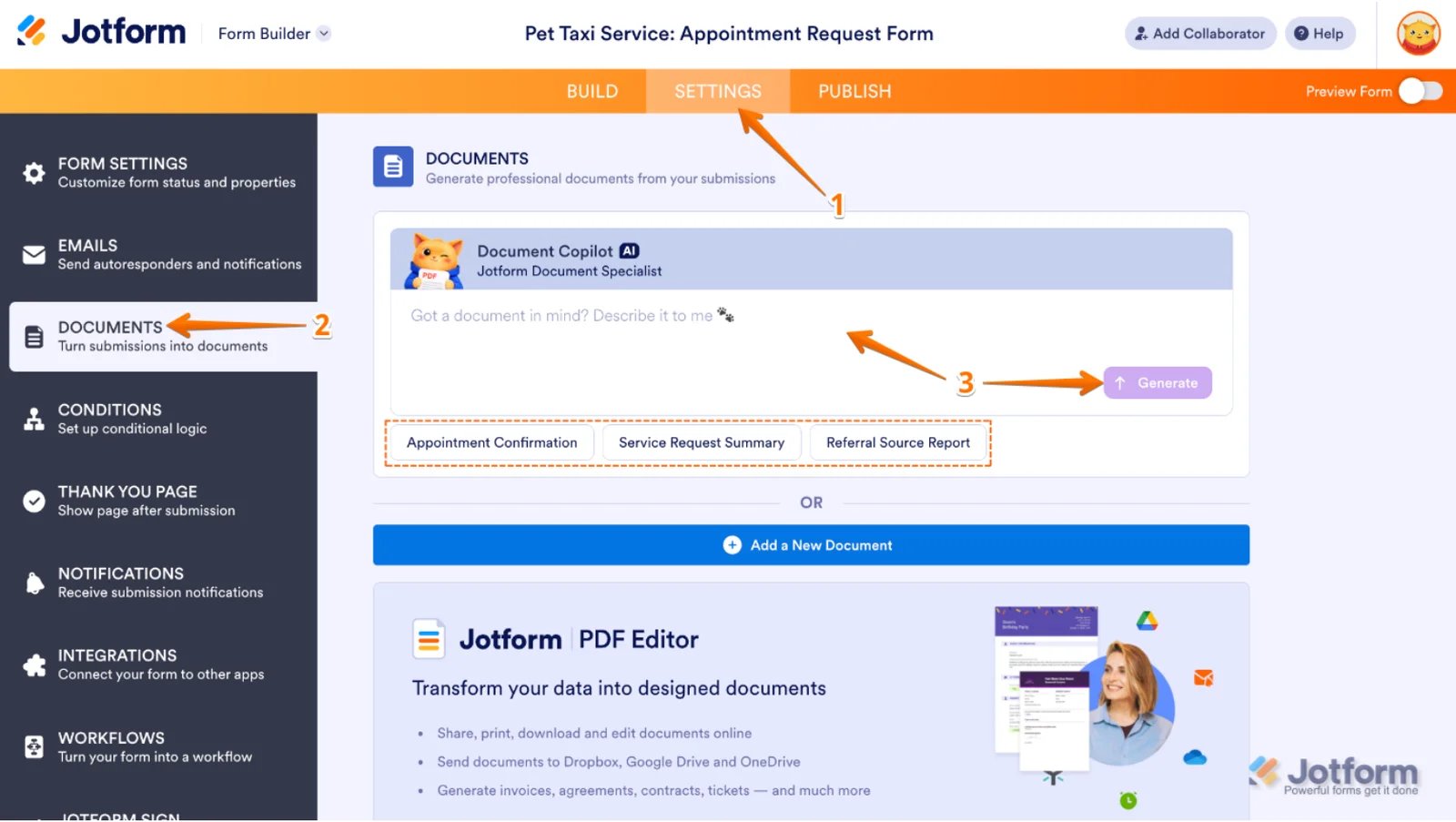
This is a strong fit for certificates, inspection reports, applications, proposals, and other records whose content begins as collected fields. It is a weaker fit for an editorially rich guide whose source is a long manuscript or website.
Jotform makes its core PDF Editor available from the free plan and mostly expands capacity on paid plans. Its AI Document Generator documentation currently gives five AI documents as the Starter example and up to 100 on Gold. Those limits sit inside a broader Jotform subscription, so price submissions, storage, automation, and document generation together.
Choose Jotform when collection and document delivery belong in the same no-code workflow. Skip it when the primary job is open-ended long-form writing and layout.
Documint
Documint is built for repeatable operational documents. Its visual template system maps structured data into variables, conditionally shows sections, loops through line items, and calculates values. Official integrations include Airtable, HubSpot, Coda, Zapier, Make, webhooks, and REST API.
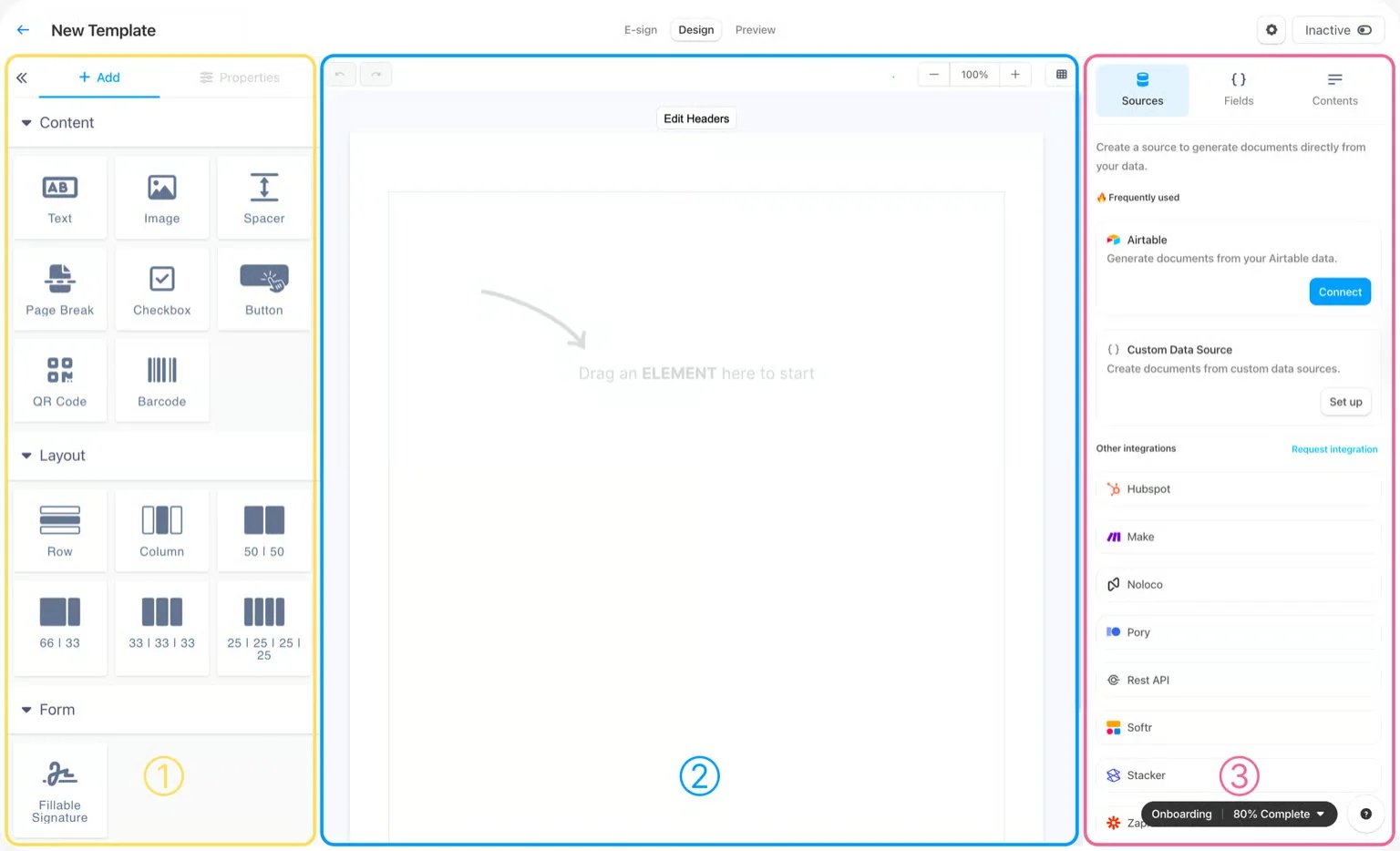
The commercial model is easy to translate into a workload. On annual billing, current published equivalents are $39 per month for 2,400 documents per year, $124 for 12,000, and $249 for 60,000. The entry tier includes a 14-day trial, custom branding, unlimited templates, integrations, and API access. One document can contain unlimited pages; the plan counts each generated document as a merge.
Choose Documint when an operations team owns the template and business data but does not want to maintain HTML/CSS rendering code. Skip it when the product must generate the narrative and visual concept from a prose prompt.
Developer PDF Generation: CraftMyPDF, PDFMonkey, or Placid?
These products belong inside software and automations. They do not replace an AI writing workspace; they give a product or engineering team more deterministic control over templates, payloads, generation, and delivery.
| Decision factor | CraftMyPDF | PDFMonkey | Placid |
|---|---|---|---|
| Template ownership | Visual editor with dynamic JSON fields | Visual Builder or HTML/CSS/Liquid | Visual templates with dynamic layers |
| Integration model | REST API plus no-code integrations | REST API plus no-code integrations | REST API, Zapier, Make, and Placid Studio |
| Native meter | Credits; one standard PDF generation equals one credit | Documents per month | Credits by page and output size |
| Distinctive fit | Mixed API/no-code teams wanting a visual template editor | Developers wanting code-template control | Personalized creative PDFs with DPI and layer control |
| Remove it if | AI must author the document | Word/PDF template import is required | Long flowing text or simple document billing is required |
CraftMyPDF
CraftMyPDF combines a drag-and-drop template editor with dynamic JSON data. Its REST API supports synchronous and asynchronous generation, while integrations cover common automation builders. The team can design a template visually without giving up application-controlled input and delivery.
The pricing meter is credit based but relatively direct for standard documents: one PDF generation consumes one credit regardless of page count. Other operations use different amounts—an e-signature request consumes ten credits, while watermarking and several manipulation operations use half a credit. Price the whole workflow rather than multiplying only the number of PDFs.
Choose CraftMyPDF when product and operations teams share ownership of a template-driven pipeline. Skip it when the service itself needs to research, write, and visually invent a report. Run a representative long-document test before relying on pagination, throughput, asset loading, or recovery behavior.
PDFMonkey
PDFMonkey offers two template paths over the same rendering engine: a visual Builder and Code Templates written with HTML, CSS, and Liquid. It accepts dynamic data through REST API and integrations, which makes it suitable for application-generated invoices, certificates, reports, and similar documents.
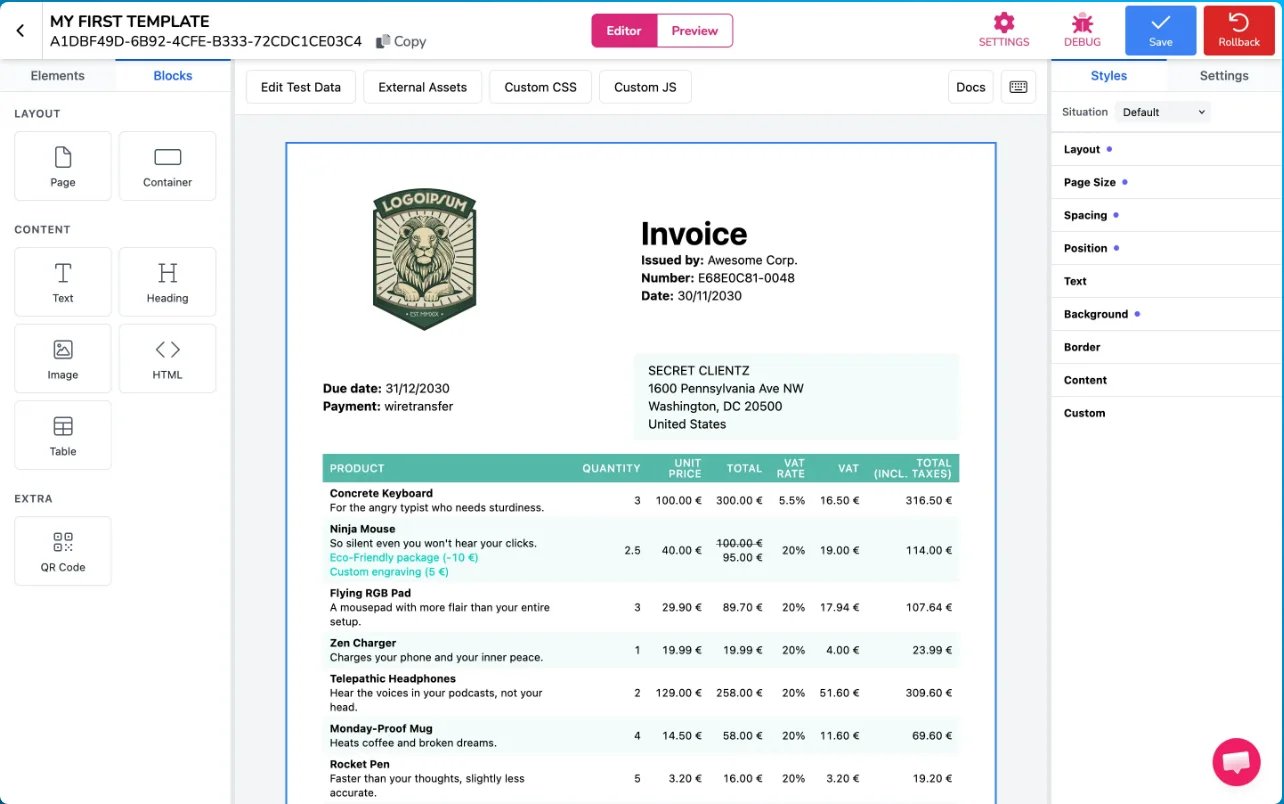
There is a clear source-import boundary: PDFMonkey does not import an existing Word or PDF file as a reusable template. A team must recreate that layout in the Builder or in code.
Current public pricing starts with 20 documents per month on Free, €5 per month for 300 documents on Starter, and €15 for 3,000 on Pro. Retention, generation timeouts, and team features change by plan. Official pages currently disagree on which paid tiers receive pay-as-you-go overages, so use the included quota for initial modeling and confirm overage behavior before launch.
Choose PDFMonkey when developers want template-code ownership and a small free test route. Skip it when prompt-first writing, automatic design invention, or source-document import is essential.
Placid
Placid is the design-sensitive automation route. Its visual templates expose dynamic text, image, color, and other layers; API calls or no-code integrations can fill those layers and merge pages into personalized PDFs. The API also documents webhooks, polling, storage transfer, image quality, DPI, and color-mode controls.
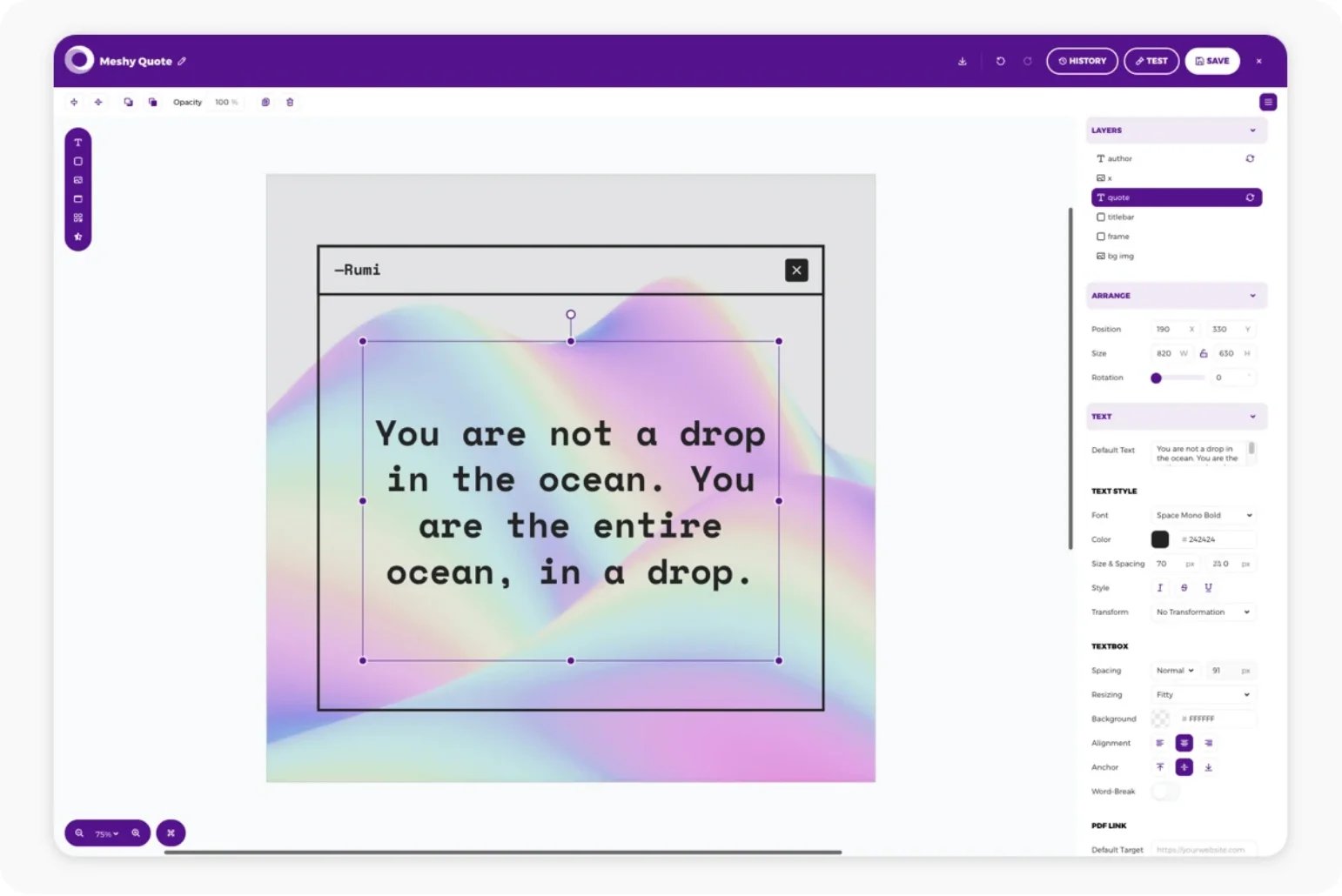
Placid's economics are page and output-size sensitive. A PDF page up to 4,000 pixels costs two credits by default. Larger dimensions or higher-DPI output can consume more, while watermarked test previews are free. That fits creative-asset automation but makes a 20-page personalized brochure economically different from a one-page certificate.
Choose Placid for branded brochures, certificates, labels, and other visually controlled personalized documents. Skip it for flowing ebook composition or when procurement needs one simple per-document meter.
When an AI PDF Editor Is the Real Answer
Adobe Acrobat
Adobe Acrobat is adjacent rather than a primary recommendation for this creation job. Its current AI positioning is strongest around understanding, summarizing, editing, converting, organizing, and transforming existing PDFs. Acrobat Studio also bundles Adobe Express for creating related visual content, but that is not the same workflow as a dedicated prompt-or-source-to-new-designed-PDF creator.
Choose an AI PDF editor when the file already exists and the task is to analyze, restructure, convert, sign, redact, or protect it. Do not buy a new-document generator when the actual job belongs to an editor or AI PDF summarizer.
How to Choose an AI PDF Generator
- Fix the input. Use the same real brief, document, URL, form, or API payload during trial. “Accepts PDF” is incomplete unless you know whether text-based and scanned files behave differently.
- Define the editable source. Decide whether editors need a visual canvas, an ebook project, a reusable data template, or code. A final PDF is usually not the working source.
- Set delivery constraints. Check watermark, page size, image resolution, clickable links, font behavior, privacy, and the exact plan's PDF export entitlement.
- Price the native meter. Seats, AI credits, documents, pages, API calls, storage, e-signatures, and overages are not interchangeable. Model one representative month.
- Keep unlike tools in separate lanes. Compare Canva with Gamma, Jotform with Documint, and PDFMonkey with CraftMyPDF—not all ten through one combined number.
- Inspect the output. Check missing content, page breaks, tables, charts, citations, links, images, brand assets, and accessibility requirements. This guide does not claim those outcomes were benchmarked.
Frequently Asked Questions
Which AI PDF generator should I try first?
Start with the workflow. Try Gamma, Canva, Piktochart, or Visme for an editable visual document; Designrr for an ebook or lead magnet from existing content; Jotform or Documint for structured no-code automation; and CraftMyPDF, PDFMonkey, or Placid for an application-owned API workflow. Eliminate any option that misses a mandatory input or export requirement before comparing the remaining one or two inside the same lane.
Can an AI PDF generator create an accessible PDF?
Public product documentation reviewed for this guide is not enough to name an accessibility winner. If PDF/UA, tags, reading order, alt text, keyboard behavior, or accessible forms are required, include a representative semantic document in the trial and inspect the exported PDF with the appropriate accessibility tools.
Can I turn an existing PDF into a new design?
Sometimes, but “PDF import” has different meanings. Piktochart documents text-based PDF ingestion, Gamma can import PDFs into editable cards, and Designrr supports plan-dependent textual PDF workflows. A scanned image PDF may need OCR, and no product should be assumed to preserve every table, citation, image, or page structure without a real test.
How should I compare AI PDF generators?
The products solve different jobs and use different billing units. A seat-based visual editor, a document-count automation service, and a page-credit API cannot share one meaningful combined rating without inventing buyer weights. This guide routes by buyer job and hard constraints instead.
Final Recommendation
For a prompt or source file that needs to become an editable visual document, shortlist Gamma, Canva, Piktochart, and Visme based on source handling and brand control. Use Designrr when the project is specifically an ebook or lead magnet built from existing long-form content.
Choose Jotform when form collection and PDF delivery belong together; choose Documint when operations data and reusable merge logic own the workflow. For software-controlled generation, compare CraftMyPDF, PDFMonkey, and Placid by template ownership and native meter.
Do not begin with the product name. Begin with what happens before the PDF exists, who owns the editable source, and what makes the final file acceptable. That removes more unsuitable tools than any universal AI ranking.
Get ToolWorthy Weekly
New AI tools, practical guides, and selected AI signals in one weekly brief.
For AI tool founders
Built a tool that belongs in this decision set?
Request an editorial evaluation for possible inclusion in ToolWorthy.
Submit your tool for reviewPaid submission does not guarantee a ranking, recommendation, inclusion, or editorial outcome.