
Best AI Lyric Video Makers in 2026 — Choose by Workflow
Choose a lyric-video workflow by transcription, timing control, clean-export limits, format, and the cost of a publishable full song.
On this page
The hard part of a lyric video is rarely putting text over footage. It is getting the approved words on screen at the right moment, keeping them readable on a phone, and downloading a final file without discovering a watermark, resolution cap, or unexpected credit bill. The best AI lyric video generator—or manually controlled maker—therefore depends on whether you need a full-song release, a word-level correction timeline, a pay-as-you-go asset, a mobile teaser, or a designed template.
This is a desk-research guide based on official product, help, and pricing pages checked September 26, 2026. We did not upload a song, measure transcription accuracy, render a finished video, or test export speed. Treat vendor claims of “automatic” syncing as a starting point, then proof one verse and chorus with your own audio before paying. If your main goal is generated visuals that react to music rather than lyric legibility, see our separate AI music video generator guide.
Pick your route in 30 seconds
- Generated visual story plus editable lyrics: Start with LyricEdits. Eliminate it if you need a free clean final or low-cost 4K.
- No-account full-song video with one clear clean-export price: Try MakeLyricVideo.com. Eliminate it if your self-serve final must be vertical or you need a free commercial release.
- Word-level proofing for a vertical video: Compare LyricMV. Eliminate it if you need a free full-song clean final.
- Quick browser-generated visuals on a lower entry budget: Try freebeat.ai. Eliminate it if you are assuming free creation includes a verified watermark-free final.
- Occasional single with music-native assets: Price Rotor Videos. Eliminate it if four-credit lyric downloads and possible add-ons make revisions too costly.
- Short lyric teasers made on a phone: Check CapCut. Eliminate it if you need Auto Lyrics generated on desktop or in a browser.
- Browser correction and team handoff: Check Kapwing. Eliminate it if a watermarked 720p free export cannot be your final.
- Final lyrics in a designed template: Try Canva. Eliminate it if you expect automatic lyric transcription or timing.
Lyric video makers at a glance
| Tool | Best workflow | Lyrics & sync | Clean free export | Cost model | Main catch |
|---|---|---|---|---|---|
| LyricEdits | Generated story | Audio → auto transcript; edit timing | No; Free is watermarked | Credits or subscription | Pro 4K is upscaled from 1080p |
| MakeLyricVideo.com | Simple full-song 16:9 | Audio → auto words/timing; correct | No; free 720p has watermark and credit requirement | $29 per clean video | Free file cannot be monetized; self-serve vertical not shown |
| LyricMV | Vertical word-level proofing | Audio → word timestamps; waveform edit | No full song; clean 30s preview only | 10 credits/min full render | Landscape route not documented |
| freebeat.ai | Fast browser visuals | Audio/link → claimed timed lyrics | Not clearly documented | Weekly plan; lyric checkout unclear | Confirm final export quote |
| Rotor Videos | Release assets | Supplied lyrics + track → auto alignment | No; preview is free | Four credits/download or annual | Premium assets may add credits |
| CapCut | Mobile teaser | Mobile Auto Lyrics | Varies by export/effect | Plan and asset dependent | No new Auto Lyrics on Web/desktop |
| Kapwing | Browser/team correction | Auto captions or manual lyrics | No; Free is watermarked | Per-member subscription | Free is 720p, max four minutes |
| Canva | Manually art-directed | Type lyrics; time clips yourself | Yes, with free assets only | Free or Pro assets | Beat Sync is not lyric sync |
On a phone, swipe the table horizontally; the route picks above remain readable without it. Prices and feature boundaries are official-page observations from September 26, 2026, not guarantees for every region, account, or checkout.
Why these tools
We researched a dozen plausible makers and editors, then kept the ones that change a material release decision: lyric transcription and timing, generated visuals, clean-export economics, campaign assets, browser review, mobile creation, or manual design. Eight is the result of that coverage, not a claim that only eight products exist.
VEED substantially overlaps Kapwing's browser-caption lane; Adobe Express overlaps Canva's manual-template lane. Specterr's current export economics were too thinly documented, while lyrics-video.ai's free-clean-export claim conflicts with controls shown on its own creation page. Those exclusions do not imply the products cannot make lyric videos.
What to check before choosing
These tools are not interchangeable. A “free” editor may let you build and preview a project but charge for a clean download. A lyric-specific AI product may save timing work yet require credits for generated scenes. A template editor can be the better buy when you already have the lyric sheet and prefer to control every reveal. Ask whether the input is audio to be transcribed, approved text to be aligned, or typed lines you will time manually; all three can be marketed as “auto-sync.”
Make a 20-second test from a dense verse and the chorus. Compare the words to the artist-approved lyric sheet, correct names and non-English phrases, then play it on a phone with sound and muted. Check line breaks, contrast, safe areas, and whether the edit remains usable in both 16:9 and 9:16. This is a proposed evaluation method, not a test we claim to have run.
Before release, confirm you have permission to use the recording, lyrics, and any artwork or footage. A tool's commercial-output license does not grant rights to someone else's song. Confirm the exact export format, watermark, resolution, and asset/credit charges in your account before committing to a launch date.
The workflow routes
LyricEdits
Best for: An artist who wants lyric timing and AI-generated story imagery in one music-specific workspace. Skip if: You need a watermark-free final without paying or a cheap 4K plan. First elimination test: Upload a short section with difficult names or phrasing, correct its words and timing, then price the clean export—not just the preview.
LyricEdits says it transcribes songs, creates scene imagery related to lyrics, and lets you edit the story, fonts, scenes, and timing. Higher-tier plans also offer handoff to Premiere Pro, DaVinci Resolve, or Final Cut Pro for advanced editing. Those are documented capabilities, not a claim that our team tested their accuracy or interchange quality. See the official product page and plan details.
The pricing distinction matters more than a headline “free” label. Its current FAQ says Free can download up to three watermarked videos per day. A one-time credit purchase (shown from $15 for 500 credits) unlocks watermark-free Creator-level features without a subscription; those purchased credits expire after a year. Creator is listed at $39/month for 1080p; Pro at $99/month unlocks up to 4K and advanced editor handoff. The pricing FAQ clarifies that 4K output is generated at 1080p and upscaled, not native 4K capture. These are public USD figures checked September 26, 2026; credit use varies with visual models, song length, and output. The exact cost of correcting a line or regenerating a scene is not clearly documented, so price your likely revisions before buying credits. If you only want clean text over existing footage, this generated-visual workflow may be more production and spend than you need.
MakeLyricVideo.com
Best for: A musician who wants to upload a finished song, correct the words and timing, and decide on one clean widescreen release without an account or subscription. Skip if: Your self-serve master must be 9:16 or you expect a free watermark-free full-song file. First elimination test: Generate the hardest verse, correct one word and its timestamp, then inspect the 16:9 export and the $29 clean-video checkout before committing your release.
Its workflow guide lists MP3, WAV, AAC, and M4A uploads, automatic transcription and word timing, plus an editor for caption text and timing. The FAQ says corrections are applied by regenerating and the browser maker handles standard songs up to about ten minutes. That is a concrete audio → transcript → corrected timeline route; we have not measured the transcription or whether a render really takes the advertised time.
The official pricing page separates a full-length 720p, watermarked free video from a $29 one-time, per-video 1080p watermark-free upgrade with commercial use. Its FAQ adds that the free video requires a credit in the description and cannot be monetized; it says uploaded songs are deleted after 24 hours. Save your source audio, approved lyric sheet, and project decisions locally rather than treating the upload as an archive. The self-serve output is 16:9; vertical clips are sold through substantially pricier human-designed Pro packages. You can make and revise a free preview before buying. The site does not clearly state whether a changed export after purchasing the $29 upgrade incurs another charge, so settle that with support or at checkout if your artist is still revising lyrics. USD terms checked September 26, 2026.
LyricMV
Best for: A creator who needs word-level lyric correction and a vertical, template-led full-song render. Skip if: A clean 30-second sample is being mistaken for a free full-song master, or your deliverable must be landscape and you cannot confirm that route. First elimination test: Use a short vocal sample, inspect each difficult word in the waveform editor, then check the total credits for the final song length and any extra render.
LyricMV's lyric-maker page describes audio upload, AI transcription with word timestamps, and a visual waveform editor for changing a word, start/end time, or line. It promotes full-length 1080×1920 vertical MP4 output. The public page disagrees with itself on the upload-size limit, so we do not give a number; verify your actual audio file in the product. We have not verified its claimed recognition accuracy or cross-device editing continuity.
A free preview is 30 seconds at 480p without a watermark. That is useful for checking style and timing, not a publishable full-song export. Full-length HD renders are paid and priced at 10 credits per minute; one-time credit packs do not expire, and subscriptions are also offered. Correct text and timestamps before spending render credits. The site does not clearly document the charge for a post-render correction and new download, so budget for another render unless your account shows otherwise. Public plan terms checked September 26, 2026.

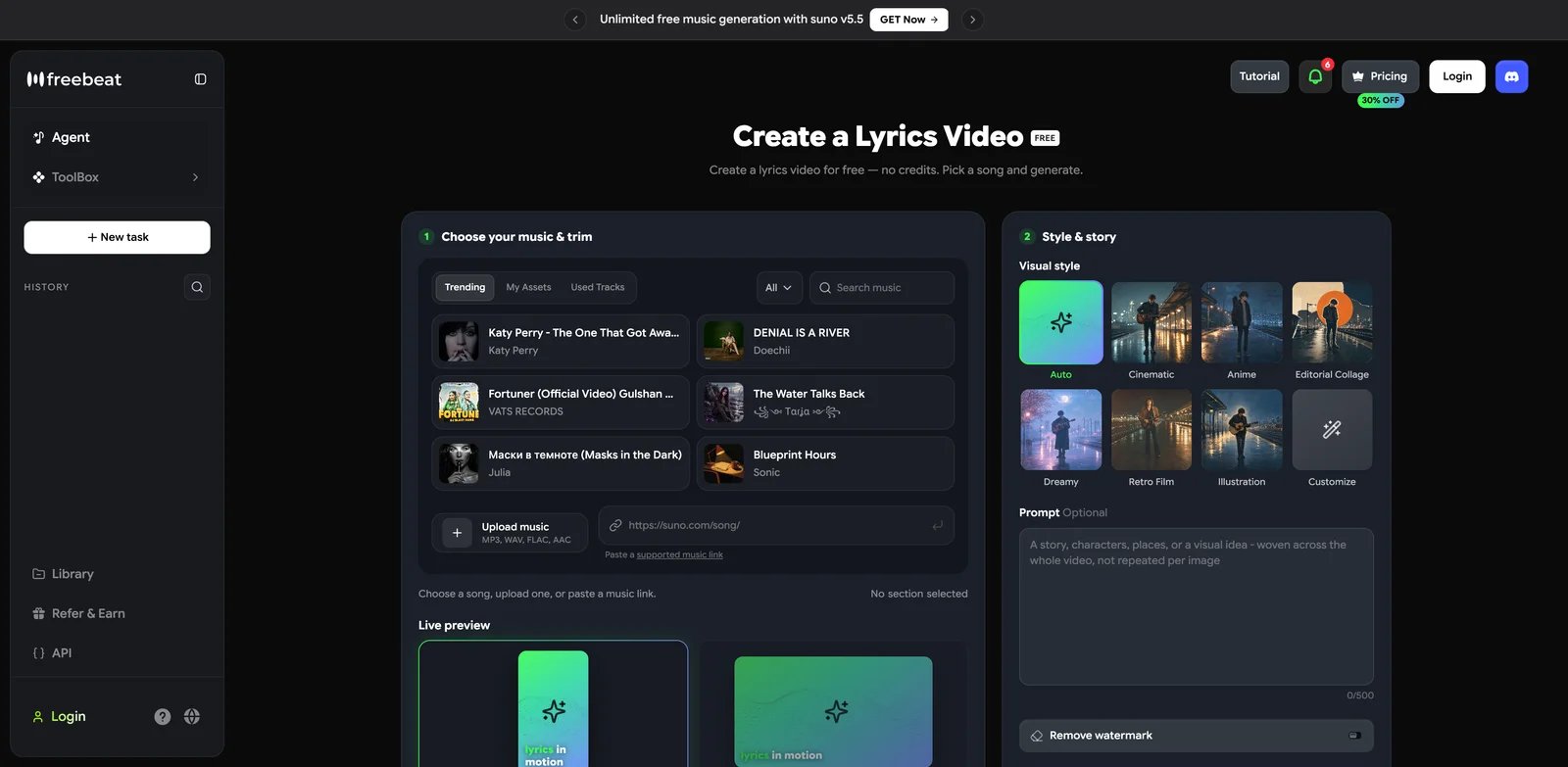
Best for: A quick browser-generated lyric video with visual styles and a lower entry price to investigate. Skip if: You need a guaranteed clean free export, documented full-song capacity, or an exact per-song cost before entering the creation flow. First elimination test: Upload a short original track, inspect the generated words and any correction controls, then confirm the remove-watermark quote and renewal terms in your account.
freebeat's actual Lyrics Video screen accepts uploaded audio or a supported music link, offers 9:16 and 16:9 layouts, and labels generation “free” with no credits. Its product page describes automatic lyric timing and karaoke-style highlights. That makes it a lyric-first visual-generator option rather than just another generic music-video tool. The public screen does not clearly document lyric-correction depth or full-song output; we have not independently measured transcription or render quality.
The decision trap is the gap between generate free and publish a clean file: the creation screen has a distinct remove-watermark control. The broad pricing page currently advertises a promotional Basic week at $4.99 (regular $6.99/week), 720p output, and watermark removal, but it does not give an unambiguous per-lyric-video checkout total or re-export cost. Do not compare that promotional sticker price with a complete LyricEdits, MakeLyricVideo, or Rotor release until you verify the exact export in the product. Prices observed in USD on September 26, 2026.
Get started with freebeat.ai's Lyrics Video screen using a track you have permission to upload.

Best for: A musician supplying approved lyrics for a single or release campaign and wanting pay-per-download math. Skip if: You need the product to transcribe your song or expect many revision downloads or premium clip/style charges. First elimination test: Enter your approved lyric text with the track, preview its alignment, then calculate the credits for your exact download and any premium assets before purchasing a pack.
Rotor's lyric-video page says it aligns lyrics to a track and lets you preview before paying to download. Its credit help specifies text-based lyrics supplied with the music; do not mistake this for documented audio-to-lyric transcription. The pricing page lists four credits per lyric video download; premium clips or styles may add credits. Credits do not expire. A five-credit pack is shown at $44.99 USD, while Artist Unlimited Video is advertised at a $14.99/month equivalent billed $179.88 annually for one artist. Those are September 26, 2026 public US figures, not a guaranteed checkout quote.
The tradeoff is simple: pay-per-download is attractive for an occasional single, but a full campaign with lyric, music, artwork, and social variants needs its own credit math. Rotor says projects stay editable and can be re-exported; it does not clearly specify the charge for a changed post-purchase re-export. Finish lyric corrections in the free preview and verify the next download quote before paying again.

Best for: Short, mobile-first lyric teasers where you can create and proof the text on a phone. Skip if: Your production process requires Auto Lyrics on desktop or Web. First elimination test: Open the current mobile app in your region, add the actual vocal track, and confirm the Auto Lyrics control appears before building the rest of the campaign.
CapCut's lyric-video page promotes automatic lyric detection and animated templates. But its more specific Help Center article says Auto Lyrics is actively supported on iOS/Android, while new Auto Lyrics generation is unavailable on CapCut Web and desktop; availability can also vary by region and audio. That platform boundary is the reason to pick or reject it. Do not plan a desktop-based batch workflow from the marketing page alone.
CapCut can be a sensible teaser route if your team already edits short-form video on mobile. The input is a vocal track in that mobile workflow; this is not evidence of a browser/desktop lyric editor with matching Auto Lyrics creation. We have not verified a single worldwide price, watermark rule, or re-export policy for every asset and path, so inspect the export screen for the exact template, effect, and territory you use. If your final is a long-form, carefully typeset YouTube lyric video, a desktop/browser review loop may fit better.
Kapwing
Best for: Correcting lyrics in a browser and handing drafts to collaborators. Skip if: You need a clean full-resolution final on the free plan. First elimination test: Import one verse, correct the transcript and timing, then inspect the planned export length, resolution, and watermark before doing the whole song.
Kapwing's lyric maker accepts manually entered lyrics or auto-generated subtitles and supports adding footage, text, and animation. Its browser collaboration route is useful when the artist, manager, and editor need to review the same project. Automatic subtitles still require human correction; singing, layered vocals, and proper nouns are exactly where an unchecked transcript can embarrass a release.
The current pricing page says Free exports carry a Kapwing watermark, are capped at four minutes, and top out at 720p. Pro removes the watermark and lists 4K exports; the public US price shown September 26, 2026 is $24 per member monthly or $16 per member monthly when billed annually. Work on the transcript in the browser before export; the specific charge or limit for a corrected re-export is not clearly documented. If a free, watermark-free master is mandatory, eliminate Kapwing before editing.

Best for: An artist with approved lyrics who wants a visually designed template and is willing to time each line manually. Skip if: You want automatic lyric transcription and vocal alignment. First elimination test: Build one chorus with free-only assets, adjust the line/clip lengths, then confirm a clean export before timing the whole song.
Canva's lyric-template guide describes uploading a song, typing lyrics, duplicating pages, and adjusting clip lengths to match each line. It mentions Beat Sync for music and video clips, but that is not automatic transcription or word-to-vocal timing. This is a manual, design-first route for a full song or a social cut, not an AI lyric engine.
Canva's video-editor FAQ says a Free account can export a video without a watermark when it uses only free elements, footage, images, and music. Pro/paid elements on a Free account change that boundary. There is no per-lyric-video credit unit in the cited workflow; your revision cost is primarily manual timing and any chosen paid assets. Canva earns its place for controllable design and a documented free-assets export path, not for doing the lyric proofing or timing for you.
A release checklist that avoids the expensive mistakes
- Lock the lyric sheet and rights first. Use the artist-approved words and confirm the recording, lyrics, and visual assets are yours to use. Auto-transcription is not editorial approval.
- Proof the hardest 20 seconds. Include fast phrasing, a proper noun, and a line break. If that fails, change the workflow before building the full song.
- Check the final file, not only the editor. Confirm watermark, length, resolution, aspect ratio, credits, and commercial terms for the exact plan and assets.
- Review on the destination screen. Watch the export on a phone and a desktop display, including one muted pass. Have someone other than the maker catch spelling and timing errors.
- Archive editable work. Keep your master audio, approved lyric sheet, artwork, and project/edit files where the tool permits. An MP4 alone is not an editable lyric timeline.
FAQ
Which AI lyric video generator is best for a full song?
Start with LyricEdits if you want generated story visuals; MakeLyricVideo.com if a simple 16:9 full song and a $29 clean export fit; or Rotor if you can supply approved text and prefer release-asset credits. LyricMV advertises a paid full-song vertical render after a short free preview. The better choice depends on input, output orientation, revision budget, and lyric proofing—not a universal quality score.
Can I make an AI lyric video for free without a watermark?
Do not infer that from a “free to start” button. LyricEdits and MakeLyricVideo.com watermark their free full-song downloads; LyricMV's clean free preview stops at 30 seconds; freebeat's generation screen does not establish a free clean final; Rotor charges to download; Kapwing's Free exports are watermarked. Canva is the clearer manual exception: its video-editor FAQ says a Free-account export can be clean if every used asset is free. CapCut's exact export terms can vary by region and selected effects. Verify a test export in your own account before promising a free master.
Is CapCut Auto Lyrics available on desktop?
CapCut's current Help Center guidance says no: create Auto Lyrics on the mobile app, subject to regional and audio availability. Desktop and Web can edit or view certain synced projects but cannot generate new Auto Lyrics there.
Will AI transcription get the lyrics exactly right?
No tool in this guide has earned that guarantee from our desk research. Check every line against an approved lyric sheet, especially names, slang, overlapping vocals, and translations. The official pages describe capabilities, not an independently measured error rate.
Do I need a lyric maker or an AI music video generator?
Use a lyric maker when word accuracy, timing, and readability are the job. Use a broader AI music video generator when the dominant job is music-reactive scenes or cinematic visual production. You may combine the two, but proof the final lyric layer separately.
Get ToolWorthy Weekly
New AI tools, practical guides, and selected AI signals in one weekly brief.
For AI tool founders
Built a tool that belongs in this decision set?
Request an editorial evaluation for possible inclusion in ToolWorthy.
Submit your tool for reviewPaid submission does not guarantee a ranking, recommendation, inclusion, or editorial outcome.