



Overview
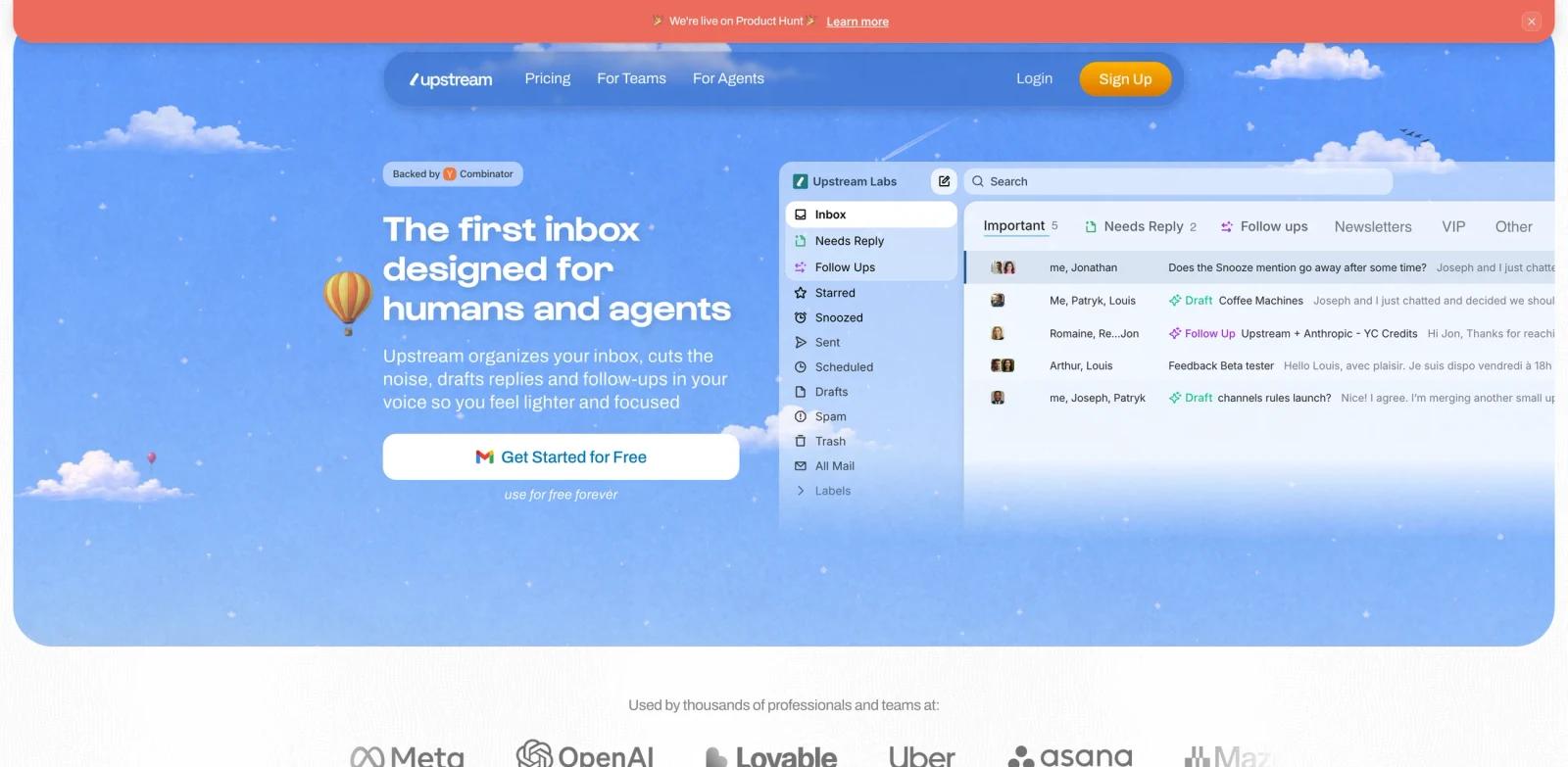
Upstream is an AI-native email client built around a simple idea: an inbox should be usable by both humans and agents. Instead of adding a small AI button to a conventional email client, Upstream organizes messages, reduces noise, drafts replies, and supports team collaboration inside the inbox itself.
The official site describes Upstream as "the first inbox designed for humans and agents." Its core workflows include AI drafts in the user's voice, smart follow-ups, custom voice and tone, split inboxes, team comments, shared channels, mobile access, and AI search. The Product Hunt launch page positions it as an inbox where agents sort messages, draft replies, and clear repetitive work while people stay focused on important conversations.
Upstream fits ToolWorthy's AI email generator, AI productivity, and AI agent readers because it combines email triage, voice-matched writing, and collaborative agent workflows in one workspace.
Key Features
AI drafts in your voice - Upstream generates reply drafts that follow the user's voice and tone, with audience-specific voice settings on paid plans.
Smart follow-ups - The inbox identifies messages that may need a reply or follow-up so important threads do not disappear into inbox noise.
Split inboxes - Users can separate important messages, newsletters, follow-ups, team threads, and other categories into clearer working views.
Team collaboration - Shared channels, comments, thread sharing, and channel rules help teams discuss email without forwarding messages around.
Agent-ready inbox surface - Upstream is designed for agents to read, write, and act around email context rather than only summarizing messages.
Advanced AI controls on paid plans - Pro includes unlimited AI drafts and follow-ups, advanced AI models, customizable prompts, AI search, and model access across OpenAI and Claude models.
How to Get Started
Start with the free Core plan and connect the inboxes you want Upstream to organize. The safest first workflow is inbox triage: split noisy mail from important threads, review AI-drafted replies, and tune voice settings before sending sensitive customer or investor messages.
Teams should test shared channels and comments with a small group first. Once the workflow is stable, Pro unlocks unlimited collaboration history, private channels, unlimited AI drafts, and more complete voice controls.
Pricing & Plans
Upstream has a free Core plan and paid team plans listed on its public pricing page.
| Plan | Price | Notes |
|---|---|---|
| Core | Free forever | AI drafts, smart follow-ups, custom voice for up to 3 audiences, split inboxes, team comments, unlimited channels and search, up to 5 team seats |
| Pro | $20 per member/month, billed yearly | Unlimited AI drafts and follow-ups, advanced AI models, unlimited team collaboration, private channels, training, and multi-account support |
| Max | $60 per member/month, billed yearly | Personal AI agents, team-wide AI automations, enterprise security, governance, and dedicated support |
The structured ToolWorthy price uses the lowest paid plan: $20 per member per month, billed yearly.
Best For
- Founders and operators with high-volume inboxes
- Teams that need shared context around customer, investor, or partner email
- Users comparing AI email clients such as Superhuman-style inboxes and focused AI writing assistants
- Companies that want AI drafts and follow-ups without moving email work into a separate task tool
- Teams experimenting with agentic workflows around communication
FAQ
What does Upstream do?
Upstream is an AI-native email client that organizes inboxes, drafts replies in the user's voice, tracks follow-ups, and supports team collaboration around email.
Is Upstream free?
Yes. Upstream lists a free Core plan. Paid plans start at $20 per member per month when billed yearly.
Does Upstream support team workflows?
Yes. Upstream includes team comments, shared channels, channel history, thread sharing, and collaboration features.
Is Upstream only an AI writing tool?
No. AI drafting is part of the product, but Upstream also focuses on inbox organization, follow-ups, shared channels, and agent-ready email workflows.