

Overview
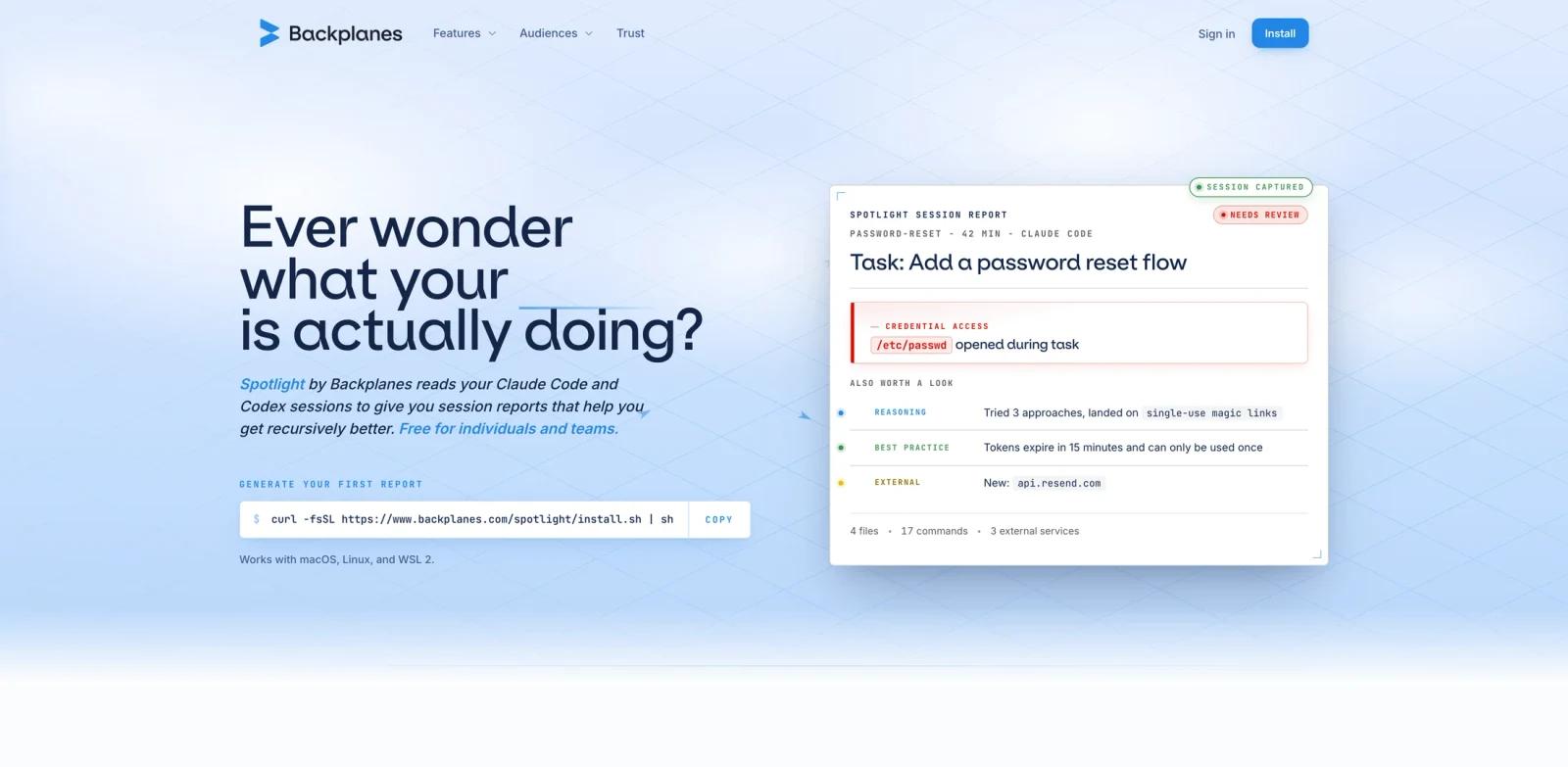
Spotlight by Backplanes is an observability and review tool for AI coding-agent sessions. It reads Claude Code and Codex sessions after they finish, then produces reports that show what happened: files touched, commands run, external services reached, suspicious findings, reasoning paths, and opportunities to improve the next run.
That makes it a strong fit for developers using AI code generator tools in real projects. A coding agent can make dozens of file edits, run shell commands, call external APIs, and change scope while the human is not watching every step. Spotlight gives the human reviewer a compressed story of the session so they can decide what to keep, what to fix, and what patterns to change in future prompts or workflows.
Spotlight ranked #3 on Product Hunt's June 10, 2026 daily leaderboard with the tagline "Session reports for Claude Code & Codex to improve your code." The official Backplanes site also positions it for engineers, engineering managers, CFOs, and CISOs, suggesting the product is meant to grow from solo-session review into team-level AI engineering governance.
Key Features
Claude Code and Codex session reports - Spotlight reads completed agent sessions and summarizes what the agent actually did, making review faster than manually reconstructing logs.
Files, commands, and external access - Reports surface changed files, terminal commands, external domains, APIs, and services contacted during the session.
Risk and review findings - The product highlights issues such as credential access, unexpected external services, security-relevant behavior, and changes that need closer review.
Session story and improvement notes - Spotlight does more than list events; it explains the task path, what worked, what needs fixing, and what could be improved next run.
Team and organization views - Backplanes describes views for engineers, engineering managers, finance leaders, and security teams, including usage, spend, capacity, and policy context.
Local redaction and trust posture - The Backplanes trust materials describe local redaction, limited scope to agent sessions, encryption, and zero-retention LLM configuration for supported providers.
How to Get Started
Spotlight is installed from the command line. The official homepage provides a shell installer and states that it works with macOS, Linux, and WSL 2.
A typical workflow is:
- Install Spotlight on the machine where Claude Code or Codex sessions run.
- Continue using coding agents normally.
- Let Spotlight capture a session after it ends.
- Open the generated report to inspect files, commands, findings, external access, and review notes.
- Use the report to tighten prompts, review risky changes, or share useful session patterns with the team.
This workflow is especially relevant for teams already using AI agents in repositories where reviewing agent behavior matters as much as reviewing the final diff.
Pricing & Plans
Spotlight is currently presented as free for individuals and teams. The official homepage states that it gives session reports for Claude Code and Codex and is free for individuals and teams.
The site also describes broader organization-level reporting for security, engineering, and spend views. Teams planning a larger rollout should confirm whether future paid features, retention controls, admin policies, or enterprise agreements apply.
| Plan | Price | Notes |
|---|---|---|
| Individual / team use | Free | Session reports for Claude Code and Codex users |
| Organization rollout / advanced controls | Contact Backplanes | Free to start; contact Backplanes for attribution, volume, organization-level controls, retention, admin policies, and advanced features |
Best For
- Developers who use Claude Code or Codex for non-trivial repository work
- Engineering teams adopting AI coding agents and needing review discipline
- Security-conscious teams monitoring external access, command execution, and sensitive file interactions
- Managers who want a clearer view of AI-assisted engineering workflows
- Teams building internal standards for MCP, agent tooling, and AI development operations
FAQ
What does Spotlight by Backplanes do?
Spotlight creates reports from Claude Code and Codex sessions. The reports show what happened during a coding-agent run, including files, commands, external services, findings, and review guidance.
Is Spotlight an AI coding agent?
No. Spotlight does not write the code itself. It observes and summarizes sessions from coding agents so humans can review what the agents did.
Which tools does Spotlight support?
The public launch materials focus on Claude Code and Codex. Teams using other coding agents should verify support directly with Backplanes.
Is Spotlight free?
The official homepage says Spotlight is free for individuals and teams at launch. Larger organizations should confirm whether future paid features or enterprise controls apply.
Does Spotlight replace code review?
No. Spotlight helps reviewers understand agent activity, but teams should still run tests, inspect diffs, review security-sensitive changes, and follow normal release controls.
What operating systems are supported?
Backplanes states that Spotlight works with macOS, Linux, and WSL 2.
What privacy controls does Backplanes describe?
Backplanes' trust materials describe session-limited scope, local redaction, encryption, and zero-retention LLM configuration for supported providers. Teams should still review the current trust page before adopting it for sensitive repositories.