
Best Social Media Engagement Tools for Team Inboxes
Compare nine social media engagement tools by network coverage, comments and DMs, team workflow, moderation, customer care, and pricing model.

On this page
The best social media engagement tool is the one that covers the conversations your team must answer—not the one with the longest feature list. A small brand replying to public comments has a different job from a support team routing private messages, an agency separating client workspaces, or a commerce team handing automated Instagram conversations to human agents.
This guide compares nine tools by those buying jobs. It uses current official product, help-center, and pricing evidence; it does not claim hands-on response-time, moderation-accuracy, or engagement-lift results. Start with your mandatory networks and interaction types, then compare workflow and cost inside the lane that remains.
Short Answer: Match the Tool to the Conversation
| If your engagement job is... | Start with... | Also consider... | Eliminate first if... |
|---|---|---|---|
| Public comments and reviews for a small team | Buffer | SocialPilot | You need broad private-message or case routing |
| Publishing plus a broad cross-network inbox | Hootsuite | Agorapulse | A narrow comment queue is enough |
| Governed social customer care | Sprout Social | Brandwatch Engage | Per-seat or sales-led procurement is too heavy |
| Ad comments, reviews, and automated moderation | NapoleonCat | Agorapulse | A required interaction is missing on your network |
| Multi-client agency operations | Sendible | SocialPilot | You need realtime coverage beyond the documented inbox |
| Messaging automation with human handoff | Manychat | — | Public cross-network moderation is the main job |
Before You Trial Anything
Write down four things: every required network, every required interaction type, who owns each reply, and what your busiest month looks like. Eliminate a tool if it misses one non-negotiable comment, DM, mention, review, or ad-comment surface. Only then compare AI replies, sentiment, analytics, and publishing features.
Public Comments Without a Care Suite: Buffer or SocialPilot?
Buffer and SocialPilot are useful when the engagement job is deliberately narrow. Buffer covers a wider set of public-comment and review surfaces; SocialPilot trades breadth for agency-friendly account and user bundles around Facebook, Instagram, and LinkedIn inboxes.
| Decision factor | Buffer | SocialPilot |
|---|---|---|
| Main inbox job | Public comments and Google Business reviews | Team inboxes for Facebook Pages, Instagram professional accounts, and LinkedIn Pages |
| Team model | Team plan adds unlimited users, approvals, and access | Multiple inboxes plus account/user bundles |
| Current economic shape | Free for three channels; paid per channel | Annual plan bundles social accounts and users |
| Remove it if | DMs or care cases are required | Required networks extend beyond its documented inbox |

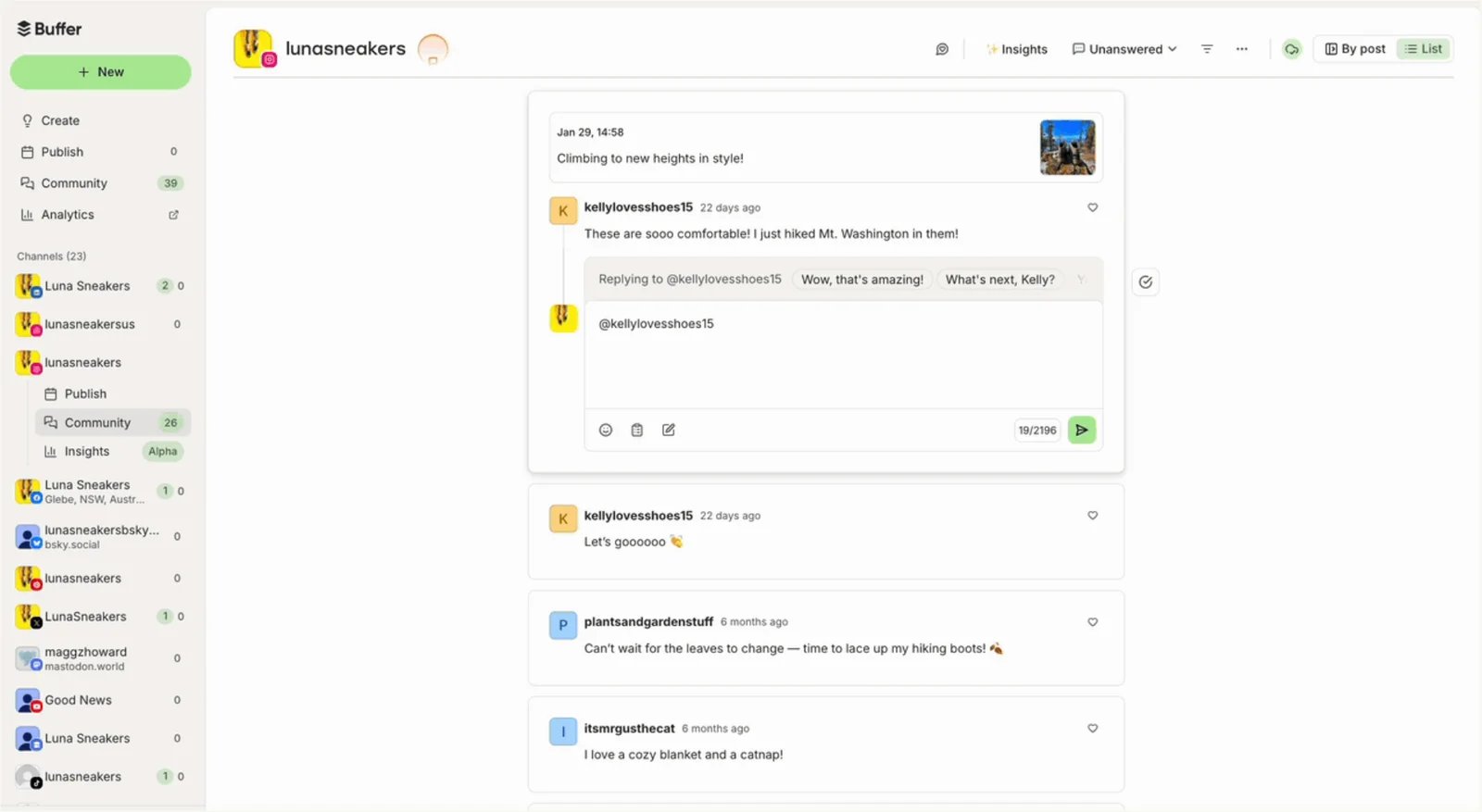
Buffer is the cleanest starting point when the daily job is replying to public comments and reviews, not operating a full customer-service queue. Buffer Community documents engagement across Facebook, Threads, Bluesky, LinkedIn, X, Instagram, Google Business reviews, TikTok, YouTube, and Mastodon.
The boundaries matter. Community pulls roughly 30 days of comments, and Buffer documents cases where a post or interaction is unavailable. More importantly, the evidence reviewed does not establish the broad private-message and case-management coverage offered by the care-oriented products below. That keeps Buffer useful for a creator or small marketing team while making it easy to rule out for a support operation.
Buffer's current pricing is channel-based. Free covers three channels and includes Community; Essentials is $5 per channel per month on annual billing, while Team is $10 per channel per month and adds unlimited users, approvals, and access levels. Model the channel count first, then decide whether the Team controls justify the step up.
Choose Buffer for a manageable public queue. Skip it when response ownership, private-message continuity, SLAs, or cases are non-negotiable.
SocialPilot
SocialPilot is an agency-budget route when the inbox requirement is concentrated on Facebook Pages, Instagram Business or Creator accounts, and LinkedIn Pages. Its official help documentation covers replies, reactions, tags, notification state, and separate client, brand, or team inboxes; one social account can belong to only one inbox. Permission-scoped team members can access the inbox, and conversation notes preserve context.
The commercial model is based on bundles rather than one channel at a time. Current annual-billing guidance lists Standard at $42.50 per month for 15 social accounts and three users, with larger Premium and Ultimate bundles. That can be easier to model for an agency managing several profiles, provided the narrower inbox surface matches the client mix.
Do not treat publishing support as inbox support. The current public docs reviewed do not establish per-conversation assignment or collision detection, so a concurrent shared queue needs its own trial; use clear responder ownership rather than assuming the software prevents duplicate replies. If X, TikTok, YouTube, Google reviews, or a broad DM workflow is mandatory, verify the exact Social Inbox coverage before keeping SocialPilot on the shortlist.
Broad Social Suites: Hootsuite or Agorapulse?
Both tools connect publishing and engagement, but they prioritize different operating friction. Hootsuite offers a broad public/private inbox across many networks. Agorapulse becomes more attractive when paid-social comments, saved replies, labels, and moderation rules shape the work.
| Decision factor | Hootsuite | Agorapulse |
|---|---|---|
| Main reason to choose | Broad network inbox plus publishing continuity | Organic and ad engagement with moderation and team controls |
| Team workflow | History, contact notes, assignments and routing on higher plans | Assignments, saved replies, labels, bulk work, and moderation by plan |
| Pricing meter | Plan and user, with account limits by tier | User and social profile |
| Trial risk | Paying for suite breadth the team will not use | Discovering a needed control sits on a higher tier |

Hootsuite suits a marketing team trying to stop switching between native apps. Its unified inbox documents public and private interactions across Facebook, Instagram, LinkedIn, X, Threads, TikTok, Google Business Profile, and WhatsApp, alongside saved replies, conversation history, contact notes, and business hours.
That breadth does not make every plan equivalent. Current public pricing lists Standard at $99, Professional at $199, and Advanced at $399 per month. Standard includes up to 10 social accounts, Professional lists unlimited accounts, and Advanced adds deeper assignment, automatic routing, and team-performance controls. Enterprise is a separate contract route.
Trial Hootsuite with the exact interaction matrix your team handles, not a generic “all networks” assumption. It is a fit when publishing-to-response continuity and broad network coverage matter. Skip it when a lightweight public queue solves the problem or when care governance—not social publishing—is the center of the purchase.
Agorapulse
Agorapulse is built around the operational middle: more structure than a lightweight comment tool, without requiring an enterprise care procurement motion. Its inbox documentation covers comments, reviews, private messages, mentions, and ad comments across supported Facebook, Instagram, Threads, X, YouTube, TikTok, LinkedIn, and Google Business surfaces.
The shortlist value is in plan-specific workflow. Organic inbox access appears earlier, while higher tiers add ad comments, assignments, team reporting, saved replies, labels, automated moderation, and bulk processing. Pricing is per user with a profile allowance, so a team should model both people and managed brands.
Choose Agorapulse when paid and organic engagement share a queue and moderation rules can remove repetitive work. Skip it when a mandatory network interaction is absent or when the needed assignment and moderation controls push the plan beyond budget.
Moderation and Review Operations: NapoleonCat
NapoleonCat
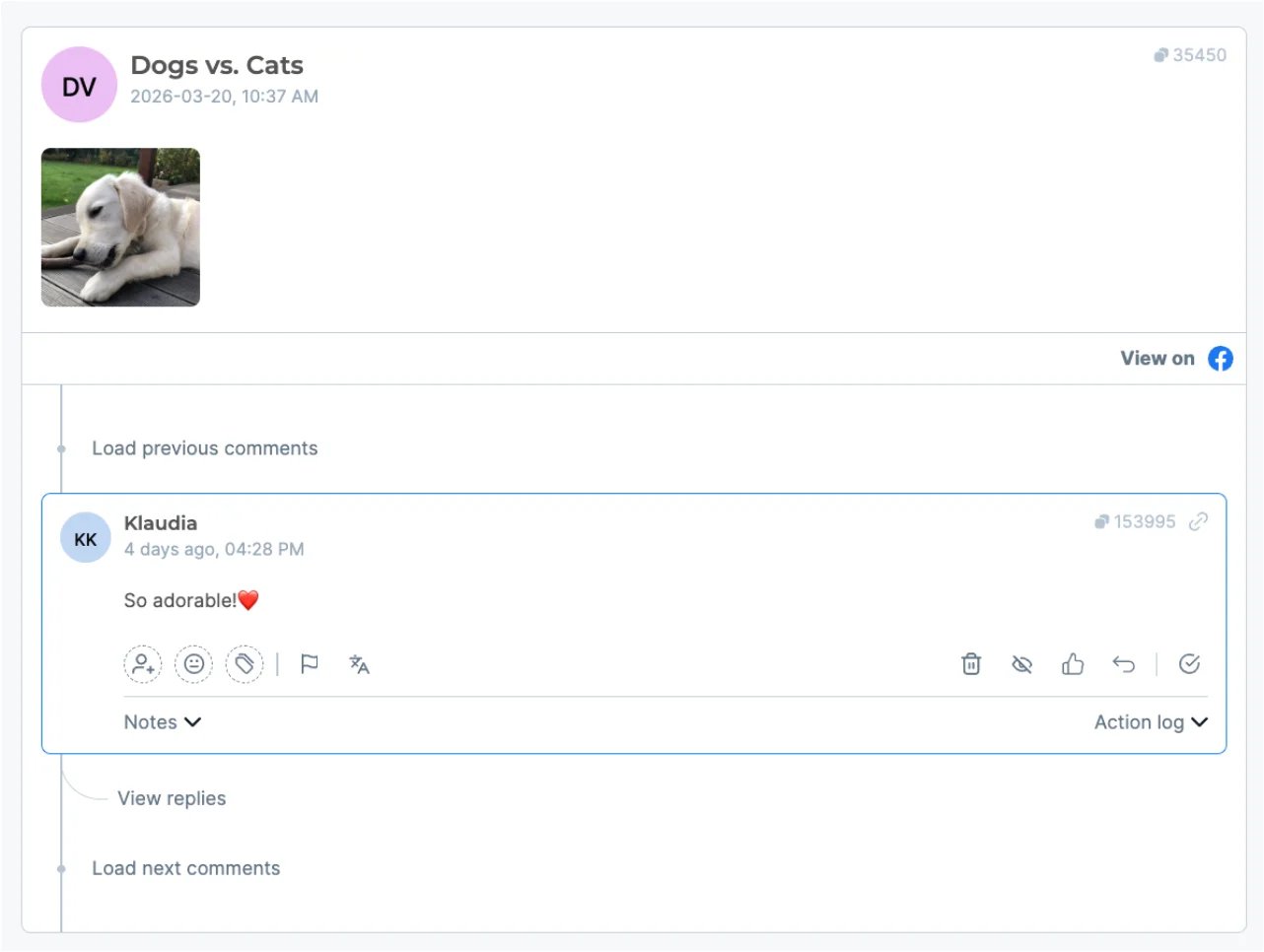
NapoleonCat is the focused choice when the decision begins with a precise interaction matrix. Its Social Inbox guide documents Facebook comments, ad comments, fan posts, mentions, private messages, and reviews; Instagram comments, DMs, and story mentions; plus selected TikTok, LinkedIn, Google Business, YouTube, and app-store interactions.
That specificity is useful for brands facing comment spikes, review queues, or rule-based moderation. NapoleonCat's current plan summary places automatic moderation, comment hiding and deletion, and sentiment analysis on Expert, while its Inbox documentation also covers moderator assignment and moderation history. The commercial model exposes users, profiles, and inbox capacity as separate planning variables. Because the pricing surface also shows configuration-dependent figures, this guide does not reduce it to one headline price.
Before trial, take one week of real volume and split it by network and interaction type. Confirm that the chosen plan can ingest the queue, that moderation rules preserve human escalation, and that unsupported private-message surfaces are not hidden by a broad network logo. Choose NapoleonCat for moderation- and review-heavy work; skip it if the missing surface owns the purchase.
Agency Workspaces: Sendible
Sendible
Sendible fits agencies that organize work by client workspace and social-profile bundle. Its current pricing starts with Core at $35 per month for one workspace and six profiles, then expands the number of workspaces and profiles while retaining unlimited users on listed plans.
The Priority Inbox is useful but deliberately bounded. Sendible documents a one-to-two-hour delay and collection primarily around recent post interactions. A message can be assigned as a task to a teammate with a note and tracked in that person's task view, but the public docs reviewed do not establish live collision detection. It supports selected Facebook, Instagram, LinkedIn, and YouTube activity, while several networks and Instagram DMs are unavailable in Priority Inbox or require separate streams.
That makes Sendible a good operational choice when workspace separation and team access matter more than a universal realtime inbox. Trial the Priority Inbox and the individual streams together using a client's actual networks. Skip it when immediate response or an unsupported interaction is a hard requirement.
Messaging Automation and Human Handoff: Manychat
Manychat
Manychat is not a general social inbox. It belongs here for a specific job: an automated Instagram, Messenger, WhatsApp, Telegram, or SMS conversation needs to reach a human agent with the contact context intact.
Manychat Inbox documents assignments, folders, labels, notes, conversation history, automation context, and plan-dependent agent seats. That supports commerce, lead qualification, or support flows where the first interaction is automated and exceptions move to a person.
The economic shape is different from a per-profile suite. Current plans vary by active contacts, channels, automation capacity, Inbox seats, and region. Price the contact database and agent coverage—not just the number of social accounts.
Choose Manychat when messaging automation is the primary workflow. Skip it when the problem is broad public-comment moderation, owned-channel reporting, or social listening across the open web.
If the workflow also includes website or general-purpose support conversations, compare the separate AI chatbot category rather than stretching a social-messaging tool beyond its documented lane.
Governed Customer Care: Sprout Social or Brandwatch Engage?
These products become relevant when a social message is a case, not simply a reply. Sprout offers transparent per-seat tiers and detailed workflow controls. Brandwatch Engage follows a sales-led enterprise route with CRM routing and broader social-suite context.
| Decision factor | Sprout Social | Brandwatch Engage |
|---|---|---|
| Care model | Smart Inbox plus Cases, queues, priority, assignments, and internal comments | Cross-channel inbox, cases, assignments, automation, reporting, and Salesforce routing |
| Procurement | Published per-seat plans | Sales-led quote |
| Best fit | Governed social and care teams wanting a defined plan ladder | Enterprise care teams buying integrations and broader suite context |
| Eliminate first if | Seat cost exceeds workflow value | Public price and lightweight deployment are mandatory |

Sprout Social is the most direct route in this guide for a team that needs governed case handling. Its engagement documentation covers public and private message types across major networks and includes collision detection. Sprout Cases adds assignment, queues, type, priority, internal comments, and a unified record across public and private conversations.
The control comes with visible per-seat economics. On annual billing, current pricing lists Standard at $199, Professional at $299, and Advanced at $399 per seat per month. Inbox access begins on Standard, while tagging, reporting, automation, AI, and help-desk depth vary by tier.
Trial one representative escalation from public comment to private case and measure how ownership, history, and reporting survive. Choose Sprout when avoiding duplicate responses and governing service work justify the seat cost. Skip it when a simple marketing inbox is enough.
Brandwatch Engage
Brandwatch Engage is the enterprise route when social engagement must connect to case workflow, reporting, automation, and Salesforce routing. Its official materials document cross-channel inboxes, assignments, notes, sentiment, team reporting, and cases; a separate interaction matrix defines which incoming content is available per network.
Brandwatch does not publish a directly comparable self-serve Engage price on the product page. Procurement therefore needs an integration and workload conversation, including network coverage, user roles, response volume, CRM ownership, data policy, and support expectations.
Choose Brandwatch Engage when the organization is already evaluating an enterprise social suite and care continuity drives the decision. Skip it when the team needs transparent self-serve pricing or can solve the job with a narrower inbox.
Listening Is Adjacent, Not the Same Job
Brand24 is useful for keyword monitoring, mention discovery, sentiment, alerts, and reporting. That can reveal conversations beyond accounts your team owns, but it does not replace the assignment, response history, interaction coverage, and case workflow required for an owned-channel inbox. Use a listening tool to discover; use an engagement or care tool to respond accountably.
eClincher is a relevant reserve candidate. Its official material describes messages, comments, mentions, reviews, email, rules, assignment, and tags, but the current public evidence reviewed did not expose enough network-by-interaction and plan detail for a precise core route. That is an evidence boundary, not a negative product judgment.
For the wider discovery job, compare ToolWorthy's AI market research tools. For content creation before engagement begins, use the AI social media post generator directory. Those are adjacent decisions, not substitutes for this inbox comparison.
How to Choose a Social Media Engagement Tool
- Build a network-by-interaction matrix. List comments, DMs, mentions, reviews, ad comments, story replies, and community posts separately. A platform logo does not prove every interaction is supported.
- Choose the operating lane. Decide whether you need public replies, a publishing-plus-inbox suite, moderation automation, messaging automation, agency workspaces, or governed customer care.
- Define ownership. For a shared queue, require assignment, collision protection, internal notes, escalation, permissions, and enough history to avoid contradictory replies.
- Constrain automation. Test routing, saved replies, moderation, and AI assistance on edge cases. Keep accountable human review wherever a wrong response can harm a customer or brand.
- Price the real meter. Count seats, profiles, channels, contacts, inbox volume, workspaces, listening add-ons, and enterprise integrations using one representative month.
- Run the same trial. Feed the finalists an ordinary week plus a spike. Measure missing interactions, duplicate work, routing friction, context loss, and time to a safe reply. This guide does not claim a universal performance winner because no controlled cross-vendor benchmark was run.
Frequently Asked Questions
Which social media engagement tool should I trial first?
Start with the lane, not the brand. Buffer fits a public-comment queue; Hootsuite or Agorapulse fit marketing teams joining publishing and response; NapoleonCat fits moderation-heavy work; Manychat fits automated messaging with human handoff; Sprout Social or Brandwatch Engage fit governed care. Remove any candidate that misses a mandatory interaction before trialing the remaining one or two.
Is a social listening tool the same as a social inbox?
No. Listening tools discover public mentions, topics, and sentiment beyond owned accounts. A social inbox is built to receive and manage interactions your team can answer, with history and ownership controls. Some suites sell both, but buyers should verify the two capabilities and their plan entitlements separately.
Can AI safely answer social comments automatically?
Official product pages describe AI assistance, rules, routing, and automated moderation, but public documentation cannot prove response quality or brand safety for your queue. Use representative edge cases, require escalation paths, and keep human approval where an incorrect or insensitive reply would create material risk.
Final Recommendation
For a small public-comment workflow, begin with Buffer. For a broad marketing inbox, compare Hootsuite and Agorapulse. Put NapoleonCat on the trial when moderation and reviews dominate; use SocialPilot or Sendible when agency economics and workspace structure own the decision. Manychat is the messaging-automation route, while Sprout Social and Brandwatch Engage belong in governed customer-care procurement.
Do not buy from the feature grid alone. Freeze the exact networks, interactions, ownership controls, and monthly workload, then run the same queue through one or two same-lane finalists. The tool that safely covers the real conversation is more useful than the one that wins an invented score.
Get ToolWorthy Weekly
New AI tools, practical guides, and selected AI signals in one weekly brief.
Related Posts
- 6 Hootsuite Alternatives in 2026: Pick the Workflow Worth Moving
A practical switch guide to Buffer, Metricool, Planable, Agorapulse, Later and Sprout Social—with the limits and migration checks that matter.
- 7 Instagram Automation Tools for Publishing, DMs, and Teams in 2026
Choosing an Instagram automation tool? Compare seven options for scheduled publishing, comment-to-DM flows, and team inboxes, with account and plan limits that decide fit.
For AI tool founders
Built a tool that belongs in this decision set?
Request an editorial evaluation for possible inclusion in ToolWorthy.
Submit your tool for reviewPaid submission does not guarantee a ranking, recommendation, inclusion, or editorial outcome.