

Overview
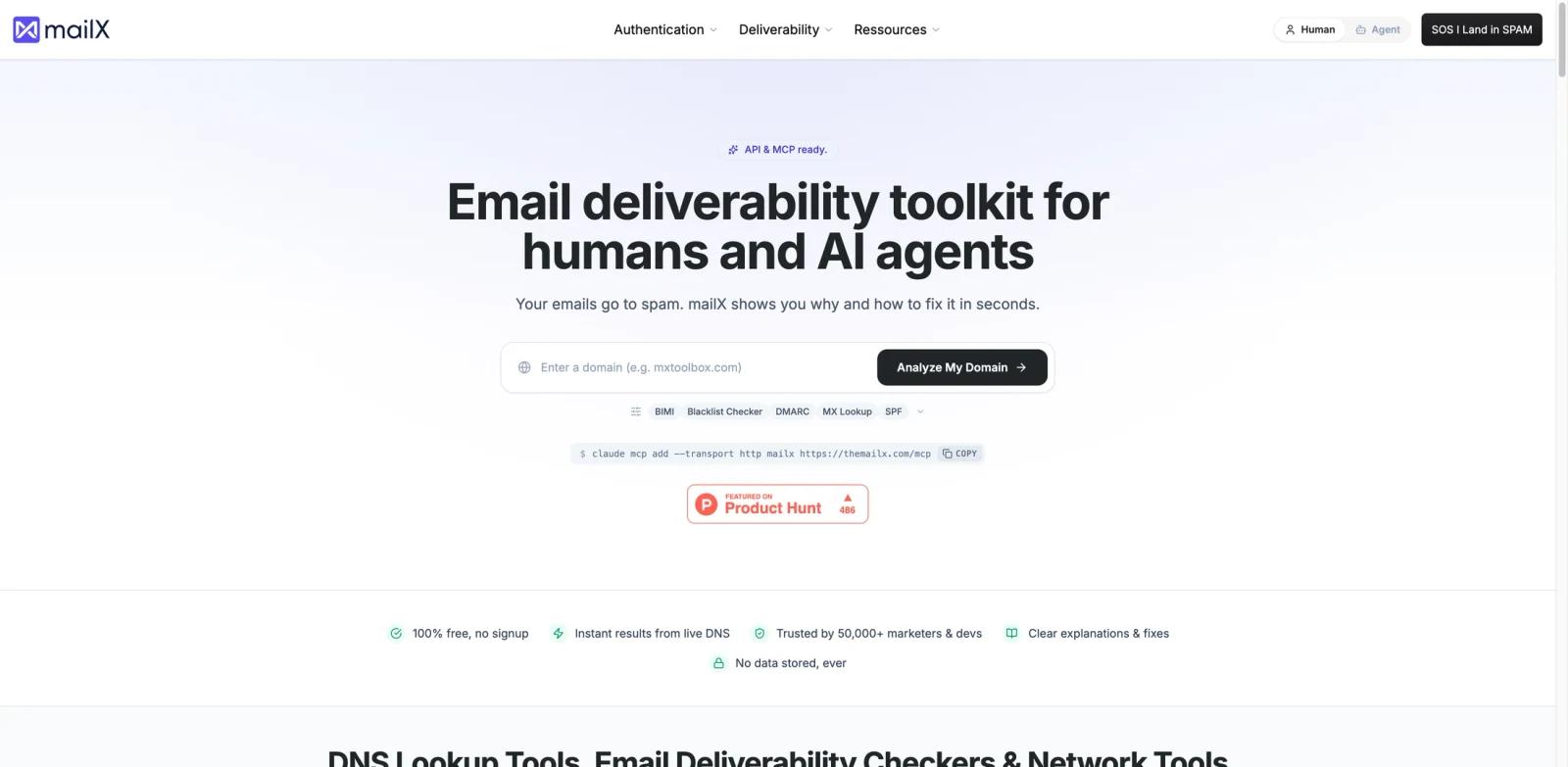
mailX is a free email deliverability toolkit from Mailwarm (YC S20) that answers one question fast: why does my email go to spam, and how do I fix it? Enter a domain or IP address and mailX runs a live infrastructure audit — DNS records (A, MX, TXT, CNAME, PTR), email authentication (SPF, DKIM, DMARC, BIMI), real-time blacklist (RBL/DNSBL) scans, SMTP/IMAP server checks, and reverse DNS + IP reputation — then returns actionable fix steps in seconds.
The differentiation isn't just the audit — it's the delivery surface. mailX ships both a documented REST API and an official Model Context Protocol (MCP) server, so the same diagnostics that humans run through the web UI can be invoked by an AI coding agent like Claude Code or Claude Desktop. Setup is one line: claude mcp add --transport http mailx https://themailx.com/mcp. The toolkit is positioned for human deliverability engineers and AI email generators / agents that draft and send outbound campaigns programmatically. It is free to use and requires no signup. On privacy: mailX is best described as data-minimizing, not zero-retention — its privacy policy says technical logs, diagnostic data, usage metadata, timestamps, IP addresses, and related request data may be processed and retained for security, debugging, analytics, abuse prevention, rate limiting, and service improvement.
Key Features
- Full deliverability audit in seconds — One scan checks DNS (A/MX/TXT/CNAME/PTR), SPF, DKIM, DMARC, BIMI, RBL/DNSBL blacklists, SMTP/IMAP server reachability, reverse DNS, and IP reputation. Returns specific fix steps, not just a pass/fail score.
- Documented REST API (no key, no signup) —
/docs/apiprovides programmatic access to the same diagnostic checks the web UI runs. The docs state no API key and no signup are required; numeric rate limits are not disclosed (HTTP 429 is referenced for rate-limited requests, and the terms reserve the right to modify auth, quotas, or paid tiers). - Official MCP server for AI clients — For Claude Code, install via
claude mcp add --transport http mailx https://themailx.com/mcp; for Claude.ai / Claude Desktop, addhttps://themailx.com/mcpthrough Settings → Connectors. Official docs also list Cursor, VS Code / Copilot, Windsurf, Zed, ChatGPT Connectors, OpenAI Agents SDK, Anthropic API, and other MCP-compatible clients. - No signup required; data retention needs nuance — mailX's landing page says "No data stored, ever," but the privacy policy says diagnostic data, request metadata, timestamps, IP addresses, API/MCP usage metadata, error logs, and technical logs may be processed and retained for operational, security, debugging, analytics, abuse-prevention, rate-limiting, and service-improvement purposes. Treat the homepage line as marketing shorthand, not a zero-retention guarantee.
- Built for humans and AI agents — The same scan surface is available through the web UI, REST API, and MCP server, so a deliverability engineer and an AI agent can both reach it without mode-switching.
- Backed by Mailwarm (YC S20) — mailX is the diagnostics arm of a sender-reputation product family, which is why the audit covers infrastructure (DNS/IPs) and not just message content.
Integration Guide
mailX is built to drop into both human and agent-driven sending workflows.
- REST API — Programmatic access at
/docs/api. The API docs state no API key and no signup are required; numeric rate limits are not disclosed but HTTP 429 is referenced, and the terms reserve the right to modify auth, quotas, or paid usage tiers. - MCP server for AI agents — Install command above for Claude Code; for Claude.ai / Claude Desktop, add
https://themailx.com/mcpvia Settings → Connectors. Official MCP docs list Claude, ChatGPT Connectors, Cursor, VS Code / Copilot, Windsurf, Zed, OpenAI Agents SDK, Anthropic API, and any MCP-compatible framework. Background on the protocol: MCP vs A2A comparison. Still test your exact host configuration before relying on it in production. - Web UI — Direct scan through
themailx.comfor one-off checks; no account needed. - Mailwarm tie-in — mailX is the diagnostic surface for Mailwarm's broader sender-reputation product (YC S20). Specific account / data-sharing behavior between mailX and Mailwarm is not detailed on the public pages — the link between the two is currently a brand and team relationship.
Pricing & Plans
mailX is currently positioned as a 100% free toolkit. There is no paid tier surfaced on the launch landing page.
| Plan | Price | What's included |
|---|---|---|
| Free | $0 | Full deliverability audit (DNS, SPF/DKIM/DMARC/BIMI, RBL/DNSBL, SMTP/IMAP, IP / reverse-DNS signals); REST API; MCP server; no signup required; technical logs and diagnostic data may be processed/retained under the privacy policy |
Enterprise tiers, API rate limits, and paid SLAs are not disclosed on the public pages. Teams that need a guaranteed rate limit or auditability should reach out via the Calendly link the mailX team publishes at calendly.com/mailwarmsessions/mailx.
Best For
- Deliverability engineers needing a fast end-to-end audit during a spam-folder incident.
- Marketing ops teams running quick checks before launching a campaign on a new sending domain.
- AI agent builders adding email-deliverability checks to a Claude Desktop / Claude Code workflow via the official MCP server.
- DevOps teams wiring an automated SPF/DKIM/DMARC monitor into CI/CD through the REST API.
- Cold-outbound or transactional senders who need a free way to validate fixes after a blacklist warning.
FAQ
What is mailX?
mailX is a free email deliverability toolkit from Mailwarm (YC S20). It runs a full infrastructure audit — DNS records, SPF/DKIM/DMARC/BIMI authentication, real-time blacklist scans, SMTP/IMAP checks, and IP reputation — and returns specific fix steps in seconds. The same scans are exposed via web UI, REST API, and an official MCP server for Claude Desktop.
Is mailX really free?
Yes. The launch material states "100% free, no signup, no data stored." There is no paid tier surfaced on the public pages. Enterprise or rate-limited tiers are not disclosed.
What does the MCP server do?
The MCP server lets supported MCP clients call mailX's deliverability diagnostics as tools during conversations. For Claude Code, use claude mcp add --transport http mailx https://themailx.com/mcp; for Claude.ai / Claude Desktop, add https://themailx.com/mcp via Settings → Connectors. Official docs also list Cursor, VS Code / Copilot, Windsurf, Zed, ChatGPT Connectors, OpenAI Agents SDK, Anthropic API, and other MCP-compatible frameworks.
What does the audit actually check?
DNS records (A, MX, TXT, CNAME, PTR), email authentication (SPF, DKIM, DMARC, BIMI), real-time blacklist databases (RBL / DNSBL), SMTP and IMAP server connectivity, reverse DNS, and IP reputation. Output includes specific remediation steps, not just pass/fail flags.
Does mailX fix problems automatically?
No. mailX is diagnostic — it tells you what's wrong and how to fix it, but the actual DNS-record updates, IP-warmup, or sender-reputation work still has to happen on your side (or via Mailwarm's separate sender-warming product).
How is mailX different from Mailwarm?
Mailwarm (YC S20) is a sender-warming and reputation-building product. mailX is the same team's free diagnostic toolkit. They share branding ("by Mailwarm") and a team but address different layers of the deliverability workflow.
Does mailX have rate limits on the API?
Specific API rate limits are not published on the launch landing page. The /docs/api page should have current details; high-volume users should confirm directly with the mailX team via the Calendly link the team publishes.
Will my domain or scan data be stored?
mailX's landing page says "No data stored, ever," but the privacy policy says domains, diagnostic results, request metadata, timestamps, IP addresses, usage events, and technical logs may be processed and retained for security, debugging, analytics, abuse prevention, rate limiting, and service improvement. Treat the homepage line as marketing shorthand, not a zero-retention guarantee. Teams in regulated environments should request the security documentation directly before integrating mailX into automated workflows.