

Overview
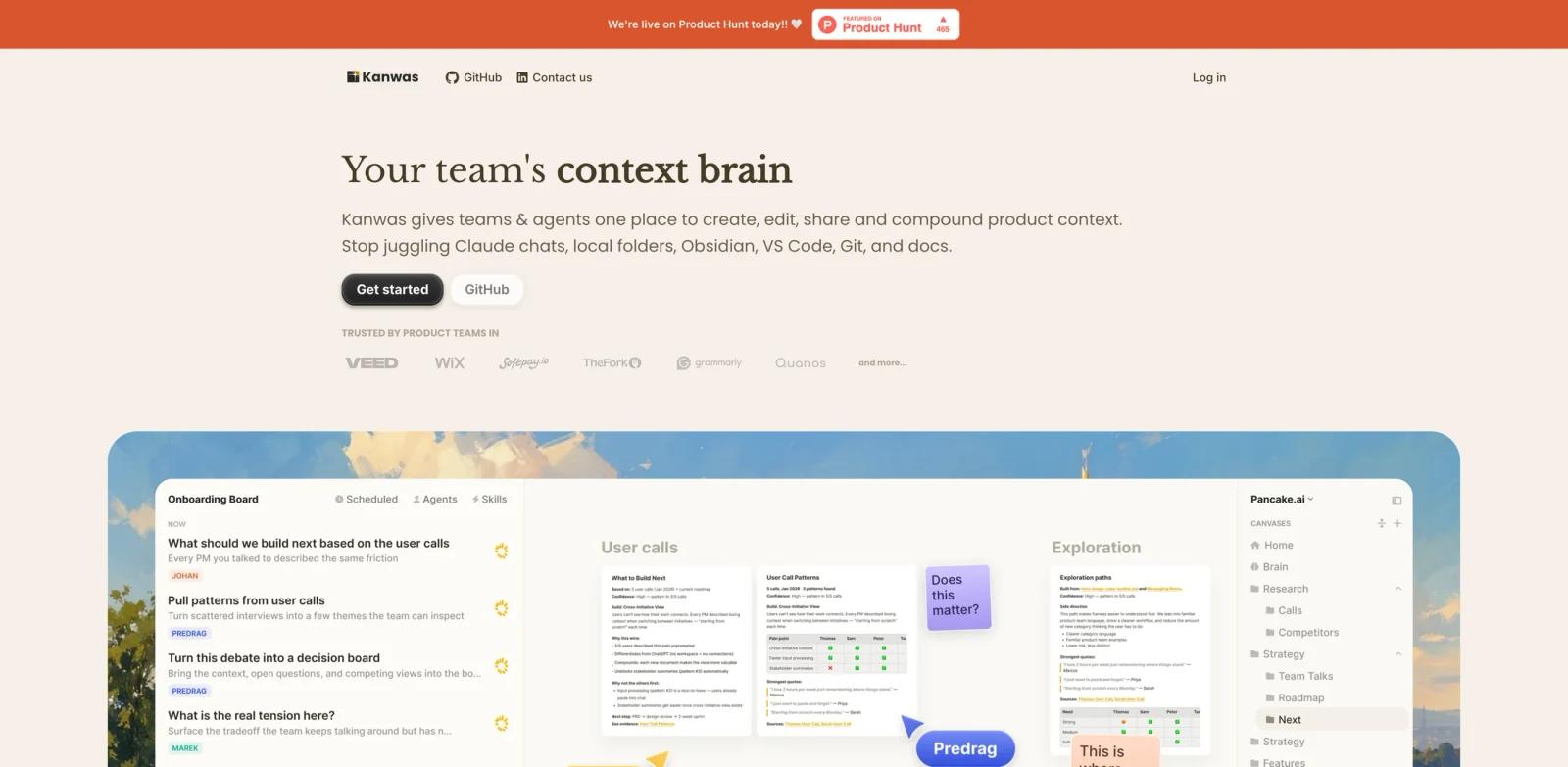
Kanwas is an open-source, multiplayer canvas where product teams and AI agents share the same documents, decisions, and research instead of scattering them across Claude chats, Notion pages, local folders, and Git repos. The agent reads everything on the board, calls tools, and streams every action into the same timeline the team is already watching — so context never has to be re-explained or copy-pasted into a new prompt.
The platform targets founders, product managers, and cross-functional teams who run a lot of strategic work through AI but find generic outputs unhelpful when the model lacks specific company context. By keeping user research, competitor analysis, PRDs, and meeting notes on a single board, Kanwas lets the agent draft deliverables grounded in the team's real history rather than its trained averages.
Files stay as plain Markdown in a Git-backed filesystem and the project ships under the Apache 2.0 license, which means teams can self-host the workspace, version-control documents like code, and exit at any time without exporting anything.
Key Features
- Canvas workspace — Boards combine docs, tasks, embeds, code, and iframes side by side, so a PRD, a Figma frame, and a customer call transcript can live in one zoomable view rather than four browser tabs.
- Compounding context graph — Every decision, note, and outcome is linked into a graph the agent can traverse, which turns the workspace into a living AI knowledge base where later prompts automatically benefit from earlier research instead of starting from a blank slate.
- Configurable team agent — Custom rules, workflows, and skills shape how the agent writes and reasons, so output sounds like the team's voice and follows the team's review process from day one.
- Multi-model routing — Works across Claude, GPT, Gemini, and other major models, letting teams pick the right brain for each task without leaving the canvas or rebuilding context for each provider.
- Git-backed Markdown filesystem — Every document is a plain
.mdfile with full version history, so changes are reviewable as diffs and the workspace can sync with an existing repo via the CLI. - Real-time multiplayer editing — Live cursors, comments, and permission controls let strategy, engineering, and design work on the same board without lock-in to a single editor or workflow.
How to Get Started
Kanwas can run hosted at kanwas.ai or self-hosted from the open-source repo — pick the path that matches the team's data policy.
- Hosted (fastest) — Sign in at kanwas.ai with a work email, create a workspace, and start a board. The default agent is available immediately; no install is required.
- Self-hosted with Docker — Clone
github.com/kanwas-ai/kanwas, copy the.env.examplefiles for the backend, frontend, and yjs-server, then rundocker-compose --profile app up. The local instance is reachable athttp://localhost:5173. - CLI sync — Install the command-line tool with
npm install -g @kanwas/cli, then usekanwas pullto bring a workspace into the local filesystem andkanwas pushto send edits back. This keeps Markdown files inside an existing Git repo without breaking the canvas view. - Wire up the agent — Add API keys for the chosen model providers, connect Slack, Linear, Notion, or a GitHub repo, and seed the board with existing research, specs, or meeting notes so the agent has real context to draft from.
Integration Guide
Kanwas treats the agent as a teammate that needs access to the same tools the team already uses. Kanwas advertises 1,000+ connections and specifically mentions Slack, Linear, Notion, and codebase connections, but public docs do not clearly confirm which of these are native integrations versus broader connector-layer integrations.
- Slack — Kanwas mentions Slack as a connected tool; exact read/write behavior, channel scope, and posting workflows should be verified in the product or official docs before relying on them.
- Linear — Kanwas mentions Linear as a connected tool; avoid claiming live ticket, project-status, or cycle-data sync unless those workflows are confirmed in current product docs or hands-on testing.
- Notion — Kanwas mentions Notion as a connected tool; describe it more cautiously as a way to bring Notion context into the workspace, without claiming full page/database import unless verified.
- GitHub / codebase — Kanwas mentions codebase connections and Git-backed Markdown workflows; avoid claiming repository browsing behavior unless confirmed through current docs or product testing.
- CLI + filesystem — Because every document is plain Markdown on disk, the workspace fits into existing repo tooling — pre-commit hooks, code review, CI — without a custom export step.
Pricing & Plans
Kanwas is currently free to use. The hosted product at kanwas.ai is available without a published paid tier at launch, and the source code is released under the Apache 2.0 license, so self-hosting carries no licensing fee — only the team's own infrastructure cost.
| Plan | Price | What's Included |
|---|---|---|
| Hosted (Free) | $0 | Browser-based canvas, default agent, real-time collaboration; public hosted-plan limits, quotas, and integration entitlements are not clearly published. |
| Self-hosted | $0 (Apache 2.0) | Full source, Docker deploy, CLI tool, no usage caps from Kanwas |
Because Kanwas is in early launch (Product Hunt #1 of the day during launch week in May 2026), the team has signaled that pricing for paid tiers may arrive later. Interested teams should check kanwas.ai or the GitHub repo for updates before planning long-term budgeting.
Best For
- Product managers who run discovery, write PRDs, and want the agent to cite specific user interviews instead of generic frameworks.
- Founders who currently juggle Claude chats, Notion, Obsidian, and a fundraising deck and want one canvas where the agent can see all of it.
- Engineering teams that prefer documents as Markdown in Git and reject SaaS lock-in for product context.
- Cross-functional teams (PM + design + eng) collaborating on strategy who want a shared view of decisions rather than meeting notes scattered across personal AI productivity tools.
- Open-source-friendly organizations that need self-hosting for compliance or data residency reasons.
FAQ
Is Kanwas free to use?
Yes. The hosted version at kanwas.ai is free at launch with no published paid tier, and the self-hosted version is released under the Apache 2.0 license. Teams pay only for the LLM API keys they bring (OpenAI, Anthropic, Google, etc.), since Kanwas does not bundle model usage.
How is Kanwas different from Notion AI or Obsidian?
Notion and Obsidian are primarily document or knowledge-work workspaces — comparable to most AI note-taking software. Kanwas positions itself as a shared canvas where agents and teammates work over the same evolving context, with tool calls, edits, and research streaming side by side. It is also Git-backed and Apache 2.0, which Notion is not.
Can I self-host Kanwas?
Yes. The full source is on GitHub at github.com/kanwas-ai/kanwas under Apache 2.0. The README documents a Docker Compose path that brings up the backend, frontend, and yjs collaboration server locally — typical setup is clone, fill .env files, and run docker-compose --profile app up.
Which AI models does Kanwas support?
Kanwas supports Claude, GPT, and Gemini, plus other major providers via configurable agents. Self-hosting requires Anthropic and/or OpenAI API keys according to the README; hosted model billing, Gemini support details, and any markup policy are not clearly published.
Does Kanwas integrate with my existing tools?
Yes. Kanwas publicly mentions Slack, Linear, Notion, codebase connections, 1,000+ connections, and a CLI tool; describe these as advertised integrations/connections unless native integration depth has been verified. The CLI also syncs documents to the local filesystem so workspaces fit inside existing Git repos.
Is my data safe with Kanwas?
Files are stored as plain Markdown in a Git-backed filesystem, so teams can audit and version everything as code. Self-hosted deployments keep all data on the team's own infrastructure. For the hosted version, teams should review kanwas.ai's privacy and data-handling docs directly, since terms can change as the product evolves.
Who is Kanwas designed for?
It's built primarily for product teams — founders, PMs, designers, engineers — who run a lot of strategic work through AI and need the model to draft from real company context rather than generic prompts. Companies cited on the landing page include Veed, Wix, Grammarly, and TheFork.
Is there a learning curve?
The browser version starts with the default agent and a blank canvas — a single board can be useful in minutes. Deeper value (custom agents, codebase integration, CLI sync into a repo) takes longer to set up and benefits from someone on the team comfortable with developer-style workflows.