

Overview
Basedash is an AI-native business intelligence platform for teams that want to ask data questions, generate charts, build dashboards, automate reports, and share governed analytics without relying on a traditional SQL-heavy BI workflow. The product connects to data sources, understands schema and metric definitions, and turns plain-English requests into charts, dashboards, and answers.
The Product Hunt launch that triggered this review was Basedash's Slack Data Agent, which lets teams ask data questions from Slack. Mention @Basedash in a Slack thread, and the agent queries connected data sources, reasons in context, and replies with an answer or chart where the team is already discussing the metric.
That makes Basedash relevant for AI data analysis, AI data visualization, and cross-functional reporting workflows. It is not just a chatbot over CSV files; the official site emphasizes governed metrics, dashboards, reports, automations, a semantic layer, MCP support, role-based access controls, and deployment options for security-conscious teams.
Key Features
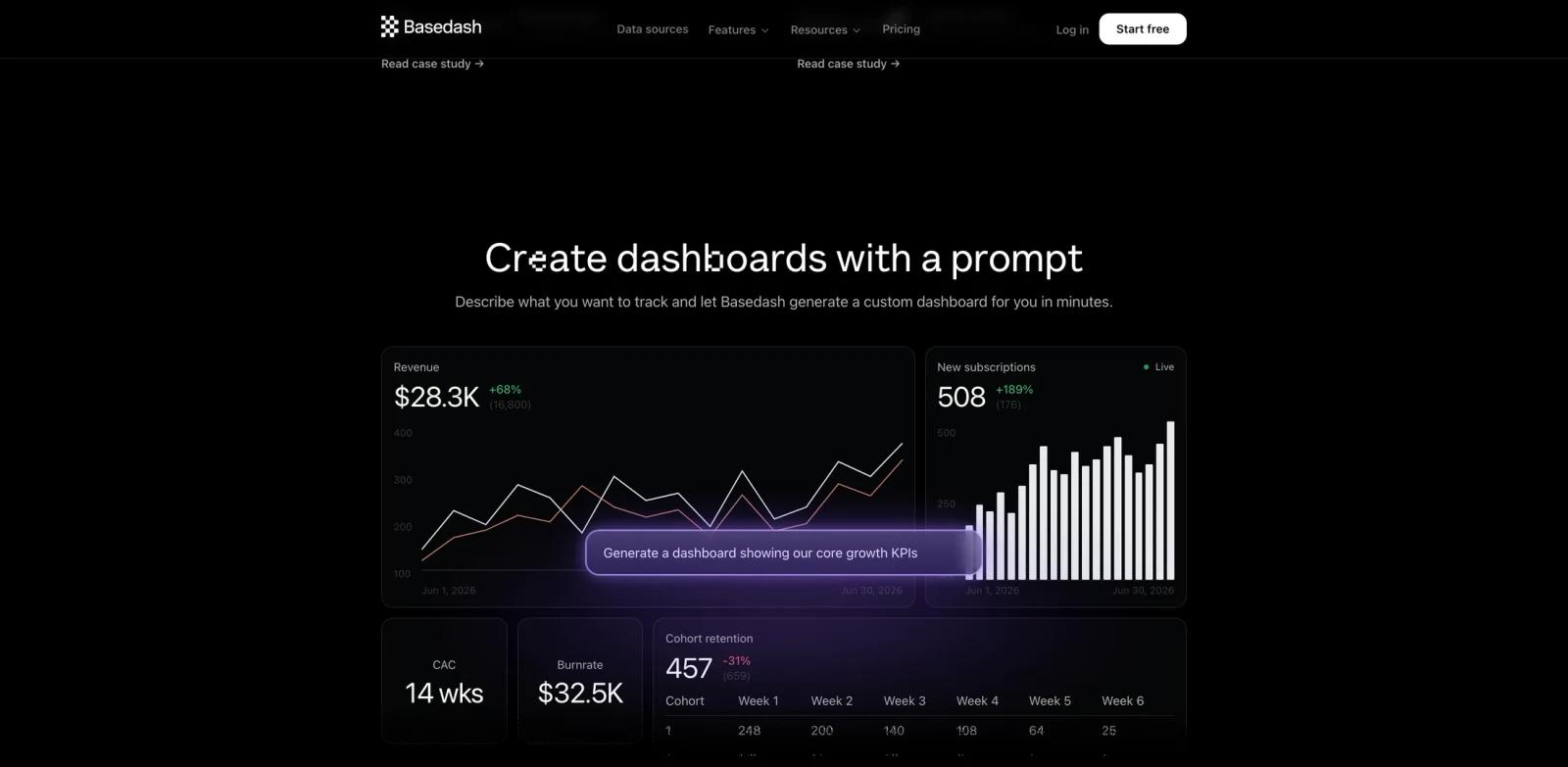
Natural language BI - Ask questions in plain English and let Basedash generate queries, charts, dashboards, and reports from connected data.
Slack Data Agent - On plans or trials that include the Slack app, ask about company data directly in Slack, receive chart-backed answers in threads, and keep analytics inside team conversations.
AI-generated dashboards - Describe the dashboard you need and have Basedash create visualizations without manually choosing every chart type.
Governed metric layer - Use a semantic layer and shared definitions so AI answers are grounded in trusted business metrics rather than freeform guesses.
Automations and insights - Schedule reports, deliver updates to channels, and surface anomalies or important metric changes automatically.
Enterprise-ready data controls - Basedash lists SOC 2 Type II compliance, encryption in transit and at rest, role-based access controls, self-hosting, and VPC options.
Broad data connectivity - The Growth plan lists 750+ data sources, while official pages mention warehouses, databases, and SaaS tools used across product, finance, and operations teams.
How to Get Started
Start by connecting the data sources your team wants to analyze. Basedash can work with SQL data sources on the Basic plan and broader integrations on Growth and Enterprise. After the data source is connected, teams can ask questions, build dashboards, and define trusted metrics. Automations and insights should be treated as Growth/Enterprise features rather than assumed to be included in Basic.
For Slack workflows, first confirm the team is on a plan or trial that includes the Slack app. Then install the Basedash Slack app, connect it to the governed analytics setup, and mention Basedash in a Slack channel or DM to ask metric questions.
For teams evaluating AI agent analytics tools, Basedash should be tested with real schema complexity, permissions, and stakeholder questions. The value is highest when it reduces repeated analyst requests while keeping the underlying data traceable and governed.
Pricing & Plans
Basedash publishes paid plans with a free trial. The pricing page says the trial lasts 14 days and does not require a credit card. Ongoing plans start at $250 per month.
| Plan | Price | Notes |
|---|---|---|
| Basic | $250/month | 2 users, SQL data sources, and $25/month AI credits |
| Growth | $1,000/month | 25 users, 750+ data sources, and $100/month AI credits |
| Enterprise | Custom | Self-hosting, embedding, SSO, dedicated support, custom AI credits, and advanced deployment options |
Basedash is priced for teams rather than individual hobby use. The entry price is higher than lightweight dashboard tools, but the plan includes AI credits and focuses on replacing manual BI setup, recurring analyst requests, and Slack reporting friction.
Best For
- Product, growth, finance, and operations teams that need faster self-serve analytics
- Companies with recurring dashboard backlogs and frequent ad hoc data questions
- Teams that already discuss metrics in Slack and want chart-backed answers in the same workflow
- Data teams that want to govern AI-generated analytics through shared definitions
- SaaS companies that need dashboards, reporting, automations, and embedded analytics options
FAQ
What does Basedash do?
Basedash helps teams ask data questions in plain English, generate charts and dashboards, create reports, automate updates, and analyze business data through an AI-native BI interface.
What is the Slack Data Agent?
The Slack Data Agent is Basedash's Slack workflow for asking questions about connected data without leaving Slack. The Product Hunt launch page says teams can mention Basedash in a channel and receive answers, charts, and thread context.
Is Basedash free?
Basedash offers a 14-day free trial with no credit card required, but its ongoing published plans are paid. The Basic plan starts at $250 per month.
How much does Basedash cost?
The official pricing page lists Basic at $250 per month, Growth at $1,000 per month, and Enterprise as custom pricing.
What data sources does Basedash support?
The Basic plan supports SQL data sources. The Growth plan lists 750+ data sources, and official pages mention warehouses, databases, and SaaS tools across product and business workflows.
Is Basedash secure enough for company data?
The official site says Basedash provides SOC 2 Type II compliance, encryption in transit and at rest, role-based access controls, self-hosted or VPC deployment options, and does not use customer data to train models.