
Canva Alternatives 2026: What to Keep, What to Rebuild
Choose a Canva alternative without losing the workflow that matters. Compare direct replacements, specialist routes, editable-file risks, and practical first trials.

On this page
For a close Canva replacement, start with Adobe Express or VistaCreate. If only one job is failing, move that job first: Snappa for desktop online graphics, Google Slides or Microsoft PowerPoint for manual presentations, Google Docs or Microsoft Word for structured documents, Visme for branded visual reports, and Clipchamp for desktop video. Affinity, Photopea, Inkscape, GIMP, and LibreOffice suit specific editing or local-file requirements.
The harder decision is what you cannot afford to lose. A new editor may make one task easier while forcing you to rebuild the templates, brand setup, and colleague handoffs that made Canva useful. An exported design that looks right is not necessarily an editable replacement for the original.
This guide gives each route a first trial with a concrete failure condition. It is desk research using current official product information and attributed community experiences. Material facts and pricing were checked on September 13, 2026; recommendations are fit judgments, not comparative speed benchmarks.
Your Switching Map: Start with the Capability You Must Keep
| Pain / trigger | Must preserve | Route / distance | Gain / loss | First trial |
|---|---|---|---|---|
| Posts and flyers feel frustrating | Templates, brand assets, colleague edits | Express or VistaCreate: direct for template production | Rebuild setup; Vista teams are web-only, sequential editors | Campaign/flyer; colleague revises source |
| Repeat digital posts need less complexity | Laptop/desktop copy edits and dimensions | Snappa: specialist | Focused graphics / three free downloads; no verified phone editing | Three graphics, then another copy change |
| You want manual presentations | Editable deck in the recipient's app | Slides or PowerPoint: specialist | Native Canva PPTX first; rebuild failures; native Office for required handoff | Export, recipient edits, reopens and presents |
| Reports are hard to revise | Flowing text and editable handoff | Docs or Word: workflow change | Canva Docs DOCX first; restructure fixed pages/failures | Export if supported; add text, revise chart, recipient edits |
| Branded reports need richer chart revision | Visual layout, chart data, client/team handoff | Visme: specialist for visual reports | Report/chart focus / rebuild setup; paid output and brand/team checks | Long report, data change, colleague edit, export/reopen |
| Artwork needs deeper control | Editable vector, pixel or PSD source | Affinity or Photopea: specialist | Artwork control / more learning, fewer easy shared templates | Reopen source/PSD; inspect fonts and masks |
| Local/no-subscription or open-source is required | The editable source for this job | LibreOffice: workflow change for docs/decks; Inkscape / GIMP: specialist for vector / raster | Local sources / manage files and versions yourself | Offline edit, source reopen, recipient format check |
| Joining clips or timing audio became cumbersome | Simple export and next-day reopening | Clipchamp: desktop video specialist | Clip focus / OneDrive editing dependency; not phone-first | Finish actual ad; export and reopen next day |
Phone-first? Trial Express on an eligible iOS/Android device. Snappa documents laptop/desktop access; VistaCreate Team Account is web-only; Clipchamp is not a phone-first recommendation. A supported app still needs to pass your actual task.
“Direct” means a similar template-led working model, not complete parity with Canva's entire Visual Suite. A specialist replaces one job. A workflow change replaces the way you work, such as moving from a visual canvas to a word processor. These routes are not a universal ranking.
Why the Decision Is Different in 2026
Canva's AI 2.0 announcement describes a conversational, agentic platform, introduced as a research preview, with iterative editing, memory and connected workflows. That launch description is not proof that every announced feature is available to every account today. Its current Visual Suite update describes more than 100 upgrades across creative and productivity formats.
That expansion can suit teams wanting one workspace. It also creates a decision tension for people who only want to finish a graphic predictably. In an April 2026 discussion, a user described social graphics and audio timing as more effortful and wanted simpler basics rather than more AI. A recent presentation user wanted an alternative without using AI. These are user viewpoints, not proof that Canva forces AI use or that AI causes lag. Canva's announcement explicitly describes taking over to edit manually.
Decide whether you want less complexity, a different capability, or a different vendor. Express and VistaCreate also offer AI features; Google offers Gemini. Another AI-enabled platform does not answer a requirement to avoid generative work by its mere existence. Using its ordinary manual editor may, depending on what you mean by that requirement.
Check Whether You Need a New Tool at All
A September mobile-workflow discussion included a real-time social creator's lag complaint alongside corrections to claims that Canva had no layout control. Official Canva help documents Position, layering and alignment. Difficulty finding a control differs from needing another artwork model.
Repeat the troublesome task in your usual device/browser setup and, where practical, on desktop. If finding the right control solves it, switching may cost more than it saves. If the repeat job still fails, trial a destination with that exact task. None of these options is promised to be faster or more reliable on your device.
If You Need Another Everyday Template Editor

Direct replacement: accessible template-led social and marketing graphics. Express preserves the broad idea of choosing a layout, changing text and imagery, and producing branded content. Start here if the workflow is frustrating but teammates still need easy edits.
Adobe has a free plan. Express Premium is US$9.99/month, billed monthly without an annual commitment. Brand kits, resizing and plan-specific assets, storage, scheduling and AI allowances need checking on the official pricing page. This is an alternative suite, not an escape from AI-enabled software.
Free-plan collaborators can use free features/content and comment. They cannot adjust Premium settings, license Premium content or export files containing Premium assets, including Stock images, videos and fonts. The individual Premium price does not establish the cost or independence of your colleague's complete handoff.
For phone-first graphics, Adobe documents eligible iOS/Android devices. Check the current device list before rebuilding anything; mobile availability does not establish speed or every desktop feature.
Budget for rebuilding recurring layouts, brand settings and approval habits. Editable PDF import can help reuse designs, but complex layouts and uncommon fonts may change. It is not a lossless transfer of Canva-native templates or collaboration history.
First trial: rebuild a five-post campaign and its resized versions. Do this on the device you actually use. Have the colleague who normally changes Canva copy make the final edit, change the brand settings they normally control, reopen the project and perform the expected final export/publishing step with their normal account. Use the actual free/Premium assets you intend to keep. The risk is losing the easy handoff, even if your own design looks good. Skip Express for advanced artwork editing or a requirement to leave AI-enabled suites entirely.

Direct replacement: novice template work across social and print graphics. A September business user wanted less friction making leaflets and posters without hiring a designer. That supports trying another template editor before a professional suite.
VistaCreate's overview covers social, web and print formats, with brand colors, fonts and logos. Its free Starter plan includes basic tools, templates and social scheduling; Pro adds advanced tools and AI features. Check the live regional upgrade price rather than assume every advertised feature is free.
The gain is a similar template-production model, not established superior performance or equivalent teamwork. VistaCreate's Team Account documentation specifies Pro is required for the documented Team Account route, and editing is sequential: two people cannot edit the same design simultaneously. Team features are web-only, team projects cannot move back to a personal account, and Brand Kits have no direct personal-to-team transfer: recreate them in the team space. Skip this direct route if live co-editing or mobile team work must survive.
First trial: make one post and one flyer. Inspect dimensions, margins, fonts and the printer's required output, then ask the usual teammate to revise the source sequentially in the intended web team workspace. Rebuild a sample Brand Kit there and have that colleague perform the required final export. Stop if print output or that handoff fails; simultaneous co-editing and mobile Team Account work are documented mismatches, not risks to discover after migration.
Snappa
Specialist replacement: laptop/desktop online marketing graphics. Snappa's editor centers on templates and dimension presets for posts, ads and online graphics. Its narrower scope is worth a trial when those are almost all you need; it is not full Canva-suite parity or guaranteed faster work.
Starter is free with three downloads per month. Pro displays $15/month, or $10/month billed yearly, on its official pricing page. Pro adds unlimited downloads and custom font uploads. An editor whose free allowance cannot cover your publishing frequency may not be the budget option you expected.
The official FAQ documents cloud access on a laptop or desktop. It does not establish phone/tablet editing. Skip this recommendation for phone/tablet-first work; a narrower product on the wrong device does not solve mobile friction.
First trial: on your laptop/desktop, make three campaign graphics, then repeat a copy change. Check downloads and custom fonts. The gain must survive repeat production. Skip Snappa for a multi-format workspace, print-production requirements or established team governance.
If the Failing Job Is a Presentation or Business Document
Google Slides
Specialist replacement: manually built, collaboratively edited presentations. The recent presentation complaint supports checking an ordinary slide editor before assuming an AI deck generator is the answer.
Google Slides is available to Google Account users, supports co-editing and sharing controls, and directly edits PowerPoint files. Google also offers Gemini; this is a manual-workflow recommendation, not an AI-free-vendor claim.
You gain slide-focused collaboration. Start with Canva Presentations' native PPTX export, then import or edit that file in Slides before deciding what needs rebuilding. Export/import does not guarantee unchanged fonts, animations, charts or object behavior. A presenter's required PowerPoint template or editing behavior determines whether the route passes.
First trial: export a representative Canva Presentations deck as PPTX, then have the recipient change text and a chart in the actual file or shared presentation they will use. Reopen it and present it. Stop if the recipient needs you to repair each edit. Skip this route for a literal AI-free-vendor requirement or presumed lossless Canva-native transfer.
Microsoft PowerPoint
Specialist replacement: the recipient requires editable PowerPoint. If the client, school or team already uses PowerPoint, start in that editing model rather than introduce an unnecessary Google conversion. This solves one presentation job, not Canva's template suite.
PowerPoint for the web creates, edits, shares and co-authors presentations stored in OneDrive. Microsoft offers free web access with a Microsoft account; that does not include all paid desktop features or make Microsoft an AI-free vendor. Use an existing desktop license if the recipient's requirements depend on that version. Free web collaboration is not local-only.
Canva Presentations exports directly to PPTX. Test that first; inspect object editability, fonts, charts and animation, then rebuild only what fails. Staying within PowerPoint avoids a second-editor round-trip. A flattened PDF or PNG is a different starting point and does not establish editable slide objects.
First trial: export a representative Canva Presentations deck as PPTX and hand it over. The recipient edits text and a chart, reopens it and presents in their actual web or desktop PowerPoint environment. Stop for missing editing/presentation behavior. Skip the free-web route for local-only requirements or assumed desktop-feature parity.
Google Docs
Workflow change: structured proposals and reports, rather than designed pages. A March business-document user described longer documents becoming difficult to format and charts not meeting their needs. Another template canvas would not necessarily change that model.
Google Docs supports document tabs, collaborative editing, Word-file editing and charts embedded from Sheets. Google Account users can create documents. Consider it when structure and revisions matter more than treating each page as a fixed composition.
If your source is Canva Docs, try its DOCX export in Google Docs first. Inspect styles, structure and chart behavior; rebuild failed elements. Fixed visual pages are a different starting point and may need restructuring as a document. Google cloud services and optional AI remain; Docs is not a custom-artwork replacement.
First trial: export a Canva Docs proposal as DOCX, or restructure a representative fixed-page proposal if that is your source. Add a page of text midway through it and revise a chart. Have a colleague edit it. Continue only if revisions work without repairing each designed page. Skip Docs for strict local-only requirements or fixed artwork.
Microsoft Word
Workflow change: the recipient requires an editable Word document. Choose Word over another designed-page canvas when proposals or reports must grow, be revised, and return as DOCX—especially if collaborators already use Microsoft 365.
Word for the web supports shared document editing. Free Microsoft-account web access uses OneDrive for collaboration; it is not included paid desktop Word or a local-only workflow. Check the needed features in the exact web/desktop version your recipient uses.
For Canva Docs, DOCX is a native download option: try it in Word before rebuilding. Inspect styles, structure and charts, then repair failures. Fixed-canvas visual pages may instead need restructuring. Native Word avoids an extra editor conversion; it does not guarantee lossless Canva workspace migration. It is not a custom-artwork replacement or an AI-free-vendor claim.
First trial: export a representative Canva Docs report as DOCX, or restructure fixed artwork if that is the source. Add text midway through it, revise a chart, and have the recipient edit and reopen the final DOCX. Continue only if revisions and handoff work in their Word version. Skip for fixed artwork or a local-only requirement relying on the free web app.

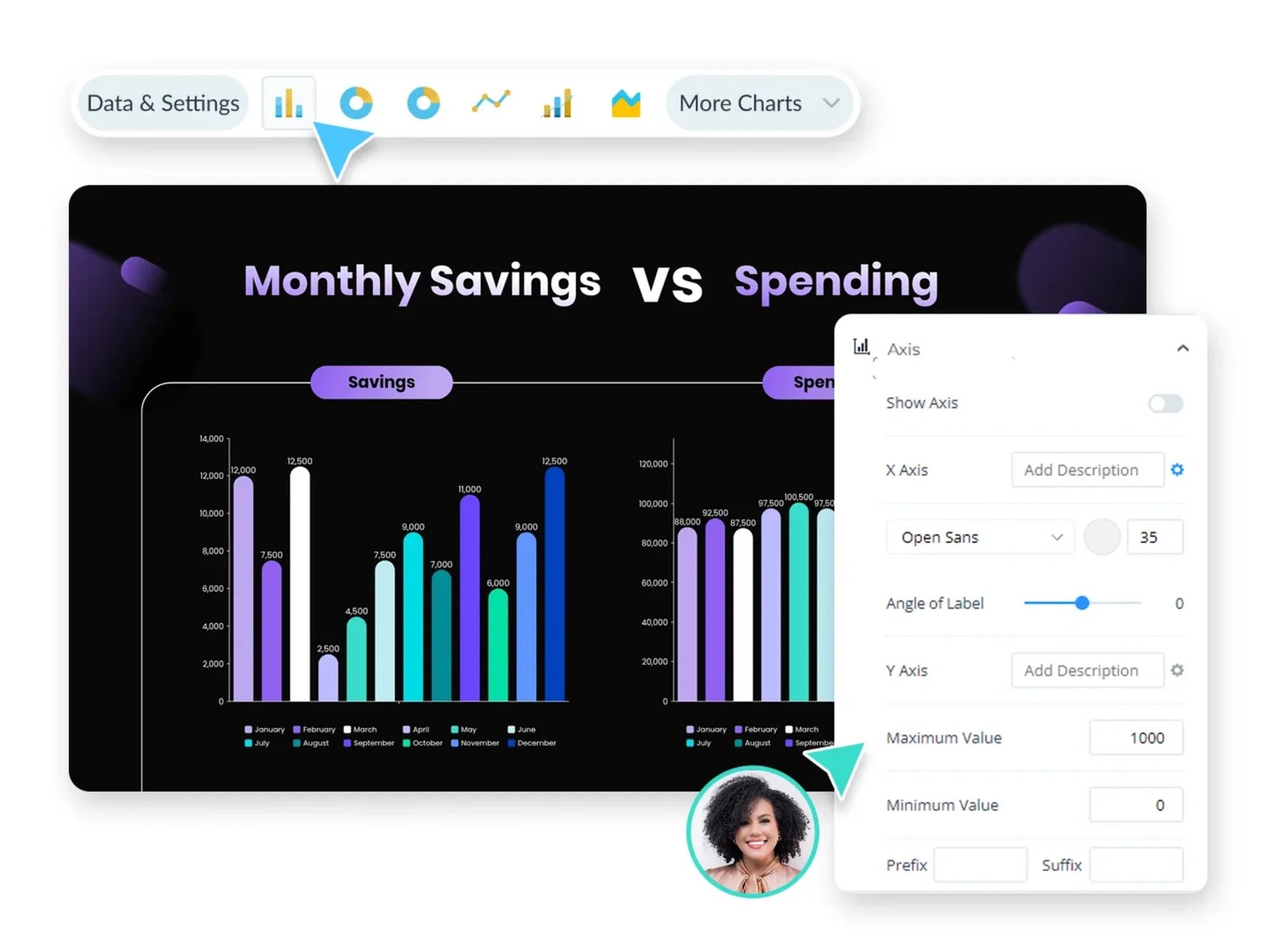
Official interface illustration from the workflow documentation, captured September 13, 2026. Illustration only; no migration performance or file-fidelity results are implied.
Specialist replacement: branded, data-heavy visual reports. The March user's complaint covered both long-document formatting and basic charts. Separate those needs: Docs/Word suit flowing prose; a visual-report platform is worth trying when chart composition and branded pages are the bottleneck.
Visme's report maker combines report layouts with data visualization, and its graph maker offers chart editing. That establishes a relevant trial route, not proof that any particular chart need is solved. Rebuild one report from original data and permitted brand assets instead of assuming native Canva-template transfer.
Basic is free for exploration. Starter adds JPG/PNG/PDF downloads; Pro adds Brand Kit and additional formats. Check the exact plan's team permissions, seats and required output. A downloadable PDF—or a PPTX option with limited editability—does not establish the client's ability to revise the source. This is not a local-only or full Canva-suite replacement.
First trial: rebuild a representative multi-page report, revise its actual chart data, apply your brand assets and have the usual collaborator edit it. Export the required deliverable, then reopen the source the next day. Stop if chart changes, brand/team permissions or recipient editability fail. Skip if you need local-only work, free final downloads or presumed editable Office export.
LibreOffice
Workflow change: local, open-source document and presentation work. A May Linux request sought image work without a web app or subscription. Local requirements must be matched to the source format for each job; an image editor cannot automatically replace a deck.
LibreOffice is a free, open-source office suite. Writer handles documents; Impress handles presentations. Consider those for the corresponding local-file jobs. You give up Canva's shared browser workspace and manage versions and assets yourself. Do not assume a DOCX/PPTX round-trip preserves every layout.
First trial: create a document or deck, edit offline and reopen its native source. Have the recipient revise their required exported format. Stop if that handoff breaks. Skip LibreOffice when browser co-editing and ready-made shared templates are non-negotiable.
If You Need Artwork Control or Local Image Sources
Affinity
Specialist replacement: professional vector, pixel and page-layout work. Affinity's unified desktop app fits artwork needing a deeper editing model. First distinguish that from difficulty discovering Canva's existing Position controls.
The core individual app is free on Mac and Windows. A Canva account is required for download/activation; core editing works offline after activation. Optional Canva AI needs an eligible premium plan. The iPad version is listed as coming soon, not a current tablet-only migration plan.
Affinity is Canva-owned. It can solve artwork control while failing a requirement to leave the Canva company. It is not the open-source or native Linux route here. You trade easy shared-template edits for desktop-editor learning.
First trial: recreate artwork involving exact shapes, retouching and layout. Reopen the native source and inspect its PDF export. Continue if control outweighs learning and rebuilding effort. Skip it for Canva-company exit, Linux-only work or effortless browser editing by non-designers.
Photopea
Specialist replacement: layered image and PSD editing in a browser. Photopea's free editor supports layers, masks, smart objects and opening/saving PSD. Use it when a collaborator's layered source must remain editable.
The model involves selections and layers. Its learning guide recommends a large screen, keyboard and mouse. Core local processing/offline behavior does not prove optional AI or connected services work offline. Browser access is not open-source software or self-hosting.
First trial: change text and a masked image in a representative PSD; save it and have the recipient reopen it. Check fonts and smart objects. Source compatibility, not an attractive PNG, is the risk. Skip Photopea for simple shared templates or an open-source requirement.
Inkscape
Specialist replacement: local, open-source vector artwork. Inkscape centers on SVG and supports Windows, macOS and Linux. It suits editable diagrams, illustrations, icons and scalable graphics when local sources or open-source software are real requirements.
It does not reproduce Canva's shared template workspace, asset catalog or presentations, and it is not the raster-photo route. You supply assets and organize files.
First trial: make a recurring diagram, reopen the SVG and inspect its rendering in the destination app. Check fonts and required output. Skip it for photo retouching or a team needing ready-made layouts with little learning.
GIMP
Specialist replacement: local raster-image editing without a subscription. GIMP is a free, open-source cross-platform image editor. It is the more relevant local route for image manipulation; Inkscape answers vector jobs.
The gain is a local editable-image workflow; the loss is Canva's template and team convenience. Budget for selections, layers and manual retouching rather than assume identical automatic background removal or an equivalent template catalog.
First trial: edit a representative image and background, keep the layered source and reopen it before exporting the delivery image. Continue only if the repeat task is practical. Skip GIMP for vector-first work or effortless shared templates.
If Simple Video Editing Is the Reason to Leave
Clipchamp
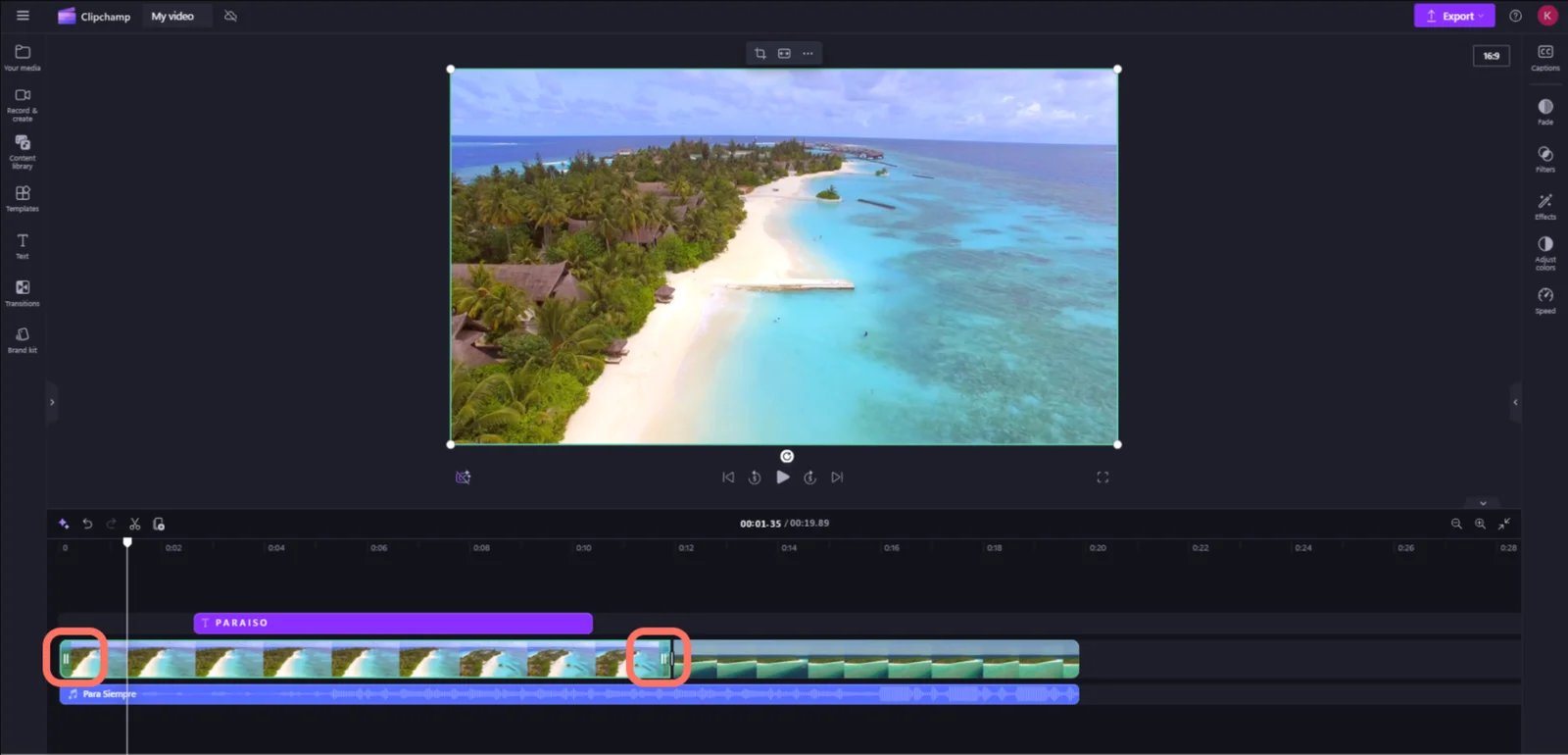
Official interface illustration from the workflow documentation, captured September 13, 2026. Illustration only; no migration performance or file-fidelity results are implied.
Specialist replacement: desktop clip editing, with an important cloud trade-off. An October 2025 short-ad creator wanted the ease of joining a few clips back after a timeline change. More recent audio-timing and business-video complaints reinforce trying the actual task, not assuming professional finishing software is the cure.
Clipchamp for personal accounts combines clips, images, music and text in desktop Edge/Chrome or a Windows app. Own/free media can export up to 1080p free. Microsoft says there is no Clipchamp watermark, but premium media/features outside your plan prevent export until upgrading.
Rebuild from original footage rather than expect Canva's page/timing model to transfer. Personal projects use OneDrive; local archives must be uploaded there to edit again, per Microsoft's cloud-storage FAQ. That fails a local-only requirement. The iOS app retired June 9, 2026; this is not a current phone-first route.
First trial: finish your real ad with footage, text, captions/audio and delivery settings. Export it, then reopen the project next day using your intended account/storage path. Stop if export or reopening fails, or cloud storage is unsuitable. This is a bounded fit recommendation, not a reliability guarantee.
Which Popular Options Are Not Core Replacements Here?
Adobe Firefly is adjacent-only: asset generation still leaves the composition job. It does not address the validated desire to recover simple template work.
Gamma is a workflow change to consider when you actively want AI-led deck drafting. It is not the default answer to manual-presentation friction or flowing documents. Figma Buzz is a workflow change for designer-created, controlled brand templates and variants. Designer setup and paid team-template publishing make it a conditional team route rather than a low-setup novice replacement.
DaVinci Resolve is a workflow change for deliberately seeking desktop editing, color, effects and audio finishing. That does not recreate the old ease of joining two clips. These tools are outside the core shortlist because of replacement fit, not because they are poor software.
What Actually Has to Move?
Distinguish delivered appearance, editable objects, and the working system around them.
| Asset or workflow | What an export establishes | What still needs checking or rebuilding |
|---|---|---|
| PNG/JPG or flattened PDF | Visual delivery; flattening combines elements into an image | Text, shapes and layers are not thereby independent editable destination objects |
| PDF imported into Express | A documented path to editable PDF content | Fonts/complex layout may change; no native template/history transfer guarantee |
| Canva Presentations PPTX / Canva Docs DOCX | A native export route to test before rebuilding | Recipient object/text/chart edits, fonts, styles, animation and reopen behavior; rebuild failed elements |
| Fixed-canvas visual pages or visual reports | An exported deliverable, depending on format | Do not assume the Canva Docs DOCX route applies to every design, or that PDF/PPTX equals fully editable client source |
| Canva-native recurring templates | References for reconstruction | Destination layouts, replaceable images, editable fields and brand settings |
| Brand and team workflow | Exported graphics do not demonstrate transfer | Permitted logo/font sources, colors, roles, comments, approvals and colleague revision habits |
| Video delivery file | A video someone can watch | Source footage, text/audio timing and a destination-native project that reopens |
Do not infer a fixed migration time or percentage of automatic transfer. Inventory your actively used templates and one example of each important handoff. Try native presentation/document export where available; reconstruct the failures and destination-specific setup. A flat export needs a different editability check. Review Canva's licensing conditions before moving assets. Export does not erase those obligations or guarantee permission to redistribute a font file.
Who Should Stay with Canva?
Stay if templates, brand consistency and easy colleague edits already work together for you. A May enterprise discussion includes positive brand-kit and adoption experiences: a useful counterweight, not proof all teams agree.
Stay if the problem is finding a control, or if only one specialist job needs moving. Keeping Canva for posts while using a document or image editor can beat rebuilding the whole suite. Postpone cancellation if a client needs Canva-native templates and the destination cannot reproduce that handoff.
For price/value concerns, compare downloads, seats, fonts/assets, storage and rebuilding time. A free specialist plus a paid template editor may cost more than your present arrangement. Optional AI you do not use is not, by itself, a reason to migrate.
Switch after the matching first trial passes. Start with Express or VistaCreate for template-led replacement; otherwise move the failing job. Both the new capability and the workflow you needed to keep must survive the move.
Get ToolWorthy Weekly
New AI tools, practical guides, and selected AI signals in one weekly brief.
Related Posts
- 13 Best AI Poster Generator Tools 2026 - Real Pricing
Compare 13 AI poster generator tools for editable layouts, templates, brand kits, export formats, commercial rights, and current pricing today.
- Best AI Design Tools 2026 - 13 Tools Compared by Workflow
13 AI design tools covering every use case: logo generation, UI mockups, product photography, and social media. Real pricing and commercial rights included.
For AI tool founders
Built a tool that belongs in this decision set?
Request an editorial evaluation for possible inclusion in ToolWorthy.
Submit your tool for reviewPaid submission does not guarantee a ranking, recommendation, inclusion, or editorial outcome.