
10 Best AI Social Media Tools 2026 — Choose by Workflow
Compare ten AI social media tools for creation, scheduling, reporting, listening, and replies. Find the right workflow, plan limits, and human review gates.

On this page
The best AI social media tool depends on what is slowing your team down. A caption generator will not fix an approval bottleneck. A scheduler will not tell you what people say about your brand outside your own accounts. And an impressive inbox may be an expensive way to solve a simple posting problem.
This guide routes ten tools by the job they can actually help with: creating assets, publishing with review, reporting on owned accounts, listening to public conversation, or managing replies. It is a desk-research comparison of current product documentation and public plan pages, checked September 23, 2026. We did not run controlled creative-quality, time-saved, sentiment-accuracy, or inbox-usability tests, so there is no credible universal performance winner here.
If asset creation is your first problem, the AI social media post generator directory is a narrower place to compare creation-oriented products before you evaluate schedulers or inboxes.
| Your main bottleneck | Start with | Eliminate the route if… |
|---|---|---|
| Generating social images, carousels, and short videos from briefs | Predis.ai | Its credit meter or Core plan's lack of auto-posting breaks your workflow. |
| Designing editable visual posts and optionally scheduling them | Canva | You need a specialist generation meter, or a trial's AI limits are being treated as paid-plan limits. |
| Scheduling a small set of channels with a review step | Buffer | Deep listening or a structured care inbox is the requirement. |
| Managing many client profiles and approvals | SocialPilot | The account bundle or billing-country package does not fit. |
| Planning visual-first posts | Later | X, long-form YouTube, or approvals within the Starter budget are non-negotiable. |
| Producing recurring owned-account reports | Metricool | You need more than 30 days of X metrics without a verified export/archive route. |
| Consolidating publishing and response operations | Hootsuite, Sprout Social, or Agorapulse | The necessary approval, inbox, or listening capability is on an unaffordable tier or add-on. |
| Finding public brand and topic mentions | Brand24 | You need fast alerts on an entry budget, or Facebook personal/group posts are a critical source. |
Use the table as a starting route, not a ranking. A product can help in several lanes, but the plan and workflow you need determine whether it belongs on your shortlist.
How we separated the tools
We asked what artifact the buyer needs to produce. Creation tools make post assets. Publishing tools move approved content to the right account and format. Owned-account analytics explain performance on connected profiles. Listening tools search public conversation beyond those profiles. Response tools move comments or messages through a team queue. These jobs overlap in marketing copy, but they are not interchangeable in operation or pricing.
For each route, we checked official product and help pages for relevant capabilities, plan limits, supported networks, pricing units, and approval boundaries. Prices below are public-route observations, not quotes for every region or contract. We did not assign numeric scores because the tools do different jobs and there is no shared controlled evaluation. The practical test is whether a tool survives your own network, governance, workload, and budget gates.
For creating social assets: Predis.ai and Canva
These two belong in the same creation lane, but the choice turns on the output and meter. Predis.ai is organized around AI-generated social assets and credits; Canva starts from editable designs, templates, and a broader visual workspace. Both require a person to check the result before it represents the brand. Neither is a substitute for public listening or a governed response inbox.
Predis.ai
When the team has briefs but not enough finished social images, carousels, or short videos, Predis.ai is the specialized social-generation option in this list. Its plan page describes generation, publishing channels, and a credit meter. That makes it more relevant to asset throughput than to social listening or a mature response operation.
The public USD annual route lists Core at $24 per month equivalent, billed $288 yearly, with 1,300 monthly credits, one brand, and ten publishing channels. Core explicitly says “No Auto Posting.” That is a material distinction: access to publishing channels does not mean an entry-tier hands-off scheduling workflow. Image and video creation can consume credits at different rates, so a headline credit number is not a dependable number of finished posts.
Start here if your team wants to turn repeatable briefs into editable creative drafts. Skip it as a replacement for a listening platform or governed care inbox. In a trial, feed the same approved brief into several real formats—static post, carousel, short video, and channel adaptation—then record actual credit use, manual edits, brand corrections, and what still needs to happen before publication. Continue only if the complete asset cost and review workload fit your normal volume; eliminate it if a key format or brand requirement fails.

If the bottleneck is making editable visual posts that stay consistent across formats and campaigns, Canva is the other creation-lane starting point. Magic Design suggests social-post templates from a prompt or supplied media; a person selects and customizes the layout. Its Content Planner can take an existing or new design through channel selection, caption entry, and scheduling or draft saving. That makes Canva more than a generic design add-on for this buyer job, though the AI tool is not evidence of autonomous publishing.
The current plan page lists limited AI use on Free, social content scheduling on Pro, and more extensive brand kits and approvals on Business. Canva's AI allowance guide separates Standard AI from Premium and Ultra: Standard AI generally does not draw from the shared monthly allowance on paid plans other than Pro Lite, while Premium and Ultra do, at task-dependent rates. A headline allowance therefore is not a guaranteed number of finished posts and cannot be compared directly with Predis.ai credits. Pro and Business trials use Free-level AI limits and exclude Ultra, so trial capacity does not represent paid-plan capacity.
In a trial, use one approved brief to make a static post, a carousel-style design, and a short-video asset, then adapt each for your required channels. Use that trial to judge editing, brand consistency, and scheduling; check the target paid plan separately for Premium/Ultra access, AI capacity, and approvals. Do not eliminate a paid Canva plan solely because its trial ran out of AI uses or lacked an Ultra tool. Choose Predis.ai when specialized social asset generation is the stronger fit; choose Canva when the editable design system and simple scheduling are the stronger fit. Neither judgment is a measured output-quality win.
For its broader design and publishing scope beyond this lane, see the Canva tool profile.
For publishing and approvals: Buffer, SocialPilot, and Later
These three can all help teams plan posts, but they charge and constrain work differently. Buffer prices by connected channel; SocialPilot bundles accounts and users by plan; Later uses “social sets” and network-specific post limits. Compare them at the tier with your required approval model, not at the lowest entry card.

If the problem is keeping a lean publishing calendar moving without overbuying a suite, Buffer has a clear starting shape. Its pricing page lists Free with up to three channels and ten queued posts per channel. On the displayed annual route, Essentials is $5 per channel per month equivalent ($60 billed yearly for one channel); Team is $10 per channel per month equivalent ($120 yearly for one channel) and adds access levels and content approval workflows. Buffer also documents an AI Assistant, insights, and a Community inbox.
The per-channel meter is easy to model: count every profile you actually need, then price the plan that includes the review step. Do not infer that Buffer Community handles every DM, ad comment, or escalation workflow merely because it is called an inbox. Buffer fits a small publishing team better than a buyer whose main problem is deep earned-media listening or complex customer care.
For a trial, connect the exact account types your team uses, schedule one post in every required format, and run draft → approval → edit → approval again. Test how a failed or disconnected post is surfaced. Continue if that sequence is visible and affordable at your channel count; eliminate it if the needed format or review gate cannot be maintained.
SocialPilot
For an agency managing many profiles, the question often becomes account and client-review capacity rather than the price of one channel. The current SocialPilot plans page shows Standard with 15 social accounts, three users, an inbox, analytics, team collaboration, and manager approval. Premium lists 25 accounts, six users, bulk scheduling, advanced analytics, client approval, and white-label reports. Those are tangible reasons to shortlist it for multi-client publishing and reporting.
/plans annual route shows Standard at $42.50 per month equivalent and Premium at $85, while another official pricing route exposed different packaging. We cannot establish a universal package from those pages alone. Set your billing country, choose monthly or yearly billing, and confirm the actual account, seat, approval, and AI-credit limits in checkout before treating a public figure as your quote.AI Pilot can draft and rewrite caption text inside Create Post, but a user selects or inserts the suggestion into a draft; generations use AI credits. It is assistance for the publishing workflow, not proof that AI can bypass client approval.
Trial the exact client workflow: assign a post, request external approval, revise it, and verify the final publish state. Continue if approval remains a real gate and the account bundle matches your clients; eliminate it if the local package or approval behavior fails. SocialPilot is not the listening-first pick; its core documented route is publishing, collaboration, inbox, and reports.

Later makes the most sense when a visual-content team's channels match its social-set model. Its AI tools page documents a visual scheduling calendar, while the Caption Writer guide describes paid-plan, credit-metered caption suggestions that a user selects and adds to a post; the feature is documented as an English-only beta. On its USD annual pricing route, Starter is $18.75 per month equivalent for one user and one social set: one profile on each of Instagram, Facebook, Threads, Pinterest, TikTok, LinkedIn, YouTube, and Snapchat. It allows 30 scheduled posts per profile per month and five AI credits per month. Internal/external approvals and Social Inbox start at Growth, shown at $37.50 per month equivalent billed yearly with two users and 50 AI credits. The current Starter pricing card says extra sets, users, and AI credits are unavailable; an add-on help page describes extra credits for paid plans more broadly, so confirm actual Starter add-on eligibility rather than budgeting it as certain.
The current format matrix is more important than the network logos. It does not list X, limits YouTube publishing to Shorts, and distinguishes Instagram profile types and post formats. For example, automatic Instagram Stories publishing is documented for business profiles on current paid plans, not every Instagram account. Those details can end a shortlist before any aesthetic preference matters.
Try the precise visual formats and account types in your calendar. Continue if the one-per-network set, post/AI limits, and Growth-level approval cost fit the actual month; eliminate Later if X, long-form YouTube, or a required profile/format combination is a hard requirement.
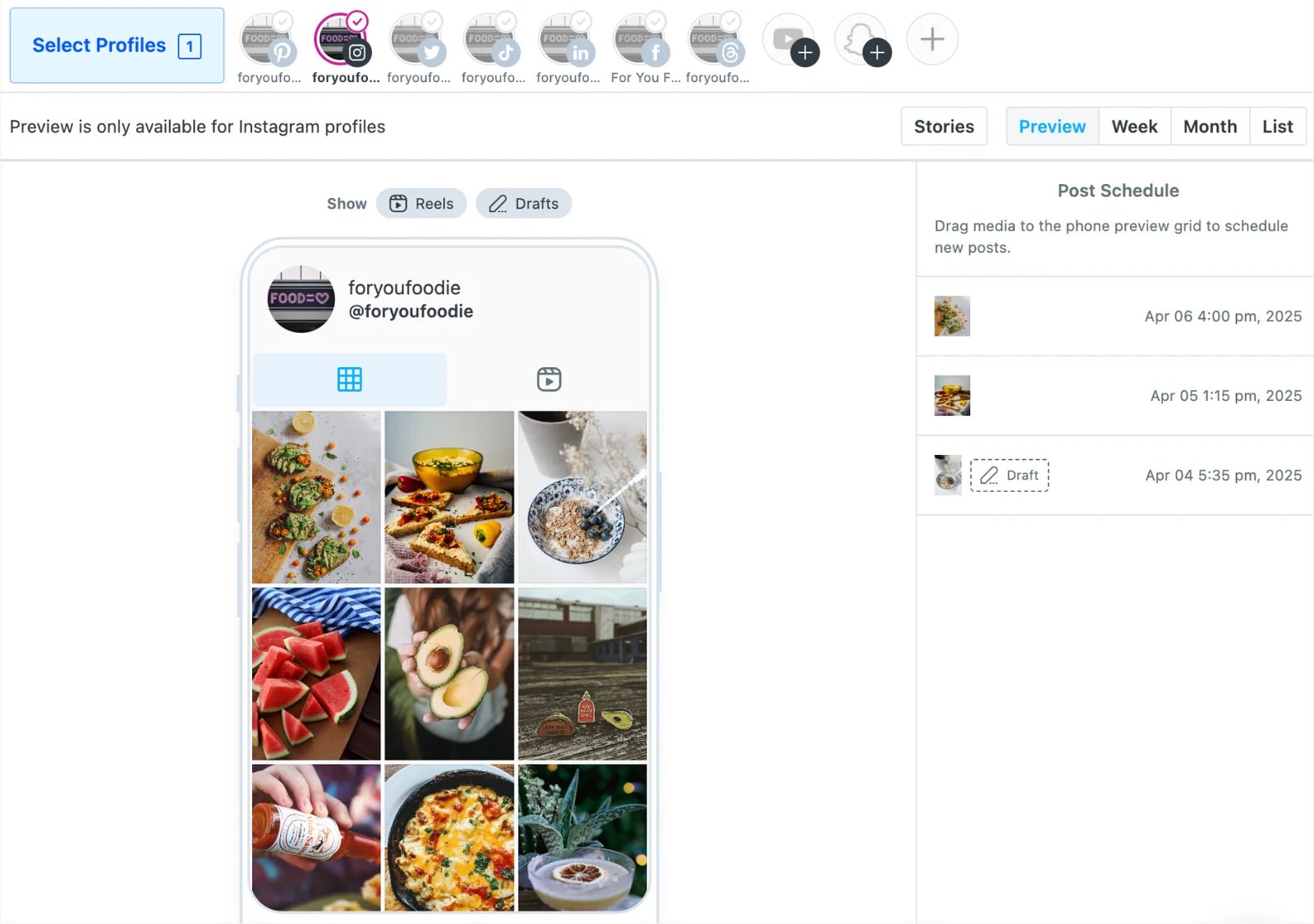
Official Later Visual Instagram Planner example, captured September 23, 2026. It shows the preview-and-schedule layout; it does not establish support for every profile type or format. See also the Later tool profile.
For measurement and client reporting: Metricool

Choose a reporting-led route when the weekly report—not drafting another caption—is what consumes the team's time. Metricool combines publishing with owned-account analytics, competitor views, and report output. Standard PDF/PPT reports and scheduled email delivery start with paid Starter; Metricool Studio is the distinct AI-reporting route, using prompts to build views and insights. Starter and Advanced without the Advanced Analytics add-on are limited to two Studio views with five versions each; full Studio access requires that separate add-on. The current plan table shows Advanced adding team/client management, post approval, customizable report templates, a Looker Studio connector, and API access. The Advanced plan does not include full Advanced Analytics add-on access by default.
Metricool's approval workflow also documents an AI caption assistant inside the planner. That assists post creation, not the reporting task; people send posts for client or team approval, and approved content can publish automatically. This is a draft-and-human-gate workflow, not evidence of unreviewed AI posting.
The free tier documents one brand, 20 scheduled posts per month, 30 days of analytics, and exclusions for LinkedIn and X. Paid plans require an X add-on, shown at $10 per connected account per month on the USD plan table; Starter's X analytics are reduced, while Advanced/Custom show complete X analytics. Even on paid plans, the pricing comparison footnote limits X metrics storage to 30 days. Calculate your brand count, add-ons, and billing cadence on the selected purchase route; do not infer that a paid upgrade restores older X history.
Rebuild one real monthly report during the trial. Specify required networks, metrics, historical range, filters, export file, and recipient. Continue only if standard reports or Metricool Studio at the affordable tier produce the needed artifact; eliminate Metricool for longer X-history work unless you verify an export/archive path before the 30-day window closes. Social-platform API changes can alter metrics over time—Sprout's June 2026 Facebook metric deprecation note is a concrete reminder to plan exports and versioned reporting definitions.
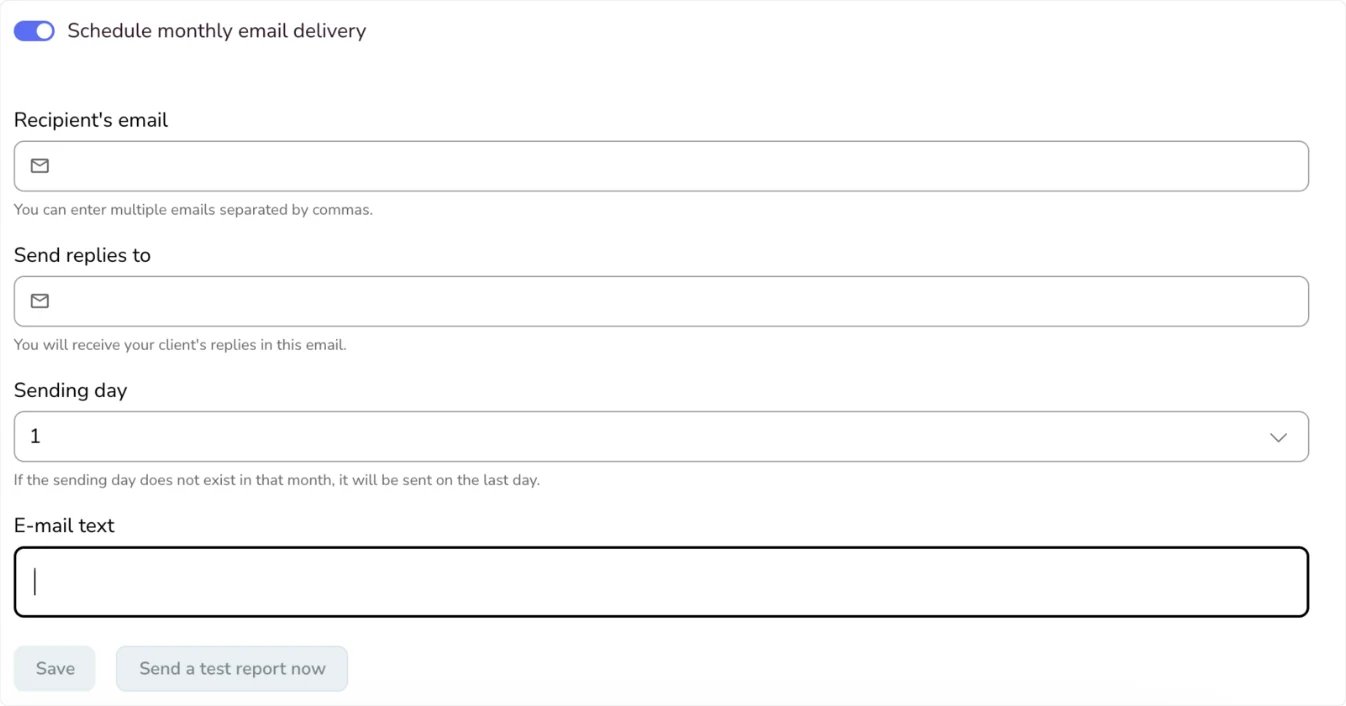
Official Metricool reporting guide example, captured September 23, 2026. This is the recurring-delivery setup, not a test of report data quality. The Metricool tool profile covers its broader feature set.
For public-conversation listening: Brand24
Brand24
Owned-account analytics answer what happened on profiles you control. Listening asks whether people are discussing the brand, competitor, or topic across public sources. Brand24's plan and source matrix is oriented around keywords, mentions, and social/web sources rather than publishing calendars. It belongs on a listening shortlist or beside a scheduler, not in place of one.
Its AI Brand Assistant answers user questions about monitored project data with summaries and charts. The documented Pro, Business, and Enterprise availability—and four-question trial cap—make AI analysis a plan gate, not a reason to assume the listening system can publish or reply for you. On the observed USD annual pricing route, Individual is $199 per month equivalent for three keywords and 2,000 mentions with updates every 12 hours; Pro, the first AI Brand Assistant tier, is $399 per month equivalent and lists real-time updates. The Pro monthly-billed card shows $499 per month. These are vendor-stated update intervals, not measured alert latency.
Model the number of queries and likely mention volume before comparing its price to a publishing product. The source list includes major networks as well as news, blogs, and forums, but a logo is not a promise that every relevant item is available. Brand24's Facebook and Instagram data guide says even public Facebook personal-profile and group posts are not collected through its official API; neither are Facebook/Instagram Stories. Private or otherwise inaccessible conversations cannot be assumed collectible either.
Test with a known set of public mentions from the sources that matter to you. Record misses, delay, noise, filtering, and how quickly the real stream consumes your allowance. Continue if it captures decision-useful conversation within your query/mention budget and stated update interval; eliminate it if a critical source is excluded or a 12-hour entry-tier update is too slow. We have not benchmarked recall, alert latency, or sentiment accuracy, so those results need to come from your controlled test, not a marketing claim.
For response operations: Hootsuite, Sprout Social, and Agorapulse
If comments, DMs, assignments, and review controls are the bottleneck, compare response-capable suites at the plan that grants the workflow. Their entry prices are not directly comparable: Hootsuite and Sprout charge by seat, Agorapulse uses per-user pricing with a shared profile allowance, and advanced listening may be a separate layer.

Hootsuite is a consolidation route when publishing, inbox, reporting, and monitoring all need to live in one operational system. Its current Social OS plans list Standard with ten accounts, AI post/image generation, an inbox, and brand/competitor monitoring. Professional adds unlimited accounts, automated inbox workflows, and custom reports. Advanced adds team content approval and message assignment/routing; Enterprise adds advanced listening. That tier separation matters more than a broad “all-in-one” label.
Plans are sold per user. The public FAQ lists paid plans starting at $99 for Standard, $199 for Professional, and up to $399 for Advanced, but the observed page did not reliably attach those figures to a specific monthly versus annual cadence. Treat them as rough public starting figures and verify the exact region, billing term, seat count, and listening depth at purchase. Skip Hootsuite if per-seat spend is unacceptable or if entry-tier monitoring is being mistaken for deep listening.
During a trial, route an incoming message to a teammate, require approval for a representative public post, and produce the exact report your team needs. Continue only if those three workflows coexist on one affordable plan; eliminate it if the required approval or listening scope sits on an impractical tier.

Sprout Social is a governed-team route rather than a low-cost scheduling shortcut. Its pricing page lists Standard at $199 per seat per month on the observed annual route with five profiles and a consolidated inbox; higher tiers broaden team and reporting capabilities. Listening and Premium Analytics are separately sold solutions, so a buyer should not assume those are included in a core seat price.
The public pricing page lists Trellis on Standard, but that label does not establish access to every Trellis agent or data domain. The Trellis overview describes a Listening-scoped agent; the cross-domain Performance & Engagement Agent, which can use Publishing, Inbox, Reporting, and Care data, requires Professional or above and is in limited release. Sprout documents 100 Trellis credits per user per month; Trellis Plus extends use at $35 per user per month, or $28 per user per month on an annual subscription. Check which agent and data scope your actual account exposes. Enhance Reply by AI Assist appears on Advanced and uses a separate allowance; neither feature proves autonomous public replies.
The trade-off is clear: a team that needs structured response work and reports may value the deeper operating model, but each seat and solution can change total spend. Check the required message types, approvals, report exports, and historical metrics on the precise plan. We have not measured inbox speed or AI-response quality; product documentation establishes availability, not operating performance.
Create a controlled queue with two agents and an approver. Test assignment, escalation, edits after approval, and whether unresolved work survives reassignment. Continue if the actual workflow and seat count justify the cost; eliminate it if a mandatory message type or governance step is missing.
The Sprout Social tool profile provides a broader product overview if this governed-team route remains on your shortlist.
Agorapulse
Agorapulse is another response-and-publishing route, with an important modular listening boundary. Its plan comparison includes a social inbox, publishing, analytics, and approval features that vary by plan. The inbox approval documentation distinguishes human review from AI-agent actions: on Professional and Advanced, one workflow can cover one team member and approver, while AI agents as team members require a higher Tailored route. Do not assume an AI suggestion and an autonomous action have the same governance.
Agorapulse uses per-user pricing with a shared ten-profile allowance across paid users, according to its pricing-per-user guide. The help table does not show a currency symbol for its base-plan figures, so verify checkout currency. X access is a separate paid add-on: X Lite is $/€29 per X profile per month for publishing only, while X Plus is $/€69 per profile per month for publishing, Inbox, and reporting. X profiles do not consume the base ten-profile allowance, and X Plus does not import history before activation. Advanced Listening is another separately purchased feature, documented at $/€100 per search query. Model X profiles and listening queries as distinct budget lines.
In a trial, move a reply through assignment and approval, then test a draft post and one listening query if you need it. If X messages matter, test them with X Plus specifically; X Lite cannot serve that inbox job. Continue if the pending-approval state, profile allowance, and add-on costs fit; eliminate it if required message types or review rights are absent at the intended tier.
A practical way to choose
Start with one bottleneck and one observable artifact: an approved post, a client report, a list of public mentions, or a resolved response queue. Then use four hard gates before spending time on polish:
- Coverage: connect the exact network, account/profile type, content format, and message type. “Supports Instagram” is not enough to prove your Story, Reel, DM, or ad-comment workflow.
- Human control: run draft → review → edit → final action. Identify whether AI only suggests copy or can publish, reply, hide, or delete, and who can approve it.
- Economics: price your real channels, users, brands, credits, profiles, and queries at the tier containing the required controls. Confirm region and billing cadence.
- Continuity: inspect exportable fields, history, failure alerts, and what happens when a network API changes or an account disconnects.
Keep the smallest tool or stack that passes all four. A creation specialist paired with a scheduler can be more coherent than a broad suite with the wrong approval model. Conversely, a single governed suite may reduce handoffs when response ownership is the real cost. These are workflow hypotheses to verify in your environment, not measured productivity claims.
Get ToolWorthy Weekly
New AI tools, practical guides, and selected AI signals in one weekly brief.
Related Posts
- 10 Best Blaze AI Alternatives 2026 - Better Control, Credits, and Brand Fit
Compare the best Blaze AI alternatives for 2026, including Marky, SocialBee, FeedHive, Jasper, Holo, Enji, Copy.ai, and Simplified.
- 16 Best AI Market Research Tools 2026 — Real Pricing, Category Fit
Tired of sales-call demos? We compared 16 AI market research tools across surveys, social listening, and competitive intel with verified pricing and real user complaints.
For AI tool founders
Built a tool that belongs in this decision set?
Request an editorial evaluation for possible inclusion in ToolWorthy.
Submit your tool for reviewPaid submission does not guarantee a ranking, recommendation, inclusion, or editorial outcome.