

Overview
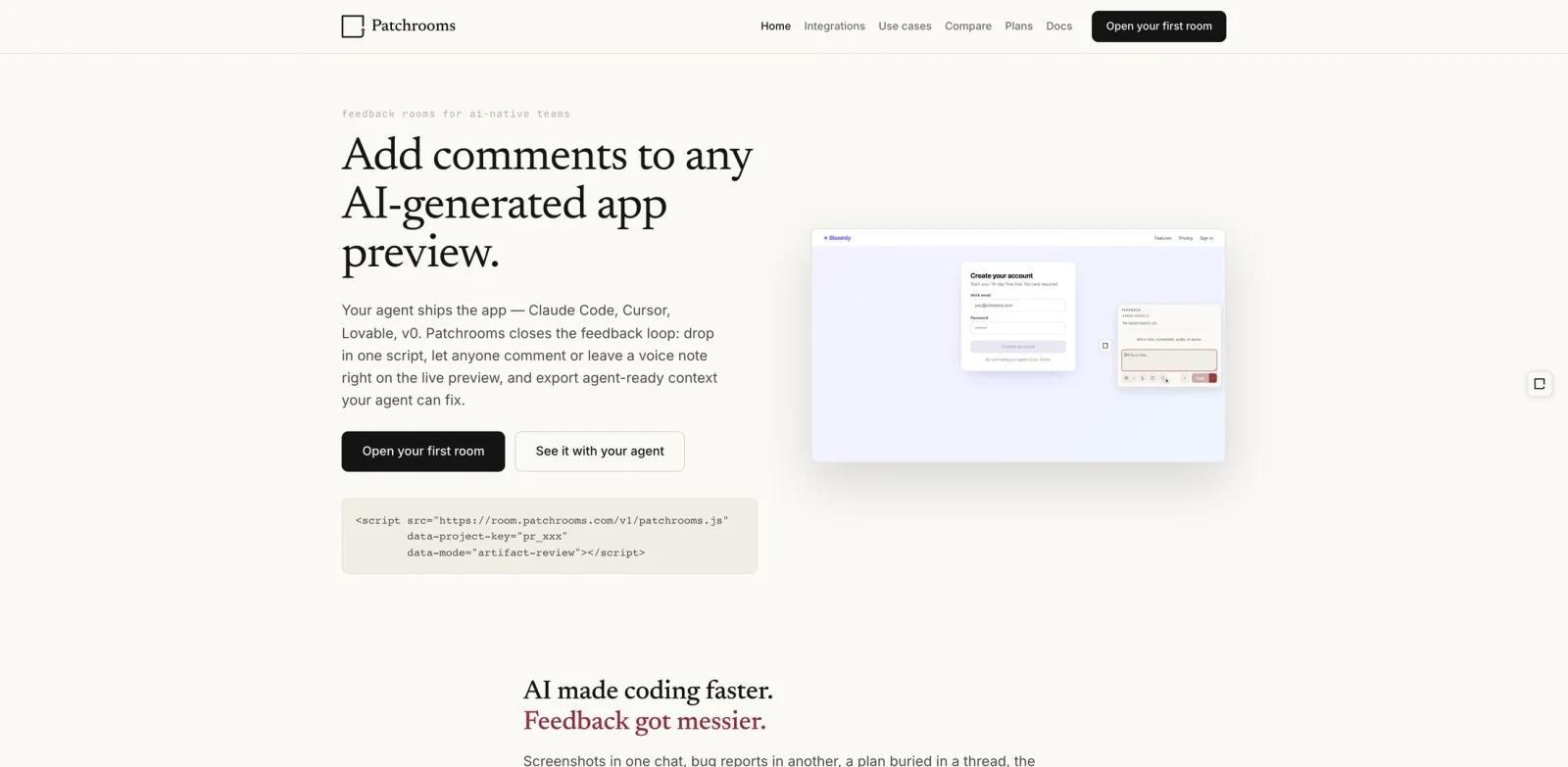
Patchrooms is a visual feedback tool for teams building apps with AI coding agents and app builders. Developers add one script to a preview, staging URL, or local artifact, then reviewers can comment directly on the page, leave voice notes, capture screenshots, and create issue-specific rooms.
The core idea is that feedback should arrive as context an AI coding agent can actually use. Patchrooms exports reports as structured Markdown for tools such as Claude Code, Cursor, Codex, Lovable, v0, Bolt, Windsurf, Cline, and Replit Agent. It also offers an MCP server so capable agents can list reports, retrieve report details as Markdown, and update status without manual copy-paste.
Product Hunt lists Patchrooms as a 2026 launch with the tagline "Turn AI-app feedback into agent-ready patch context." Its launch blog describes Patchrooms as early access and free while in preview.
Key Features
Embedded feedback rooms - Add a script tag to any AI-generated preview or staging page so reviewers can leave comments in context.
Pixel-level screenshots and annotations - Reviewers can point at exact UI elements, add arrows, notes, and highlights, and preserve the visual state behind the issue.
Voice notes with transcription - Reviewers can record feedback instead of typing; Patchrooms transcribes voice into clean text for developers or agents.
Agent-ready Markdown export - Copy structured feedback into Claude Code, Cursor, Codex, or other AI builders so the agent receives page URL, quoted selection or element context when provided, screenshot links or assets, comment text, and browser context.
MCP server for agent workflows - MCP-capable agents can list reports, retrieve report details as Markdown, and update report status through tool calls instead of relying on manual paste workflows.
Local mode and no-account reviewers - Local mode can run without a server or account, while reviewers can leave feedback from a shared preview without signing up.
How to Get Started
Patchrooms starts with a lightweight script tag. The official homepage shows an embed using https://room.patchrooms.com/v1/patchrooms.js with a project key and data-mode="artifact-review". Once installed, reviewers can open the preview and leave comments on the live UI.
For agent workflows, teams can either copy agent feedback as Markdown or connect an agent to the Patchrooms MCP server. The launch post says the MCP server supports actions such as listing reports, retrieving report details as Markdown, and setting status when a fix is complete.
Pricing & Plans
Patchrooms is currently in early access. The official launch post says Patchrooms is free during early access/preview, with no credit card required; pricing will be announced before general availability, and the Plans page currently shows planned Personal, Team, and Enterprise directions without published prices.
| Plan | Price | Notes |
|---|---|---|
| Early access preview | Free while in preview | No credit card required according to Patchrooms' launch post |
| General availability | Not announced | Pricing will be announced before GA |
Because pricing is not finalized, teams adopting Patchrooms for client or production workflows should watch for future pricing, role, and integration changes before standardizing around it.
Best For
- Solo founders building with Claude Code, Cursor, Lovable, v0, Bolt, or Codex
- Agencies sending AI-generated previews to clients and needing structured feedback
- Product teams reviewing fast-changing AI-built prototypes on staging URLs
- Developers who want better prompts for bug fixes than screenshots and vague chat messages
- Teams experimenting with MCP-based feedback loops for AI code generation
FAQ
What does Patchrooms do?
Patchrooms lets reviewers comment directly on an app preview, then turns that feedback into agent-ready context with screenshots, selectors, comments, browser details, and status.
Which AI coding tools does Patchrooms work with?
Patchrooms' official site mentions Claude Code, Cursor, Lovable, v0, Bolt, Replit Agent, Codex, Windsurf, OpenCode, Cline, and other agents that can consume structured feedback.
Is Patchrooms free?
Yes, during early access. Patchrooms says it is free while in preview and does not require a credit card. Pricing for general availability has not been announced.
Do reviewers need accounts?
No. The launch post says reviewers can open the preview URL with the widget embedded and comment immediately without signing up.
Can Patchrooms work without a server?
Yes. Local mode can run the widget with local browser storage and export feedback as agent-ready Markdown or JSON.
Does Patchrooms replace Jira or Linear?
No. Patchrooms is for turning visual feedback into agent-readable patch context. Planning and broader issue management can still live in Jira, Linear, GitHub, or Notion.