Overview
Qwen3.8-Omni-Flash is Qwen's September 18, 2026 native omni-modal model for text, image, audio, and video understanding. It accepts those modalities together, processes up to a 1M-token context, and returns text through Chat Completions or the Responses API. Qwen positions it for multimedia analysis and agent workflows rather than speech-first conversation.
The upgrade decision depends on output, not input alone. Qwen3.8-Omni-Flash brings a 1M context window, spatial-audio understanding, granular reasoning_effort controls, Responses support, caching, and wider regional availability; function calling and web search are supported but are not new to the Omni family. However, it does not generate speech. Teams that need voice responses, voice cloning, or real-time spoken interaction should keep Qwen3.5-Omni in their model route instead of treating 3.8 as a universal replacement.
What's New
Native multimodal analysis with 1M context
The model retains Qwen3.5-Omni's ability to combine text, images, audio, and video in one request and returns text only. Its 1M-token context supports up to 991,808 input tokens without thinking or 983,616 input tokens with thinking, plus a maximum text output of 131,072 tokens. That capacity makes it suitable for long recordings, large multimedia archives, and agent traces that would exceed earlier Omni limits.
Compared with Qwen3.5-Omni, Qwen3.8-Omni-Flash raises maximum video duration from one hour to two hours, keeps maximum audio duration at three hours, and caps video-file count at 64 rather than Qwen3.5-Omni's 512 public-URL or 250 Base64 files; both allow up to 2 GB per public-URL media file. For meeting analysis, media review, or long-form transcription, those limits materially change how much source material can be processed in one job.
Spatial-audio understanding
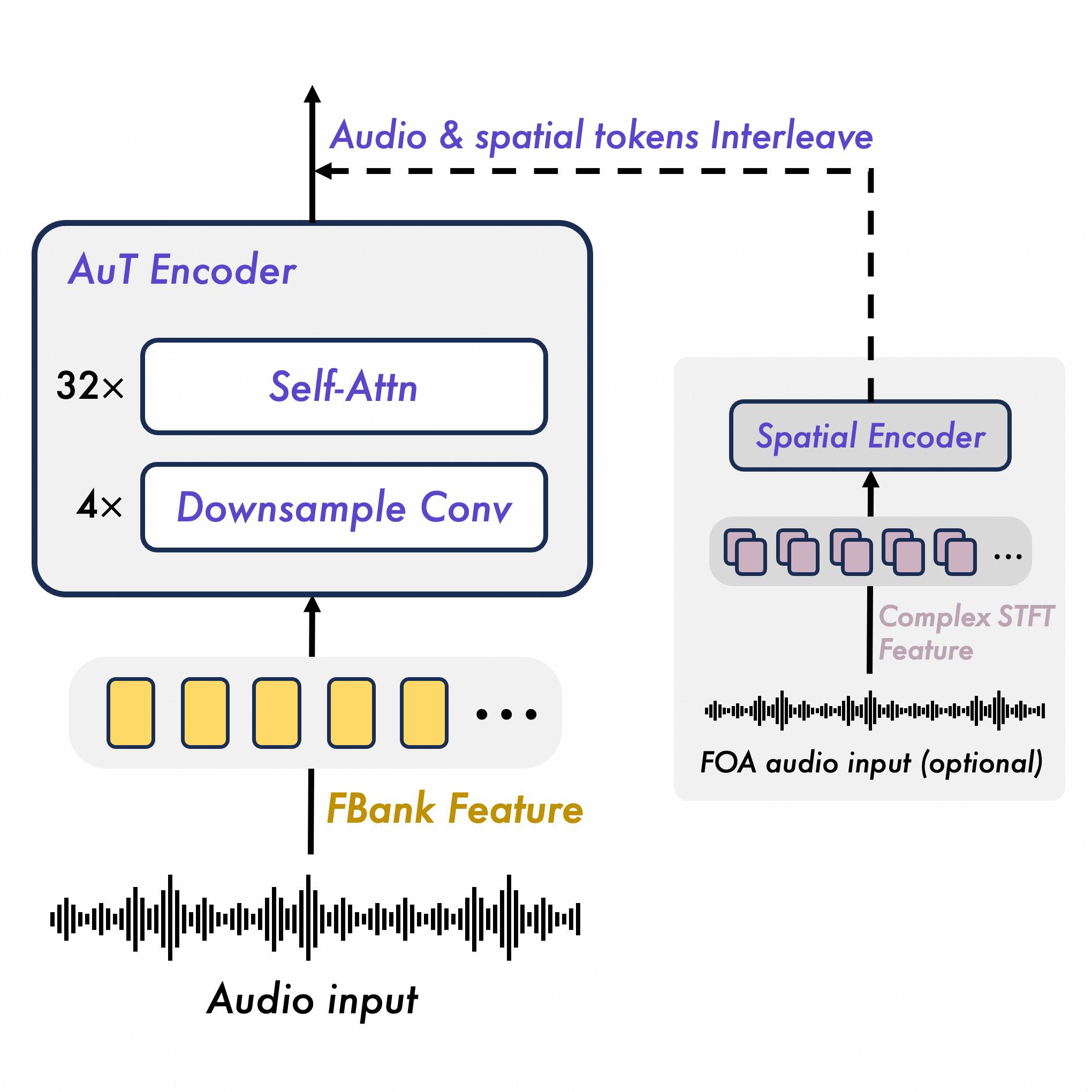
With use_multichannel enabled, supported stereo or four-channel FOA inputs retain spatial information for audio understanding; otherwise audio is parsed as mono.
This is an understanding feature, not an audio-generation feature. The model returns text and does not synthesize a spoken response.
Agent-ready reasoning and tools
Thinking is enabled by default, with reasoning_effort values from none through max. Qwen3.8-Omni-Flash introduces Responses support and granular reasoning_effort controls. Function calling and web search are supported too, but both capabilities existed in earlier Omni configurations. Qwen also supports implicit context caching and Responses Session caching for repeated or multi-turn work.
The official release recommends Qwen-MM-Plugins to help agent frameworks access the model's native multimodal capabilities. This makes the release relevant beyond summarization: an AI agent can inspect recordings, images, and videos before calling tools or producing a structured text result.
Broader hosted availability
Alibaba Cloud documents support in China (Beijing), Singapore, China (Hong Kong), Japan (Tokyo), Germany (Frankfurt), and the United States (Virginia). API keys are region-specific, and endpoint formats vary by region, so deployments should keep credentials and base URLs separate rather than moving a single key between regions.
QwenCloud also exposes an OpenAI-compatible API. For non-real-time use, Qwen3.8-Omni-Flash supports both Chat Completions and Responses. Earlier Qwen3.5-Omni non-real-time models use Chat Completions, while separate 3.5 Realtime variants remain available for spoken interaction.
Compared With Qwen3.5-Omni
Qwen3.5 is the closer predecessor for migration comparison than Qwen3.8-Max because both Qwen3.5-Omni and Qwen3.8-Omni-Flash handle audio-video input. Qwen3.8-Omni-Flash shifts the family toward long-context analysis and tool-using agents, while Qwen3.5-Omni retains speech generation and real-time conversational variants.
| Area | Qwen3.5-Omni | Qwen3.8-Omni-Flash |
|---|---|---|
| Primary role | Audio-video understanding plus spoken interaction | Long-context multimedia analysis and agent workflows |
| Output | Text and optional generated audio on supported models | Text only |
| Thinking | Not supported on the documented 3.5 Omni models | Enabled by default; seven reasoning-effort levels |
| API | Chat Completions; separate Realtime variants | Chat Completions and Responses |
| Maximum video duration | 1 hour | 2 hours |
| Maximum audio duration | 3 hours | 3 hours |
| Hosted regions | China (Beijing) and Singapore | Beijing, Singapore, Hong Kong, Tokyo, Frankfurt, and Virginia |
| Voice features | Speech output, audio control, and supported voice-cloning paths | No speech output or voice cloning |
Compared with Qwen3-Omni-Flash, the change is larger: Qwen3-Omni-Flash video input is limited to 150 seconds, while Qwen3.8-Omni-Flash raises video input to two hours and supports up to three hours of audio input. Alibaba says Qwen-Omni-Turbo is no longer updated and recommends 3.8 for text analysis.
Compatibility & Migration Notes
- Replace older Omni model IDs only after confirming that the application needs text output. Keep Qwen3.5-Omni for generated speech, voice cloning, or real-time voice interaction.
- Move new analytical integrations to
qwen3.8-omni-flash; Qwen-Omni-Turbo is no longer updated, and Alibaba directs text-analysis workloads to 3.8. - Set
modalitiesto text output. Requests that expect audio output are incompatible with this model. - Re-test prompts under the default thinking behavior. Use
reasoning_effort: "none"when reasoning latency or token cost is undesirable, and do not combinereasoning_effortwiththinking_budget. - Keep
reasoning_contentwhen using the defaultpreserve_thinkingbehavior in multi-turn conversations. Historical reasoning counts toward input tokens and billing. - Enable
use_multichannelonly for two-channel stereo or four-channel FOA files that should preserve spatial information; otherwise audio is parsed as mono. - Verify endpoint, API key, feature availability, and data requirements separately in each target region. QwenCloud and Alibaba Cloud Model Studio can expose different commercial terms.
Pricing & Access
QwenCloud lists the following public API rates for qwen3.8-omni-flash:
| Usage | Price per 1M tokens |
|---|---|
| Input | $0.15 |
| Implicit-cache input | $0.016 |
| Text output | $0.47 |
Audio, images, and video are converted into billable tokens. Alibaba documents audio input at seven tokens per second; image and video usage depends on dimensions, frames, and processing settings. The public QwenCloud rates are a useful international baseline, but Model Studio pricing and promotions can vary by deployment region, so production budgets should be verified in the target console.
The published QwenCloud limits include 2 million tokens per minute and 30,000 requests per minute. Actual account limits and regional capacity may differ. Teams building AI meeting-note workflows should measure full-media tokenization rather than estimating cost from transcript length alone.
Who Should Upgrade / Who Should Wait
Upgrade or start with Qwen3.8-Omni-Flash if:
- You need text answers from long audio, video, image, and text inputs in one model.
- Your workload benefits from two-hour video support, 1M context, spatial-audio analysis, or large multimedia batches.
- You are building tool-using multimodal agents through Chat Completions or Responses.
- You are migrating text-analysis workloads from Qwen-Omni-Turbo or the short-input Qwen3-Omni-Flash line.
- You need hosted deployment outside Beijing or Singapore in one of the newly documented regions.
Keep Qwen3.5-Omni or evaluate longer if:
- Your product must generate speech, clone voices, or run a real-time spoken conversation.
- Your application depends on 3.5-specific audio controls or established Realtime API behavior.
- You need independently verified, release-specific quality benchmarks before changing production routing.
- Your compliance or residency review has not approved the regional endpoint and data path.
Known Limitations
- Output is text only; "omni-modal" describes the input and understanding path, not audio generation.
- Qwen has not published a version-isolated benchmark suite that quantifies the claimed performance gain for this exact release.
- Thinking is on by default and preserved reasoning can increase billed input in later turns.
- Public model pages and regional Model Studio documentation may expose different limits, features, or prices; the deployment console is authoritative for the selected region.
- Long context and large media allowances do not guarantee low latency. Test representative files, concurrency, tool calls, and cache behavior before production migration.