
6 Hootsuite Alternatives in 2026: Pick the Workflow Worth Moving
A practical switch guide to Buffer, Metricool, Planable, Agorapulse, Later and Sprout Social—with the limits and migration checks that matter.

On this page
The best Hootsuite alternative depends on which part of Hootsuite you are actually replacing. A small publishing team may need only a reliable calendar. A service team may need assigned replies and a shared inbox. An agency may care more about approvals than either. Buying a cheaper scheduler to replace all three creates a second migration later.
Hootsuite itself remains a substantial suite: its current Social OS plans combine publishing, an inbox, monitoring and analytics, while higher tiers add automation, approvals and enterprise controls. If you use that breadth, switching may add tools rather than simplify work. This guide is for readers who can name the workflow they want to improve—or the cost they want to stop carrying.
This is desk research based on current official documentation, checked September 29, 2026. We did not hands-on test reliability, publishing speed or support quality. Plan access, supported post types and pricing can change; confirm your own channel/format combination during a trial.
Hootsuite alternatives at a glance
On a phone, swipe the table sideways to see each option's first elimination test.
| If your main switch reason is… | Start with | Cost or access boundary | First elimination test |
|---|---|---|---|
| A simpler publishing queue | Buffer | Free has 3 channels and 10 queued posts per channel; paid plans meter channels | Do you still need Hootsuite-level inbox or listening? |
| Analytics for a few brands | Metricool | Free has 1 brand and 20 posts/month; LinkedIn and X are not included in Free | Can your must-have networks fit the actual plan? |
| Client or stakeholder approvals | Planable | Free is 50 posts total; Pro is needed for required approval | Does the approval route match your real sign-off chain? |
| Assigned replies and moderation | Agorapulse | Per-user pricing; X inbox needs paid X Plus | Are the exact message types you handle supported? |
| Visual-first content planning | Later | Starter has one social set and 30 posts/profile/month; current platform list excludes X | Is X publishing or deep care a must-preserve workflow? |
| Larger-team care and controls | Sprout Social | Higher per-seat spend; listening and premium analytics add-ons | Is a stronger suite worth more than Hootsuite for your team? |
The first elimination test is more useful than counting checkmarks: rule out a tool if it cannot preserve the work that already matters.
Why switch—and when to stay with Hootsuite
The usual switching triggers are not all the same problem. Hootsuite's current plans are sold per user, so a growing team can feel the seat cost even if it mostly schedules posts. Another team may need publishing but not a full inbox or listening layer. Conversely, a team frustrated by approvals or response routing may need a deeper workflow, not a cheaper calendar. Account caps, network support, posting formats, analytics windows and add-ons can also move the real bill away from the headline price.
Stay with Hootsuite if your team actively uses its calendar, inbox, monitoring and reporting together, or if an Advanced/Enterprise control is already embedded in review and customer-care operations. Standard covers up to 10 social accounts; Professional and above add different capabilities, so compare the tier you actually have, not an outdated “Hootsuite has no X” claim. A narrower replacement plus separate inbox, listening and approval software may cost more and require more coordination.
If you are not sure, make one list: what does your team open Hootsuite to do every week? A candidate only wins when it solves the painful part without breaking the valuable part.
Before you compare: protect the workflow you already have
Do not treat a CSV or a folder of images and videos as a full social-workflow migration. Hootsuite's bulk scheduling help documents a CSV import path; it is not evidence that scheduled posts, editable drafts, approvals, conversation history and analytics all transfer into another vendor.
Before changing tools, inventory these items:
- Connected profiles and formats: every social account, who owns it, required post types and any network-specific publishing constraint.
- Future queue and source assets: approved drafts, scheduled dates/time zones, reusable captions, images, videos, link destinations and UTM rules. Save the source material you are entitled to keep; reconstruct an editable queue where needed.
- People and permissions: approvers, external clients, response owners, escalation rules and saved replies. Rebuild the actual approval path—not just a calendar view.
- Reporting baseline: the historical measures and report exports available on your Hootsuite plan. Take the snapshots you need before access changes; do not assume another vendor imports that history.
Rebuild one representative week in the candidate: one complex post, one approval, one reply/assignment if relevant, and one report. Verify the published result on each required network. During a parallel run, decide which system owns each future post; two connected schedulers can produce duplicate activity. Only after the new queue and ownership are checked should you retire old scheduled items and revoke old access. Hootsuite's access guidance is a reminder that disconnecting an integration is a separate action from auditing the queue.
Which replacement passes your first elimination test?

Best for: a creator or small team that mainly wants an understandable publishing queue and is willing to separate community care from scheduling.
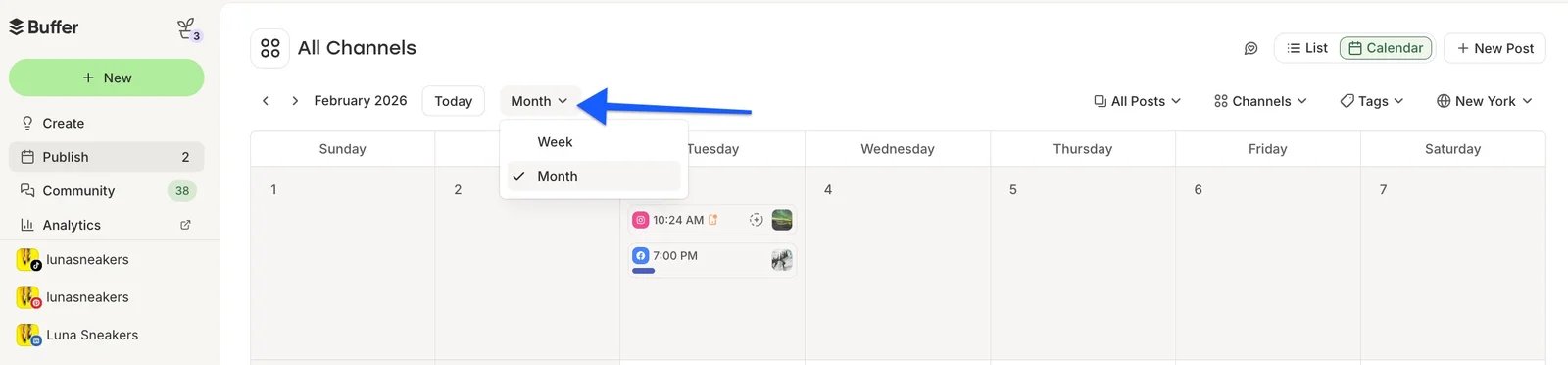
Buffer's publishing calendar, from its official calendar help. The view illustrates the queue workflow, not a hands-on ToolWorthy test.
Why consider it: Buffer's pricing page makes the meter visible. Its Free plan supports three channels, one user and up to ten queued posts per channel. Essentials is priced per channel; Team adds collaboration and approval features. That can be easier to reason about than paying for a broader seat-based suite when you publish to only a few profiles.
First elimination test: make a list of the exact public comments, private messages, assignments and listening tasks your team handles in Hootsuite. Buffer has Community features, but do not assume they cover the same private-message and care workflows across your networks. If the inbox is a daily operating surface, test Agorapulse or Sprout Social first instead.
Skip if: approvals across clients, response routing or broad listening are non-negotiable and you are trying to replace Hootsuite with one product. Buffer is strongest here as a narrower choice, not as a guaranteed suite clone.

Best for: a small brand or agency that needs a planner with accessible analytics and clear brand-level budgeting.
Why consider it: Metricool's official plans put one brand, 20 scheduled posts per month and a 30-day analytics window in Free. Paid tiers add more brands and reporting capacity. This is a useful route if your switch trigger is seeing performance across a modest number of brands rather than managing a large response team.
First elimination test: check each must-have network against the exact tier. Metricool's Free plan does not include LinkedIn or X; X is presented as an add-on for eligible paid use. A “free Hootsuite replacement” answer would be wrong for a team that must publish there. Also check whether your reporting window and export needs require a paid tier.
Skip if: advanced social listening, complicated inbox routing or approvals are the center of your operation. A capable planner and reporting layer is not automatically a care suite.
Planable
Best for: agencies and in-house teams whose real bottleneck is getting posts approved by the right people before they go live.
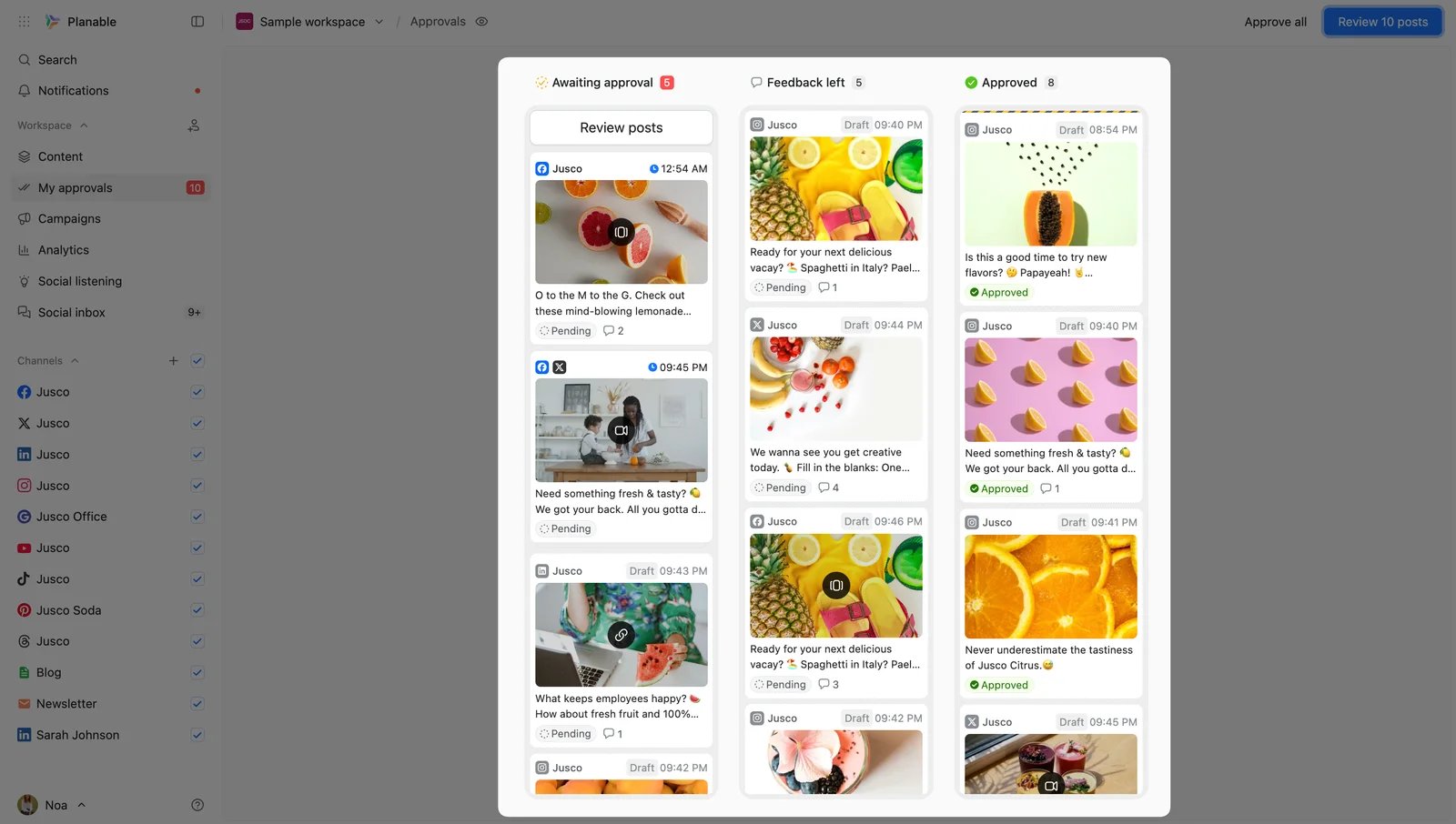
Planable's actual approval queue, from its official My approvals help. The three lanes make the handoff explicit.
Why consider it: Planable's plans are built around workspaces and a collaboration flow. The free allowance is 50 posts in total, not 50 per month, and its free trial does not publish to X. Basic has optional approvals; Pro is needed to require approval before publishing, while Enterprise supports multiple approval levels. Analytics and social inbox are add-ons. This makes Planable a purposeful choice when sign-off quality matters more than all-in-one breadth.
First elimination test: put one representative client/manager approval through the exact workspace and paid tier you would buy. Confirm who can request, approve and revise, how many pages/profiles are needed, and whether add-ons make the final price acceptable. If X publishing is essential, a free trial alone cannot validate your cutover. Planable's approval documentation is a good checklist, but your own route is the test.
Skip if: Hootsuite's shared inbox or monitoring is your main daily job and you expect these to be included in a low-cost base plan.
Agorapulse
Best for: teams leaving Hootsuite because response assignment, moderation and inbox operations matter more than simple scheduling.
Why consider it: Agorapulse's pricing and per-user explanation distinguish the seat meter from the shared social-profile allowance. Higher tiers add more assignment, moderation and reporting capability. That is a plausible replacement lane when inbox work justifies a specialist operating surface.
First elimination test: write down the exact networks, public/private message types, ad comments, assignments and response permissions your team needs. Test those combinations in a trial and compare the required plan/add-ons—not just the marketing phrase “unified inbox.” X integration requires a paid add-on: X Lite publishes only, while X Plus is required for X inbox and reporting. Advanced Listening is sold separately, so a listening-heavy team must account for it.
Skip if: your goal is simply the lowest-cost post scheduler. Per-user pricing and richer care features may recreate the same cost issue that made Hootsuite uncomfortable.

Best for: a visual-first team planning Instagram, TikTok, Pinterest and other supported channels through a media-centric calendar.
Why consider it: Later Social's current plans emphasize visual planning and a social-set model. Starter includes one user, one set of up to eight supported profiles and 30 scheduled posts per profile per month; Growth adds collaboration/approvals and a social inbox. This can be a better creative planning surface than a broad operations suite when the content calendar is the bottleneck.
First elimination test: inspect the supported networks and formats before moving your queue. Later's current listed platforms are Instagram, Facebook, TikTok, Threads, YouTube, Pinterest, LinkedIn and Snapchat—not X. If X publishing is required, this route fails immediately. If inbox/approvals matter, check Growth rather than comparing only Starter's headline price.
Skip if: X, complex service workflows or cross-channel governance are must-preserve requirements. A beautiful visual planner does not compensate for a missing channel.

Best for: organizations that need a substantial social-care and governance platform and have a budget for it.
Why consider it: Sprout Social's plans combine publishing and a consolidated inbox, with higher tiers expanding team features and profile capacity. It is a serious alternative when Hootsuite's breadth is useful but the team's specific care, analytics or governance workflow is the pain point.
First elimination test: price the required seats, profiles and add-ons side by side with your actual Hootsuite contract. Sprout's lower-priced Essentials is a publishing-focused tier, not the like-for-like inbox comparison; evaluate Standard or above for the care workflow described here. Sprout's plans are priced per seat, and Listening and Premium Analytics are separately priced. Put one assignment/escalation and one report through a trial or sales evaluation before promising a better fit.
Skip if: all you need is a lower-cost scheduler for a few channels. Start with Buffer, Metricool or Later instead.
What about SocialBee and other names on “Top 10” lists?
SocialBee's current plans make sense to inspect when evergreen post categories and recycling are the primary need. Agencies should also check SocialPilot's account/client-seat bundles and Sendible's workspace-based, unlimited-user plans if multi-client economics—not approval depth—drive the switch. We have not made these three additional detailed picks because each needs a narrower test than the six workflow routes above. Likewise, a tool that makes attractive social assets is not necessarily a replacement for approvals, inbox work or reporting. If content creation is the real bottleneck, our AI social media tools guide addresses that separate decision.
The point is not to rank every vendor. It is to reduce the number of trials you need.
A low-risk Hootsuite cutover
Start by choosing an owner for each of the workflows you actually use: publishing, approvals, customer response, listening and reporting. One alternative can own all of them, or you may deliberately use two smaller tools. Either way, write down where each task will live after the switch.
Then run the representative-week test described above. Compare your target queue with Hootsuite's future queue and remove duplicates intentionally. Keep copies of the relevant assets and available reports. Give stakeholders the new approval or response route before you change permissions. Finally, verify several live posts, a real incoming interaction and one expected report before canceling a plan. The most expensive migration failure is rarely losing a feature checkbox; it is discovering that a daily handoff no longer has an owner.
For a broader look at reply-heavy products rather than the entire Hootsuite replacement decision, see our social media engagement tools comparison. You can also use the Hootsuite profile as the baseline while checking the vendor's latest plan page for current limits.
Hootsuite alternatives FAQ
What is the easiest Hootsuite alternative for basic scheduling? If you publish to only a few channels and do not rely on Hootsuite's inbox, listening or approvals, Buffer is the most direct first trial. Its Free queue limits make it easy to determine quickly whether the workflow fits. “Easiest” is a fit judgment, not a hands-on speed score.
Is there a free Hootsuite alternative? Buffer has a Free tier for three channels and ten queued posts per channel; Metricool has a Free tier for one brand and 20 posts per month, but excludes LinkedIn and X. Neither free plan should be described as a full Hootsuite-equivalent suite. Check the exact channels and monthly volume before migrating.
Which alternative is best for approvals? Planable is the first trial when content sign-off itself is the bottleneck; check workspace limits and the approval route. If approval is tightly coupled to a large shared inbox or customer-care team, compare Hootsuite's own higher tiers and a fuller suite rather than assuming Planable replaces every layer.
Can I move scheduled Hootsuite posts and history into another tool? Do not assume a one-click transfer. Hootsuite documents CSV bulk import, which is not proof that drafts, permissions, replies, analytics or the existing future queue export as editable objects for another product. Inventory and rebuild one representative week first, then cut over deliberately.
What if Sprout Social is too expensive? If you mainly need assigned inbox work, compare Agorapulse's required seats and add-ons. If you mainly need publishing, start with Buffer or Metricool. Choosing a cheaper product that cannot handle your essential messages is not a saving.
Pricing and plan boundaries above were checked against official vendor pages on September 29, 2026. Published prices and capabilities can vary by region, billing period and network API changes; the linked vendor plans are the final authority before purchase.
Get ToolWorthy Weekly
New AI tools, practical guides, and selected AI signals in one weekly brief.
Related Posts
- 10 Best AI Social Media Tools 2026 — Choose by Workflow
Compare ten AI social media tools for creation, scheduling, reporting, listening, and replies. Find the right workflow, plan limits, and human review gates.
- 7 Instagram Automation Tools for Publishing, DMs, and Teams in 2026
Choosing an Instagram automation tool? Compare seven options for scheduled publishing, comment-to-DM flows, and team inboxes, with account and plan limits that decide fit.
- Best Social Media Engagement Tools for Team Inboxes
Compare nine social media engagement tools by network coverage, comments and DMs, team workflow, moderation, customer care, and pricing model.
For AI tool founders
Built a tool that belongs in this decision set?
Request an editorial evaluation for possible inclusion in ToolWorthy.
Submit your tool for reviewPaid submission does not guarantee a ranking, recommendation, inclusion, or editorial outcome.