
7 Instagram Automation Tools for Publishing, DMs, and Teams in 2026
Choosing an Instagram automation tool? Compare seven options for scheduled publishing, comment-to-DM flows, and team inboxes, with account and plan limits that decide fit.

On this page
The best Instagram automation tool depends on what you are trying to automate. Scheduling a Reel, sending a DM after someone comments, and assigning an incoming message to a teammate are three different jobs. A single “best overall” ranking would hide the account requirements and cost meters that decide whether a tool fits.
This guide compares seven products using official documentation checked on September 20, 2026. The routes below describe documented capabilities and plan terms, not measured delivery or conversion performance.
| Your immediate job | Start with | Check before paying |
|---|---|---|
| Schedule eligible image posts or Reels; test Stories separately | Buffer, Later | Automatic publish versus a phone notification; Later's Story auto-publish requires a Business profile and a current paid plan |
| Send a private response after a post or Reel comment | Manychat, Metricool, Vista Social | Exact comment trigger, first-message rule, contact meter, and handoff |
| Respond to a Story reply | Manychat, Metricool, Vista Social | All three document a Story-reply route; compare the eligible reply, first message and plan |
| Match a keyword in an incoming DM | Manychat, Metricool; Vista Social for a New DM plus keyword-rule trial | Manychat and Metricool document the exact keyword route; Vista documents New DM and keyword rules, but confirm that combination in your account |
| Assign Instagram comments or DMs across a team | Hootsuite, NapoleonCat; Vista Social if flows matter too | Which inbox surfaces appear, assignment rights, seats, and collision handling |
Hootsuite also documents a narrower post/reel comment-keyword-to-DM path, and Later has an Instagram DM inbox. Those crossovers do not make either product equivalent to every multi-trigger messaging platform. The routes below reflect the primary buying job for each detailed review.
What problem are you trying to remove?
People searching for an “Instagram automation tool” often mean one of three bottlenecks. Publishing debt means posts are ready but someone still has to upload them at the right time. Conversation debt means a comment or Story reply should start a relevant, user-initiated exchange. Ownership debt means messages arrive, but nobody knows which teammate should answer. Buying for the wrong bottleneck creates an expensive second workflow: a scheduler cannot by itself run a comment-triggered conversation, and a flow builder does not establish a reliable team queue.
Compare the output: a live post, the right first message and follow-up state, or an assigned case. A feature label alone does not establish any of these outcomes on your account and plan.
For a solo creator batching Reels, start with Buffer or Later and check notification fallback. For a shop offering a link after a comment, compare Manychat and Vista Social if a first-message link matters; compare Metricool if its reaction-gated link sequence and scheduler fit. For an agency with several operators, test Vista Social, Hootsuite or NapoleonCat against actual assignment and seat needs. A small business using Story replies or incoming DM keywords should compare the exact triggers in the first table rather than pick by business label alone.
First, check the Instagram access path
For API-based automation, the target account generally needs to be a Professional Business or Creator account. Meta's ordinary Instagram Send API requires the recipient to have messaged the professional account first and does not return inactive Requests older than 30 days. A comment Private Reply is a separate, limited route: a product can send the first private response to a commenter without an earlier DM, but that response alone does not open the normal follow-up window. Manychat's comment-trigger guide makes this distinction explicit. Neither route authorizes unsolicited cold-DM campaigns.
Do not assume every vendor needs the same Facebook connection. Meta's Facebook Login route requires a linked Page, while its Instagram Login route does not. A vendor can still require a Page for a particular feature.
There are three message states to separate. An incoming DM or Story reply starts a user-initiated conversation that a supported tool may answer within the applicable messaging window. A comment Private Reply is the first, limited private response to a public comment; it does not itself open the window for more automated messages. A later automated message needs the user's qualifying interaction, such as a reply or an in-chat button/quick reply, and must be sent within the resulting window. A link can sometimes be placed in the first Private Reply—Manychat's guide permits a link button, and Vista Social's template can make the link message first—but opening a website link does not by itself qualify the user for more messages in Manychat. Metricool's comment Flow instead puts the link in a follow-up after a reply or reaction. These are product-flow differences, not a universal ban on first-message links.
Capability map: compare the same job
“Automates Instagram” is too broad to compare. The table maps the documented route used in this guide, not every feature in each product. A dash means this guide has not established that capability; it does not claim the product cannot do it. The linked product sections explain the plan and account conditions.
| Tool | Publishing route evaluated | Inbound automation route evaluated | Team response route evaluated | Decision boundary |
|---|---|---|---|---|
| Buffer | Posts, Reels and Stories where eligible | — | Team content approvals | Automatic versus Notify Me |
| Later | Images, Reels, Stories and carousels with format and plan limits | Inbox reply, not a documented multi-trigger outbound flow | Beta desktop Social Inbox | Paid plan and linked Page for Inbox |
| Manychat | — | Post/Reel comment, Story reply and incoming DM keyword | Business Inbox seats and lead assignment | Private Reply versus later message; Active Contacts |
| Metricool | Eligible posts, Reels and Stories | Comment, DM-keyword and Story-reply Flows | Inbox present; advanced assignment not established here | Linked Page for comment flow; current paid-plan Flows access and future add-on terms |
| Vista Social | Posts, Reels and Stories | New DM with configurable rules, comment, Story reply and mention | Inbox task assignment | Confirm DM keyword combination; DM Contacts |
| Hootsuite | Scheduler within social suite | Narrow scheduled-post/Reel comment-keyword DM | Inbox assignment and routing by plan | Seat billing and Advanced entitlement |
| NapoleonCat | — | Multi-step lead flow not established here | Ticket assignment, notes and moderation | Seats, profiles and Inbox capacity |
The practical comparison is Buffer versus Later for publishing, Manychat versus Metricool versus Vista Social for the exact inbound trigger, and Hootsuite versus NapoleonCat for staffed response. The crossover products can join a second shortlist, but a tick in two columns does not prove equal depth in both jobs.
For scheduled publishing and approvals
Start here if the repeated job is preparing posts, getting approval, and having eligible content appear at the planned time. The decisive question is whether your actual format goes out automatically or becomes a reminder for a person to finish in Instagram.

Buffer is a clear first trial for a creator or small team whose main problem is a queue of posts, Reels, and Stories. Its Instagram publishing guide distinguishes automatic publishing for eligible Professional accounts and media from notification publishing. Music, stickers, Story links, product tags, or an unsupported format can turn a scheduled item into a phone notification. That notification does not publish the post for you.
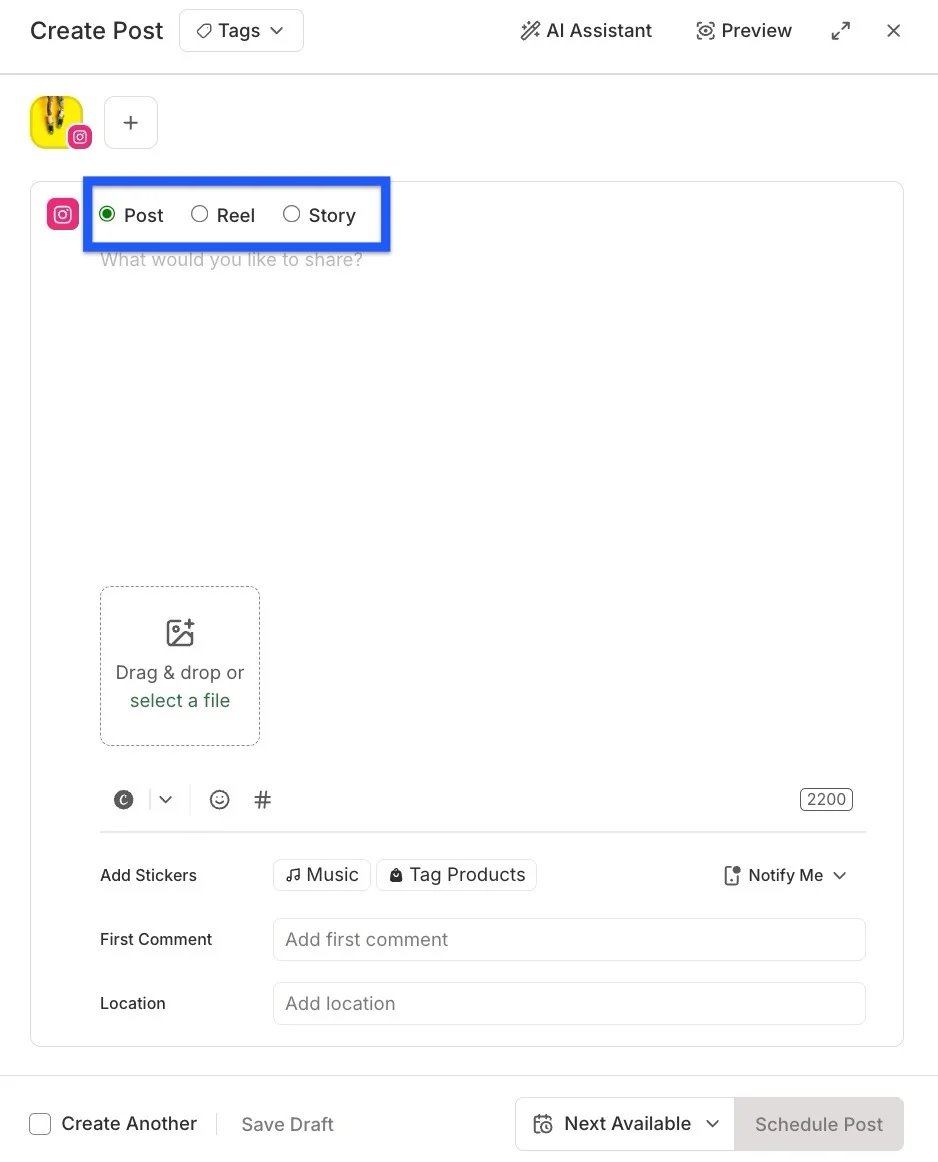
This official composer example shows where to check the publish mode before counting a scheduled item as unattended.
The cost unit is a channel, meaning one connected social account. Buffer's public pricing lists a Free plan with up to three channels and 10 scheduled posts per channel. Annual-billing equivalents start at $5 per channel per month for Essentials and $10 for Team; Team adds content approval workflows and more collaboration. Check the plan and channel count for your own portfolio before comparing this with products billed by social set or contact.
Choose Buffer when publishing behavior and straightforward channel economics matter more than an inbound lead sequence. Skip it as the main purchase if your required output is a comment-triggered DM flow or assigned Instagram DM cases. Its Community features should not be treated as proof of a full Instagram DM team inbox.
Trial check: schedule one ordinary image post and one post using your real creative requirements, such as a Story link or music. Continue only if the formats that must be unattended show Automatic in the composer and publish as expected. If the critical format falls back to Notify Me, eliminate it for that unattended use case; a useful reminder is still a different workflow.

Later fits a content team that wants publishing and a shared place to answer incoming messages. Its supported post types include Instagram images, Reels, Stories, and carousels; Stories and carousels require a current paid plan, and Story auto-publish is for Business profiles. Its Social Inbox documentation covers Instagram DMs and comments, currently on Growth and Scale. Free and Starter users can preview it but need an upgrade to reply and manage comments. The Inbox is described as beta and desktop-only, which matters if operators answer messages from phones.
The connection requirement is feature-specific: Later says most publishing works without a linked Facebook Page, but Social Inbox needs one. Pricing revolves around social sets, users, and post allowances. Its current plan page and some older public pricing surfaces show different plan structures, so use the subscription screen or checkout for the account-specific amount rather than treating a search snippet as a guaranteed rate.
Choose Later if the publishing workflow is primary and desktop DM/comment response is a useful addition. Skip it when the purchase depends on documented comment-, Story-, and DM-keyword-triggered outbound flows or deep assignment controls. An inbox that receives messages is not the same thing as a lead automation engine.
Trial check: connect the exact Professional account and Page route you will use; schedule a representative post, then have a follower and a non-follower send messages. Verify that your team can see and answer the required inbox surfaces on the intended plan. If Page linking or desktop-only operation breaks the process, move to a different route.
For comment-to-DM and inbound flows
These tools begin with an action by the Instagram user: a comment, Story reply, or incoming DM. Compare the exact trigger and next state, not merely a marketing label such as “Instagram automation.” Also compare the meter: Active Contacts, DM Contacts, brands, and plan add-ons are not interchangeable units.
Manychat
Manychat fits a buyer whose primary job is a triggered conversation, not only comment-to-DM. Its official guides document post/Reel comments, Story replies, and keywords in incoming Instagram messages. The comment trigger activates on a person's first comment under a post or Reel; a repeat comment is not a fresh run. A Story reply or reaction is a different, user-initiated route, while a DM keyword rule matches a message the person sends.
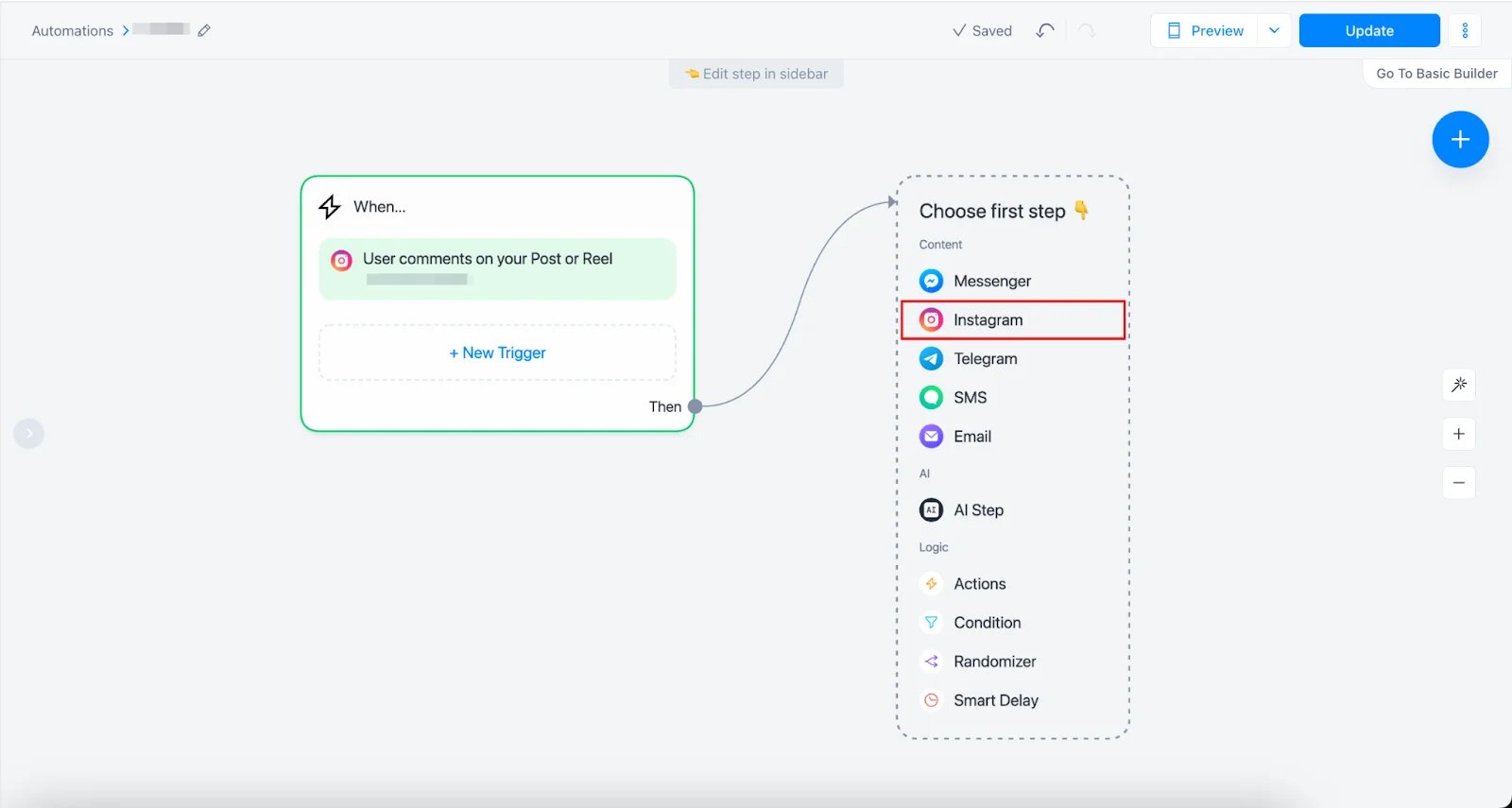
This official Flow Builder example shows a post/Reel comment trigger connected to an Instagram message step. It does not show the message content or the separate Story and DM-keyword triggers.
For comments, Manychat lets the first Private Reply carry a link button, but opening a website does not opt the person in or open the 24-hour follow-up window. A reply or an eligible in-chat button/quick reply does. For Story replies, its guide says to send within that 24-hour window. The first-link choice therefore depends on whether you only need to deliver one resource or need a continuing sequence.
Its key economic variable is a monthly Active Contact. Under Manychat's new-plan model, the same person generally counts once within the billing month regardless of message count. Essential includes 250 and Pro 2,500 Active Contacts; overages and the month-pay example appear below. Availability varies by region and legacy account. Its Business plan documentation lists three Inbox seats and lead assignment; confirm that plan in your account before buying for team handoff.
Choose Manychat when the desired output is a user-triggered conversation and contact volume is a sensible billing proxy. Skip it as a primary tool when the job is mostly scheduled publishing or when a contact-based meter makes the campaign uneconomic. Published automation breadth does not prove delivery rate or conversion lift.
Trial check: use a test comment, Story reply and incoming DM keyword if those are your intended routes. For the comment, compare a first-message link with a quick reply that opens a continuing conversation; include a non-follower and one repeat comment.

Metricool is the crossover choice for a team that schedules content and wants inbound flows in the same workspace. Its Instagram publishing guide documents eligible posts, Reels and Stories with notification fallback for unsupported creative features. Its Flows guide documents comment-to-DM, incoming DM keyword and Story-reply templates. Comment-to-DM needs a Professional account and a linked Facebook Page. In that Flow, the first DM is text with a reaction prompt; the link comes after the person replies or reacts. Its limits guide distinguishes this from DM-keyword and Story-reply flows, which can place a link in the first response.
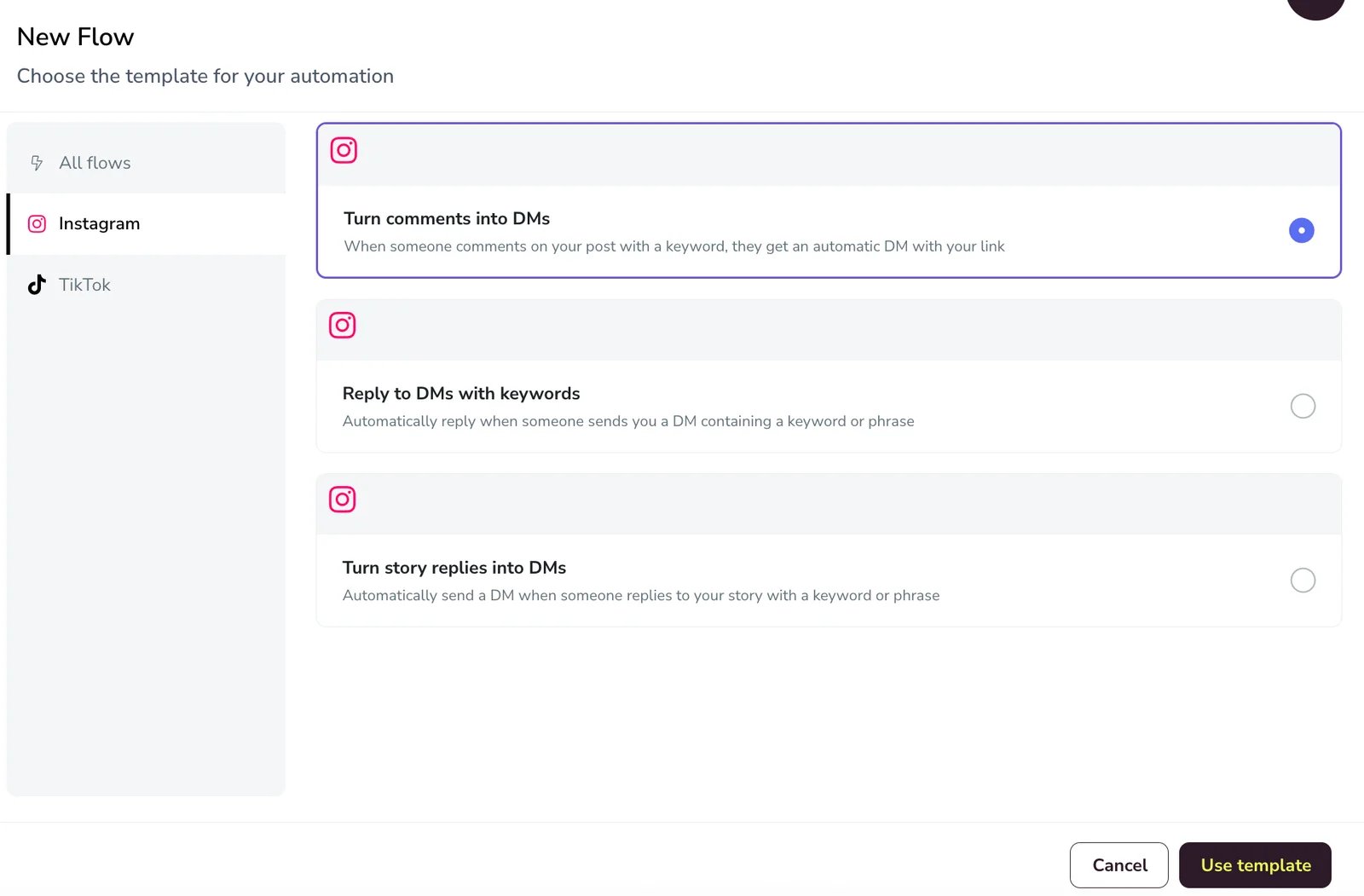
This official template chooser lets you verify that three inbound triggers are separate workflows; the account trial must still confirm the next message state.
Metricool's current Flows limits say Flows has no extra cost for a limited time on paid plans; Free and Starter Mobile 5 are excluded. Its launch announcement says Flows is expected to become a paid add-on for Starter and Advanced after that period. The eventual add-on price is not established here. Because this feature and its reaction behavior changed recently, check the account's live entitlement and a newly activated flow before budgeting long-term use. Its plan guide shows a brand and plan-tier structure, with separate add-ons; that denominator cannot be compared directly with Manychat's contacts.
Choose Metricool if publishing plus several documented inbound triggers is the job. Skip it if you cannot connect the Page required for comment-to-DM, if limited-time entitlement is unacceptable, or if the team's main purchase is proven assignment and escalation depth. An Inbox listing alone does not settle that team-ops question.
Trial check: activate only the triggers you intend to use. For comments, record the first text DM, the reply or reaction, and whether the linked second message arrives; for incoming DMs and Story replies, check the first response separately.
Vista Social
Vista Social is the broadest documented crossover here for a team combining publishing and assigned response work. Its publishing guide covers posts, Reels and Stories; its network table lists Instagram new DM, comment, Story reply and mention triggers, with DM/comment actions and task assignment. Its automation setup guide also shows keyword matching as a rule. The published pages support a New DM plus configurable-rule route, but do not demonstrate the exact Instagram DM-keyword combination in one example. Keep Vista Social in that trial shortlist and verify the combination in the connected account rather than treating the documentation gap as absence.
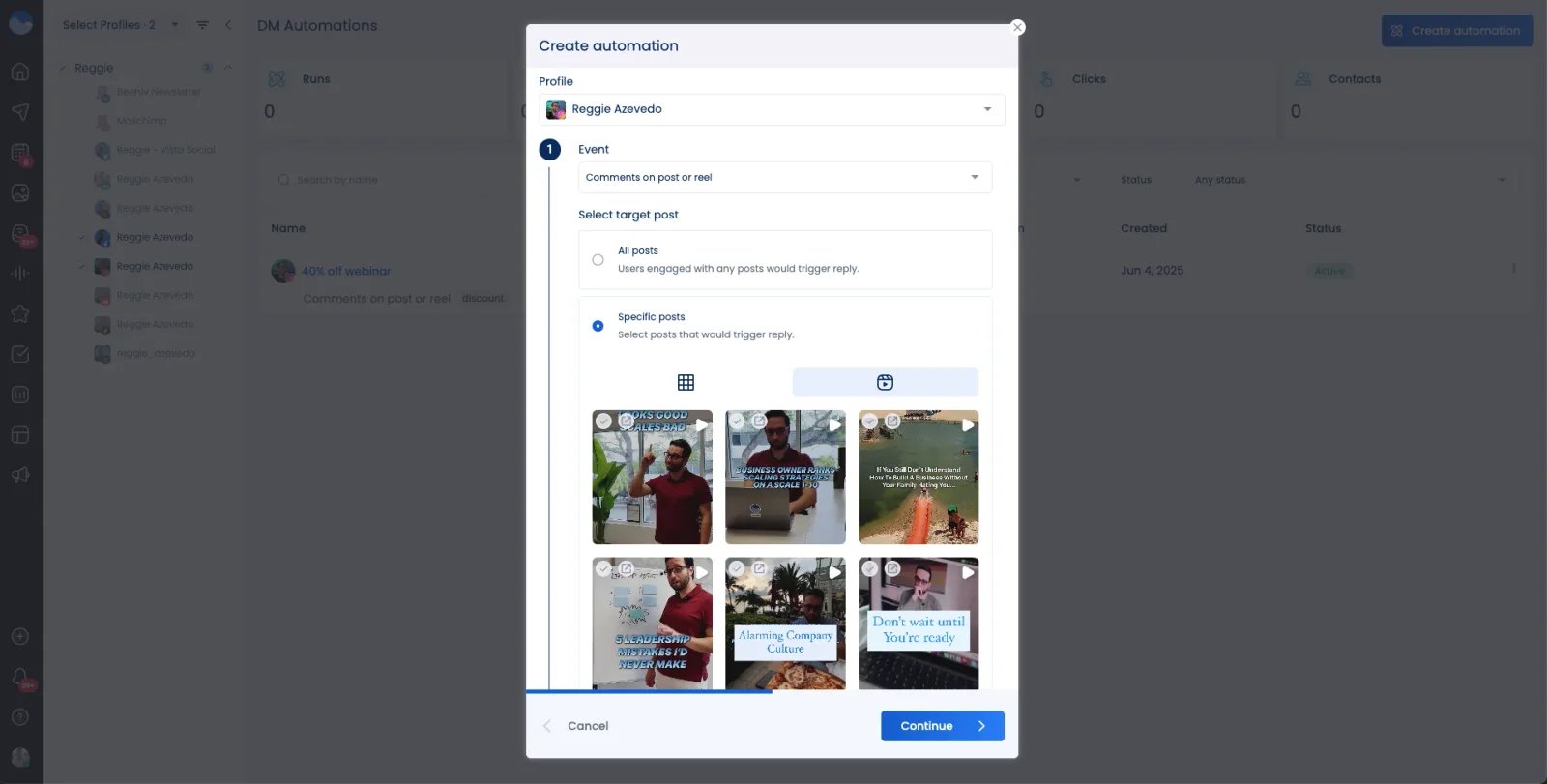
This vendor help example shows the comment campaign's all-post versus selected-post scope; it does not depict the New DM keyword-rule setup.
For a comment campaign, Vista Social's link template can make the link message the first DM by skipping its Opening DM. If the workflow needs later messages, the opening button is the documented interaction that permits continuation. Its Story-reply and New DM actions are distinct incoming routes. Confirm the exact follow-up timing and message-request behavior in the connected account; do not infer either from a first-link send.
The budget variable is not just the headline subscription. Its public pricing currently lists Professional at $79/month, Advanced at $149, and Scale at $349, with 10,000, 25,000, and 100,000 DM Contacts respectively. Its Data Collection help gates that feature to Advanced and higher. Confirm the definition of a DM Contact and the exact automation entitlement in the account before committing a large campaign.
Choose Vista Social for a multi-profile team whose actual workflow crosses the three lanes. Skip it when contact allowances or the required higher-tier feature make the economics poor. The docs establish available building blocks, not that its routing, delivery, or handoff will outperform a focused product.
Trial check: test the comment first-link and opening-button variants, then a Story reply and a New DM filtered by your intended keyword. Assign one resulting case to another operator and check the DM Contacts meter. If the DM-keyword combination is unavailable, compare the remaining documented routes without crediting it for that use case.
For shared inbox and moderation
Choose this lane when the bottleneck is ownership of incoming work: who sees a comment or DM, who answers, who escalates, and how the team avoids two people responding at once. A flow builder can be useful here, but it does not replace a working inbox process. For a wider cross-network comparison, see our social media engagement tool guide.

Hootsuite's Social Inbox describes Instagram messaging, notes, routing, and assignment across a team. It also documents a specific post/reel comment-keyword-to-DM workflow: a keyword comment on a scheduled post or Reel can receive a public reply and DM. This is useful if the team already schedules there, but the cited documentation does not establish the same Story-reply or DM-keyword trigger breadth as Metricool or Vista Social.
The purchase decision is therefore about team inbox scope and plan entitlement. Hootsuite's plan comparison describes per-user billing, a ten-account Standard cap, automated inbox workflows on Professional, and message assignment and auto-routing on Advanced. The public page does not settle the exact checkout price or every Instagram-specific entitlement for your account. Check the plan, Instagram connection path, agent permissions, and DM access in the actual trial workspace.
Choose Hootsuite when coordination across staff is the primary need and its documented narrow DM automation is enough. Skip it as a full multi-trigger lead-funnel substitute without further proof. A claim that the Inbox can assign work is different from a measured claim that it prevents every collision.
Trial check: have two operators handle a comment and a DM arriving close together. Assign one, add an internal note, reassign it, and see what each person can view before replying. Continue if ownership is visible and the required Instagram surface is present; eliminate the configuration if it creates unresolved duplicate replies or the necessary route is plan-gated.
NapoleonCat
NapoleonCat is most relevant when a team wants comment and DM moderation with accountable ticket ownership. Its teamwork guide documents assigning inbox tickets, flags, and internal notes. Its Social Inbox page covers Instagram interactions and team workflows. That is a clearer reason to trial it than assuming every automation labeled “reply” equals a stateful lead funnel.
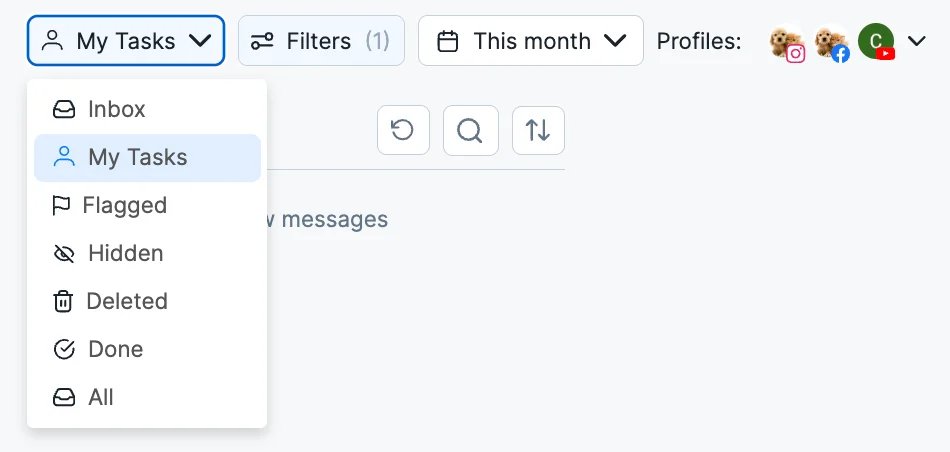
This official My Tasks view shows the queue for assigned work; it does not by itself prove that your Instagram DM and comment surfaces appear under your plan.
NapoleonCat's plan page varies by plan, user seats, profile slots, and Inbox capacity; Pro includes Social Inbox, while Expert adds automation. A displayed Expert amount for one bundle should not be compared with a smaller bundle's starting rate. Compare the quoted configuration for the number of profiles, operators, inbox messages, and moderation rules you need. Choose NapoleonCat when ownership and moderation are the core purchase. Skip it when the essential output is a documented multi-trigger, multi-step DM nurture flow; that breadth has not been established by the sources used for this recommendation.
Trial check: send a real DM and an organic or ad comment, assign them to different operators, then test a flag, internal note, reassign, and resolution. Continue if the second operator can see the state needed to act safely; eliminate the route if the required DM or assignment surface is unavailable under the quoted plan.
What the headline price can hide
The cheapest monthly number is rarely the right comparison. Build a one-month estimate from the unit you will actually consume, then repeat it at your expected campaign peak. Buffer counts connected channels and scheduled-post capacity; Later combines social sets, users and posting allowances; Manychat counts monthly Active Contacts; Metricool organizes brands and plan tiers while its Flows entitlement is temporary; Vista Social includes a DM Contacts allowance; Hootsuite adds users and plan-gated assignment; NapoleonCat varies seats, profiles and Inbox capacity. Their pricing and plan pages cannot be normalized by comparing starting prices alone.
| Cost trap | Question to put to the vendor or trial workspace |
|---|---|
| A second Instagram profile or operator | Is this another channel, social set, brand, profile slot or paid seat? |
| A successful comment campaign | Does every distinct person become a billable Active Contact or DM Contact, and when does the counter reset? |
| An apparently included Flow or Inbox | Is it a limited-time entitlement, preview, beta, or a higher-tier feature? Check Metricool Flows and Later Social Inbox on your account. |
| Unattended Story or Reel publishing | Will the actual creative publish automatically, or generate a notification that still needs a person? |
| Team handoff | Does the quoted tier include assignment, routing, the required Instagram surface and enough operator seats? |
Worked example, not a bill: Assume one eligible Manychat account on the new 2026 pricing model, USD monthly billing, and 1,000 distinct Active Contacts in one billing month. Essential is $17/month with 250 included and $0.10 per extra contact: $17 + (1,000 − 250) × $0.10 = $92. Pro is $39/month with 2,500 included, so $39 at the same volume. This compares the contact meter only; plans differ in features and seats. It excludes tax, extra Inbox seats, paid channel charges such as WhatsApp/SMS, other add-ons, and any regional or account-specific price. Manychat says new-plan access varies by region and legacy account; check the actual subscription screen before applying the arithmetic.
Three workflows to rehearse before choosing
1. Solo creator: from approved Reel to live post. Create one ordinary Reel and one Reel using the music or sticker treatment you actually need. Schedule both in Buffer or Later. Have the creator approve the item, then record the composer mode, the scheduled time and whether each item becomes a live post without a phone action. If the second item becomes a notification, plan for the human step rather than calling that workflow fully automated.
2. Shop: from a product comment to the right private message. Publish a test post with a clear, voluntary comment call to action. In Manychat, Metricool or Vista Social, scope the trigger to that post and use a follower and non-follower as test participants. Record whether the link appears in the first Private Reply or after a qualifying interaction, and whether further messages become available. Test one repeat comment separately.
3. Service team: from inbound DM to owned resolution. Send a real inquiry, then let operator A assign it to operator B in Hootsuite, NapoleonCat or Vista Social. Have both operators open the item; check visibility, note history, reassignment and whether the case remains in Requests or moves into the expected Inbox. A successful automation here is an answerable case with one accountable owner, not simply an automatic greeting.
Common mistakes that change the shortlist
- Counting the first Private Reply as consent for more DMs. A link in that first message and an open follow-up window are separate conditions; a website click alone does not opt someone in under Manychat's documented comment flow.
- Comparing starting prices across different meters. A channel, brand, Active Contact, DM Contact and seat measure different demand. Use the worked volume example only for the matching billing model.
- Reading “Instagram supported” as “this account and plan support my exact trigger.” A Story reply, incoming DM keyword and comment keyword are distinct. The screenshot may show a builder, but the connected account must expose the needed route.
A 30-minute screening checklist
This is an initial setup screen, not a test of long-term delivery, conversion or account safety. Use one Professional account, one ordinary post, one edge-case creative asset, two test people and two operators if team handling matters. Record what the workspace actually shows.
| Minute | Action | Pass evidence |
|---|---|---|
| 0–5 | Connect the account through the vendor's required route; note Business/Creator status and Page connection | Required Instagram surfaces appear without an unexpected account change |
| 5–10 | Schedule the ordinary and edge-case media | Composer states Automatic or Notify Me for each; later verify the live outcome |
| 10–18 | Run the one inbound trigger you intend to buy | First comment, Story reply or DM produces the intended first message, with follow-up conditions recorded |
| 18–24 | Send a non-follower inquiry and hand it between operators | Required Request/Inbox item appears, ownership is visible and reassignment is usable |
| 24–30 | Read the account's plan and usage counters | Seats, profiles, channels, brands, contacts and any temporary entitlement match the proposed budget |
Skip steps outside your buying lane. For long-term reliability or conversion, run a separate controlled trial after this screen with the same account, test users and observation window across finalists.
Get ToolWorthy Weekly
New AI tools, practical guides, and selected AI signals in one weekly brief.
Related Posts
- 6 Hootsuite Alternatives in 2026: Pick the Workflow Worth Moving
A practical switch guide to Buffer, Metricool, Planable, Agorapulse, Later and Sprout Social—with the limits and migration checks that matter.
- Best Social Media Engagement Tools for Team Inboxes
Compare nine social media engagement tools by network coverage, comments and DMs, team workflow, moderation, customer care, and pricing model.
For AI tool founders
Built a tool that belongs in this decision set?
Request an editorial evaluation for possible inclusion in ToolWorthy.
Submit your tool for reviewPaid submission does not guarantee a ranking, recommendation, inclusion, or editorial outcome.