
Best Burning Bridges AI Video Generators: Choose Your Route
Turn a photo into a Burning Bridges party clip. Compare party presets, character motion, scene changes and final editing by inputs, output and cost.

On this page
The best Burning Bridges AI video generator for your post depends on the scene you want: a new party built around your photo, a cast of characters following your footage, or a party shot you direct yourself. Start with the output you need—landscape or vertical, silent or with sound—then compare the cost of that exact render.
Burning Bridges AI at burningbridgesai.org is the first option here for a one-photo, twenty-second party video with both landscape and vertical downloads. Reeldo adds preset styling and background casting. Kling and Viggle bring your own movement or cast into the workflow; Higgsfield, Luma and Wan transform source footage; Runway transfers an acting performance. CapCut covers the final editing step. The first two supply a prepared party sequence. The other generators are creative routes for building a Burning Bridges-style post from your own inputs.
Compare the Routes Before You Generate
Choose the workflow before choosing a subscription or credit pack. Prices are USD, checked October 11, 2026; credits have a different value on each platform.
| Tool | Choose it for | Inputs and casting | Output and sound | Purchase or render unit |
|---|---|---|---|---|
| Burning Bridges AI · burningbridgesai.org | A new party around one person | One photo; generated room and crowd | 20s; 16:9 + blurred-fill 9:16; silent | $9.99/1, $19.99/3, $59.99/10 videos |
| Reeldo AI | Outfit presets and a shared video studio | Lead + up to 5 background photos; 4 presets | 15s or 29s; 9:16/16:9 controls; 480p/720p; song added separately | 157–651 credits; monthly plans from $9.90/280 credits |
| Kling Motion Control | Your own gestures driving one lead | Character image + action video | VIDEO 3.0 Motion Control; select orientation mode | Standard 9 / Professional 12 Kling credits per second |
| Viggle | Individually assigning a group cast | Images + template/video; up to 7 tracks | Template or reference-driven character video | 5 free videos/day; Pro $9.99/month, 80 credits |
| Higgsfield Genjutsu | Selective changes to your own shot | Video + images + change instructions | Reference-driven; mode determines scene handling | Credit estimate before each run |
| Luma Ray3.2 | Changing a filmed scene and its look | Source footage + transformation direction/keyframes | Modify up to 20s/1080p; preserves source audio | Plus $30/month; 1080p SDR V2V 144 credits/second |
| Wan 2.2 Animate Replace | A technical character-replacement workflow | Reference video + one character image | 480p/720p; optional source-audio merge | Replicate: $0.02/$0.05 per output second |
| Runway Act-Two | A character performing your gestures | Driving video + character image/video | Up to 30s; portrait/landscape; performance audio | 5 credits/second; Standard or higher |
| CapCut | Framing, trimming and finishing | An existing generated MP4 | Edited canvas, captions and permitted audio | Basic editing available free; paid features vary |
For a prepared party, start with Burning Bridges AI or Reeldo. For your own choreography, compare Kling and Viggle. For a transformed source scene, compare Genjutsu, Luma and Wan. Act-Two suits a recorded character performance. CapCut is the editor for the resulting clip. These are workflow recommendations based on documented capabilities.
Prepared Party Videos From Photos

Upload one clear photo and the service builds a new party room and crowd around the lead. Its prepared sequence includes the close-up, hand across the face, cheers, raised cup and wave. This is a useful starting point for a personal party post without preparing motion footage.
The documented output is a 20-second, watermark-free MP4 in 1920×1080 landscape, plus a 1080×1920 portrait version with blurred fill. Both files are silent: add the appropriate sound in your posting app. The vertical download adapts the landscape composition.
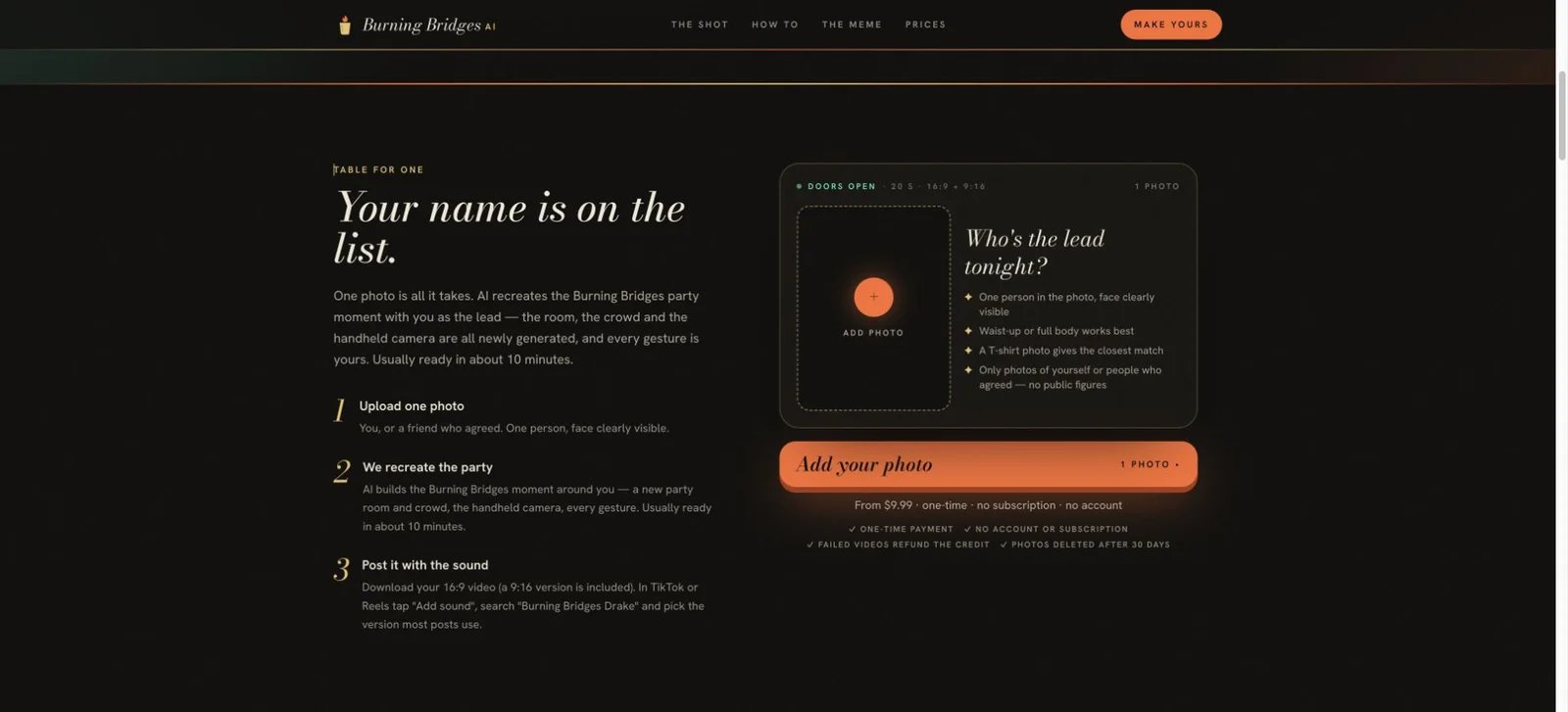
One-time packs cost $9.99 for one video, $19.99 for three, or $59.99 for ten. The multi-video packs work out to approximately $6.66 or $6.00 per video. Each credit covers one twenty-second generation with both download formats. Choose one for a single post, three for a few separate clips or additional takes, and ten for a series. No account or subscription is required. Under the credit terms, credits never expire; keep your private pack link for later use.
This route suits personal, non-commercial social sharing as parody, as described in the terms. Use a consenting person's photo and label the post as AI-generated. The privacy policy specifies automatic deletion of photos and videos after 30 days, so save the result locally. For separate background photo inputs, consider Reeldo; for your own choreography or source shot, use the reference-video routes below.
Reeldo AI
Open the Burning Bridges preset
Reeldo offers Original, Black tee, Lounge and Hockey presets, one lead photo and up to five background references. The preset supplies the outfit direction; the photo supplies the lead's appearance. It suits creators choosing a style in a shared studio. Advanced options offer 9:16 or 16:9 and TikTok/Reels link imports for a chosen motion reference; these controls were inspected publicly, without generating an export.
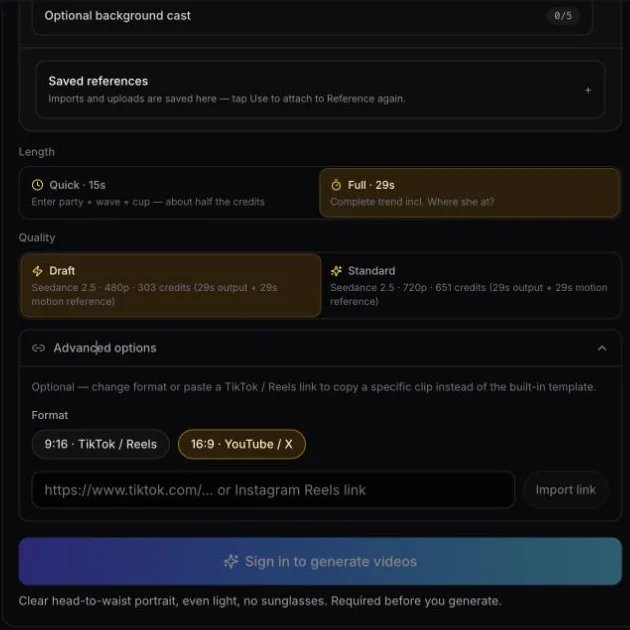
The preset's published estimates include the motion reference: 157 credits for 15s/480p, 337 for 15s/720p, 303 for 29s/480p and 651 for 29s/720p. The song is added after downloading. Sign-in is required for uploads and generation.
The monthly plans offer Basic $9.90/280 credits, Standard $19.90/600 and Pro $39.90/1,300. A 157-credit short draft fits within Basic's monthly allowance; the 651-credit full HD render fits within Pro's. These examples assume an unused balance. Basic covers personal use; Standard and higher list a commercial license. Choose the plan for your intended use and the live render estimate; general videos-per-month figures use other models and lengths. One-time packs are also offered on the pricing page.
Direct the Motion and Cast
Kling Motion Control
Read the Motion Control guide · Open Kling
Kling pairs a character image with an action reference video, so you can record the hand-over-eyes gesture, cup raise and wave yourself. Its VIDEO 3.0 Motion Control guide also describes facial-element binding for additional identity references. That binding uses the mode where the character orientation follows the video.
The documented VIDEO 3.0 rate is 9 credits per second in Standard or 12 in Professional, with duration rounded to the nearest second. A fifteen-second run therefore uses 135 or 180 Kling credits. Use the selected mode's live estimate and your account's purchase options for the cash cost; these units apply to this Motion Control version.
Choose Kling for one lead whose gestures you want to supply. Start with a clearly framed subject and a character image suited to the motion. For separately assigned people in the same shot, consider Viggle's Multi-Track workflow; for a prepared party from one photo, start with Burning Bridges AI.
Viggle
Explore character animation · Plans
Viggle takes a character image and a template or your own motion video. Its Multi-Track editor supports up to seven characters or objects, with individual tracking and replacement. It is a useful route for a group party scene when you want to decide which image belongs to each person. Supply a source clip you may use, then assign the cast.
The Free plan offers five videos per day, with limited Multi-Track sessions and seven-day storage. Pro costs $9.99 billed monthly, including 80 credits, unlimited Multi-Track sessions and watermark-free downloads; the yearly plan is $7.99 per month, billed annually. Feature and model choices determine credit consumption, so 80 credits should be budgeted against the actual generation estimate.
Choose this route for hands-on casting and motion selection. Begin with a short passage containing clearly separated people, assign their images and inspect the intended character tracks before planning a longer edit. The paid plan's upload allowance is an input-file limit, separate from the length and cost of a particular generation.
Transform Your Own Source Scene
Higgsfield Genjutsu
Genjutsu offers two relevant modes. Object Swap changes selected elements while aiming to preserve the rest of the shot. Motion Transfer carries over movement, camera and timing while rebuilding the cast or setting from references. Choose the mode according to what you want to keep.
You provide a reference video, images and instructions. The official workflow supports reference clips up to thirty seconds and quotes credits before generation. Use the current estimate for your chosen mode and resolution; an API rate and a consumer credit balance are separate billing systems.
This is the route for choosing your own shot or specifying changes beyond a prepared party template. Start with footage you have permission to transform. For a photo-only workflow with the motion already supplied, choose a specialist above. Browse AI video generators for broader original-scene options.
Luma Ray3.2
Explore Ray3.2 · Plans and generation rates
Luma's Ray3.2 Modify Video V2 transforms existing footage, including wardrobe, environment and character changes, with motion and performance as the source. The official page supports up to twenty seconds at 1080p and describes up to sixteen keyframes for directing what changes within a clip. Modify Video preserves the original audio.
Choose Luma when you have filmed the party performance and want to reshape its setting, look or character. Decide which details should remain before directing the transformation. Ray3.2 also offers Reframe for a new delivery shape, as a separately billed action.
On the current web pricing page, Plus is $30 billed monthly with 10,000 credits and commercial use. Ray3.2 SDR video-to-video costs 72 credits per second at 720p or 144 at 1080p: a fifteen-second 1080p pass calculates to 2,160 credits. Additional transformations and Reframe use their own credits. Select the exact model, action and dynamic range when estimating a project.
Wan 2.2 Animate Replace
Wan's replacement workflow takes a character image and a reference video. It is designed to replace the character while carrying over the performance and scene. Replicate exposes 480p and 720p settings and a merge_audio option to copy source audio.
The hosted model charges $0.02 per second of output at 480p or $0.05 at 720p. An exactly fifteen-second 720p output therefore calculates to $0.75 per run. This is model usage on Replicate, with additional runs billed separately; it is not a finished-video service price.
Choose it if you are comfortable setting up a model or API workflow and supplying your own video. The model documentation recommends one main subject, so a full group recast is better approached through a tool with separate casting controls such as Viggle Multi-Track.
Runway Act-Two
Read the Act-Two workflow · Plans
Act-Two transfers a driving performance to a character image or character video. Character-image mode supports gesture control. Character-video mode keeps that input's scene and camera; choose it when the performance belongs in a character scene you have prepared.
It supports clips up to 30 seconds, including 1280×720 landscape and 720×1280 portrait, with performance audio. Usage costs 5 credits per second, with a three-second minimum. Fifteen seconds uses 75 credits; twenty-nine uses 145.
Act-Two requires Standard or higher. Standard includes 625 monthly credits, at $15 billed monthly or $12 per month billed annually. Choose it for gestures and acting in your own character setup. For selective scene edits, compare Genjutsu Object Swap or Luma Modify; for a prepared party sequence, choose Burning Bridges AI or Reeldo.
Finish the Video for Your Post

CapCut helps turn a generated MP4 into your final post: trim the opening, choose a vertical canvas, crop or use background fill, add text and synchronize audio you may use. Basic editing tools are available free; premium features and local subscription prices vary.
For a landscape party clip, compare a close crop with blurred fill. A crop emphasizes the lead; fill keeps more of the crowd visible. Manual text overlays work on a silent video, while automatic captions need speech to transcribe. Use CapCut when you already have the clip; choose a generator above to create it first.
Plan the Clip, Then the Purchase
Three choices make the shortlist manageable. First, decide between a newly generated party and a particular reference shot. Second, decide whether you need one lead or separately cast friends. Third, choose the generation format, a supplied portrait adaptation or an editor crop before paying for extra resolution.
Budget for the selected length and resolution. Credits from different sites are separate currencies. Compare a complete video pack, a model's per-second charge and an eligible subscription as different purchases. Preview sound and framing, then use the destination app's available audio options for your post.
How This Collection Was Researched
Official product pages, public creator controls, pricing pages and documentation were checked on October 11, 2026. The screenshots show public interfaces; no paid generations or comparative output tests were performed. Recommendations describe workflow fit, inputs, delivery and billing. Source links appear beside each tool.
Get ToolWorthy Weekly
New AI tools, practical guides, and selected AI signals in one weekly brief.
Related Posts
- 8 Best Tools to Make Rumpelstiltskin AI Videos in 2026
Put yourself in the Rumpelstiltskin tiptoe meme, transfer a dance to your own character, or finish a green-screen remix with these eight video tools.
- 10 AI Zombie Video Generators for the Zombie Love Story
Make a zombie love story from photos or direct your own scenes. Compare ten generators by inputs, pricing, creative controls, audio, and video formats.
- 5 Gas Station Dance AI Video Generators Compared in 2026
Choose a gas station dance video maker by photo count, output format, preview, credits, and whether it creates the whole three-shot trend or swaps one face.
For AI tool founders
Built a tool that belongs in this decision set?
Request an editorial evaluation for possible inclusion in ToolWorthy.
Submit your tool for reviewPaid submission does not guarantee a ranking, recommendation, inclusion, or editorial outcome.