



Overview
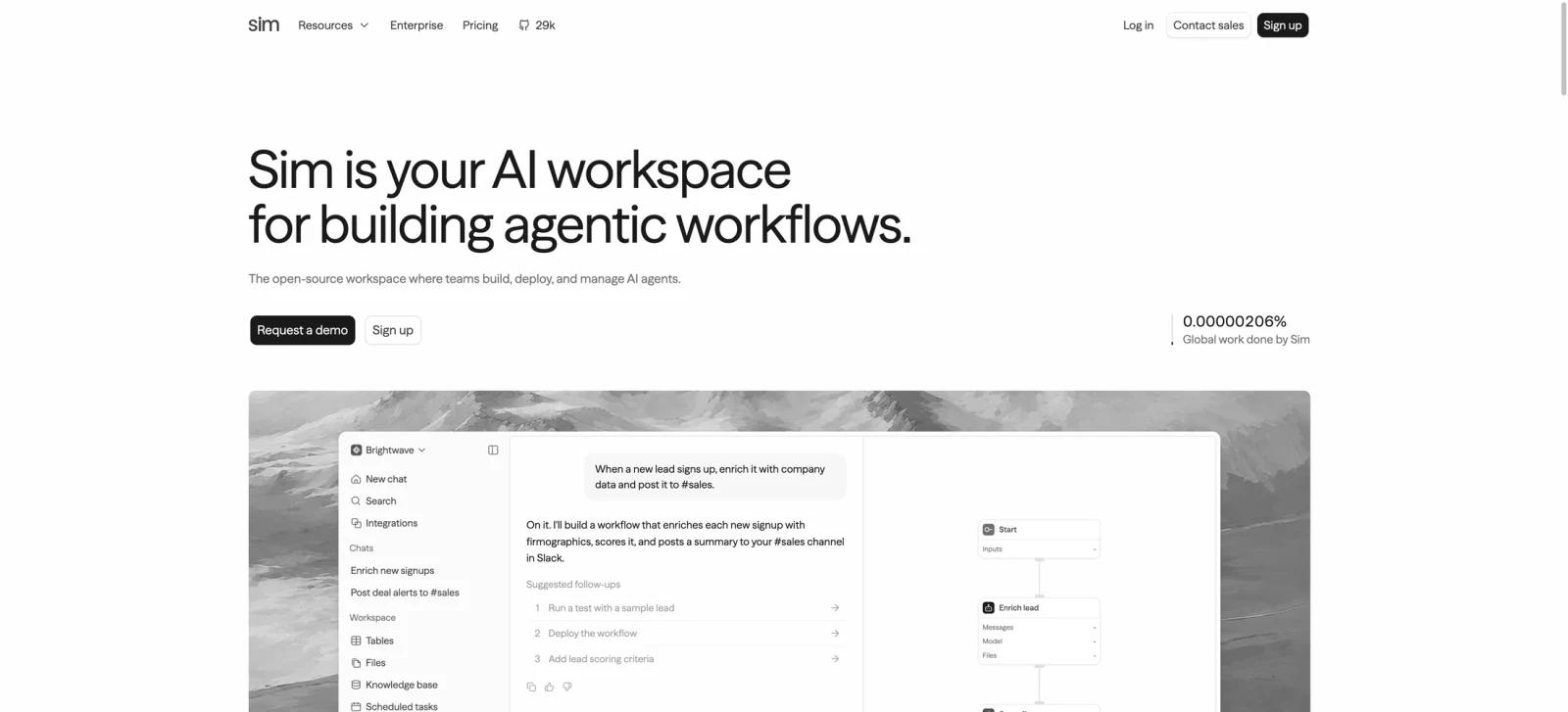
Sim is an open-source workspace for building, deploying, and managing AI agents. It gives teams three ways to create an agentic workflow: describe the job in plain English, assemble visual blocks, or write code. The same workspace connects models, business apps, data, schedules, and run monitoring.
The product is aimed at builders who need more than a single chatbot but do not want to start every automation from a blank codebase. Sim's current integrations directory lists 225 apps and services exposing more than 3,700 callable tools, including Slack, HubSpot, Salesforce, and Notion. It also supports major LLM providers, traces, logs, and per-run cost visibility. That makes it a practical option in the AI workflow automation category for teams that need repeatable work across their existing stack.
Key Features
- Visual and conversational building - Describe an outcome to Sim or assemble the agent logic in a visual builder. This is useful when a workflow needs both a fast first draft and explicit control over its steps.
- Integrations and model choice - Connect services such as Slack, HubSpot, Salesforce, and Notion, then use the model provider that fits the task instead of being locked into one LLM.
- Grounded context - Store working context in tables, files, and knowledge bases so agents can reason over company data rather than only a prompt.
- Run monitoring - Inspect live traces, logs, and cost data to understand what an agent did and where a workflow failed or became expensive.
- Open-source and self-hostable codebase - Sim publishes its Apache-2.0 core on GitHub and documents Docker-based self-hosting. Enterprise access controls, SSO, compliance features, and dedicated support are separate capabilities listed under its custom Enterprise plan.
For teams deciding how agents should exchange tools and context, the broader MCP vs. A2A protocol comparison is useful background before designing a multi-system workflow.
How to Get Started
Start with one concrete workflow, such as enriching a new lead and posting it to Slack, triaging a support email, or syncing a record between systems. Connect the systems of record first, describe the desired result, then inspect the generated flow before deploying it.
For more complex work, use the visual builder to make approvals, branch logic, model settings, and error handling explicit. Teams comparing Sim with a general AI app builder should note that Sim is centered on agent and workflow orchestration, not only on generating an application interface.
Pricing & Plans
Sim offers a free tier and publishes per-user monthly plans. The current pricing page lists Free at $0, Pro at $25 per user/month billed monthly, Max at $100 per user/month billed monthly, and Enterprise as custom; annual billing is advertised at 15% off. Sim also bills usage in credits: one credit equals $0.005, every workflow run has a one-credit base charge, and AI model usage adds variable cost. Runs stop at the included credit limit by default unless on-demand billing is enabled.
| Plan | Monthly price | Key included limits |
|---|---|---|
| Free | $0 | 1,000 monthly credits; 1 workspace; no teammate invitations; 5 GB storage; 5 tables; 50,000 rows per table; 30-day log retention |
| Pro | $25/user/month, billed monthly | 6,000 monthly credits plus 50 daily-refresh credits; 3 workspaces; teammate invitations; 50 GB storage; 100 tables; 100,000 rows per table; unlimited log retention |
| Max | $100/user/month, billed monthly | 25,000 monthly credits plus 200 daily-refresh credits; unlimited workspaces; 500 GB storage; 1,000 tables; 500,000 rows per table; unlimited log retention |
| Enterprise | Custom | Custom credits, rate limits, timeouts, storage, and table limits; unlimited workspaces and log retention; access control, SSO, SOC 2 compliance, self-hosting, and dedicated support |
Best For
- Operations and product teams automating multi-step work across Slack, CRM, databases, and internal tools
- Developers who want an open-source AI agent platform with visual control
- Teams that need logs and traces to evaluate agent reliability before wider rollout
- Builders replacing scattered scripts or one-off automations with a shared workspace
- Teams assessing open-source AI agent tools before committing to a proprietary workflow platform
FAQ
What is Sim?
Sim is an open-source AI workspace for building, deploying, and managing agents and workflows through prompts, a visual builder, or code.
Is Sim only for developers?
No. Its conversational and visual workflow tools reduce the amount of code needed, though technical users will benefit when they need to manage integrations, permissions, or complex logic.
Does Sim have a free plan?
Yes. Sim lists a Free plan at $0. Its paid plans start at $25 per user per month.
What can Sim connect to?
Sim's live integrations directory lists 225 apps and services exposing more than 3,700 tools. Listed connectors include Slack, HubSpot, Salesforce, and Notion; verify the required actions and authentication method in the catalog before rollout.
Can Sim use company data?
Yes. The platform supports tables, files, and knowledge bases as context for agents. Teams should still define which data sources are allowed and what actions agents can take.
How is Sim different from a chatbot?
A chatbot mainly responds in a conversation. Sim is designed to connect models to tools and data, then run multi-step workflows with observable execution records.