



Overview
QuantConnect is an algorithmic trading research and execution platform built around the open-source LEAN engine. Its core value is giving quants one environment for research notebooks, backtesting, optimization, cloud execution, and live deployment across multiple brokerages and asset classes instead of stitching together separate data, IDE, and execution tools.
That makes QuantConnect more infrastructure-heavy than a lightweight backtesting website. It is not just a chart-driven retail simulator. The platform is built for people who want to write code, work with historical market data, test strategies systematically, and potentially deploy them into paper trading or live trading. The LEAN open-source engine is a major part of the pitch because it gives the platform more credibility with technical users who do not want to be locked into a fully opaque black box.
QuantConnect currently highlights a free plan with unlimited backtesting, community support, and broad asset-class data access, alongside paid tiers for researchers, teams, firms, and institutions. It also markets local coding through VS Code and CLI, cloud compute, collaboration, and broker integrations for live trading. For most buyers, the question is whether they want an all-in-one cloud workflow around LEAN or a more self-managed stack.
Key Features
Built on the open-source LEAN engine — QuantConnect maintains LEAN and uses it as the foundation for its platform, which is a meaningful advantage for technical teams that want portability, transparency, and a path beyond a single hosted UI.
Research, backtesting, optimization, and live trading in one stack — The platform is designed to cover the full quant workflow from research notebooks to production deployment, reducing the need to move code and data between unrelated tools.
Broad asset-class and market-data coverage — The free plan already advertises access to equities, indexes, forex, crypto, futures, and options data, while paid tiers add tick and second data resolution, higher resource ceilings, and add-on access to futures live feeds or alternative datasets.
Local coding plus cloud execution — QuantConnect explicitly supports local development through VS Code and CLI, then lets users run research, backtests, and live strategies in QuantConnect Cloud rather than forcing all coding into a browser-only IDE.
Broker and live-trading integrations — The pricing page lists support across brokers and exchanges such as Interactive Brokers, Alpaca, tastytrade, Binance, Coinbase, and others, which matters for users who actually want to move from research into execution.
Collaboration and organizational controls — Paid tiers add shared projects, more compute nodes, team permissions, ownership controls, and infrastructure options that make the platform viable for startups, trading firms, and institutions rather than only solo quants.
Pricing & Plans
QuantConnect uses a freemium model, but the free tier is mostly an entry point for solo exploration. Serious cloud usage, local coding workflows, or team collaboration push you into paid organizational plans fairly quickly.
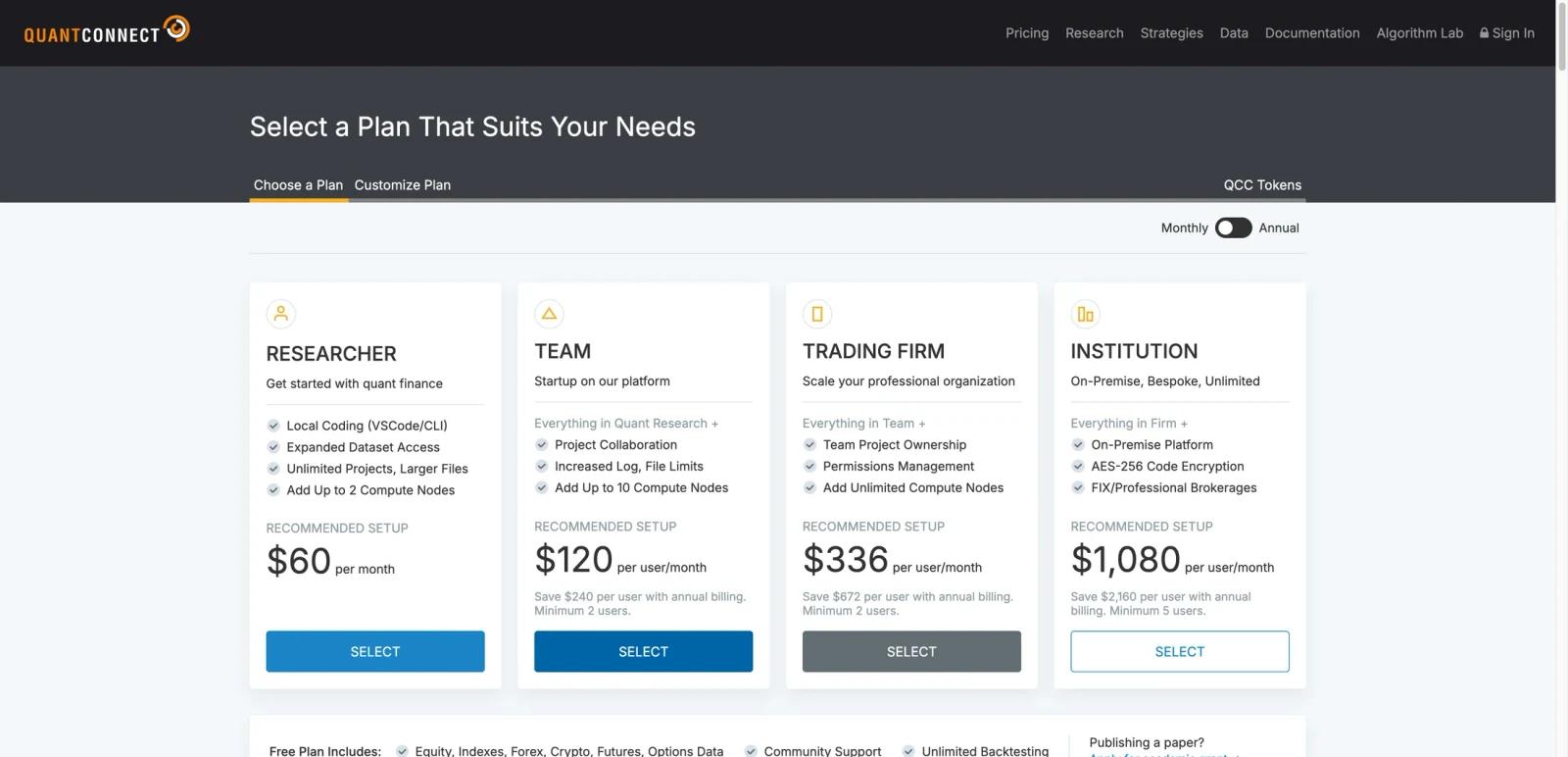
| Plan | Price | What it is best for |
|---|---|---|
| Free Plan | $0 | Solo evaluation with major asset classes, community support, and unlimited backtesting |
| Quant Researcher | $60/month | Individual quants who need local coding and expanded data/resource access |
| Team | $120 per user/month | Teams that need collaboration and higher resource ceilings |
| Trading Firm | $336 per user/month | Professional organizations that need permissions and organization-owned projects |
| Institution | $1,080 per user/month | On-premise or bespoke institutional deployments |
The plan price is only one part of the cost. Compute nodes, datasets, brokerage/data entitlements, and organization requirements are separately configurable, and resource quotas can change. Confirm the live pricing matrix and current resource documentation for a real deployment estimate.
Best For
- Developers and quants who want an engineering-style workflow for algorithmic trading
- Individuals evaluating LEAN without building a full stack from scratch
- Small teams that need shared quant research and deployment infrastructure
- Trading firms that want one platform for data, backtests, and live execution
- Users who prefer code-first systems over drag-and-drop retail trading tools
Avoid If
- You want a no-code trading bot or a managed promise of profitability; QuantConnect is a research and execution platform that still requires strategy design and risk controls.
- Your strategy depends on data, brokerage, or compute entitlements that are not included in your selected plan; verify each dependency before committing.
- You cannot validate backtest assumptions, fees, slippage, and live brokerage behavior independently.
Sources & Verification
- Last verified: 2026-08-20
- Evaluation scope: Platform workflow, LEAN/open-source relationship, documented data and brokerage model, and public plan structure; no strategy returns were tested.
- Method: Source-based research from the official product materials below. No hands-on testing was performed for this update.
- Official sources:
FAQ
What is QuantConnect?
QuantConnect is an algorithmic trading platform built on the open-source LEAN engine. It supports research, backtesting, optimization, and live trading for code-based quantitative strategies.
Is QuantConnect free?
It has a free plan. QuantConnect currently advertises a free tier with broad asset data access, community support, and unlimited backtesting, but more advanced local, cloud, and team workflows are paid.
What is LEAN?
LEAN is QuantConnect's open-source algorithmic trading engine. It powers the hosted platform and also gives technical users a more portable foundation than a fully proprietary backtesting system.
How much does QuantConnect cost?
The current public self-service prices shown in this review are $60/month for Researcher, $120 per user/month for Team, $336 per user/month for Trading Firm, and $1,080 per user/month for Institution. Organization minimums, node costs, datasets, and add-ons must be confirmed in the live configurator.
Can you live trade with QuantConnect?
QuantConnect supports paper and live trading through multiple broker and exchange integrations. Practical availability depends on the selected organization tier, compute nodes, asset class, brokerage, and data subscriptions; verify that full dependency chain before relying on a deployment path.
Who should use QuantConnect instead of a simpler backtesting tool?
It is a better fit for people who want a code-first environment spanning research, backtesting, optimization, and deployment. If you only want casual retail strategy testing, QuantConnect may feel heavier than necessary.
