
7 Best AI Budgeting Tools 2026 — Advice vs a Working Budget
Choose an AI budgeting app by the job it actually does: explain spending, clean up transactions, build a budget or help manage recurring bills.

On this page
The best AI budgeting tool is not necessarily the one with the most persuasive chatbot. It is the one that connects to the accounts you need, keeps spending records correct, and turns a suggestion into a budget you can review and maintain.
Start with Monarch for a shared household plan, Copilot Money for transaction cleanup, or Origin for AI-assisted budget creation. Simplifi adds an in-product assistant to its Spending Plan; Cleo emphasizes coaching, Rocket Money recurring bills, and Piere optional money-movement automation. These are different jobs, not a tested ranking. If you already maintain a useful budget, a new AI subscription may add little.
Scope and research boundary: This guide focuses on personal and household budgeting, primarily U.S. offers, checked October 15, 2026. We reviewed official product, pricing, support and privacy documentation and public interfaces. We did not connect bank accounts, purchase plans, test live financial recommendations or benchmark categorization accuracy. This is software-selection guidance, not personalized financial advice. Vendor privacy statements are not our independent security audit.
AI budgeting tools at a glance
Use these quick picks to eliminate the wrong workflow before comparing AI features. Prices are the displayed U.S.-dollar web offers on the check date, not global, tax-inclusive quotes; regional and app-store offers can differ. Official sources appear in each tool section.
- Monarch: shared household budgeting and explanations; web and mobile, U.S./Canada. Core is $99.99/year, with a 7-day trial requiring a payment method. Skip if you need fully local processing or supported banking elsewhere.
- Copilot Money: AI-assisted transaction categorization; web, iPhone, iPad and Mac; U.S. accounts only. $95/year, with a one-month trial. Its conversational Money Assistant remains beta with a waitlist—do not buy assuming immediate access.
- Origin: generate and save a suggested budget from your financial context. Standard annual membership is $99/year; a temporary $1 first-year offer currently replaces the free trial. Mobile access is U.S.-only; web access abroad does not prove foreign-bank support.
- Quicken Simplifi: Spending Plan plus AI chat on web/mobile; U.S./Canada banking, one currency at a time. Regular price is $6.99/month billed annually; current introductory offer is lower. AI access is dataset-owner only, not available in shared spaces.
- Cleo: phone-based money coaching rather than a household reporting hub. Basic budgeting has free access; the U.S. Pro plan is $8.99/month for advanced AI coaching. Skip if the budgeting benefit does not justify another recurring charge.
- Rocket Money: understand subscriptions and recurring bills, with an AI text assistant on Premium+ at $15/month plus tax. U.S. members and banks only. Free tracking is not free Rowan AI; do not upgrade solely to read spending totals.
- Piere: AI-created budgets and optional transfer automation. Free Purple is limited to 3 connected accounts; Platinum lists IQ chat and a 7-day trial, currently advertised at $1.99/month special pricing. Verify renewal and transfer eligibility; a budget view and permission to move money are not the same purchase.
First eliminate the wrong kind of AI budget
Three capabilities are often bundled under the same label:
- Explain: answer questions about spending. Useful only if the underlying dates, accounts and categories are correct.
- Organize: classify transactions, suggest corrections or identify recurring charges. You still need to check transfers, refunds and duplicates.
- Plan and update: save category limits or adjust a budget after you approve it. A plausible chat response is not proof that the live budget changed.
None of these should be mistaken for your bank enforcing a spending limit. A connected-account dashboard and a service that can initiate savings transfers or cancellation requests have different permission boundaries.
Before starting a trial, check your exact bank and account type, country, device and required paid tier. An advertised institution count is not a guarantee that your credit union, joint account or particular card syncs correctly. If you need business books or tax workflows, compare AI accounting software instead; a household spending plan is not a replacement for bookkeeping.
The seven options, by budgeting job
Monarch
Best for: a household that wants one shared budget and AI explanations alongside its financial records.
Visit Monarch. Its Flex budgeting guide groups spending into Fixed, Non-monthly and Flex buckets; category budgeting is also available. That makes it worth considering when “what can we spend this month?” matters more than having a separate limit for every purchase type. The budget is the working plan; the assistant explains the records around it.
Price and access: The current web pricing separates Core at $99.99 annually from Plus at $199.99 annually. Both list the AI Assistant; ordinary budgeting does not require buying Plus for its advanced forecasting and business features. The seven-day trial requires a payment method. Monarch's availability FAQ limits service to the U.S. and Canada and recommends USD/CAD accounts; a household member does not cost extra.
Privacy tradeoff: Monarch says third-party models process limited task-relevant data without retention or training. Its assistant is optional, but AI categorization is integral and cannot be disabled. Hiding the assistant is therefore not an all-AI-off mode.
Skip if: local-only records, unsupported countries or no AI processing are hard requirements.
First elimination test: during the trial, check one household transfer and one irregular bill, then compare the budget's remaining amount with your own calculation. If you cannot explain a mismatch, fix the records before trusting an AI summary. Have both people confirm they understand the shared budget and account visibility.
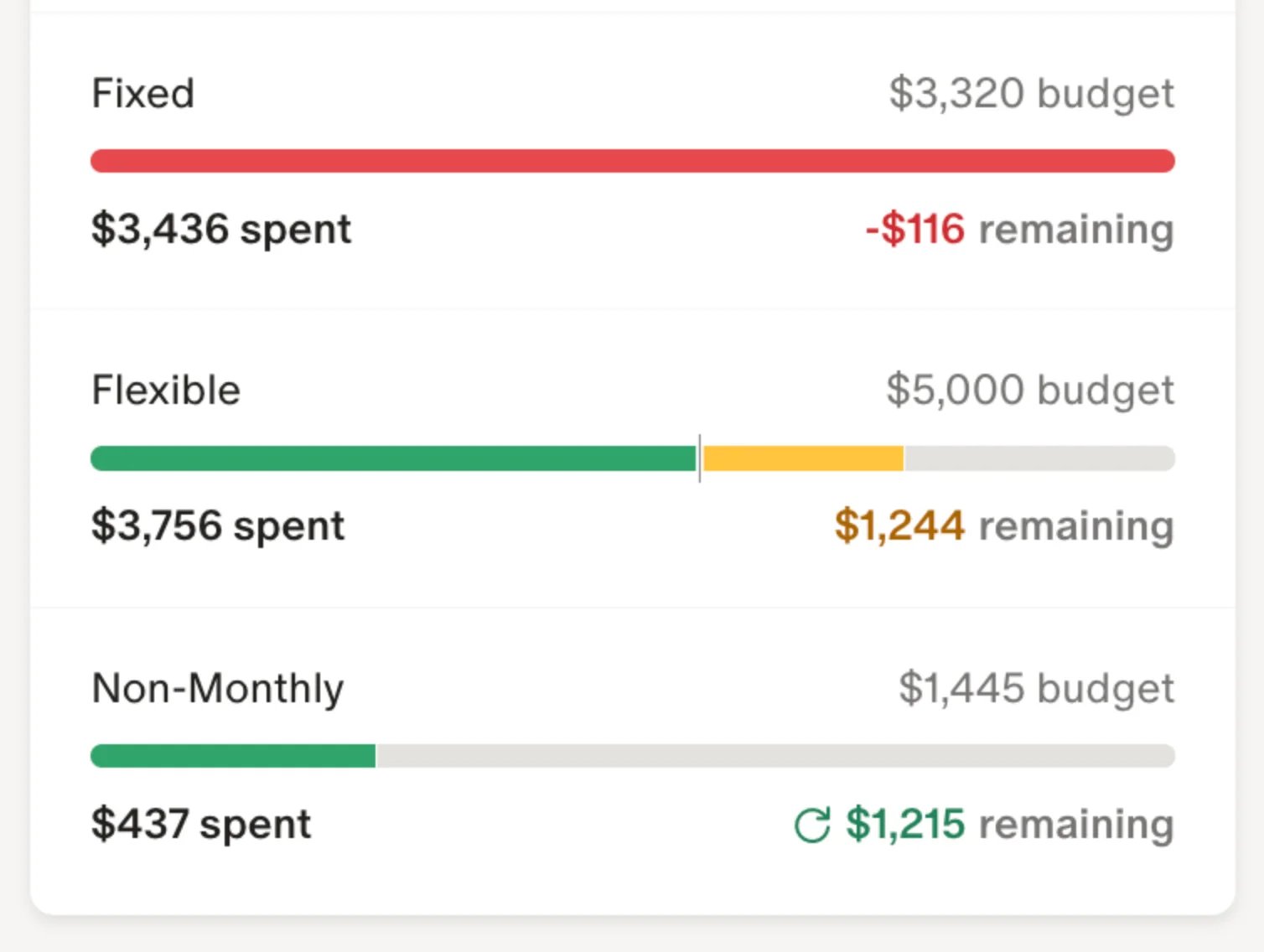
Official help-page interface example, captured October 15, 2026. This illustrates the documented workflow, not our connected-bank test.
Copilot Money
Best for: someone whose main budgeting friction is reviewing and correcting transactions.
Visit Copilot Money, the independent finance app—not Microsoft Copilot. Copilot Intelligence applies AI to transaction categorization. That is useful to assess even if you never chat with the app: the real question is whether corrections leave you with a ledger you can trust.
Price and access: The annual web subscription is $95. Its FAQ lists a one-month trial, no permanent free tier, U.S.-based accounts only, and apps for web, iPhone, iPad and Mac. It is no longer accurate to describe Copilot Money as Apple-only; a web app is not the same as a native Android app.
The separate Money Assistant announcement describes a public beta with a waitlist. It can suggest changes to budgets, categories and recurring transactions and asks for approval before edits. Confirm your own access before paying for that feature. Do not treat beta plans for greater autonomy as a current guarantee.
Skip if: non-U.S. banking, native Android use or guaranteed immediate conversational-assistant access is essential.
First elimination test: on a supported native app, start with the advertised sample-data experience. The Web FAQ says web is desktop-optimized and currently lacks demo mode, Goals and Cash Flow tabs; do not assume full feature parity on an Android browser. If you continue, check a transfer, refund and split purchase. CSV export is documented; inspect an export before committing a year of history. Exported transactions do not necessarily transfer budget rules or assistant history.
Origin
Best for: turning a conversation into a saved, editable budget rather than a paragraph of advice.
Visit Origin. Its current budget instructions document asking AI Advisor to create a budget, reviewing suggested income, savings and category limits, then selecting Create with AI to save it. Manual setup, category changes and rollover for eligible categories are also documented. Saving the plan is the useful distinction—not whether the answer sounds like a financial planner.
Price and access: The pricing help page, updated October 13, lists $99/year and a temporary $1 first year for new users. It explicitly says the usual free trial is currently unavailable during that promotion. Treat $1 as an introductory offer, not a permanent annual price; check the renewal total and cancellation terms at checkout. Employer or partner access can differ.
Origin's regional guidance says the mobile app is U.S.-only while accounts remain accessible through the web abroad. This is not evidence of worldwide bank connectivity. Its AI documentation explains that linked financial information supplies context; incomplete or outdated inputs can undermine the suggestion.
Skip if: you cannot verify the accounts and device workflow you need, or want a budget without giving an AI service financial context.
First elimination test: ask for a budget with a known irregular expense, inspect every suggested number, save it only if it is right, then reopen the Budget page. Check that the stored limits—not just the chat—match what you approved. A low introductory price does not remove this test.
Quicken Simplifi
Best for: a Spending Plan user who wants to query records and approve changes inside the same app.
Visit Quicken Simplifi. Its AI Chat instructions document financial-data questions and approved changes to items such as transactions and savings goals. AI Chat is available to Basic subscribers; Business & Personal users need Early Access. Only the dataset owner can use it—it is not available in shared spaces. That matters if two people expect equal access to the assistant.
Price and access: The U.S. web offer displays $3.99/month billed annually, against $6.99/month regular pricing. The annual charge is due upfront; confirm the checkout total, since rounded monthly equivalents can differ from the final annual price. This is not a $3.99 month-to-month subscription. Subscription guidance says there is no free trial; the 30-day money-back guarantee applies to Quicken.com purchases, while third-party purchases follow that platform's policy. Banking supports the U.S./Canada and one currency at a time.
Skip if: a shared-space member needs AI access, or you need a combined USD/CAD ledger without currency discrepancies. The capability guide labels the assistant beta and says it cannot modify external bank accounts or export downloadable files. Do not treat chat as a replacement for the app's export controls.
First elimination test: check the correct space and owner, enable AI Chat, then review one proposed category correction before approving it. Compare the saved result with the Spending Plan; a request that sounds complete is not enough.
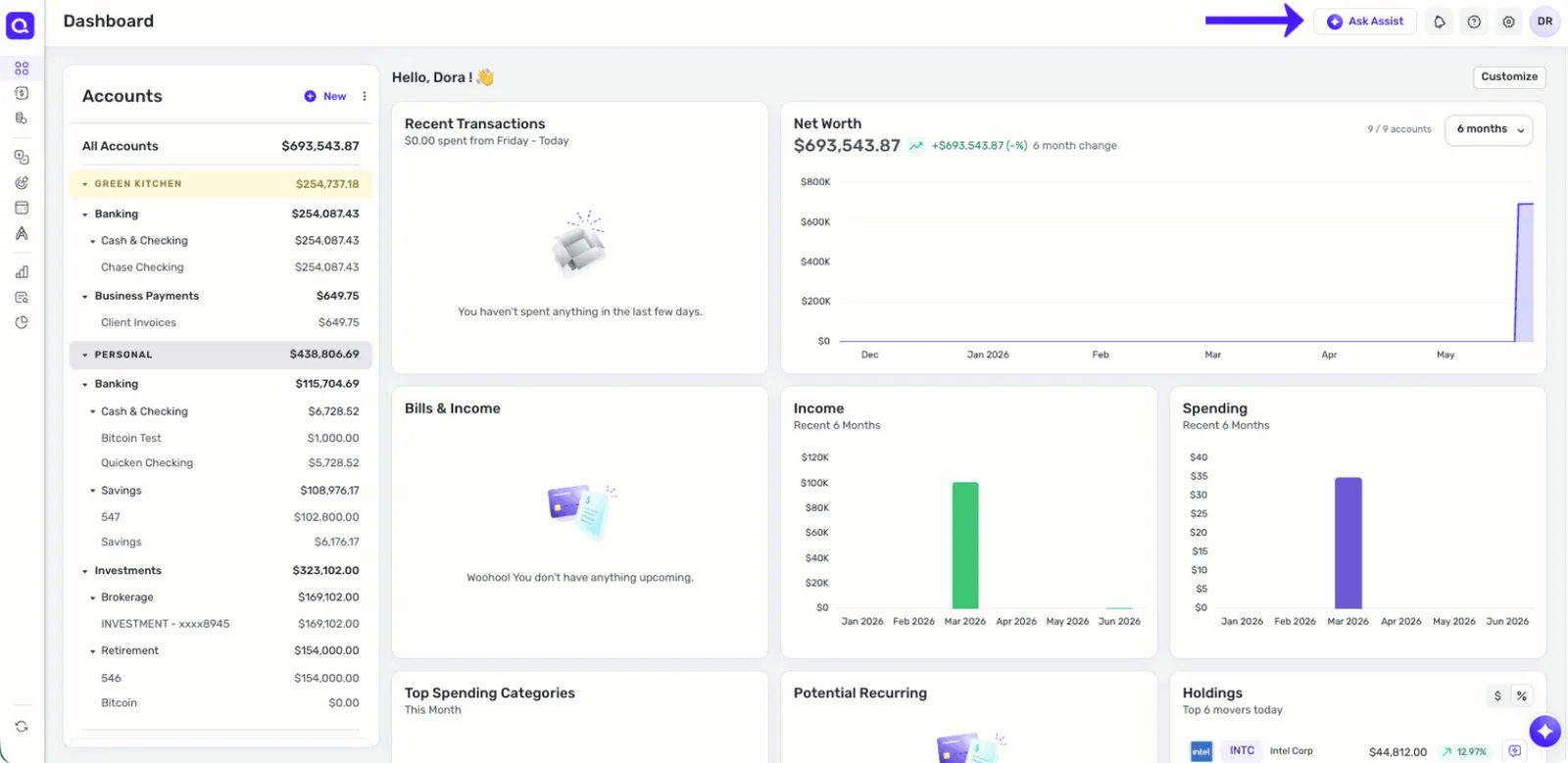
Frame from the official AI Chat help demonstration, captured October 15, 2026. Vendor example data, not our bank account or an accuracy test.
Cleo
Best for: someone more likely to engage with short money check-ins than a detailed reporting dashboard.
Visit Cleo. Its U.S. terms distinguish free financial-management and budgeting services from paid capabilities such as more powerful AI models and conversation memory. A free download does not prove that the full AI coaching experience is free.
Price and access: The U.S. pricing page lists Pro at $8.99/month with advanced AI coaching. Plus and Builder package other financial products; do not choose a higher tier just because the page lists more benefits. Cash advances, cards and savings products are separate decisions, subject to terms and eligibility. Express advance fees can apply; this guide does not recommend borrowing to justify a budgeting subscription.
Region matters: Cleo also has a separate U.K. offer. Its U.K. Pro help page lists £12.99/month. Do not carry the U.S. price or package into a U.K. comparison. Check your region's bank connections and terms before subscribing.
Skip if: you need a shared household reporting workflow, or the coaching and paid-product prompts would distract from maintaining the budget itself.
First elimination test: try the budgeting access available without upgrading. Ask one specific spending question and compare the answer with its source transactions. Upgrade only if the paid coaching would change a repeatable habit or task—not because a cash advance is presented beside it.
Rocket Money
Best for: someone whose budget problem is recurring charges and who wants help acting on them.
Visit Rocket Money. Rowan works through text messages and can explain spending, review budget progress and help with eligible transaction updates or subscription requests. That is closer to an assisted bill-management workflow than simply generating a monthly budget.
Price and access: Premium+ costs $15/month plus tax and includes Rowan. Free tracking and ordinary Premium should not be confused with that AI entitlement. The service supports U.S.-based members and banks only.
A dated bill-negotiation boundary: As checked October 15, new negotiations move exclusively to Premium+ on November 2, 2026. Its notice says existing negotiations finish under their current agreement, including applicable success fees; upgrading does not erase those charges. New Premium+ negotiations have no added success fee. Read the current agreement before submitting a request rather than assuming every bill service is free.
Skip if: you only need free spending tracking, require non-U.S. bank support, or do not want financial conversations in your messaging app.
First elimination test: inspect detected subscriptions before requesting any cancellation or negotiation. A recurring charge may still be essential. Begin with an explanation, then review the exact provider, account, requested action and any fee before authorizing it. Do not interpret a helpful AI reply as a completed cancellation.
Piere
Best for: evaluating AI budget creation with an optional, separately authorized money-movement layer.
Visit Piere. Its pricing separates free Purple, with three connected accounts, from Platinum, which lists IQ chat, automated budget creation and Moves. Platinum currently displays $1.99/month special pricing with a seven-day trial. The page does not establish a lasting standard renewal price for that offer; verify the billed amount, billing period and renewal terms before entering payment details. Free budget management is not unlimited free IQ chat.
Permission boundary: Piere's Moves explanation describes transfers under instructions you authorize. This is materially different from correcting a category inside a read-only budgeting app. Do not enable money movement simply to try a chat answer. Canadian availability covers budgeting, but does not establish that every transfer feature is available for Canadian accounts; confirm your region and exact accounts separately.
Skip if: you want a local-only ledger, or cannot verify the renewal and transfer conditions relevant to you. We do not adopt Piere's advertised growth or savings guarantees as expected results.
First elimination test: inspect the budget and AI plan without enabling Moves. If automation is your actual goal, understand the source, destination, trigger, amount limits and how to pause it before authorizing any transfer rule. A transfer allowance is not a reason to activate one.
When you do not need an AI assistant
If the problem is assigning the money you already have to upcoming obligations, prioritize the budgeting method over a chatbot. YNAB's official pricing and method page describes giving each dollar a job, a 34-day direct-signup trial without a card, and $109/year or $14.99/month, plus applicable tax. It is a useful baseline here, not another native AI-assistant pick. Its API directory explicitly labels community AI integrations as third-party, unsupported tools—not a built-in AI coach.
For a U.K. budgeting workflow, Emma's official setup guide documents suggested budgets based on three months of spending. A suggested average is not automatically the right future limit. PocketGuard's pricing page also lists AI chat, but we have not established from its current public documentation that this provides the same financial-data questions and saved-budget actions as the assistants above. It remains a budgeting comparator, not an unverified AI-capability recommendation.
If you prefer manual records, an ordinary spreadsheet may be enough. AI spreadsheet tools can help organize formulas or summaries, but inspect the math yourself and use synthetic or minimized data while evaluating a new service. A private AI chat tool is not automatically offline, a bank-sync app or a transaction ledger.
A short trial that reveals more than a chatbot demo
Use the same small set of checks for whichever app you shortlist. These are suggested reader checks, not tests we have performed:
- Reconcile the inputs. Confirm the imported date range, latest posted balance and missing transactions against your own records. Check that a credit-card payment or transfer is not counted as new spending twice.
- Test an exception. Inspect one refund, split purchase or annual bill. If the category is wrong, correct it and see whether the working budget now makes sense.
- Check the next obligation. Include one irregular expense and a realistic pay date. A historical spending average can omit a bill that has not arrived yet.
- Trace one AI answer. Ask why a category changed. Compare the explanation with the actual records and date range. Ask separately whether it only suggested a change or saved one.
- Check the exit. Find the export, cancellation and account-deletion controls before moving your routine. Verify which history and settings are exportable. Subscription cancellation, bank-access revocation and deletion are separate tasks; follow the vendor's current instructions for each.
Before linking financial data, inspect the app's current privacy policy and AI-specific disclosure: what reaches external processors, what is retained, whether training is allowed, what can be disabled, and how deletion works. “Read-only bank connection,” “does not sell financial data” and “no external AI processing” are different claims. If you cannot resolve a non-negotiable privacy requirement, do not connect the account.
Frequently asked questions
Is there a free AI budgeting app?
Cleo documents free budgeting access, while advanced AI coaching belongs to paid plans. Rocket Money's free tracking is not its Premium+ Rowan assistant. Monarch and Copilot Money offer trials, not permanent free tiers. Check the exact feature and region; free installation alone does not answer the question.
Can an AI app create and maintain my budget automatically?
Some can save a suggested plan after you approve it: Origin documents this explicitly. That does not guarantee correct bank imports, realistic limits or enforcement at your bank. Review transfers, refunds, upcoming bills and any proposed edits yourself. An explanation and a saved budget are separate outputs.
Which options work outside the United States?
Monarch, Simplifi and Piere cover Canadian budgeting as well as U.S. use, with feature and currency limits. Copilot Money supports U.S. accounts, and Rocket Money requires U.S. members and banks. Cleo has separate U.S. and U.K. offers. Origin's web access abroad is not proof of foreign-bank support. Verify the exact institution, currency and package.
Is sharing bank data with an AI budgeting tool safe?
No blanket guarantee fits every app. Check the bank connection, AI processors, retention, training rules, permission controls and deletion process separately. A read-only bank connection does not mean no financial data reaches AI services. If local-only processing is essential, do not assume these connected cloud apps qualify.
Should I switch from YNAB or a spreadsheet just to get AI?
Not if the current system already gives you reliable records and a plan you follow. Switch only for a specific recurring improvement, such as transaction cleanup, shared household visibility or a saved AI-generated budget. Check bank coverage, exportability and the standard renewal cost before replacing a working routine.
Get ToolWorthy Weekly
New AI tools, practical guides, and selected AI signals in one weekly brief.
For AI tool founders
Built a tool that belongs in this decision set?
Request an editorial evaluation for possible inclusion in ToolWorthy.
Submit your tool for reviewPaid submission does not guarantee a ranking, recommendation, inclusion, or editorial outcome.