
6 Best AI SEO Audit Tools 2026 — Find, Explain or Fix?
An AI audit summary is not a completed fix. Compare six tools by crawl evidence, AI access, real costs and the permissions needed to change a website.

On this page
The best AI SEO audit tool is the one that turns a real website problem into an inspectable change—not the one that writes the longest report. First decide what you are buying: a crawler that collects evidence, an assistant that interprets it, or a system allowed to publish fixes. Those are different responsibilities, with different costs and risks.
Start with Screaming Frog or Sitebulb for a desktop audit workflow, Semrush or SE Ranking for cloud audit data and AI-assisted triage, and Ahrefs or Search Atlas when controlled deployment is part of the requirement. You may already own enough capability. Do not buy another suite just to get an AI summary of data you can already export.
Research boundary: Official product, pricing and support information checked October 21, 2026. This is desk research, not a controlled crawler benchmark: we did not crawl client websites, buy plans, connect private accounts, run paid AI calls or install fixes. Product examples are vendor documentation, not our test results. Order follows audit jobs, not measured accuracy or speed.
AI SEO audit tools at a glance
Choose the part of the audit loop you need to improve. Each tool links to its detailed evidence and first elimination test. On a phone, swipe within a table to read its other column; the tool name stays visible.
| Tool | Useful audit route | Where the work happens |
|---|---|---|
| Screaming Frog SEO Spider | Custom AI prompts over crawl data | Desktop crawler; chosen model provider |
| Sitebulb | Explain and compare completed audits | Desktop or Cloud; external AI through MCP |
| Semrush | Triage audit findings within an SEO suite | Cloud audit and Copilot insights |
| SE Ranking | Start audits and query evidence through AI | Cloud audit; API/MCP and external assistant |
| Ahrefs | Audit first, then consider supported patches | Cloud; separate project boosts/deployment |
| Search Atlas | Connect an audit to an implementation queue | Cloud auditor and OTTO-enabled website |
What an AI audit must prove
Ask for an affected URL, the observed response or page element, why it matters for that page, and a way to check the change. An explanation without traceable evidence is not an audit finding you can safely implement.
Three distinctions prevent expensive wrong turns:
- Crawling is not reasoning. A chatbot given a URL may not have fetched every page, rendered JavaScript or inspected HTTP headers. A polished summary cannot fill those evidence gaps.
- AI assistance is not AI-search visibility. Checking whether a bot can access a page is different from measuring whether an answer engine mentions your brand. Our AI search monitoring comparison covers that separate job.
- A recommendation is not a deployed repair. Generating a title, creating a ticket, installing a browser-side patch and changing server HTML are different outputs. Know which one your subscription supplies.
This page focuses on technical website auditing and the route to a verified fix. For keyword research, backlink tools and content optimization in one purchase, use the broader AI SEO suite comparison. We are not re-ranking those suites by the size of their feature list.
Compare AI assistance with publishing authority
These are documented workflow boundaries, not tested quality scores. “No direct site change in this route” does not mean a vendor has no other integration; it means the audited capability below should not be mistaken for a CMS editor.
| Tool | What the AI route supplies | What still needs separate control |
|---|---|---|
| Screaming Frog SEO Spider | Runs chosen prompts against selected crawl/page data | Prompt validation, model costs and implementing changes |
| Sitebulb | Read-only MCP queries over finished audits | Starting the crawl and publishing changes |
| Semrush | Copilot alerts and suggestions from project data | Inspecting source reports and implementing fixes |
| SE Ranking | MCP/API can launch crawls and retrieve issues/URLs | Assistant authorization, usage limits and site changes |
| Ahrefs | Ask AI; higher boost adds Batch AI and Patches | Verified ownership, supported fields and JS/Worker deployment |
| Search Atlas | Auditor hands findings to OTTO implementation | Site activation, deployment scope and post-change verification |
Which pair is actually comparable? Screaming Frog processes prompts during a crawl; Sitebulb exposes finished audits to an assistant. Sitebulb's MCP cannot start a crawl, whereas SE Ranking documents that capability through its audit API/MCP. Compare Ahrefs Patches with OTTO only if you actually want another service to affect the website—not merely produce a report.
For a JavaScript-heavy site, confirm the audited content is the rendered version you need before judging the AI explanation. A successful request does not establish that the crawler saw the same links, canonical or text as a browser. Keep crawl scope and rate appropriate for a site you own or are authorized to audit.
Compare the cost of a usable audit
Prices are public USD-facing offers checked October 21, 2026, not tax-inclusive worldwide checkout quotes. Monthly subscriptions, yearly licenses, crawl credits and external AI charges are not interchangeable units. Annual equivalents below require annual billing; they are not month-to-month prices.
| Tool | Free audit or trial boundary | Relevant paid cost and meter |
|---|---|---|
| Screaming Frog SEO Spider | 500 URLs per crawl; not the paid AI/JS workflow | $279 per user/year; external model charges separate |
| Sitebulb | 14-day Desktop trial; MCP included | Lite $18/month, 10k URLs/audit; Pro $42/month, 500k URLs/audit |
| Semrush | Limited free audit/basic Copilot; not full paid capacity | SEO $139/month, or $117.33/month equivalent annually |
| SE Ranking | 14-day trial, no card required | Core $129/month; 250k platform audit pages/month; Data API metered separately |
| Ahrefs | 5k crawl credits/month per verified project | Ask AI: Pro Boost $20/project/month; Patches/Batch AI: Max Boost $200/project/month |
| Search Atlas | Advertised 7-day trial | Starter $99/month; 1 project, 1 seat and 1 OTTO site |
For Ahrefs, boost prices are project add-ons: a paid base subscription is not required to buy a boost, including on Ahrefs Free, but existing account credit limits still apply. For Sitebulb and SE Ranking MCP workflows, an external AI client's charges or entitlements are separate from the crawler subscription. A 5,000-credit monthly allowance is not the same offer as 500 URLs on each crawl.
If you need two people, several client sites or frequent recrawls, price that workload—not the headline entry plan. Search Atlas's universal execution credits are not simply a count of audit URLs. An unused AI bundle is not cheaper than continuing with an adequate existing crawler.
The six tools, by audit job
Screaming Frog SEO Spider
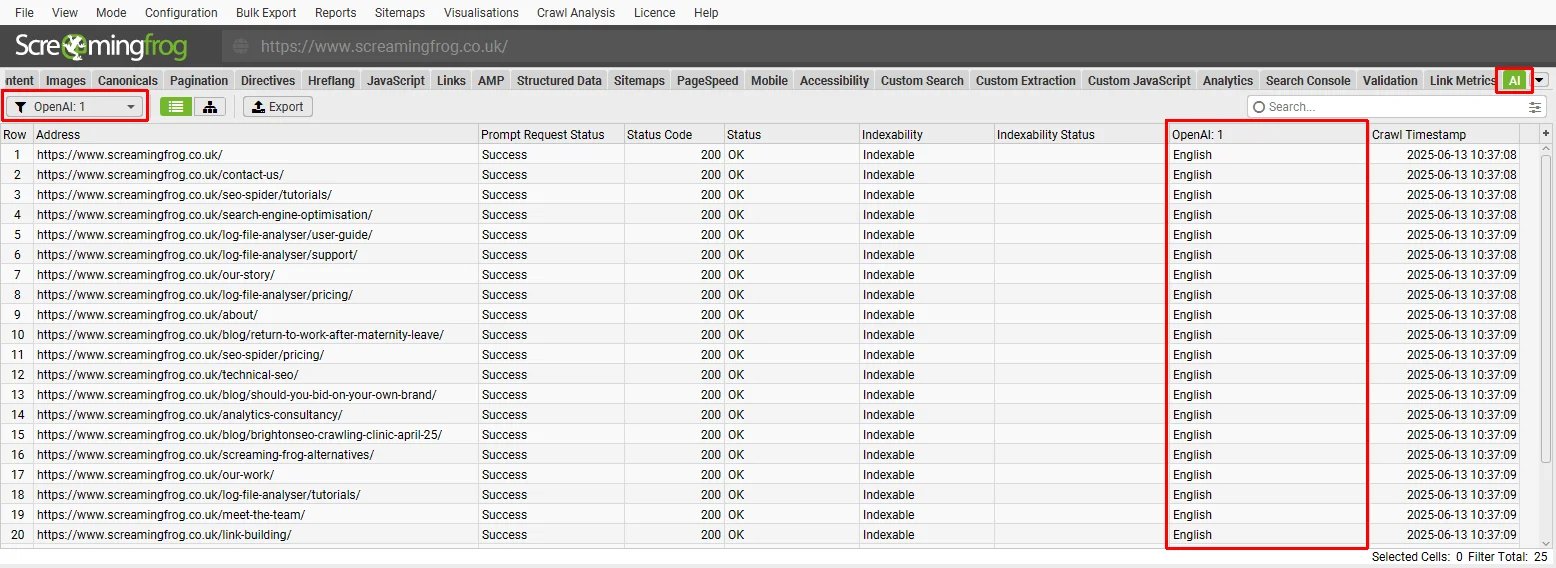
Official tutorial example: the AI results tab keeps the generated output beside its source URLs and request status. This vendor screenshot is not our crawl or a benchmark.
Best for: an SEO practitioner who wants to control what is crawled and what each AI prompt receives.
The official AI-prompt tutorial documents OpenAI, Gemini, Anthropic and Ollama connections. You can target page data and inspect prompt outputs rather than asking a general chatbot to infer the website. Use that flexibility for a narrow task such as classifying page intent or drafting missing alt text—not for treating every generated suggestion as a confirmed technical defect.
The USD pricing comparison separates the free 500-URL crawler from the $279-per-user annual license. JavaScript rendering, saved crawls and AI integrations are paid features. Larger crawl capacity still depends on available memory/storage. External API usage is an additional cost; connecting a local model is a possible configuration, not our guarantee that every integration stays offline.
Skip if: you want an unattended cloud service or a report that publishes website changes for you.
First elimination test: use a small authorized sample and a prompt with an answer you can verify. Inspect the source field, returned output and failed requests before applying it to thousands of URLs. If the task is ordinary status-code detection, do not pay an LLM to recreate a deterministic crawler check.
Sitebulb
Best for: a consultant or team that wants an assistant to interrogate completed audit evidence, especially comparisons between crawls.
Sitebulb's MCP documentation makes a useful limitation explicit: the connection is read-only. An assistant can retrieve finished projects, audits, issues and URL data, but cannot start new crawls through that MCP. Run or schedule the audit in Sitebulb, then ask the assistant to explain the actual results. Creating a ticket through another connected tool is a separate permission—not Sitebulb silently fixing your website.
The Desktop pricing page displayed $18/month for one-user Lite and $42/month for one-user Pro after selecting USD. Lite allows 10,000 URLs per audit; Pro allows 500,000 and adds audit comparisons, scheduled audits and customized PDF reporting. MCP is included across plans and the 14-day Desktop trial. Cloud is a separate deployment/pricing choice, not included merely because you buy Desktop.
Skip if: starting crawls from your assistant is essential, or you require a local-only end-to-end AI workflow. A local crawl does not mean audit data shared with an external assistant stays on your device.
First elimination test: finish a representative crawl, ask for five affected URLs supporting one finding, and trace them back to Sitebulb. If comparison is the buying reason, evaluate Pro rather than assuming Lite's MCP includes every underlying report.
Semrush
Best for: a team already using Semrush that wants audit issues explained alongside its other project data.
Site Audit is the evidence-collection layer. Copilot surfaces alerts and suggestions from project reports; its instructions call for setting up Site Audit and Position Tracking. That is a reason to configure the data correctly, not evidence that an AI prompt alone ran a complete audit or changed the site.
The current SEO pricing page lists SEO at $139 month-to-month or $117.33/month equivalent on annual billing. The SEO + AI Search Starter offer is a different $199 monthly bundle. Do not buy the larger bundle solely because “AI” appears in its name: basic Copilot is documented for free accounts too, within restricted underlying tool access. Map your required crawl volume and reporting to the actual plan; don't import an old Pro/Guru allowance into a newly labeled package.
Skip if: you only need a controlled desktop crawl or custom per-page model prompts and have no use for the suite.
First elimination test: open one Copilot recommendation, follow it to the affected audit report and verify the URLs. If it cannot give you a usable developer handoff, a more fluent summary does not solve the bottleneck.

Best for: a team that wants an external AI assistant to launch and query cloud audits using structured tools.
The Website Audit API/MCP route documents creating audits, checking status and retrieving issues and affected pages. This is materially different from a connector that can only read a finished report. The underlying Website Audit supports JavaScript rendering and audit comparisons; the assistant still depends on the selected crawl scope and data.
The Core plan lists $129/month, 10 projects, one manager seat, 250,000 monthly platform audit pages, MCP access and 25,000 Research API credits. Annual billing displays $103.20/month equivalent. The 14-day trial requires no card.
The Data API audit endpoints charge 2 credits per crawled page for standard HTML and 20 for JavaScript rendering, including rechecks. The API credit guide distinguishes that credit balance from Project API actions that consume subscription limits. Check which endpoint your MCP/client uses; do not treat the 250k platform pages as a free Data API crawl budget. Include report queries and repeat runs in your estimate.
Skip if: you need direct CMS fixes from this documented audit route, or cannot share the relevant audit evidence with your chosen AI client.
First elimination test: authorize only an appropriate project, ask for an audit status and a small issue sample, then check the corresponding URL evidence. Starting another full crawl is not necessary for every follow-up question. Control request rates and avoid unexpected crawl/API consumption.

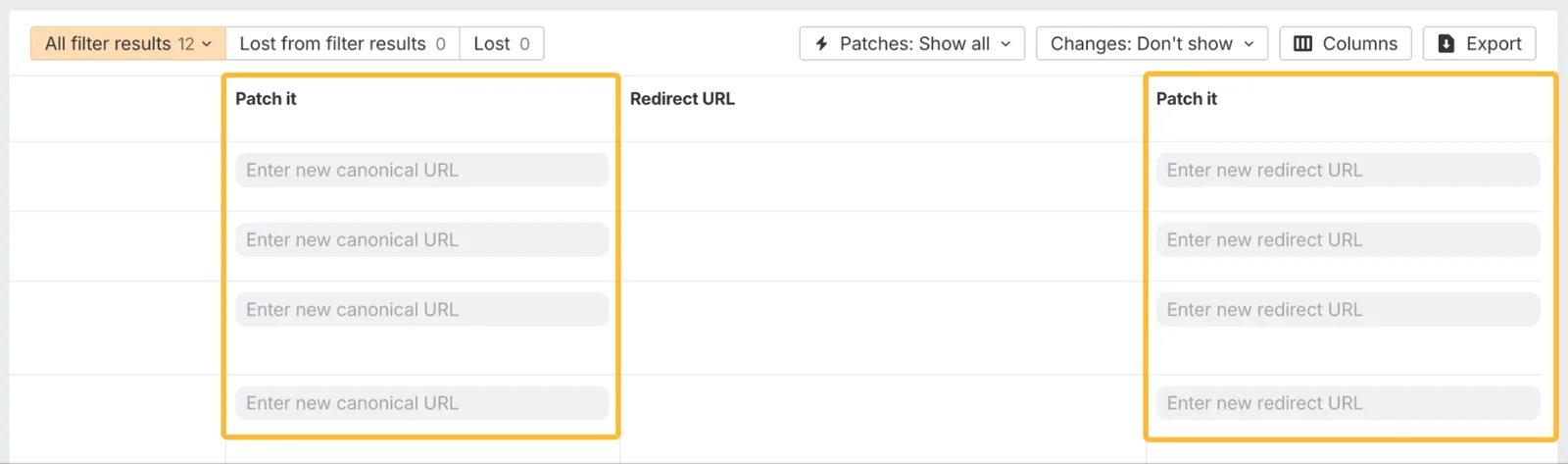
Official product-update example of expanded patch fields. Availability and deployment requirements still need account-level verification; this is not a change we deployed.
Best for: a site owner who wants a free audit baseline, with an optional paid path from AI drafts to supported, reversible patches.
Ahrefs Free's audit provides 5,000 monthly crawl credits per verified project. Its credit explanation counts internal HTML pages returning 200; redirects and other resources are not simply billed as equivalent pages. This is a useful starting point without assuming free access includes every AI or deployment feature.
The current project add-ons distinguish Pro Boost at $20/project/month with Ask AI from Max Boost at $200/project/month with Batch AI and Patches. The official Boost guide says a paid base subscription is not required: Free and Starter users can buy boosts, subject to existing account credit limits. Do not automatically add Lite's $129/month to either boost price or assume a boost upgrades your free crawl allowance.
The Patches deployment guide describes verified projects, a supported boost, and JavaScript or Cloudflare deployment. Its first-release instructions still focus on titles and meta descriptions, but the December 2025 product update explicitly announced canonical, redirect and internal-link patches. It specifies Cloudflare for canonical URLs, redirects and robots tags; link opportunities can use JavaScript or Cloudflare. Official documents are inconsistent, so confirm your required field and deployment mode in the account before buying. A client-side patch is not a CMS or server-response edit.
Skip if: permanent source-code changes are required or you cannot authorize a deployment layer on the website. Do not assume canceling a boost removes existing patches: the guide says published patches may remain after downgrading.
First elimination test: on an appropriate staging site, inspect one supported draft, its publication state and rollback. Check both raw HTML and rendered output where relevant. No live-site patch should be the price of discovering what the feature actually changes.
Search Atlas
Best for: an operator who wants audit findings connected to an implementation workflow and accepts the associated website access.
The Site Auditor groups issues, retains crawl history and connects findings to OTTO. That route is more than writing an explanation, but it is not permission to fix every warning automatically. The official crawl/settings guidance includes crawl scope, JavaScript rendering and rate controls. Supported fixes depend on the site and issue.
The current pricing page lists Starter at $99/month with one project, one seat and one OTTO-powered site. The advertised seven-day trial does not make unlimited sites or execution free. Keep its universal credits distinct from its listed Site Audit Pages allowance; they do not describe the same unit. The current OTTO installation page says the pixel connects the site and fixes deploy automatically by default; approval mode allows review before deployment. Installing it is a consequential deployment step, not a prerequisite for comparing reports.
Skip if: you only want an independent diagnostic report, or cannot approve how the service will affect your website.
First elimination test: evaluate a representative issue with automation scoped down or not yet enabled. Establish how to inspect, disable and verify the specific change before authorizing ongoing implementation. Marketing promises about ranking improvements are not our measured results.
Choose the smallest audit loop that closes
For a small owned site, first see whether a free crawl exposes the problem. For a desktop consultant, compare Screaming Frog's custom prompt control with Sitebulb's finished-audit interpretation. For an existing suite user, test the assistant over the audit you already pay for before buying another subscription. Only compare publishing systems after you decide an external deployment layer is acceptable.
Surfer's Content Audit documentation describes GSC/SERP-driven reoptimization and an editor workflow. That is useful for a different bottleneck; we have not added it as another whole-site technical crawler just to lengthen this list. Browse the broader AI SEO category landscape for adjacent tools. If leaving an existing Ahrefs workflow is the actual decision, our Ahrefs switching guide covers migration rather than repeating it here.
This is a six-workflow shortlist, not an exhaustive market ranking. For a large-site investigation that must join server-log evidence with crawl and GSC data, separately evaluate JetOctopus's documented MCP route; that log-led buying brief needs a different capacity comparison. For recurring multi-client monitoring and white-label reporting, Sitechecker is another relevant candidate. Neither omission means those products lack AI or technical auditing; they are not assessed in the six-tool comparison here.
Use one representative defect to evaluate the entire loop. These are suggested reader checks, not tests we performed:
- Capture evidence. Record the URL, crawl time, rendering mode, relevant header or element and affected template. A stale crawl cannot verify a new release.
- Check intent. An intentionally excluded account page may correctly use noindex. A canonical or redirect needs a destination decision, not a generic AI rewrite. Confirm whether the issue affects a page you want discoverable.
- Approve the smallest change. Keep a before-value and a rollback path. A ticket, CMS edit, JavaScript patch and edge change have different owners and persistence.
- Recheck the same evidence. Confirm the intended response and rendered result, recrawl the affected URLs, then inspect search-engine evidence separately. A higher vendor score alone does not prove a ranking or indexing improvement.
Google's guidance on third-party SEO tools is a useful boundary: using a service does not guarantee ranking success. Do not make the audit's health score the objective at the expense of a working website.
Frequently asked questions
Is there a free AI SEO audit tool?
Free audit data and free AI features are separate questions. Screaming Frog has a 500-URL free crawl, but its integrated AI workflow is paid. Ahrefs Free offers 5,000 monthly crawl credits per verified project; Ask AI and deployment have additional plan/project conditions. Semrush documents limited free audit access and basic Copilot. None of these means unlimited AI analysis or automatic fixes.
Can ChatGPT audit my whole website from its URL?
A URL alone does not establish a complete crawl, JavaScript rendering or header inspection. Give an assistant traceable crawler evidence or an appropriately scoped connector, then verify its conclusions. Do not upload private pages, credentials or client data without the necessary permission.
Which tools can change the website rather than just explain issues?
Ahrefs Patches and Search Atlas's OTTO route document deployment capabilities with their own setup and eligibility. Sitebulb's MCP is explicitly read-only; SE Ranking's audit API can start crawls but is not itself a CMS editor. Check supported fields, scope and rollback before authorizing changes.
Does a desktop crawler keep all AI audit data local?
Not automatically. Screaming Frog can send selected data to the model provider you configure. Sitebulb can share finished audit data with a connected AI assistant. Assess the complete route, not just where the crawler runs, and minimize sensitive input.
Will fixing every audit warning improve rankings?
No guarantee follows from a cleaner report. Some exclusions and directives are intentional, and vendor scores do not establish search-engine outcomes. Verify the page's purpose, make a justified change and recheck the actual response, rendered page and relevant search evidence.
Get ToolWorthy Weekly
New AI tools, practical guides, and selected AI signals in one weekly brief.
Related Posts
- 16 Best AI SEO Tools in 2026 — Real Pricing, Honest Reviews
We reviewed 30+ AI SEO tools and narrowed the list to 16. Compare dated pricing evidence, recurring user complaints, and specific use-case guidance.
For AI tool founders
Built a tool that belongs in this decision set?
Request an editorial evaluation for possible inclusion in ToolWorthy.
Submit your tool for reviewPaid submission does not guarantee a ranking, recommendation, inclusion, or editorial outcome.